Of course. Here is a comprehensive guide on how to encode and decode Base64 in both Java and PHP, covering strings, files, and URLs.
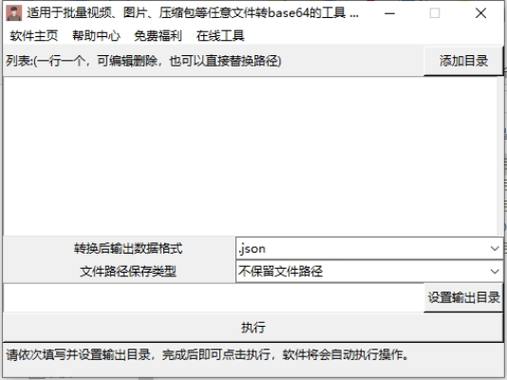
What is Base64?
Base64 is an encoding scheme that represents binary data in an ASCII string format. It's not an encryption method; it's a way to safely transmit data over media that are designed to handle text.
- Why use it? To embed binary data (like images, files) into text formats (like XML, JSON, HTML, or email attachments).
- How it works: It takes binary data, groups it into 24-bit chunks, and represents each chunk as four characters from a 64-character set (A-Z, a-z, 0-9, '+', '/'). Padding with '=' is used if the last chunk has fewer than 24 bits.
Java
Java has built-in support for Base64 in the java.util package since Java 8. The main classes are java.util.Base64.
Encoding and Decoding a String
This is the most common use case.
import java.util.Base64;
import java.nio.charset.StandardCharsets;
public class Base64JavaExample {
    public static void main(String[] args) {
        String originalString = "Hello, World! This is a test for Base64.";
        // --- Encoding ---
        // Get the encoder
        Base64.Encoder encoder = Base64.getEncoder();
        // Encode the string to a byte array, then to a Base64 string
        byte[] bytesToEncode = originalString.getBytes(StandardCharsets.UTF_8);
        String encodedString = encoder.encodeToString(bytesToEncode);
        System.out.println("Original: " + originalString);
        System.out.println("Encoded:  " + encodedString);
        // --- Decoding ---
        // Get the decoder
        Base64.Decoder decoder = Base64.getDecoder();
        // Decode the Base64 string back to a byte array
        byte[] decodedBytes = decoder.decode(encodedString);
        // Convert the byte array back to a string
        String decodedString = new String(decodedBytes, StandardCharsets.UTF_8);
        System.out.println("Decoded:  " + decodedString);
    }
}
Output:
Original: Hello, World! This is a test for Base64.
Encoded:  SGVsbG8sIFdvcmxkISBUaGlzIGlzIGEgdGVzdCBmb3IgQmFzZTY0Lg==
Decoded:  Hello, World! This is a test for Base64.
Encoding and Decoding a File
For handling files, it's more memory-efficient to use streams rather than reading the entire file into memory.
import java.io.*;
import java.util.Base64;
public class Base64FileJavaExample {
    public static void main(String[] args) throws IOException {
        File inputFile = new File("my-image.png");
        File encodedFile = new File("my-image.b64");
        File decodedFile = new File("my-image-decoded.png");
        // --- Encoding a File to Base64 ---
        try (InputStream inputStream = new FileInputStream(inputFile);
             OutputStream outputStream = new FileOutputStream(encodedFile);
             Base64.Encoder encoder = Base64.getEncoder().wrap(outputStream)) {
            byte[] buffer = new byte[1024];
            int bytesRead;
            while ((bytesRead = inputStream.read(buffer)) != -1) {
                encoder.write(buffer, 0, bytesRead);
            }
        }
        System.out.println("File encoded to: " + encodedFile.getAbsolutePath());
        // --- Decoding a Base64 File back to Binary ---
        try (InputStream inputStream = new FileInputStream(encodedFile);
             OutputStream outputStream = new FileOutputStream(decodedFile);
             Base64.Decoder decoder = Base64.getDecoder().wrap(inputStream)) {
            byte[] buffer = new byte[1024];
            int bytesRead;
            while ((bytesRead = decoder.read(buffer)) != -1) {
                outputStream.write(buffer, 0, bytesRead);
            }
        }
        System.out.println("File decoded to: " + decodedFile.getAbsolutePath());
    }
}
URL-Safe Encoding
Standard Base64 uses and , which have special meanings in URLs. For use in URLs, you should use the URL-safe variant, which replaces them with and _.
import java.util.Base64;
import java.nio.charset.StandardCharsets;
public class Base64UrlJavaExample {
    public static void main(String[] args) {
        String originalString = "https://example.com/path?param=value";
        // Get the URL-safe encoder
        Base64.Encoder urlEncoder = Base64.getUrlEncoder();
        String encodedString = urlEncoder.encodeToString(originalString.getBytes(StandardCharsets.UTF_8));
        System.out.println("Original: " + originalString);
        System.out.println("URL-Safe Encoded: " + encodedString);
        // Get the URL-safe decoder
        Base64.Decoder urlDecoder = Base64.getUrlDecoder();
        byte[] decodedBytes = urlDecoder.decode(encodedString);
        String decodedString = new String(decodedBytes, StandardCharsets.UTF_8);
        System.out.println("Decoded: " + decodedString);
    }
}
Output:
Original: https://example.com/path?param=value
URL-Safe Encoded: aHR0cHM6Ly9leGFtcGxlLmNvbS9wYXRoP3Bhcm1hPHZhbHVl
Decoded: https://example.com/path?param=value
PHP
PHP has had base64_encode() and base64_decode() functions since its early versions. They are simple and widely used.
Encoding and Decoding a String
This is the most straightforward operation in PHP.
<?php
$originalString = "Hello, World! This is a test for Base64.";
// --- Encoding ---
$encodedString = base64_encode($originalString);
echo "Original: " . $originalString . "\n";
echo "Encoded:  " . $encodedString . "\n";
// --- Decoding ---
$decodedString = base64_decode($encodedString);
echo "Decoded:  " . $decodedString . "\n";
?>
Output:
Original: Hello, World! This is a test for Base64.
Encoded:  SGVsbG8sIFdvcmxkISBUaGlzIGlzIGEgdGVzdCBmb3IgQmFzZTY0Lg==
Decoded:  Hello, World! This is a test for Base64.
Encoding and Decoding a File
PHP makes this very easy with its file handling functions.
<?php
$inputFile = 'my-image.png';
$encodedFile = 'my-image.b64';
$decodedFile = 'my-image-decoded.png';
// --- Encoding a File to Base64 ---
$rawData = file_get_contents($inputFile);
$encodedData = base64_encode($rawData);
file_put_contents($encodedFile, $encodedData);
echo "File encoded to: " . $encodedFile . "\n";
// --- Decoding a Base64 File back to Binary ---
$encodedDataFromFile = file_get_contents($encodedFile);
$decodedData = base64_decode($encodedDataFromFile);
file_put_contents($decodedFile, $decodedData);
echo "File decoded to: " . $decodedFile . "\n";
?>
URL-Safe Encoding
PHP's base64_encode does not produce a URL-safe string by default. You need to manually replace the characters and remove padding.
<?php
$originalString = "https://example.com/path?param=value";
// --- Encoding ---
$encodedString = base64_encode($originalString);
// Replace + with - and / with _
$urlSafeEncoded = str_replace(['+', '/', '='], ['-', '_', ''], $encodedString);
echo "Original: " . $originalString . "\n";
echo "URL-Safe Encoded: " . $urlSafeEncoded . "\n";
// --- Decoding ---
// Add padding back if necessary
$paddedEncoded = $urlSafeEncoded;
$mod4 = strlen($paddedEncoded) % 4;
if ($mod4) {
    $paddedEncoded .= substr('====', $mod4);
}
// Replace - with + and _ with /
$standardEncoded = str_replace(['-', '_'], ['+', '/'], $paddedEncoded);
$decodedString = base64_decode($standardEncoded);
echo "Decoded: " . $decodedString . "\n";
?>
Output:
Original: https://example.com/path?param=value
URL-Safe Encoded: aHR0cHM6Ly9leGFtcGxlLmNvbS9wYXRoP3Bhcm1hPHZhbHVl
Decoded: https://example.com/path?param=value
Summary Table
| Feature | Java | PHP |
|---|---|---|
| Encode String | Base64.getEncoder().encodeToString(str.getBytes(StandardCharsets.UTF_8)) |
base64_encode($string) |
| Decode String | new String(Base64.getDecoder().decode(b64Str), StandardCharsets.UTF_8) |
base64_decode($b64str) |
| Encode File | Use Base64.Encoder.wrap(outputStream) with a file input stream. |
file_get_contents() then base64_encode() then file_put_contents(). |
| Decode File | Use Base64.Decoder.wrap(inputStream) with a file output stream. |
file_get_contents() then base64_decode() then file_put_contents(). |
| URL-Safe Encode | Base64.getUrlEncoder().encodeToString(...) |
str_replace(['+', '/', '='], ['-', '_', ''], base64_encode(...)) |
| URL-Safe Decode | Base64.getUrlDecoder().decode(...) |
str_replace(['-', '_'], ['+', '/'], $str) then base64_decode() |
Important Considerations
- Character Encoding: Always specify the character encoding (e.g., UTF-8) when converting between strings and byte arrays. In Java, this is explicit. In PHP, it's implicit based on your script's encoding, but it's best practice to ensure consistency.
- Not Encryption: Base64 is encoding, not encryption. The data can be easily decoded by anyone. Do not use it to store sensitive information like passwords.
- Padding: The character is padding. For URLs, it's common practice to remove it, which is why the PHP URL-safe example includes a
str_replacefor . The JavagetUrlEncoderhandles this for you.