Of course. This is a fundamental concept in Python, especially for anyone working with text data. Let's break it down clearly.
The Core Problem: A Tale of Two Encodings
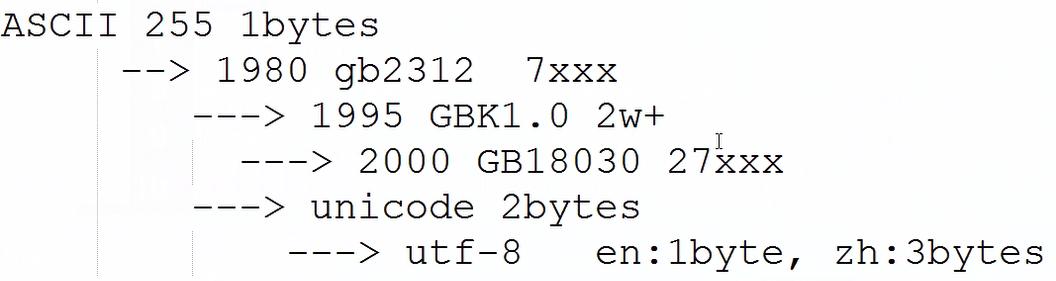
The core issue you're asking about is how Python handles different text encodings, primarily GBK and Unicode.
-
Unicode: This is not an encoding. It's a universal character set. Think of it as a giant, master list that assigns a unique number (a "code point") to every character from every language in the world (e.g.,
A,你, , ). This unique number is written likeU+0041for 'A' orU+4F60for '你'. Python 3's native string type (str) is stored in memory as Unicode. -
GBK: This is an encoding. An encoding is a set of rules for mapping Unicode characters to bytes. GBK is a specific encoding primarily used for Simplified Chinese. It's a variable-width encoding: some characters take 1 byte, and others take 2 bytes. It's not universal; it can't represent characters from, say, Arabic or Japanese.
The Golden Rule of Python 3:

str= Unicode (text in memory)bytes= Encoded bytes (a sequence of numbers, 0-255)
You can't mix them directly. You must encode a str to get a bytes object, and decode a bytes object to get a str.
The UnicodeDecodeError (The Most Common Problem)
This error happens when you try to treat a bytes object (which is in some encoding, like GBK) as if it were a str (Unicode).
Scenario: You read a file that was saved using the GBK encoding, but Python assumes it's UTF-8 (the modern default).
Example of the Error:
Let's say you have a file named data_gbk.txt containing the Chinese characters "你好世界". This file was saved using the GBK encoding.
# data_gbk.txt contains the bytes for "你好世界" in GBK encoding.
# The WRONG way - assuming UTF-8
try:
    with open('data_gbk.txt', 'r', encoding='utf-8') as f:
        content = f.read()
        print(content)
except UnicodeDecodeError as e:
    print(f"An error occurred: {e}")
Output:
An error occurred: 'utf-8' codec can't decode byte 0xc4 in position 0: invalid start byteWhy? The byte 0xc4 is a valid start of a 2-byte character in GBK, but it's an invalid byte sequence in UTF-8. Python correctly raises an error because the data doesn't match the specified encoding.
The UnicodeEncodeError (The Other Side of the Coin)
This error happens when you have a str (Unicode) in Python and try to convert it to bytes using an encoding that doesn't support all the characters in your string.
Scenario: You have a string with an emoji, but you try to save it to a file using the GBK encoding.
Example of the Error:
my_string = "你好,世界!😊" # This string contains an emoji
try:
    # The WRONG way - trying to encode GBK can't handle the emoji
    my_bytes = my_string.encode('gbk')
    print(my_bytes)
except UnicodeEncodeError as e:
    print(f"An error occurred: {e}")
Output:
An error occurred: 'gbk' codec can't encode character '\U0001f60a' in position 7: illegal multibyte sequenceWhy? The emoji '😊' (Unicode code point U+1F60A) is not defined in the GBK character set. Therefore, GBK has no rule for mapping it to bytes, so it fails.
Solutions and Best Practices
How to Fix the UnicodeDecodeError (Reading a File)
You must tell Python the correct encoding of the source file.
# The CORRECT way - specifying the GBK encoding
with open('data_gbk.txt', 'r', encoding='gbk') as f:
    content = f.read()
    print(content)
    # Output: 你好世界
How to Fix the UnicodeEncodeError (Writing a File)
You must use an encoding that supports all the characters in your string. UTF-8 is the recommended choice.
my_string = "你好,世界!😊"
# The CORRECT way - using UTF-8, which supports the emoji
my_bytes = my_string.encode('utf-8')
# Now you can write it to a file
with open('data_utf8.txt', 'wb') as f: # Note the 'wb' for write bytes
    f.write(my_bytes)
print("File written successfully.")
What if You Don't Know the Encoding? (The "Chardet" Library)
Sometimes you're dealing with messy data from an unknown source. The chardet library can help you guess the encoding.
First, install it:
pip install chardet
import chardet
# Let's say we have some bytes from an unknown source
# We'll use the GBK bytes from our example
unknown_bytes = open('data_gbk.txt', 'rb').read()
# chardet detects the most likely encoding
result = chardet.detect(unknown_bytes)
encoding = result['encoding']
confidence = result['confidence']
print(f"Detected encoding: {encoding} with {confidence:.2f} confidence")
# Now you can use this detected encoding to decode
if encoding:
    decoded_string = unknown_bytes.decode(encoding)
    print(f"Decoded string: {decoded_string}")
Best Practice: Use UTF-8 Whenever Possible
To avoid most of these headaches, make UTF-8 your standard.
- Save your source code files as UTF-8. Most modern editors do this by default.
- Save your data files (CSV, JSON, TXT, etc.) as UTF-8.
- When communicating over the web (HTTP requests), use UTF-8.
If you do this, you'll rarely need to specify an encoding, as UTF-8 is the default in many places.
# Reading a UTF-8 file (no need to specify encoding if it's the system default)
# But it's good practice to be explicit!
with open('data_utf8.txt', 'r', encoding='utf-8') as f:
    content = f.read()
# Writing a UTF-8 file
with open('my_new_file.txt', 'w', encoding='utf-8') as f:
    f.write("This will be saved as UTF-8.")
Summary Table
| Concept | Python 3 Type | Description | Example |
|---|---|---|---|
| Unicode | str |
The internal representation of text. A sequence of Unicode code points. | my_str = "你好" |
| Encoding | bytes |
A translation from Unicode to a sequence of bytes. | my_bytes = my_str.encode('gbk') my_bytes = my_str.encode('utf-8') |
| Decoding | str |
A translation from bytes back to Unicode. | my_str_again = my_bytes.decode('gbk') |
| Common Error 1 | UnicodeDecodeError |
Tried to read bytes as str with the wrong encoding. |
open('gbk_file.txt', 'r', encoding='utf-8') |
| Common Error 2 | UnicodeEncodeError |
Tried to write a str with characters not supported by the chosen encoding. |
"😊".encode('gbk') |
| Best Practice | utf-8 |
Use UTF-8 for everything: source files, data files, and web communication. | open('file.txt', 'w', encoding='utf-8') |