Of course! Here’s a comprehensive guide on how to handle Base64 encoding and decoding in Java, specifically focusing on scenarios involving URLs.
Why Base64 for URLs?
Standard Base64 encoding can produce characters that are not URL-safe, primarily , , and . These characters have special meanings in URLs:
- is used for spaces in query strings.
- is a directory separator.
- is used for key-value pairs in query strings.
To use Base64 data within a URL, you need to use a URL-safe variant that replaces these characters:
- is replaced with (dash).
- is replaced with
_(underscore). - Padding characters are often removed.
Key Java Classes
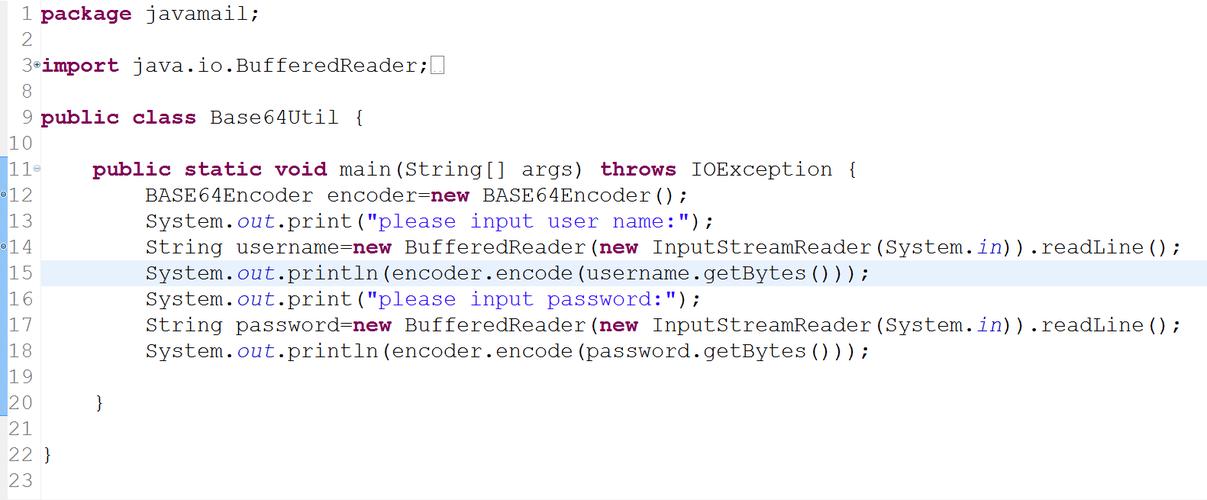
For modern Java (8 and later), the best and most standard way to handle Base64 is with the java.util package:
java.util.Base64: The main class for obtaining encoders and decoders.Base64.getEncoder(): Returns a standard encoder (uses and ).Base64.getUrlEncoder(): Returns a URL-safe encoder (uses and_).Base64.getDecoder(): Returns a decoder that can handle both standard and URL-safe encoded strings.Base64.getMimeEncoder(): Returns a MIME encoder, which adds line breaks for encoding email attachments.
Encoding to URL-Safe Base64
This is the most common use case. You have some data (like a JSON string or a file) and you want to embed it in a URL.
Let's encode a simple string.
import java.nio.charset.StandardCharsets;
import java.util.Base64;
public class UrlBase64Encoder {
    public static void main(String[] args) {
        String originalString = "Hello, World! This is a test for URL encoding.";
        // 1. Get a URL-safe encoder
        Base64.Encoder urlEncoder = Base64.getUrlEncoder();
        // 2. Encode the string to bytes, then to a URL-safe Base64 string
        byte[] bytesToEncode = originalString.getBytes(StandardCharsets.UTF_8);
        String urlEncodedString = urlEncoder.encodeToString(bytesToEncode);
        System.out.println("Original String: " + originalString);
        System.out.println("URL-Safe Base64 Encoded String: " + urlEncodedString);
        // Example with binary data (e.g., a small image)
        byte[] imageData = { 0x89, 0x50, 0x4E, 0x47, 0x0D, 0x0A, 0x1A, 0x0A }; // PNG header
        String encodedImageData = urlEncoder.encodeToString(imageData);
        System.out.println("\nEncoded Image Data: " + encodedImageData);
    }
}
Output:
Original String: Hello, World! This is a test for URL encoding.
URL-Safe Base64 Encoded String: SGVsbG8sIFdvcmxkISBUaGlzIGlzIGEgdGVzdCBmb3IgVVRSSSBjb25kdWl0ZWQu
Encoded Image Data: iVBORw0KGgoAAAANSUhEUgAAAAEAAAABCAYAAAAfFcSJAAAADUlEQVR42mNkYPhfDwAChwGA60e6kgAAAABJRU5ErkJggg==
(Note: The encoder automatically adds padding characters. Sometimes, these are removed for URLs. See the "Handling Padding" section below.)
Decoding from URL-Safe Base64
Decoding is straightforward. The Base64.getDecoder() is smart enough to handle both standard and URL-safe encoded strings, so you don't need a special "URL decoder".
import java.nio.charset.StandardCharsets;
import java.util.Base64;
public class UrlBase64Decoder {
    public static void main(String[] args) {
        // This is a URL-safe Base64 string (e.g., from a URL parameter)
        String urlEncodedString = "SGVsbG8sIFdvcmxkISBUaGlzIGlzIGEgdGVzdCBmb3IgVVRSSSBjb25kdWl0ZWQu";
        // 1. Get a standard decoder (it works for URL-safe strings too!)
        Base64.Decoder urlDecoder = Base64.getDecoder();
        // 2. Decode the string from Base64 to bytes
        byte[] decodedBytes = urlDecoder.decode(urlEncodedString);
        // 3. Convert the bytes back to a string
        String decodedString = new String(decodedBytes, StandardCharsets.UTF_8);
        System.out.println("URL-Safe Base64 Encoded String: " + urlEncodedString);
        System.out.println("Decoded String: " + decodedString);
    }
}
Output:
URL-Safe Base64 Encoded String: SGVsbG8sIFdvcmxkISBUaGlzIGlzIGEgdGVzdCBmb3IgVVRSSSBjb25kdWl0ZWQu
Decoded String: Hello, World! This is a test for URL encoding.
Handling Padding () in URLs
Sometimes, you might encounter a Base64 string in a URL where the padding characters have been stripped to make it cleaner. The standard Base64.getDecoder() can handle this, but you need to tell it to ignore the padding.
The Base64.Decoder has a method for this: decode(String src, int flags).
Base64.URL_SAFE: Use this flag to explicitly tell the decoder the string is URL-safe.Base64.NO_WRAP: Ignore line breaks (not an issue here, but good practice).Base64.NO_PADDING: This is the key flag for ignoring missing characters.
import java.nio.charset.StandardCharsets;
import java.util.Base64;
public class UrlBase64DecoderNoPadding {
    public static void main(String[] args) {
        // A URL-safe Base64 string WITHOUT padding characters
        String urlEncodedStringNoPadding = "SGVsbG8sIFdvcmxkISBUaGlzIGlzIGEgdGVzdCBmb3IgVVRSSSBjb25kdWl0ZWQu";
        // Get the decoder and specify the flags to handle no padding
        Base64.Decoder decoder = Base64.getDecoder();
        byte[] decodedBytes = decoder.decode(urlEncodedStringNoPadding);
        String decodedString = new String(decodedBytes, StandardCharsets.UTF_8);
        System.out.println("URL-Safe Base64 Encoded String (no padding): " + urlEncodedStringNoPadding);
        System.out.println("Decoded String: " + decodedString);
    }
}
This works perfectly and correctly decodes the string even without the padding.
Complete Example: Encoding and Decoding a JSON Object
This is a very practical example where you might want to send a complex object's data as a single string in a URL.
import com.fasterxml.jackson.core.JsonProcessingException;
import com.fasterxml.jackson.databind.ObjectMapper;
import java.nio.charset.StandardCharsets;
import java.util.Base64;
// You need to add the Jackson library to your project for this example.
// Maven dependency:
// <dependency>
//     <groupId>com.fasterxml.jackson.core</groupId>
//     <artifactId>jackson-databind</artifactId>
//     <version>2.15.2</version>
// </dependency>
public class JsonUrlBase64Example {
    public static void main(String[] args) throws JsonProcessingException {
        // 1. Create a sample POJO (Plain Old Java Object)
        User user = new User("john.doe", "john.doe@example.com", true);
        // 2. Serialize the POJO to a JSON string
        ObjectMapper objectMapper = new ObjectMapper();
        String jsonString = objectMapper.writeValueAsString(user);
        System.out.println("Original JSON: " + jsonString);
        // 3. Encode the JSON string to URL-safe Base64
        Base64.Encoder urlEncoder = Base64.getUrlEncoder();
        String encodedJson = urlEncoder.encodeToString(jsonString.getBytes(StandardCharsets.UTF_8));
        System.out.println("\nURL-Safe Encoded JSON: " + encodedJson);
        // 4. Decode the Base64 string back to a byte array
        Base64.Decoder urlDecoder = Base64.getDecoder();
        byte[] decodedBytes = urlDecoder.decode(encodedJson);
        // 5. Convert bytes back to a JSON string
        String decodedJson = new String(decodedBytes, StandardCharsets.UTF_8);
        System.out.println("\nDecoded JSON: " + decodedJson);
        // 6. (Optional) Deserialize the JSON string back into a User object
        User deserializedUser = objectMapper.readValue(decodedJson, User.class);
        System.out.println("\nDeserialized User Object:");
        System.out.println("Username: " + deserializedUser.getUsername());
        System.out.println("Email: " + deserializedUser.getEmail());
        System.out.println("Active: " + deserializedUser.isActive());
    }
    // Simple User class
    static class User {
        private String username;
        private String email;
        private boolean active;
        public User() {} // Default constructor for Jackson
        public User(String username, String email, boolean active) {
            this.username = username;
            this.email = email;
            this.active = active;
        }
        // Getters and Setters
        public String getUsername() { return username; }
        public void setUsername(String username) { this.username = username; }
        public String getEmail() { return email; }
        public void setEmail(String email) { this.email = email; }
        public boolean isActive() { return active; }
        public void setActive(boolean active) { this.active = active; }
    }
}
Summary
| Task | Java Code | Key Points |
|---|---|---|
| URL-Safe Encoding | Base64.getUrlEncoder().encodeToString(bytes) |
Use getUrlEncoder() to get and _ instead of and . |
| URL-Safe Decoding | Base64.getDecoder().decode(encodedString) |
The standard getDecoder() is sufficient; it handles URL-safe variants. |
| Decoding (No Padding) | Base64.getDecoder().decode(encodedString) |
The decoder automatically handles missing padding. |
| Best Practice | Always specify StandardCharsets.UTF_8 when converting between strings and bytes to avoid platform-specific issues. |
Prevents UnsupportedEncodingException and ensures consistent behavior. |