
Of course! "Java exception error" is a very common phrase, but it's important to understand that an exception is not an error in the sense of a bug.
Let's break it down from the basics to how you handle them effectively.
What is an Exception in Java?
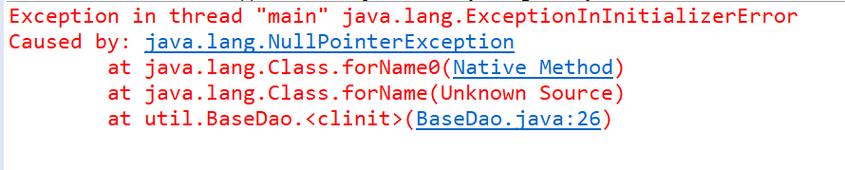
In simple terms, an exception is an event that disrupts the normal flow of a program. It's a signal that something unexpected or erroneous has happened during the program's execution.
Think of it like this:
- Normal Code: You are driving down a smooth road.
- Exception: A giant pothole appears in the road. You can't just ignore it; you have to react. You swerve, slow down, or stop.
Java provides a robust mechanism to handle these "potholes" (exceptions) gracefully, so your program doesn't just crash.
The Exception Hierarchy in Java
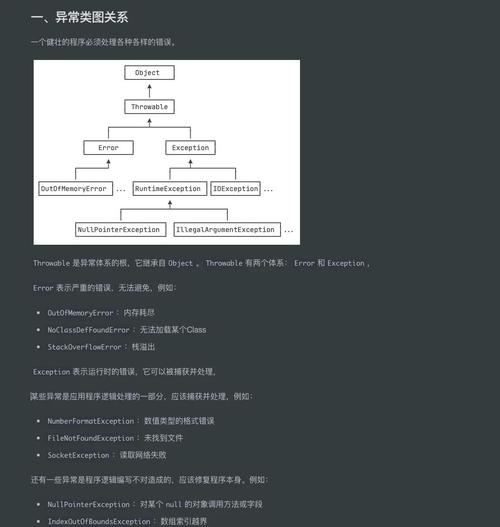
All exceptions in Java are objects that are subclasses of the java.lang.Exception class. This class has a hierarchy, and understanding it is key to handling exceptions correctly.
java.lang.Object
       java.lang.Throwable
             java.lang.Error  <-- NOT for handling in your code
             java.lang.Exception  <-- This is what we handle
                  java.lang.RuntimeException  <-- Unchecked Exceptions
                  java.lang.CheckedException  <-- Checked Exceptions
Key Distinctions:
| Type | Description | Examples | How to Handle? |
|---|---|---|---|
| Checked Exceptions | These are exceptions that the Java compiler forces you to handle. They represent conditions from which your code can and should recover. They are typically related to external factors (like files, network, user input). | IOException, SQLException, FileNotFoundException |
You must either try-catch them or declare them in your method's throws clause. |
| Unchecked Exceptions | These are exceptions that the compiler does not force you to handle. They usually indicate programming bugs or serious problems that your application should not try to recover from. | NullPointerException, ArrayIndexOutOfBoundsException, IllegalArgumentException, ArithmeticException |
You are not required to handle them, but it's good practice to do so if you anticipate the condition. |
| Errors | These are serious problems that a reasonable application should not try to catch. They are thrown by the Java Virtual Machine (JVM) to indicate serious problems. | OutOfMemoryError, StackOverflowError, VirtualMachineError |
You should never catch an Error. Your program will likely terminate anyway. |
The try-catch-finally Block: The Core of Exception Handling
This is the primary tool you use to handle exceptions.
try Block
You place code that might throw an exception inside a try block.
catch Block
You catch a specific exception type. If an exception of that type (or a subclass) occurs in the try block, the code inside the catch block is executed.
finally Block
This block is optional but very important. The code inside a finally block always executes, whether an exception was thrown or not, and whether it was caught or not. It's typically used for cleanup actions (like closing a file or a database connection).
Example:
import java.io.BufferedReader;
import java.io.FileReader;
import java.io.IOException;
public class ExceptionExample {
    public static void main(String[] args) {
        // The 'resources' in the try-with-resources statement is the modern way to handle closing resources.
        // It automatically closes the reader, even if an exception occurs.
        try (BufferedReader reader = new BufferedReader(new FileReader("myfile.txt"))) {
            String line = reader.readLine();
            System.out.println("Line read from file: " + line);
            // This line might cause an ArrayIndexOutOfBoundsException if 'line' is null
            System.out.println("First character: " + line.charAt(0));
        } catch (IOException e) {
            // This block catches IOExceptions (e.g., file not found)
            System.err.println("An error occurred while reading the file: " + e.getMessage());
            // e.printStackTrace(); // This prints the full stack trace to the console
        } catch (NullPointerException e) {
            // This block specifically catches a NullPointerException if 'line' was null
            System.err.println("The file was empty or could not be read, resulting in a null value.");
        } catch (Exception e) {
            // A general catch-all. It's best practice to catch specific exceptions first.
            System.err.println("An unexpected error occurred: " + e.getMessage());
        } finally {
            // This code will ALWAYS run, for cleanup.
            System.out.println("This finally block always executes.");
        }
        System.out.println("Program continues running...");
    }
}
The throw and throws Keywords
throw
You use the throw keyword to explicitly create and throw an exception object from within your code.
public class Validator {
    public void validateAge(int age) {
        if (age < 18) {
            // Create and throw a new exception
            throw new IllegalArgumentException("Age must be 18 or older.");
        }
        System.out.println("Age is valid.");
    }
}
throws
You use the throws keyword in a method's signature to declare that the method might throw a particular checked exception. This is a way of saying, "I'm not handling this exception here, so the caller of this method must handle it."
import java.io.IOException;
public class DataReader {
    // This method declares that it might throw an IOException
    public void readData() throws IOException {
        // Some code that could throw an IOException
        // If it happens, this method will not catch it. It will be passed up to the caller.
        if (true) { // Simulating an error
            throw new IOException("Failed to connect to the database.");
        }
    }
}
// The caller MUST handle the IOException
public class Main {
    public static void main(String[] args) {
        DataReader reader = new DataReader();
        try {
            reader.readData();
        } catch (IOException e) {
            System.err.println("Caught the exception in main: " + e.getMessage());
        }
    }
}
Best Practices for Exception Handling
- Be Specific: Catch the most specific exception you can. Catching
Exceptionis often too broad and can hide real problems. - Don't Swallow Exceptions: Avoid empty
catchblocks likecatch (Exception e) {}. At a minimum, log the exception so you know it happened. - Use
finallyfor Cleanup: Usefinallyto release resources like files, database connections, or network sockets. The modern try-with-resources statement is even better for this. - Provide Meaningful Messages: When creating exceptions (
throw new MyException("...")), provide a clear and descriptive message that will help with debugging. - Document Exceptions: Use
@throwsin your JavaDoc to document which checked exceptions your method can throw. - Don't Use Exceptions for Control Flow: Exceptions are for exceptional events. Don't use them to handle normal program logic (e.g., using a
NullPointerExceptionto check if an object exists is a bad idea). - Prefer
try-with-resources: For any class that implementsAutoCloseable(likeFileReader,Connection,InputStream), use the try-with-resources syntax. It's cleaner and prevents resource leaks.
Common Java Exceptions (and what they mean)
| Exception | Cause |
|---|---|
NullPointerException |
You tried to use a reference that points to null (e.g., myString.length() where myString is null). |
ArrayIndexOutOfBoundsException |
You tried to access an array element with an invalid index (e.g., myArray[10] when the array only has 5 elements). |
StringIndexOutOfBoundsException |
Similar to the above, but for a String's charAt() method. |
ArithmeticException |
An arithmetic error occurred, like dividing by zero (int x = 10 / 0;). |
NumberFormatException |
You tried to convert a String to a number, but the String was not in the correct format (e.g., Integer.parseInt("hello")). |
FileNotFoundException |
A FileReader or FileInputStream tried to open a file that does not exist. |
IOException |
The general class for I/O-related problems. FileNotFoundException is a subclass of it. |
SQLException |
An error occurred when interacting with a database. |


