Of course! This is a very common point of confusion for Java developers, especially when dealing with different operating systems or legacy systems. Let's break down the relationship between Java, UTF-8, and ANSI.
The Core Idea: What They Are
- Java: A programming language and a platform. The Java Virtual Machine (JVM) has its own internal way of representing text, which is UTF-16. This is a crucial detail.
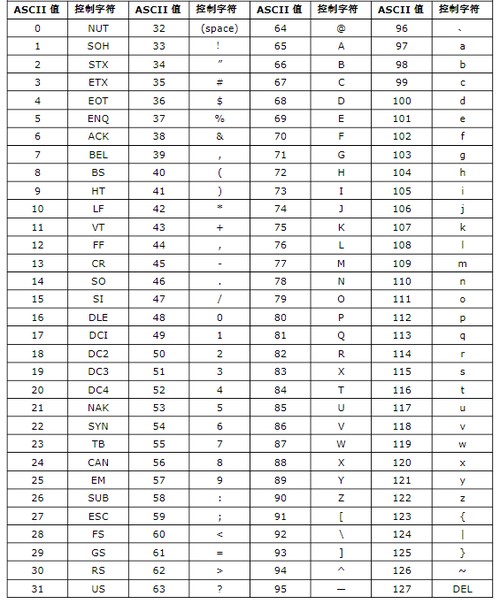
- UTF-8: A character encoding. It's a universal, variable-width encoding that can represent every character in the Unicode standard. It's the dominant encoding on the web and in modern systems. It's backward-compatible with ASCII.
- ANSI: This is the tricky one. It's not a single encoding. It's a family of legacy encodings used historically by Microsoft Windows (e.g.,
windows-1252for Western European languages,GBKfor Simplified Chinese, etc.). The term "ANSI" is often used as a generic placeholder for the system's default legacy encoding, which is almost never a good thing to rely on.
Java's Internal Representation: UTF-16
When you work with text inside a Java program (e.g., a String object), you are working with UTF-16. You don't usually need to worry about this.
String text = "Hello, 世界!"; // "世界" means "world" in Chinese
// The Java String 'text' is stored internally as UTF-16 code units.
// For ASCII characters, this is 1 char = 1 byte.
// For characters outside the Basic Multilingual Plane (like many emojis), it takes 2 chars (4 bytes).
The JVM handles this conversion for you. The important part is how Java interacts with the outside world (files, network, console), which is where encodings come in.
I/O Operations: Where You Specify Encoding
When you read from or write to a file, a network socket, or the console, you must specify the encoding. If you don't, Java will use the platform's default, which can lead to bugs on different operating systems.
Best Practice: Always Specify the Encoding
Modern Java (9+) makes this easier.
Reading a File (UTF-8)
import java.nio.file.Files;
import java.nio.file.Paths;
import java.nio.charset.StandardCharsets;
import java.io.IOException;
public class ReadUtf8 {
    public static void main(String[] args) {
        String filePath = "my-file.txt";
        try {
            // The BEST way: Read all lines at once with explicit UTF-8 encoding
            String content = Files.readString(Paths.get(filePath), StandardCharsets.UTF_8);
            System.out.println(content);
            // Alternative: Read into a byte array and then decode
            // byte[] bytes = Files.readAllBytes(Paths.get(filePath));
            // String content = new String(bytes, StandardCharsets.UTF_8);
            // System.out.println(content);
        } catch (IOException e) {
            System.err.println("Error reading file: " + e.getMessage());
        }
    }
}
Writing a File (UTF-8)
import java.nio.file.Files;
import java.nio.file.Paths;
import java.nio.charset.StandardCharsets;
import java.io.IOException;
public class WriteUtf8 {
    public static void main(String[] args) {
        String filePath = "my-file.txt";
        String content = "This is a test with special chars: á é í ó ú 你好";
        try {
            // The BEST way: Write string with explicit UTF-8 encoding
            Files.writeString(Paths.get(filePath), content, StandardCharsets.UTF_8);
            System.out.println("File written successfully.");
        } catch (IOException e) {
            System.err.println("Error writing file: " + e.getMessage());
        }
    }
}
For Older Java (8 and below)
You had to use InputStreamReader and OutputStreamWriter.
// Reading in Java 8
try (InputStreamReader reader = new InputStreamReader(
        new FileInputStream("my-file.txt"), StandardCharsets.UTF_8)) {
    // ... read from the reader
}
// Writing in Java 8
try (OutputStreamWriter writer = new OutputStreamWriter(
        new FileOutputStream("my-file.txt"), StandardCharsets.UTF_8)) {
    writer.write("This is also UTF-8");
}
The "ANSI" Problem: Legacy System Interoperability
You will encounter "ANSI" when you need to read a file created by an old Windows program or write a file for an old system that expects a specific legacy encoding.
Never use Charset.forName("ANSI") or Charset.defaultCharset() in portable code. The "ANSI" charset is just an alias for the system's default legacy encoding, which can be windows-1252 on one machine and GBK on another.
How to Correctly Handle "ANSI" Files
You need to know the actual encoding name. Common ones are:
windows-1252(for Western European languages)ISO-8859-1(Latin-1, a safe but limited fallback)GBK(for Simplified Chinese)Big5(for Traditional Chinese)
Example: Reading a file saved by an old Windows Notepad in "ANSI" (which is windows-1252)
import java.nio.charset.Charset;
import java.nio.charset.StandardCharsets;
import java.nio.file.Files;
import java.nio.file.Paths;
import java.io.IOException;
public class ReadAnsi {
    public static void main(String[] args) {
        String filePath = "old-windows-file.txt";
        // You MUST know the actual encoding. Here we assume it's windows-1252.
        // This is the encoding you select in Notepad's "Save As" dialog.
        Charset ansiCharset = Charset.forName("windows-1252");
        try {
            // Read the file using the specified legacy encoding
            String content = Files.readString(Paths.get(filePath), ansiCharset);
            System.out.println("Content read as windows-1252:");
            System.out.println(content);
            // Show the difference if you incorrectly used UTF-8
            System.out.println("\n--- Attempting to read as UTF-8 (will likely show mojibake) ---");
            String wrongContent = Files.readString(Paths.get(filePath), StandardCharsets.UTF_8);
            System.out.println(wrongContent);
        } catch (IOException e) {
            System.err.println("Error reading file: " + e.getMessage());
        }
    }
}
What is Mojibake?
If you read a windows-1252 file as UTF-8, you'll get mojibake—garbled text where characters are displayed completely wrong. For example, the character in windows-1252 (byte value 0xE9) might be rendered as †when incorrectly interpreted as UTF-8.
Summary Table
| Task | Best Practice (Java 9+) | Why? |
|---|---|---|
| Reading a text file | Files.readString(path, StandardCharsets.UTF_8) |
Explicitly uses the universal, modern standard. Avoids platform bugs. |
| Writing a text file | Files.writeString(path, content, StandardCharsets.UTF_8) |
Same reason. Ensures your file is readable everywhere. |
| Reading "ANSI" file | Files.readString(path, Charset.forName("actual-encoding")) |
"ANSI" is not an encoding. You must specify the real one (e.g., windows-1252). |
| Console Output | Use -Dfile.encoding=UTF-8 JVM argument or configure your terminal. |
The console's encoding is separate from the file encoding. Set it to UTF-8 for consistency. |
| Internal String Work | Just use String. Don't worry about it. |
Java String objects are always UTF-16 internally. |
Key Takeaways
- Java's internal encoding is UTF-16. You only need to worry about encodings for I/O.
- Always specify your encoding for I/O operations. Don't rely on defaults.
- For modern applications,
StandardCharsets.UTF_8is your best friend. It's the standard for the web, databases, and most modern systems. - "ANSI" is a trap. It's a vague term for a system's legacy encoding. If you have to deal with it, you must find out the actual encoding name (like
windows-1252) and use that explicitly.