Of course! Let's break down Java, .NET, and Web Services. This is a classic topic in software development, especially for enterprise-level applications.

Here’s a comprehensive guide covering what each technology is, how they relate to web services, and how they interact with each other.
What is Java?
Java is a high-level, class-based, object-oriented programming language designed to have as few implementation dependencies as possible. It's a general-purpose programming language.
Key Characteristics:
- Platform Independent: Java code is compiled into an intermediate form called "bytecode," which can run on any device that has a Java Virtual Machine (JVM). This is the famous "Write Once, Run Anywhere" (WORA) principle.
- Object-Oriented: Everything in Java is an object (except for primitive types).
- Rich Ecosystem: Has a massive standard library (Java Development Kit - JDK) and a vast ecosystem of third-party libraries and frameworks (e.g., Spring, Hibernate, Maven, Gradle).
- Strongly Typed: The language is statically typed, which helps catch errors at compile time.
Common Use Cases:
- Enterprise backend applications (Spring Boot is extremely popular).
- Android app development (though Kotlin is now the preferred language).
- Big Data technologies (Hadoop, Spark, Kafka are often written in Java/Scala).
- Web applications and web services.
What is .NET (pronounced "dot net")?
.NET is a free, cross-platform, open-source developer platform for building many different types of applications. It's not just a language; it's a framework or a platform.
Key Characteristics:
- Multi-Language: You can write .NET applications using several languages, the most popular being C# (pronounced "C-sharp"). Others include F# and Visual Basic.
- Cross-Platform: While historically tied to Windows, .NET is now fully cross-platform and can run on Windows, Linux, and macOS.
- High Performance: .NET applications are known for their high performance and scalability.
- Integrated Ecosystem: The .NET platform includes the language (C#), a runtime (the .NET Runtime), a vast class library (Base Class Library - BCL), and powerful developer tools (Visual Studio, VS Code).
- Modern Frameworks: Offers frameworks like ASP.NET Core for building web APIs and web applications, and MAUI for cross-platform mobile apps.
Common Use Cases:
- Building high-performance web APIs and microservices (ASP.NET Core is a top choice).
- Windows desktop applications (Windows Forms, WPF, and modern WinUI 3).
- Cloud services and serverless applications.
- Mobile apps (.NET MAUI).
- Games (using Unity, which uses .NET).
What is a Web Service?
A web service is a software system designed to support interoperable machine-to-machine interaction over a network. It has a standardized interface described in a machine-processable format (like WSDL).
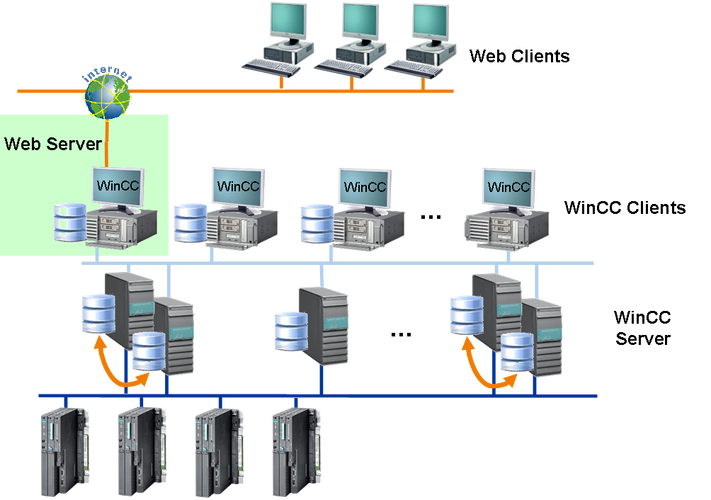
The Core Idea: Think of it as a function or a method that you can call over the internet, from any application, regardless of the programming language or operating system it's built on.
Types of Web Services:
-
SOAP (Simple Object Access Protocol)
- Protocol: A strict protocol with a defined standard (W3C).
- Format: Uses XML for its message format.
- Transport: Can be transported over various protocols (HTTP, SMTP, TCP), but HTTP is the most common.
- Features: Highly extensible, provides built-in error handling, security, and ACID compliance (for transactions). It's considered more "heavyweight."
- Use Cases: Enterprise-level applications where security, transactions, and strict contracts are critical (e.g., banking, finance, large-scale integrations).
-
REST (Representational State Transfer)
- Architecture Style: Not a protocol, but an architectural style.
- Format: Uses standard HTTP methods (GET, POST, PUT, DELETE) and data formats like JSON (most common) or XML.
- Transport: Almost exclusively uses HTTP/HTTPS.
- Features: Lightweight, simple, and stateless. It's easier to use and more flexible than SOAP.
- Use Cases: Public APIs (like Twitter, Google Maps), modern web and mobile applications, and microservices. It's the de-facto standard for new web services today.
How Java and .NET Relate to Web Services
Both Java and .NET are excellent platforms for creating and consuming web services. The choice between them often depends on the project's existing tech stack, team expertise, and specific requirements.
A. Creating Web Services
| Feature | Java (using frameworks like JAX-WS, Spring Boot) | .NET (using ASP.NET Core) |
|---|---|---|
| SOAP Services | Excellent Support. JAX-WS (Java API for XML Web Services) is the standard for creating SOAP services in Java. Frameworks like Spring-WS also provide powerful support. | Excellent Support. WCF (Windows Communication Foundation) was the classic .NET technology for SOAP services. In modern .NET (Core 5+), you can still create SOAP services, but it's less common than REST. |
| REST Services | Excellent Support. The most popular approach is using Spring Boot with @RestController and Jackson/Gson for JSON conversion. The older JAX-RS (Java API for RESTful Web Services) with frameworks like Jersey or RESTEasy is also very common. |
Excellent & Modern. ASP.NET Core is the premier framework for building REST APIs in .NET. It's lightweight, high-performance, and has first-class support for JSON (via System.Text.Json) and OpenAPI/Swagger for documentation. |
| Key Strength | Massive ecosystem, platform independence, huge community. | High performance, excellent tooling (Visual Studio), seamless integration with Windows ecosystem, and modern C# features. |
B. Consuming Web Services
Both platforms have robust tools for calling (consuming) web services, whether SOAP or REST.
Java (Consuming):
- REST: Use the
RestTemplateclass (in older Spring versions) or the modernWebClient(in Spring WebFlux). For simple cases, libraries like Apache HttpClient are also used. - SOAP: Use the
JaxWsProxyFactoryBeanfrom the CXF framework or the built-in support in JAX-WS.
.NET (Consuming):
- REST: The modern and recommended way is to use
HttpClient. For even easier consumption, you can use HttpClientFactory. For generating type-safe clients from OpenAPI/Swagger specs, useRefit. - SOAP: Use the
AddServiceReferencefeature in Visual Studio or thesvcutil.execommand-line tool to generate a proxy class from a WSDL file.
Example: Creating a Simple REST API
Let's see how you'd create a simple "Hello World" REST API in both worlds.
Java Example (using Spring Boot)
-
Dependencies (pom.xml):
<dependencies> <dependency> <groupId>org.springframework.boot</groupId> <artifactId>spring-boot-starter-web</artifactId> </dependency> </dependencies> -
Controller (GreetingController.java):
import org.springframework.web.bind.annotation.GetMapping;
import org.springframework.web.bind.annotation.RequestParam;
import org.springframework.web.bind.annotation.RestController;
// This annotation marks the class as a REST controller
@RestController
public class GreetingController {
    // This annotation maps GET requests to "/greeting"
    @GetMapping("/greeting")
    public String greeting(@RequestParam(value = "name", defaultValue = "World") String name) {
        return String.format("Hello, %s! From Java Spring Boot.", name);
    }
}
.NET Example (using ASP.NET Core)
-
Dependencies (via the
dotnetCLI):dotnet new webapi -n MyApi cd MyApi
-
Controller (WeatherForecastController.cs - we'll modify this):
using Microsoft.AspNetCore.Mvc;
// This attribute marks the class as an API controller
[ApiController]
[Route("[controller]")]
public class GreetingController : ControllerBase
{
    // This attribute maps GET requests to "/greeting"
    [HttpGet]
    public string Get([FromQuery] string name = "World")
    {
        return $"Hello, {name}! From .NET ASP.NET Core.";
    }
}
Result:
In both cases, if you run the application and navigate to http://localhost:<port>/greeting?name=Developer, you will get the corresponding JSON response:
"Hello, Developer! From Java Spring Boot."
or
"Hello, Developer! From .NET ASP.NET Core."
Summary and Key Takeaways
| Java | .NET |
|---|