Of course! The "Broken Pipe" error in Java is a classic java.io.IOException. It can be confusing because it doesn't always mean your code has a bug. Let's break down what it means, why it happens, and how to handle it.
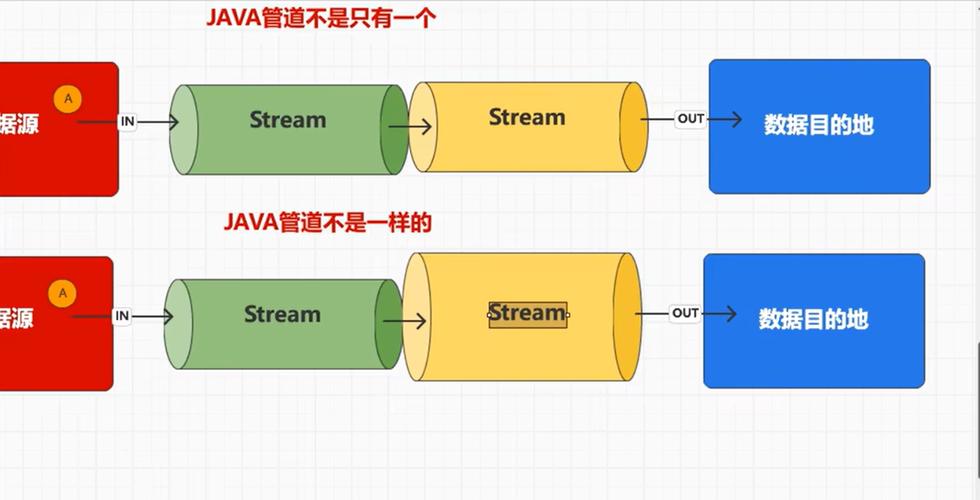
The Core Concept: What is a "Pipe"?
Think of a pipe in the Unix/Linux world (and by extension, Java's I/O model) as a one-way communication channel between two processes or threads. You have an end to write data into the pipe and an end to read data from it.
Imagine a real-life pipe:
- You (the writer) pour water (data) into one end.
- Someone else (the reader) collects the water from the other end.
The "Broken Pipe" error happens when the reader end of the pipe is closed or disappears before the writer is finished.
When the writer tries to pour more water into the now-closed pipe, it gets stopped and told, "Hey, this pipe is broken! The other end isn't listening anymore."

The Two Most Common Scenarios in Java
This error almost always occurs in one of two situations:
Scenario 1: The Classic Runtime.exec() Mistake
This is the most frequent cause. You spawn a child process from your Java application using Runtime.exec() or ProcessBuilder, but you don't manage its input and output streams correctly.
The Problem: The child process (e.g., ls, grep, ffmpeg) inherits its standard output and error streams from your Java application. If your Java application exits or closes these streams, the child process's "pipe" to you is broken.
Example of the Problem:
// THIS CODE WILL LIKELY CAUSE A "BROKEN PIPE" ERROR
public class BrokenPipeExample {
    public static void main(String[] args) {
        try {
            // We start a process that will produce a lot of output
            Process process = Runtime.getRuntime().exec("find / -name '*.java'");
            // We try to read the output, but we only read a little bit
            BufferedReader reader = new BufferedReader(new InputStreamReader(process.getInputStream()));
            String line;
            int i = 0;
            while ((line = reader.readLine()) != null && i < 5) { // Only read 5 lines
                System.out.println("OUTPUT: " + line);
                i++;
            }
            // We close our reader and exit the main method.
            // The 'find' command is STILL RUNNING and trying to write to its stdout pipe,
            // but the Java end has been closed. This causes the "Broken Pipe" error in the 'find' process.
            // Your Java app might not see it, but it happens.
            System.out.println("Java app finished. The 'find' process is now broken.");
        } catch (IOException e) {
            e.printStackTrace();
        }
    }
}
The Solution: Consume the Streams!
You must consume the output and error streams of the child process. The best way is to spawn separate threads to read from them continuously, otherwise the process can block waiting for a buffer to empty.
import java.io.*;
public class FixedPipeExample {
    public static void main(String[] args) {
        try {
            Process process = Runtime.getRuntime().exec("find / -name '*.java'");
            // Create readers for the output and error streams
            BufferedReader stdInput = new BufferedReader(new InputStreamReader(process.getInputStream()));
            BufferedReader stdError = new BufferedReader(new InputStreamReader(process.getErrorStream()));
            // --- THE FIX: Read the streams in separate threads ---
            // This prevents the process from blocking and breaking the pipe.
            Thread outputReader = new Thread(() -> {
                try {
                    String s;
                    while ((s = stdInput.readLine()) != null) {
                        System.out.println("OUTPUT: " + s);
                    }
                } catch (IOException e) {
                    // This is where you might see the "Broken Pipe" if the process dies unexpectedly.
                    // It's often okay to ignore here, as it means the process finished.
                    if (!e.getMessage().contains("Broken pipe")) {
                        e.printStackTrace();
                    }
                }
            });
            Thread errorReader = new Thread(() -> {
                try {
                    String s;
                    while ((s = stdError.readLine()) != null) {
                        System.err.println("ERROR: " + s);
                    }
                } catch (IOException e) {
                    if (!e.getMessage().contains("Broken pipe")) {
                        e.printStackTrace();
                    }
                }
            });
            outputReader.start();
            errorReader.start();
            // Wait for the process to complete
            int exitCode = process.waitFor();
            System.out.println("Process exited with code: " + exitCode);
            // Wait for the reader threads to finish
            outputReader.join();
            errorReader.join();
        } catch (IOException | InterruptedException e) {
            e.printStackTrace();
        }
    }
}
Scenario 2: Inter-Thread Communication with PipedOutputStream and PipedInputStream
This is a more direct use of Java's pipe mechanism. You connect a PipedOutputStream (the writer) to a PipedInputStream (the reader). They run in different threads.
The Problem: The thread that is reading from the PipedInputStream dies or finishes its work early. The thread writing to the PipedOutputStream then tries to write more data, but the buffer is full and the reader is gone. The write operation blocks, and eventually, the system reports a "Broken Pipe."
Example of the Problem:
import java.io.*;
class ReaderTask implements Runnable {
    private PipedInputStream inputStream;
    public ReaderTask(PipedInputStream inputStream) {
        this.inputStream = inputStream;
    }
    @Override
    public void run() {
        System.out.println("Reader thread started.");
        try {
            // Read only 3 bytes and then exit
            for (int i = 0; i < 3; i++) {
                System.out.println("Reader read: " + inputStream.read());
            }
            System.out.println("Reader thread finished.");
            // The inputStream is implicitly closed when the thread exits or the object is GC'd.
        } catch (IOException e) {
            e.printStackTrace();
        }
    }
}
public class PipedBrokenPipeExample {
    public static void main(String[] args) throws Exception {
        PipedInputStream pis = new PipedInputStream();
        PipedOutputStream pos = new PipedOutputStream(pis);
        Thread readerThread = new Thread(new ReaderTask(pis));
        readerThread.start();
        // Give the reader a moment to read some data
        Thread.sleep(100);
        System.out.println("Writer thread started.");
        try {
            // The writer will try to write 100 bytes
            for (int i = 0; i < 100; i++) {
                pos.write(i); // This will block after a few writes because the reader is gone!
                System.out.println("Writer wrote: " + i);
            }
        } catch (IOException e) {
            // This is where the "Broken Pipe" error will be thrown by the writer thread
            System.err.println("Caught IOException in writer: " + e.getMessage());
        } finally {
            pos.close();
        }
        readerThread.join();
    }
}
The Solution: Proper Coordination
The writer and reader must be coordinated. The writer should know when the reader is done. This can be done with a shared flag or by using more modern concurrency tools.
A Simple Fix with a Flag:
// ... (ReaderTask and main class structure similar to above)
class CoordinatedReaderTask implements Runnable {
    private PipedInputStream inputStream;
    private volatile boolean running = true; // Shared flag
    public CoordinatedReaderTask(PipedInputStream inputStream) {
        this.inputStream = inputStream;
    }
    public void stop() {
        running = false;
    }
    @Override
    public void run() {
        System.out.println("Reader thread started.");
        try {
            while (running) {
                int data = inputStream.read();
                if (data == -1) { // End of stream
                    break;
                }
                System.out.println("Reader read: " + data);
                Thread.sleep(50); // Simulate work
            }
        } catch (IOException | InterruptedException e) {
            // Handle exceptions
        } finally {
            System.out.println("Reader thread finished.");
            try { inputStream.close(); } catch (IOException e) {}
        }
    }
}
public class FixedPipedExample {
    public static void main(String[] args) throws Exception {
        PipedInputStream pis = new PipedInputStream();
        PipedOutputStream pos = new PipedOutputStream(pis);
        CoordinatedReaderTask readerTask = new CoordinatedReaderTask(pis);
        Thread readerThread = new Thread(readerTask);
        readerThread.start();
        System.out.println("Writer thread started.");
        try {
            for (int i = 0; i < 100; i++) {
                if (!readerThread.isAlive()) { // Check if the reader is still alive
                    System.out.println("Reader is dead. Stopping writer.");
                    break;
                }
                pos.write(i);
                System.out.println("Writer wrote: " + i);
                Thread.sleep(20);
            }
        } finally {
            readerTask.stop(); // Signal the reader to stop
            pos.close();       // This will cause the reader's read() to return -1
            readerThread.join();
        }
    }
}
Summary: Key Takeaways
- What it is:
java.io.IOException: Broken pipemeans you tried to write to a pipe whose read end was closed. - Common Cause #1 (
Runtime.exec()): You didn't read the output/error streams of the child process, causing it to fill its internal buffer and eventually break the pipe when it can't write anymore.- Fix: Always consume the streams. The best practice is to read them in separate threads.
- Common Cause #2 (
PipedInputStream/OutputStream): The reader thread died or finished before the writer thread, leaving the writer with nowhere to send its data.- Fix: Implement proper coordination between the threads (e.g., using flags,
volatilevariables, or higher-level concurrency utilities).
- Fix: Implement proper coordination between the threads (e.g., using flags,
- Is it always a bug? Not always. If a child process (like
grep) finds its results and exits cleanly, it might close its write end of the pipe. If your Java code then tries to write to it, you'll get a "Broken Pipe." In this case, it's expected behavior, and you should handle the exception gracefully.