Of course! Here is a comprehensive guide to using PyMySQL with Python 3.5.
Overview
- PyMySQL: A pure Python MySQL client library. This means it doesn't require any external C libraries to be compiled, making it very easy to install and use, especially in virtual environments and containers.
- Python 3.5: An older version of Python, but the principles and code shown here are largely applicable to modern Python versions (3.6+) with minor syntax adjustments.
Installation
First, you need to install the PyMySQL library. It's highly recommended to do this in a virtual environment to keep your project dependencies isolated.
# Create and activate a virtual environment (optional but recommended)
python3.5 -m venv my_project_env
source my_project_env/bin/activate  # On Windows, use `my_project_env\Scripts\activate`
# Install PyMySQL
pip install PyMySQL
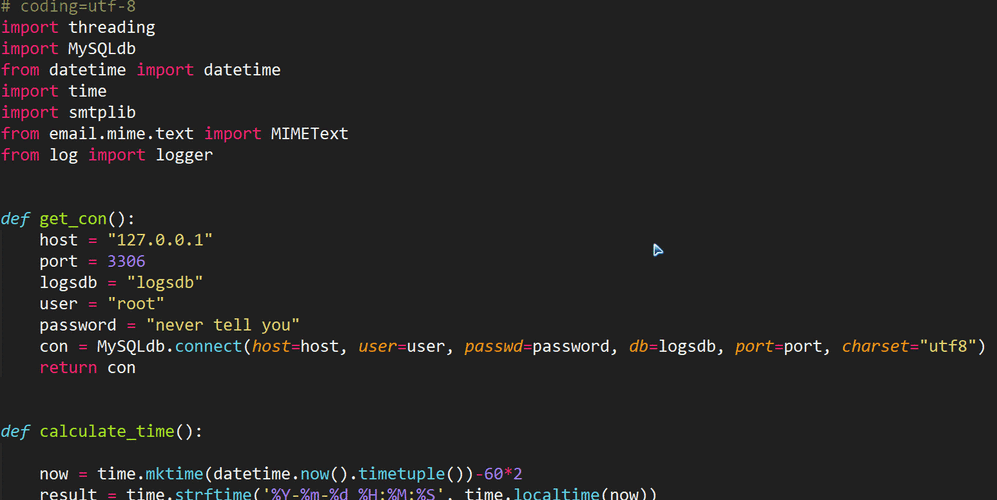
Basic Connection
To connect to a MySQL database, you need the following information:
- Hostname (e.g.,
localhostor an IP address) - Username
- Password
- Database name
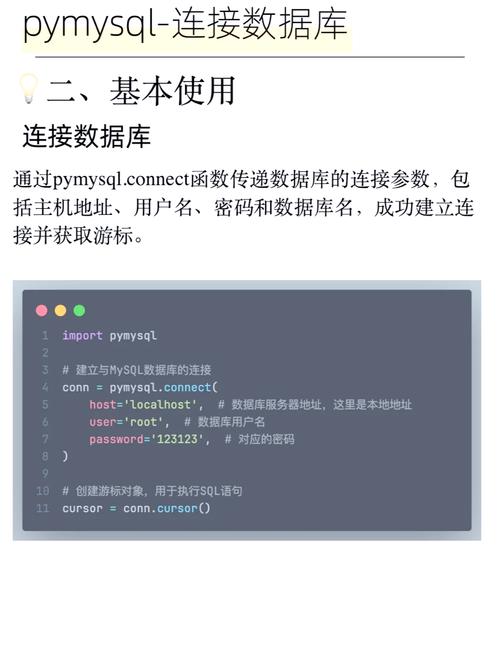
The pymysql.connect() function is used to establish a connection.
import pymysql
# --- Database Connection Details ---
# Replace with your own database details
db_config = {
    'host': 'localhost',
    'user': 'your_username',
    'password': 'your_password',
    'database': 'your_database',
    'charset': 'utf8mb4',
    'cursorclass': pymysql.cursors.DictCursor  # This is very useful!
}
try:
    # Establish the connection
    connection = pymysql.connect(**db_config)
    print("Successfully connected to the database!")
    # You can now perform database operations...
    # ...
except pymysql.MySQLError as e:
    print(f"Error connecting to MySQL: {e}")
finally:
    # The connection will be closed in the 'finally' block
    if 'connection' in locals() and connection.open:
        connection.close()
        print("Database connection closed.")
Explanation:
- We use a dictionary
db_configto hold connection parameters for clarity. pymysql.connect(**db_config)unpacks the dictionary into keyword arguments.- The
try...except...finallyblock is a robust way to handle connections. It ensures that if an error occurs, you'll know about it, and most importantly, it guarantees that the connection is closed in thefinallyblock, preventing resource leaks. cursorclass=pymysql.cursors.DictCursoris a highly recommended option. It makes your results fetch as dictionaries instead of tuples, which is much more readable (e.g.,row['name']instead ofrow[1]).
Creating a Table (DDL - Data Definition Language)
Let's create a simple table to work with. We'll use a cursor object to execute SQL commands.
import pymysql
# (Use the same connection code from section 2)
db_config = {
    'host': 'localhost',
    'user': 'your_username',
    'password': 'your_password',
    'database': 'your_database',
    'charset': 'utf8mb4',
    'cursorclass': pymysql.cursors.DictCursor
}
try:
    connection = pymysql.connect(**db_config)
    print("Successfully connected to the database.")
    with connection.cursor() as cursor:
        # SQL statement to create a table
        # Note: IF NOT EXISTS prevents an error if the table already exists
        create_table_sql = """
        CREATE TABLE IF NOT EXISTS users (
            id INT AUTO_INCREMENT PRIMARY KEY,
            username VARCHAR(50) NOT NULL,
            email VARCHAR(100) NOT NULL,
            created_at TIMESTAMP DEFAULT CURRENT_TIMESTAMP
        )
        """
        cursor.execute(create_table_sql)
        print("Table 'users' created or already exists.")
    # IMPORTANT: For DDL (CREATE, ALTER, DROP) and data-changing operations (INSERT, UPDATE, DELETE),
    # you must commit the transaction to make the changes permanent.
    connection.commit()
except pymysql.MySQLError as e:
    print(f"Error: {e}")
    if 'connection' in locals() and connection.open:
        connection.rollback() # Rollback in case of error
        print("Transaction rolled back.")
finally:
    if 'connection' in locals() and connection.open:
        connection.close()
        print("Database connection closed.")
Key Points:
with connection.cursor() as cursor:is the recommended way to use a cursor. It automatically closes the cursor when the block is exited.cursor.execute(sql)runs the SQL query.connection.commit()is essential. Without it, all changes (like creating a table or inserting data) are lost when the connection closes.
CRUD Operations (Create, Read, Update, Delete)
This is the core of database interaction.
A. Create (INSERT)
# (Connection setup is the same)
try:
    connection = pymysql.connect(**db_config)
    with connection.cursor() as cursor:
        # SQL query with placeholders (%s)
        insert_sql = "INSERT INTO users (username, email) VALUES (%s, %s)"
        # Data to be inserted
        new_user = ('johndoe', 'john.doe@example.com')
        # Execute the query
        cursor.execute(insert_sql, new_user)
        print(f"Successfully inserted user: {cursor.lastrowid}") # Get the ID of the new row
        # Commit the transaction
        connection.commit()
except pymysql.MySQLError as e:
    print(f"Error inserting user: {e}")
    if 'connection' in locals() and connection.open:
        connection.rollback()
finally:
    if 'connection' in locals() and connection.open:
        connection.close()
Security Note: Always use %s placeholders for user data. This prevents SQL injection attacks. PyMySQL will safely escape the values for you.
B. Read (SELECT)
# (Connection setup is the same)
try:
    connection = pymysql.connect(**db_config)
    with connection.cursor() as cursor:
        # SQL query to select all users
        select_sql = "SELECT id, username, email FROM users"
        # Execute the query
        cursor.execute(select_sql)
        # Fetch all results
        # fetchone() gets the next single row
        # fetchall() gets all remaining rows as a list
        results = cursor.fetchall()
        print("All users in the database:")
        for user in results:
            print(f"ID: {user['id']}, Username: {user['username']}, Email: {user['email']}")
except pymysql.MySQLError as e:
    print(f"Error fetching users: {e}")
finally:
    if 'connection' in locals() and connection.open:
        connection.close()
C. Update (UPDATE)
# (Connection setup is the same)
try:
    connection = pymysql.connect(**db_config)
    with connection.cursor() as cursor:
        # SQL query to update a user's email
        update_sql = "UPDATE users SET email = %s WHERE username = %s"
        # New email and username to find the user
        update_data = ('john.doe.new@example.com', 'johndoe')
        cursor.execute(update_sql, update_data)
        print(f"Updated {cursor.rowcount} user(s).") # rowcount shows how many rows were affected
        connection.commit()
except pymysql.MySQLError as e:
    print(f"Error updating user: {e}")
    if 'connection' in locals() and connection.open:
        connection.rollback()
finally:
    if 'connection' in locals() and connection.open:
        connection.close()
D. Delete (DELETE)
# (Connection setup is the same)
try:
    connection = pymysql.connect(**db_config)
    with connection.cursor() as cursor:
        # SQL query to delete a user
        delete_sql = "DELETE FROM users WHERE username = %s"
        # Username of the user to delete
        username_to_delete = 'johndoe'
        cursor.execute(delete_sql, (username_to_delete,)) # Note the comma to make it a tuple
        print(f"Deleted {cursor.rowcount} user(s).")
        connection.commit()
except pymysql.MySQLError as e:
    print(f"Error deleting user: {e}")
    if 'connection' in locals() and connection.open:
        connection.rollback()
finally:
    if 'connection' in locals() and connection.open:
        connection.close()
Best Practices and Using Context Managers
Manually opening and closing connections and cursors can be tedious. You can wrap this logic in a reusable context manager using Python's @contextlib.contextmanager decorator. This is a very common and elegant pattern.
import pymysql
from contextlib import contextmanager
# (db_config dictionary from before)
@contextmanager
def get_db_connection():
    """A context manager for handling database connections."""
    connection = None
    try:
        connection = pymysql.connect(**db_config)
        yield connection
    except pymysql.MySQLError as e:
        print(f"Database error: {e}")
        if connection:
            connection.rollback()
        raise # Re-raise the exception after handling
    finally:
        if connection and connection.open:
            connection.close()
        print("Connection closed.")
# --- How to use the context manager ---
try:
    with get_db_connection() as conn:
        with conn.cursor() as cursor:
            # All operations happen within these 'with' blocks
            cursor.execute("SELECT * FROM users")
            users = cursor.fetchall()
            for user in users:
                print(user)
except pymysql.MySQLError:
    print("An error occurred during the database operation.")
This pattern makes your main application code much cleaner and ensures resources are always managed correctly.