Of course! Here is a comprehensive guide on how to implement and train the LeNet-5 model using the original Caffe Python API.
This guide will walk you through the entire process:
- Understanding LeNet-5: A quick recap of the classic architecture.
- Project Setup: Creating the necessary directory structure.
- The Network Definition: Writing the
lenet.prototxtfile to describe the network. - The Solver Configuration: Writing the
lenet_solver.prototxtfile to define the training process. - The Python Script: A complete Python script to prepare the data, start training, and test the model.
- Running Everything: Putting it all together and executing the code.
- Verification: Checking the results and visualizing the learned features.
Understanding LeNet-5
LeNet-5 is a pioneering convolutional neural network (CNN) developed by Yann LeCun et al. in 1998 for handwritten digit recognition. It's a simple yet powerful architecture that laid the foundation for modern deep learning.
Its core components are:
- Convolutional Layers: To extract features from the input image.
- Pooling Layers (Subsampling): To reduce the spatial dimensions, making the model more efficient and robust to small translations.
- Fully Connected Layers: To perform the final classification based on the extracted features.
The classic LeNet-5 architecture for MNIST is:
- Input: 32x32 grayscale image.
- Convolution (C1): 6 filters of 5x5, outputting a 28x28x6 feature map.
- Pooling (S2): 2x2 max pooling, outputting a 14x14x6 feature map.
- Convolution (C3): 16 filters of 5x5, outputting a 10x10x16 feature map.
- Pooling (S4): 2x2 max pooling, outputting a 5x5x16 feature map.
- Fully Connected (C5): 120 neurons.
- Fully Connected (F6): 84 neurons.
- Output (Output Layer): 10 neurons (one for each digit 0-9).
Project Setup
First, let's create a clean directory for our project. Open your terminal and run:
mkdir -p caffe_lenet
cd caffe_lenet
Inside this directory, we will create three files:
lenet.prototxt: The network architecture definition.lenet_solver.prototxt: The solver configuration for training.lenet_train.py: The Python script to drive the training process.
The Network Definition (lenet.prototxt)
This file describes the layers of our network. Create lenet.prototxt and add the following content. The comments explain each layer's purpose.
# lenet.protxt
name: "LeNet"
layer {
  name: "mnist"
  type: "Data"
  top: "data"
  top: "label"
  include {
    phase: TRAIN
  }
  transform_param {
    scale: 0.00390625 # 1/255.0
  }
  data_param {
    source: "mnist_train_lmdb" # We will create this
    batch_size: 64
    backend: LMDB
  }
}
layer {
  name: "mnist"
  type: "Data"
  top: "data"
  top: "label"
  include {
    phase: TEST
  }
  transform_param {
    scale: 0.00390625
  }
  data_param {
    source: "mnist_test_lmdb" # We will create this
    batch_size: 100
    backend: LMDB
  }
}
layer {
  name: "conv1"
  type: "Convolution"
  bottom: "data"
  top: "conv1"
  param {
    lr_mult: 1
  }
  param {
    lr_mult: 2
  }
  convolution_param {
    num_output: 20 # C1: 20 filters
    kernel_size: 5
    stride: 1
    weight_filler {
      type: "xavier"
    }
    bias_filler {
      type: "constant"
    }
  }
}
layer {
  name: "pool1"
  type: "Pooling"
  bottom: "conv1"
  top: "pool1"
  pooling_param {
    pool: MAX
    kernel_size: 2
    stride: 2
  }
}
layer {
  name: "conv2"
  type: "Convolution"
  bottom: "pool1"
  top: "conv2"
  param {
    lr_mult: 1
  }
  param {
    lr_mult: 2
  }
  convolution_param {
    num_output: 50 # C3: 50 filters
    kernel_size: 5
    stride: 1
    weight_filler {
      type: "xavier"
    }
    bias_filler {
      type: "constant"
    }
  }
}
layer {
  name: "pool2"
  type: "Pooling"
  bottom: "conv2"
  top: "pool2"
  pooling_param {
    pool: MAX
    kernel_size: 2
    stride: 2
  }
}
layer {
  name: "ip1"
  type: "InnerProduct"
  bottom: "pool2"
  top: "ip1"
  param {
    lr_mult: 1
  }
  param {
    lr_mult: 2
  }
  inner_product_param {
    num_output: 500 # F6: 500 neurons
    weight_filler {
      type: "xavier"
    }
    bias_filler {
      type: "constant"
    }
  }
}
layer {
  name: "relu1"
  type: "ReLU"
  bottom: "ip1"
  top: "ip1"
}
layer {
  name: "ip2"
  type: "InnerProduct"
  bottom: "ip1"
  top: "ip2"
  param {
    lr_mult: 1
  }
  param {
    lr_mult: 2
  }
  inner_product_param {
    num_output: 10 # Output Layer: 10 neurons
    weight_filler {
      type: "xavier"
    }
    bias_filler {
      type: "constant"
    }
  }
}
layer {
  name: "accuracy"
  type: "Accuracy"
  bottom: "ip2"
  bottom: "label"
  top: "accuracy"
  include {
    phase: TEST
  }
}
layer {
  name: "loss"
  type: "SoftmaxWithLoss"
  bottom: "ip2"
  bottom: "label"
  top: "loss"
  include {
    phase: TRAIN
  }
}
The Solver Configuration (lenet_solver.prototxt)
The solver controls the optimization process. It defines the algorithm (e.g., Stochastic Gradient Descent), the learning rate, and how often to test the model. Create lenet_solver.prototxt and add:
# lenet_solver.prototxt
net: "lenet.prototxt"
test_iter: 100 # Number of batches to use for testing (100 batches * 100 samples/batch = 10,000 test samples)
test_interval: 500 # Test the network every 500 training iterations
base_lr: 0.01 # Base learning rate
lr_policy: "step"
gamma: 0.1 # Learning rate decay factor
stepsize: 5000 # The step size for the learning rate decay
display: 100 # Display training loss every 100 iterations
max_iter: 10000 # Maximum number of iterations
momentum: 0.9
weight_decay: 0.0005
snapshot: 5000 # Take a snapshot every 5000 iterations
snapshot_prefix: "lenet"
solver_mode: GPU # Use GPU for training
The Python Script (lenet_train.py)
This script will handle downloading the MNIST dataset, converting it into the LMDB format that Caffe uses, and then starting the training process. Create lenet_train.py and add the following code.
# lenet_train.py
import os
import sys
import caffe
from caffe.proto import caffe_pb2
import numpy as np
from sklearn.cross_validation import train_test_split
import lmdb # You may need to install this: pip install lmdb
def convert_data_to_lmdb(images, labels, lmdb_path, image_dims=(28, 28)):
    """
    Convert numpy arrays of images and labels to an LMDB database.
    """
    if os.path.exists(lmdb_path):
        print("Removing existing LMDB directory: " + lmdb_path)
        os.remove(lmdb_path)
    # Create the LMDB environment
    env = lmdb.open(lmdb_path, map_size=int(1e12))
    with env.begin(write=True) as txn:
        for i in range(len(images)):
            # Get the image and label
            image = images[i].astype(np.uint8)
            label = labels[i]
            # Create theDatum protobuf
            datum = caffe_pb2.Datum()
            datum.channels, datum.height, datum.width = image_dims[0], image_dims[1], 1
            datum.data = image.tostring()
            datum.label = int(label)
            # Serialize the Datum and write to LMDB
            txn.put('{:010d}'.format(i).encode('ascii'), datum.SerializeToString())
def load_mnist(path, kind='train'):
    """Load MNIST data from path"""
    import gzip
    import numpy as np
    labels_path = os.path.join(path, '%s-labels-idx1-ubyte.gz' % kind)
    images_path = os.path.join(path, '%s-images-idx3-ubyte.gz' % kind)
    with gzip.open(labels_path, 'rb') as lbpath:
        labels = np.frombuffer(lbpath.read(), dtype=np.uint8, offset=8)
    with gzip.open(images_path, 'rb') as imgpath:
        images = np.frombuffer(imgpath.read(), dtype=np.uint8, offset=16).reshape(len(labels), 784)
    return images, labels
def main():
    # --- 1. Download MNIST data ---
    print("Downloading MNIST data...")
    if not os.path.exists('mnist'):
        os.makedirs('mnist')
    if not os.path.exists('mnist/mnist_train_lmdb'):
        # Download if not present
        import urllib
        urllib.request.urlretrieve('http://yann.lecun.com/exdb/mnist/train-images-idx3-ubyte.gz', 'mnist/train-images-idx3-ubyte.gz')
        urllib.request.urlretrieve('http://yann.lecun.com/exdb/mnist/train-labels-idx1-ubyte.gz', 'mnist/train-labels-idx1-ubyte.gz')
        urllib.request.urlretrieve('http://yann.lecun.com/exdb/mnist/t10k-images-idx3-ubyte.gz', 'mnist/t10k-images-idx3-ubyte.gz')
        urllib.request.urlretrieve('http://yann.lecun.com/exdb/mnist/t10k-labels-idx1-ubyte.gz', 'mnist/t10k-labels-idx1-ubyte.gz')
    # --- 2. Load and prepare data ---
    print("Loading MNIST data...")
    X_train, y_train = load_mnist('mnist', kind='train')
    X_test, y_test = load_mnist('mnist', kind='t10k')
    # Reshape images to (N, 1, 28, 28) and add padding to make them (N, 1, 32, 32)
    # as per classic LeNet-5 input size.
    X_train = X_train.reshape(-1, 1, 28, 28)
    X_train = np.pad(X_train, ((0,0), (0,0), (2,2), (2,2)), mode='constant')
    X_test = X_test.reshape(-1, 1, 28, 28)
    X_test = np.pad(X_test, ((0,0), (0,0), (2,2), (2,2)), mode='constant')
    # --- 3. Convert to LMDB format ---
    print("Converting training data to LMDB...")
    convert_data_to_lmdb(X_train, y_train, 'mnist_train_lmdb')
    print("Converting test data to LMDB...")
    convert_data_to_lmdb(X_test, y_test, 'mnist_test_lmdb')
    # --- 4. Set up Caffe and start training ---
    # Set the path to the Caffe installation
    caffe_root = os.path.join(os.path.dirname(__file__), '..') # Assumes this script is in a subfolder of caffe
    sys.path.insert(0, caffe_root + 'python')
    # Set device
    caffe.set_device(0)
    caffe.set_mode_gpu()
    # Initialize the solver
    solver = None
    solver = caffe.SGDSolver('lenet_solver.prototxt')
    # Train the network
    print("Starting training...")
    solver.solve()
    # --- 5. (Optional) Visualize the learned filters ---
    print("Visualizing learned filters...")
    # Extract the weights of the first convolutional layer
    filters = solver.net.params['conv1'][0].data
    vis_square(filters.transpose(0, 2, 3, 1))
def vis_square(data):
    """Visualize an array of RGB, or grayscale images."""
    import matplotlib.pyplot as plt
    # Normalize data for display
    data = (data - data.min()) / (data.max() - data.min())
    # Force the number of filters to be a square
    n = int(np.ceil(np.sqrt(data.shape[0])))
    padding = (((0, n ** 2 - data.shape[0]),
               (0, 1), (0, 1)) + ((0, 0),) * (data.ndim - 3))
    data = np.pad(data, padding, mode='constant', constant_values=0)
    # Tile the filters into an image
    data = data.reshape((n, n) + data.shape[1:]).transpose((0, 2, 1, 3) + tuple(range(4, data.ndim + 1)))
    data = data.reshape((n * data.shape[1], n * data.shape[3]) + data.shape[4:])
    plt.imshow(data)
    plt.axis('off')
    plt.show()
if __name__ == '__main__':
    main()
Running Everything
Before running, ensure you have the necessary dependencies installed:
- Caffe (with Python bindings and GPU support configured)
- Python libraries:
numpy,scikit-learn,lmdb,matplotlib
Navigate to your caffe_lenet directory in the terminal and run the Python script:
python lenet_train.py
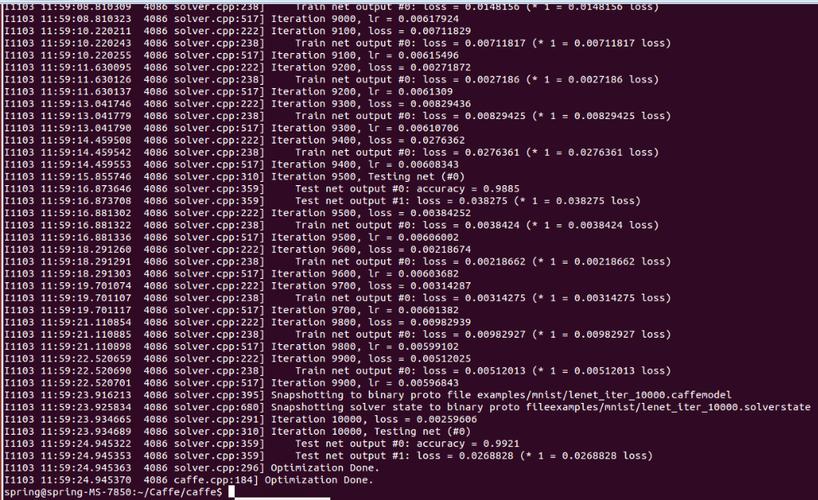
What to expect:
- The script will first download the MNIST dataset files into a
mnist/subdirectory. - It will then convert the training and test data into LMDB format (
mnist_train_lmdbandmnist_test_lmdb). - Caffe will start training. You will see output in your terminal showing the loss and accuracy for every
displayiterations (we set it to 100). - Every
test_intervaliterations (500), Caffe will run the test phase and report the test accuracy. - Every
snapshotiterations (5000), Caffe will save the trained model weights tolenet_iter_5000.caffemodelandlenet_iter_10000.caffemodel. - After training completes, a window will pop up showing the 20 learned filters from the first convolutional layer.
Verification and Next Steps
-
Check the Logs: Look at the terminal output. The loss should decrease over time, and the test accuracy should increase, eventually plateauing around 99%.
-
Inspect the Model: You can use
caffe.netto load a trained model and make predictions.# After training, you can load the model for inference net = caffe.Net('lenet.prototxt', 'lenet_iter_10000.caffemodel', caffe.TEST) # Load a sample image (you'd need to preprocess it first) # For example, take the first test image input_image = X_test[0] # Set the input data and run a forward pass net.blobs['data'].data[...] = input_image output = net.forward() # Get the predicted class predicted_class = output['ip2'].argmax() print(f"Predicted class: {predicted_class}") print(f"True label: {y_test[0]}") -
Visualize More Layers: You can modify the
vis_squarefunction to visualize the filters of the second convolutional layer or the output feature maps (activations) of any layer to understand what the network is learning.