Of course! In Java, converting a byte to its binary (bit) representation is a common task. Since a byte is a primitive data type and doesn't have methods, you need to use bit manipulation or formatting to achieve this.
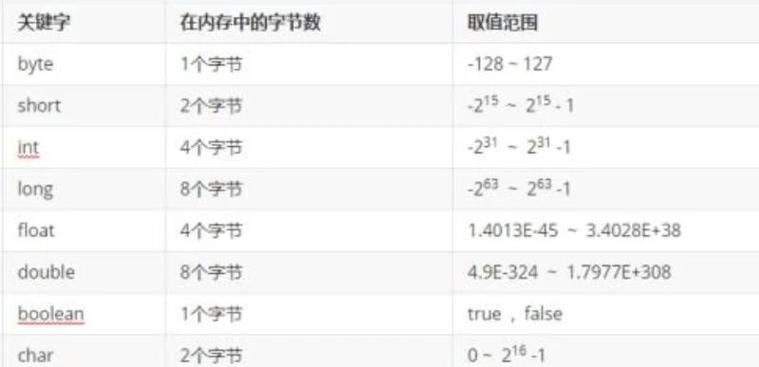
Here’s a complete guide covering the best ways to do it, from the simplest to the most fundamental.
The Easiest Way: Using String.format()
This is the most straightforward and readable method for converting a byte to an 8-bit binary String.
Key Concept:
%8s: Formats the string to be 8 characters wide, padding with spaces on the left if necessary.%08d: Formats the number to be 8 digits wide, padding with zeros (0) on the left.Integer.toBinaryString(): This is the crucial part. It converts anintto a binaryString. However, Java treatsbytevalues as negative if the most significant bit (the 8th bit) is1. When you pass a negativebytetoInteger.toBinaryString(), it converts thebyteto a negativeintand gives you the 32-bit two's complement representation (e.g.,11111111becomes11111111111111111111111111111111).& 0xFF: This is the magic trick. It performs a bitwise AND with thebyteand the hexadecimal value0xFF(which is255or0000000011111111in binary). This effectively "zeroes out" all the higher 24 bits of theint, leaving only the lower 8 bits, which is exactly the unsigned representation of your originalbyte.
Code Example:

public class ByteToBit {
    public static void main(String[] args) {
        byte myByte = 42; // A positive number
        byte myNegativeByte = -42; // A negative number
        // --- Convert to an 8-bit String ---
        // For positive numbers, this works directly
        String positiveBits = String.format("%8s", Integer.toBinaryString(myByte & 0xFF))
                                .replace(' ', '0');
        System.out.println("Byte " + myByte + " in 8 bits: " + positiveBits);
        // Expected output: 00101010
        // For negative numbers, the & 0xFF is essential
        String negativeBits = String.format("%8s", Integer.toBinaryString(myNegativeByte & 0xFF))
                                .replace(' ', '0');
        System.out.println("Byte " + myNegativeByte + " in 8 bits: " + negativeBits);
        // Expected output: 11010110
    }
}
Explanation:
myByte & 0xFF: Ensures we are working with the 8 bits of the original byte, correctly interpreted as an unsigned value.Integer.toBinaryString(...): Converts this unsigned 8-bit value into a binary string. For42, this gives"101010".String.format("%8s", ...): Pads the string with spaces on the left to make it 8 characters long."101010"becomes" 101010"..replace(' ', '0'): Replaces the spaces with zeros." 101010"becomes"00101010".
The Manual Way: Using Bit Shifting
This method is more verbose but helps you understand the underlying bit manipulation. It's also useful if you need to work with the bits individually (e.g., in a loop).
Key Concept:
- Bitwise AND (
&):byte & 0x80checks if the most significant bit (bit 7) is set.0x80is10000000in binary. - Right Shift (
>>):byte >> 1shifts all bits to the right by one position. The sign bit is preserved, which is what we want for two's complement representation.
Code Example:
public class ByteToBitManual {
    public static void main(String[] args) {
        byte myByte = -42;
        // Create a char array to hold the 8 bits
        char[] bits = new char[8];
        // Loop through each bit from left to right (7 down to 0)
        for (int i = 7; i >= 0; i--) {
            // Shift the byte to the right by 'i' positions
            // Then AND with 1 to get the value of the least significant bit
            bits[7 - i] = (char) (((myByte >> i) & 1) + '0');
        }
        // Convert the char array to a String
        String bitString = new String(bits);
        System.out.println("Byte " + myByte + " in 8 bits: " + bitString);
        // Expected output: 11010110
    }
}
Explanation:
- We create a
chararray of size 8 to store each bit as a character ('0' or '1'). - The loop runs from
i = 7down toi = 0. myByte >> i: In the first iteration (i=7), this shifts the byte 7 places to the right. For-42(11010110), this results in11111111. The LSB of this result is the original MSB.& 1: This isolates the least significant bit.11111111 & 1results in1.+ '0': We convert the integer1to the character'1'. If the bit was0, this would result in'0'.- The process repeats for each bit position, filling the
chararray. - Finally,
new String(bits)creates the final binary string.
The "From First Principles" Way: Using a ByteBuffer
This is a more advanced and flexible approach if you are dealing with binary data streams (like reading from a file or a network socket). It's less about a simple conversion and more about interpreting a byte's value in a specific context.
Key Concept:
A ByteBuffer can wrap a byte array. You can then get the bytes from the buffer in different formats, but to get the raw bits, you still need one of the methods above. This approach is useful when you have a sequence of bytes that you want to treat as a single number.
Code Example:
import java.nio.ByteBuffer;
import java.nio.ByteOrder;
public class ByteToBitBuffer {
    public static void main(String[] args) {
        byte myByte = -42;
        // 1. Create a ByteBuffer and wrap our single byte in an array
        ByteBuffer bb = ByteBuffer.wrap(new byte[]{myByte});
        // You can now interpret this byte in different ways
        // For example, get it as a signed byte (this just gives you the original value back)
        byte signedValue = bb.get();
        System.out.println("Interpreted as signed byte: " + signedValue); // -42
        // To get the bits, you would still need to convert it.
        // Let's use the String.format method from example 1.
        String bits = String.format("%8s", Integer.toBinaryString(signedValue & 0xFF))
                          .replace(' ', '0');
        System.out.println("Byte " + signedValue + " in 8 bits: " + bits);
        // Expected output: 11010110
    }
}
Summary and Recommendation
| Method | Pros | Cons | Best For |
|---|---|---|---|
String.format() |
Most readable, concise, and standard. | Relies on Integer utility and the & 0xFF trick. |
Almost all use cases. This is the recommended approach for converting a byte to a binary String. |
| Manual Bit Shifting | Excellent for learning bitwise operations. Gives you an array of bits. | Verbose, more error-prone. | Situations where you need to process each bit individually in a loop. |
ByteBuffer |
Powerful for handling streams of bytes. Overkill for a single conversion. | Complex setup for this specific task. | When working with I/O streams or when you need to interpret a sequence of bytes as a multi-byte number (e.g., int, long). |
For your day-to-day Java programming, use the String.format() method. It's the cleanest, most idiomatic, and easiest to understand solution.