Of course! This is a fundamental concept in computer programming. Let's break down Java, ASCII, and UTF-8, and how they all work together.

The Big Picture: What are these things?
Think of it like this:
- Characters: The letters, numbers, and symbols you see (
A,B, ,你, ). - Encoding (ASCII & UTF-8): The "secret code" or set of rules that maps each character to a number.
- Java: The programming language that provides tools to handle these characters and their encodings.
ASCII (American Standard Code for Information Interchange)
ASCII is one of the oldest and simplest character encodings.
- What it is: A 7-bit character set.
- What it covers: It defines codes for 128 characters. This includes:
- English alphabet (uppercase
A-Z, lowercasea-z) - Digits (
0-9) - Basic punctuation (, , , )
- Control characters (like newline
\n, tab\t, carriage return\r)
- English alphabet (uppercase
- The Limitation: It only covers English. It has no representation for characters used in other languages like , , , or Chinese characters like
你or猫.
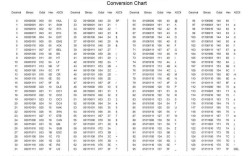
ASCII Table Snippet:
| Character | Decimal | Hex |
|---|---|---|
A |
65 | 41 |
B |
66 | 42 |
a |
97 | 61 |
0 |
48 | 30 |
| 64 | 40 | |
\n (Newline) |
10 | 0A |
UTF-8 (Unicode Transformation Format - 8-bit)
UTF-8 is a modern, universal character encoding.

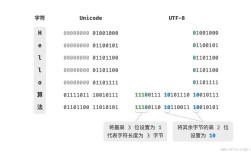
- What it is: A variable-width character encoding that can represent every character in the Unicode standard.
- What it covers: Everything! English, Chinese, Arabic, emojis (), mathematical symbols, and much more. It's the dominant encoding on the web and in most modern software.
- How it works (Variable-width):
- For standard ASCII characters (like
A,B,0-9), UTF-8 uses 1 byte and is identical to ASCII. This is a brilliant design choice for backward compatibility. - For characters outside the ASCII set (like or
你), it uses 2, 3, or even 4 bytes.
- For standard ASCII characters (like
Example:
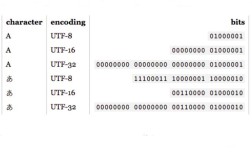
A(ASCII) ->01000001(1 byte in UTF-8)你(Chinese for "you") ->11100100 10111101 10100000(3 bytes in UTF-8)
Java: The Bridge Between Characters and Bytes
Java was designed from the ground up to handle internationalization, which is why its approach to characters and encodings is so robust.
The Core Concepts in Java
char and the char Data Type
- Java uses the UTF-16 encoding internally to represent characters. This means a single
charvariable in Java is a 16-bit unsigned value. - This allows a single
charto store most common characters, including those from European and East Asian languages. - Example:
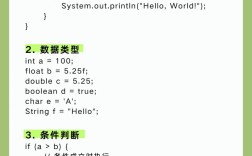
char englishLetter = 'A';  // Stored as a 16-bit number: 65
char chineseChar = '你';    // Stored as a 16-bit number: 20320
- The
chartype is for representing a single character, not a sequence of bytes.
String

- A
Stringin Java is an immutable sequence ofcharvalues. - Because each
charis UTF-16, aStringis essentially a sequence of 16-bit characters. It's an in-memory representation of text. - Example:
String message = "Hello 你!"; // This is a sequence of 7 chars: H, e, l, l, o, , 你, !
byte and Encodings (The Conversion)
- A
bytein Java is an 8-bit signed value. This is the fundamental unit for data storage, transmission over a network, or writing to a file. - The crucial step is converting a
String(UTF-16 chars) into a sequence ofbytes. This is where you specify the encoding, most commonly UTF-8.
Practical Code Examples
Let's see how this all works in practice.
Example 1: Getting the ASCII Value of a Character
This is straightforward because Java's char is a number, and for ASCII characters, that number is the ASCII code.
public class AsciiExample {
    public static void main(String[] args) {
        char myChar = 'A';
        // The char 'A' can be cast to an int to get its numeric value
        int asciiValue = (int) myChar;
        System.out.println("The character is: " + myChar);
        System.out.println("Its ASCII/numeric value is: " + asciiValue); // Output: 65
        char anotherChar = '@';
        System.out.println("The character is: " + anotherChar);
        System.out.println("Its ASCII/numeric value is: " + (int) anotherChar); // Output: 64
    }
}
Example 2: Converting a String to UTF-8 Bytes (and back)
This is the most common operation you'll perform.
import java.nio.charset.StandardCharsets;
public class Utf8Example {
    public static void main(String[] args) {
        String originalString = "Hello 你!";
        System.out.println("Original String: " + originalString);
        System.out.println("Length of String in chars: " + originalString.length()); // Output: 7
        // 1. Convert the String to a byte array using UTF-8 encoding
        byte[] utf8Bytes = originalString.getBytes(StandardCharsets.UTF_8);
        System.out.println("Length of byte array: " + utf8Bytes.length); // Output: 9
        // Why 9? "Hello " is 6 bytes (1 byte each), "你" is 3 bytes. Total 9.
        // You can see the raw byte values
        System.out.println("Byte array values: ");
        for (byte b : utf8Bytes) {
            System.out.print(b + " "); // Prints: 72 101 108 108 111 32 -28 -70 -87 33
        }
        System.out.println("\n");
        // 2. Convert the byte array back to a String using UTF-8 encoding
        String reconstructedString = new String(utf8Bytes, StandardCharsets.UTF_8);
        System.out.println("Reconstructed String: " + reconstructedString);
        System.out.println("Are they equal? " + originalString.equals(reconstructedString)); // Output: true
    }
}
Example 3: The Pitfall of Using the Default Encoding
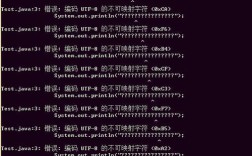
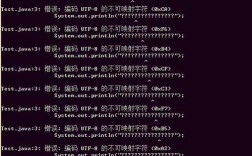
Never rely on the platform's default encoding! It can lead to bugs that only appear on certain operating systems (e.g., Windows often uses CP1252 by default, while Linux uses UTF-8).
This code demonstrates why you should always specify your encoding explicitly.
import java.nio.charset.Charset;
public class EncodingPitfall {
    public static void main(String[] args) {
        String specialString = "Café"; // The 'é' is a non-ASCII character
        // --- GOOD: Explicitly specify UTF-8 ---
        byte[] goodBytes = specialString.getBytes(StandardCharsets.UTF_8);
        String goodReconstructed = new String(goodBytes, StandardCharsets.UTF_8);
        System.out.println("Explicit UTF-8: " + goodReconstructed); // Works perfectly
        // --- BAD: Use the default encoding (unpredictable!) ---
        // This might work on your machine but fail on another.
        byte[] badBytes = specialString.getBytes(); // Relies on default charset
        String badReconstructed = new String(badBytes); // Relies on default charset
        // Let's see what the default charset actually is on this machine
        System.out.println("Default Charset: " + Charset.defaultCharset());
        // On a Windows machine with default encoding CP1252, 'é' is one byte.
        // On a Linux/macOS machine with default encoding UTF-8, 'é' is two bytes.
        // If you write bytes from one system and read them on the other, it will be corrupted.
        System.out.println("Default Encoding (risky): " + badReconstructed); // Might be "Café" on Windows
    }
}
Summary Table
| Concept | Description | Java Type / Role |
|---|---|---|
| Character | A symbol like A, B, 你. |
char (16-bit UTF-16) |
| String | A sequence of characters. | java.lang.String (sequence of chars) |
| ASCII | A 7-bit encoding for 128 English characters. | Legacy, but UTF-8 is compatible. |
| UTF-8 | A variable-width, universal encoding for all characters. | The standard for I/O (files, network). Use StandardCharsets.UTF_8. |
| Conversion | The process of turning a String into bytes for storage/transmission. |
String.getBytes(StandardCharsets.UTF_8) and new String(byte[], ...) |
Key Takeaway: In Java, work with char and String for in-memory text manipulation. When you need to save text to a file or send it over the network, explicitly convert it to a byte[] array using StandardCharsets.UTF_8. This ensures your application is robust and works correctly everywhere.