Of course! This is a very common point of confusion for Java developers, especially when dealing with command-line applications or terminal-based output. Let's break down the relationship between Java, ANSI, and UTF-8.
Here's a summary table, followed by detailed explanations.
| Concept | What it is | Role in Java | Key Classes/Considerations |
|---|---|---|---|
| Java | A programming language and runtime environment. | The platform that executes your code. | System.out, InputStreamReader, OutputStreamWriter |
| ANSI | A set of control codes for terminals (e.g., colors, cursor movement). | A way to format text sent to the console. | Not natively supported; requires a library like JANSI or JLine. |
| UTF-8 | A character encoding standard that can represent every character in the Unicode standard. | The encoding used for your source code, internal strings, and standard I/O streams. | StandardCharsets.UTF_8, InputStreamReader, OutputStreamWriter |
Java and UTF-8 (The Foundation)
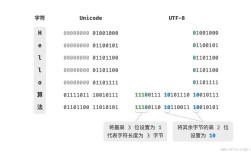
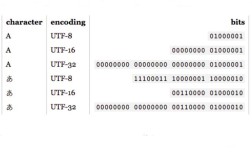
UTF-8 is the most important of the three for modern Java development. It's an encoding that maps characters (like 'A', 'ñ', '你', '😂') to bytes.
a) Source Code Files (.java)
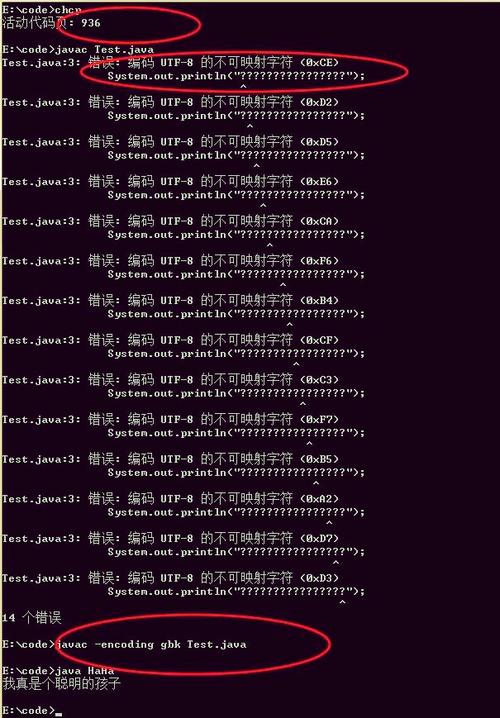
Since Java 18, the default encoding for source files is UTF-8. Before that, it was platform-dependent (e.g., Cp1252 on Windows). This is why you should always declare the encoding explicitly if you're on an older version or need to be sure:
<!-- In your pom.xml (Maven) -->
<properties>
    <project.build.sourceEncoding>UTF-8</project.build.sourceEncoding>
    <project.reporting.outputEncoding>UTF-8</project.reporting.outputEncoding>
</properties>
<!-- In your build.gradle (Gradle) -->
tasks.withType(JavaCompile) {
    options.encoding = 'UTF-8'
}
b) Internal Strings (String)
Java String objects are sequences of Unicode characters, not bytes. They are internally represented using UTF-16. You almost never need to worry about this internal representation. The key is that when you need to convert a String to bytes (e.g., to write to a file or send over a network), you must specify an encoding.
c) Standard I/O (Console, Files, Network)
This is where most problems occur. The standard I/O streams (System.in, System.out, System.err) are just byte streams. They don't know anything about characters or encodings by themselves.
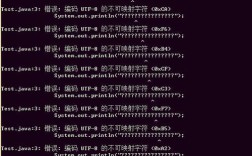
The Problem: By default, System.out uses the platform's default character encoding. On a US Windows machine, this might be Cp1252, which cannot display characters like or correctly. It will show a or a garbled character.
The Solution: You must wrap these streams with readers/writers that explicitly use the UTF-8 encoding.
Correct Way to Handle Console Input/Output:
import java.io.*;
import java.nio.charset.StandardCharsets;
public class Utf8ConsoleExample {
    public static void main(String[] args) {
        // --- WRITING TO CONSOLE (System.out) ---
        // Wrap System.out with an OutputStreamWriter that uses UTF-8.
        // This ensures all characters are correctly encoded before being sent to the terminal.
        try (OutputStreamWriter outWriter = new OutputStreamWriter(System.out, StandardCharsets.UTF_8);
             BufferedReader reader = new BufferedReader(new InputStreamReader(System.in, StandardCharsets.UTF_8))) {
            outWriter.write("Hello, World! (UTF-8 is working)\n");
            outWriter.flush(); // Ensure it's written
            // --- READING FROM CONSOLE (System.in) ---
            outWriter.write("Please enter your name with special characters (e.g., José, Müller): ");
            outWriter.flush();
            String name = reader.readLine();
            outWriter.write("Hello, " + name + "!\n");
        } catch (IOException e) {
            System.err.println("An I/O error occurred.");
            e.printStackTrace();
        }
    }
}
For File I/O (Java 7+):
The try-with-resources block with Files.newBufferedWriter makes this incredibly easy and safe.
import java.io.IOException;
import java.nio.charset.StandardCharsets;
import java.nio.file.Files;
import java.nio.file.Path;
import java.nio.file.Paths;
import java.util.List;
public class Utf8FileExample {
    public static void main(String[] args) {
        Path path = Paths.get("output.txt");
        // Writing to a file with UTF-8
        try {
            List<String> lines = List.of("Line 1: Héllö", "Line 2: Wörld");
            Files.write(path, lines, StandardCharsets.UTF_8);
            System.out.println("File written successfully with UTF-8 encoding.");
        } catch (IOException e) {
            e.printStackTrace();
        }
        // Reading from a file with UTF-8
        try {
            List<String> readLines = Files.readAllLines(path, StandardCharsets.UTF_8);
            readLines.forEach(System.out::println);
        } catch (IOException e) {
            e.printStackTrace();
        }
    }
}
Java and ANSI (The Formatting)
ANSI escape codes are special sequences of characters that control terminal behavior. For example:
\u001B[31msets the text color to red.\u001B[0mresets all formatting.
The Challenge: Standard Java has no built-in library to generate these codes easily. You have to manually create the strings, which is error-prone.
The Solution: Use a third-party library. The most popular one is JANSI.
Example with JANSI
First, add the dependency to your project:
<!-- Maven -->
<dependency>
    <groupId>org.fusesource.jansi</groupId>
    <artifactId>jansi</artifactId>
    <version>2.4.0</version>
</dependency>
Now, you can print colored text to the console:
import org.fusesource.jansi.Ansi;
import org.fusesource.jansi.AnsiConsole;
public class AnsiExample {
    public static void main(String[] args) {
        // IMPORTANT: This enables JANSI to hook into System.out
        // It handles the ANSI codes on different terminals (including Windows CMD).
        AnsiConsole.systemInstall();
        // Use the Ansi class to build formatted strings
        String message = Ansi.ansi()
            .fg(Ansi.Color.RED)
            .a("This is ")
            .fg(Ansi.Color.GREEN)
            .a("bold and ")
            .fg(Ansi.Color.BLUE)
            .a("colored")
            .fg(Ansi.Color.DEFAULT) // Reset color
            .a(" text!")
            .toString();
        System.out.println(message);
        // You can also use constants
        System.out.println(Ansi.ansi().eraseScreen().cursor(1, 1).a("Screen cleared!").toString());
        // Uninstall when done
        AnsiConsole.systemUninstall();
    }
}
Putting It All Together: UTF-8 and ANSI
This is the ideal scenario for a modern, cross-platform terminal application. You want to:
- Use UTF-8 for all character encoding to support international text.
- Use ANSI codes for rich formatting (colors, styles).
The good news is that these two concepts are independent! You just need to make sure both are set up correctly.
The Correct Approach:
- Configure I/O for UTF-8: Wrap
System.outwith anOutputStreamWriterusingStandardCharsets.UTF_8. This ensures that characters like and你are converted to the correct byte sequences. - Use an ANSI Library: Use JANSI (or JLine, which also handles this) to generate the ANSI escape codes.
- Let the Library Handle the Rest: The ANSI library will print its special escape codes as part of the UTF-8 encoded byte stream. Modern terminals are smart enough to interpret these codes correctly.
Here is the complete, robust example:
import org.fusesource.jansi.Ansi;
import org.fusesource.jansi.AnsiConsole;
import java.io.OutputStreamWriter;
import java.io.PrintStream;
import java.nio.charset.StandardCharsets;
public class CombinedAnsiUtf8Example {
    public static void main(String[] args) {
        // 1. SETUP UTF-8 OUTPUT STREAM
        // This is the most critical step for cross-platform compatibility of characters.
        // We wrap the original System.out with a writer that uses UTF-8.
        OutputStreamWriter utf8Writer = new OutputStreamWriter(System.out, StandardCharsets.UTF_8);
        PrintStream utf8Out = new PrintStream(utf8Writer, true); // 'true' for auto-flush
        // 2. SETUP ANSI SUPPORT
        // JANSI needs to be installed to process ANSI codes on platforms like Windows.
        // We tell it to use our custom UTF-8 PrintStream.
        AnsiConsole.systemInstall(utf8Out);
        // 3. PRINT USING ANSI AND UTF-8
        System.out.println("Demonstrating UTF-8 and ANSI together.");
        // Example with a UTF-8 character (like 'é') and ANSI colors
        String name = "José";
        System.out.println(Ansi.ansi()
            .fg(Ansi.Color.CYAN)
            .a("Hello, ")
            .fg(Ansi.Color.YELLOW)
            .a(name)
            .fg(Ansi.Color.DEFAULT)
            .a("! How are you today?")
            .toString());
        // Example with a different character set
        System.out.println(Ansi.ansi()
            .fg(Ansi.Color.MAGENTA)
            .a(" Grüße aus Deutschland! ") // German 'ü'
            .fg(Ansi.Color.RED)
            .a("Привет из России!") // Cyrillic
            .fg(Ansi.Color.DEFAULT)
            .toString());
        // Clean up
        AnsiConsole.systemUninstall();
    }
}
Summary and Best Practices
- Always Explicitly Use UTF-8: Never rely on the platform default encoding. For console I/O, wrap
System.in/out/errwithInputStreamReader/OutputStreamWriterusingStandardCharsets.UTF_8. For file I/O, useFiles.readAllLines()andFiles.write()withStandardCharsets.UTF_8. - Use a Library for ANSI: Don't manually write
\u001B[...codes. It's fragile. Use JANSI for a simple, effective solution. - Combine Them Correctly: When using an ANSI library, configure it to use your UTF-8 enabled output stream. This ensures that both special formatting characters and international text are displayed correctly across all modern operating systems and terminals.