Of course! Let's dive deep into the Thread.join() method in Java. It's a fundamental and very useful method for coordinating threads.
What is Thread.join()?
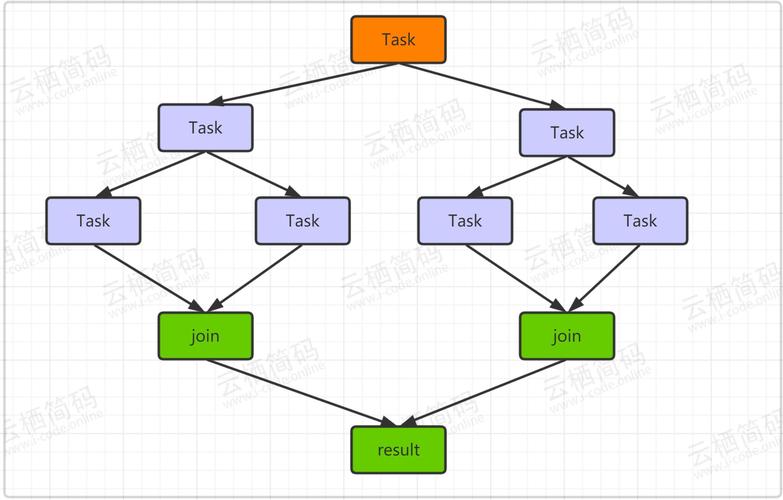
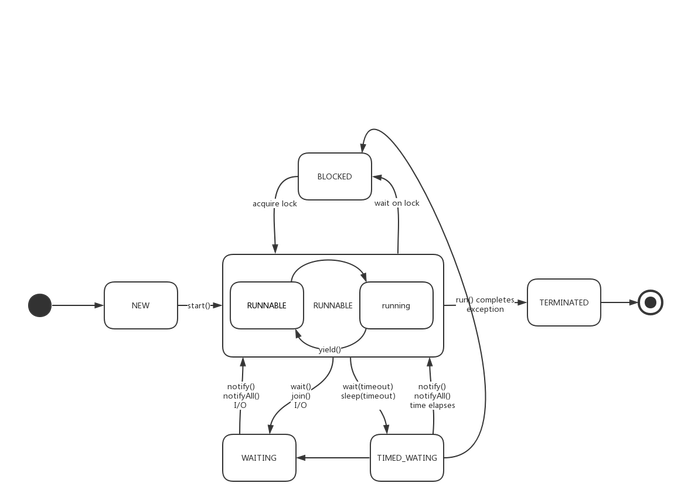
In simple terms, Thread.join() is a method that makes the current thread (the one calling join()) wait until the thread it's called on terminates.
Think of it like waiting for a friend to finish their meal before you leave the restaurant.
- You are the "current thread".
- Your friend is the "target thread".
- Calling
friend.join()means you will pause and wait right there until your friend has finished eating (theirrun()method has completed).
The Core Concept: Thread Synchronization
When you call threadA.join(), you are essentially telling the main thread (or any other thread), "Don't proceed until threadA is completely done." This is a form of thread synchronization. It ensures that the work done by the target thread is visible to the waiting thread.
Method Signatures and Overloads
The join() method comes in three flavors, which give you different levels of control:
join()
This is the simplest form. It waits indefinitely until the thread terminates.
Syntax:
public final void join() throws InterruptedException
Example:
class MyRunnable implements Runnable {
    @Override
    public void run() {
        for (int i = 1; i <= 5; i++) {
            System.out.println("MyRunnable count: " + i);
            try {
                Thread.sleep(500); // Simulate work
            } catch (InterruptedException e) {
                e.printStackTrace();
            }
        }
    }
}
public class SimpleJoinExample {
    public static void main(String[] args) {
        Thread myThread = new Thread(new MyRunnable());
        myThread.start();
        System.out.println("Main thread is about to wait for myThread.");
        try {
            myThread.join(); // Main thread pauses here until myThread finishes
        } catch (InterruptedException e) {
            e.printStackTrace();
        }
        System.out.println("Main thread has resumed after myThread finished.");
    }
}
Output:
Main thread is about to wait for myThread.
MyRunnable count: 1
MyRunnable count: 2
MyRunnable count: 3
MyRunnable count: 4
MyRunnable count: 5
Main thread has resumed after myThread finished.
Notice how "Main thread has resumed..." only appears after MyRunnable has counted to 5.
join(long millis)
This form waits for the thread to terminate, but only for a specified number of milliseconds. If the thread doesn't finish in that time, the join() method simply returns, and the waiting thread resumes its execution.
Syntax:
public final void join(long millis) throws InterruptedException
Example:
public class TimedJoinExample {
    public static void main(String[] args) {
        Thread myThread = new Thread(() -> {
            try {
                System.out.println("Task thread is starting a 3-second task...");
                Thread.sleep(3000); // Task takes 3 seconds
                System.out.println("Task thread finished.");
            } catch (InterruptedException e) {
                e.printStackTrace();
            }
        });
        myThread.start();
        System.out.println("Main thread is waiting for 2 seconds.");
        try {
            // Wait for a maximum of 2 seconds
            myThread.join(2000);
        } catch (InterruptedException e) {
            e.printStackTrace();
        }
        System.out.println("Main thread has resumed. The task may or may not be finished.");
    }
}
Output:
Main thread is waiting for 2 seconds.
Task thread is starting a 3-second task...
Main thread has resumed. The task may or may not be finished.
Task thread finished.
The main thread waited for 2 seconds, gave up, and continued, even though the task thread was still busy for one more second.
join(long millis, int nanos)
This is the most precise form. It waits for a specified number of milliseconds + nanoseconds.
Syntax:
public final void join(long millis, int nanos) throws InterruptedException
This is useful for very high-precision timing, but in practice, join(long millis) is used far more often.
Handling InterruptedException
The join() method throws an InterruptedException. This is a crucial part of Java's cooperative thread cancellation mechanism.
- When does it happen? If the thread that is waiting (the one that called
join()) is interrupted by another thread, thejoin()call will throw this exception. - What should you do? You should catch the exception and decide how to handle it. Typically, you should re-set the thread's interrupted status by calling
Thread.currentThread().interrupt()if you are not exiting the method.
Example with Interruption:
public class InterruptedJoinExample {
    public static void main(String[] args) {
        Thread longRunningThread = new Thread(() -> {
            try {
                System.out.println("Long-running thread started.");
                Thread.sleep(5000); // Sleep for 5 seconds
                System.out.println("Long-running thread finished.");
            } catch (InterruptedException e) {
                System.out.println("Long-running thread was interrupted!");
                // Restore the interrupted status
                Thread.currentThread().interrupt();
            }
        });
        longRunningThread.start();
        // Let the main thread wait for 1 second
        try {
            Thread.sleep(1000);
        } catch (InterruptedException e) {
            e.printStackTrace();
        }
        System.out.println("Main thread is interrupting the long-running thread.");
        longRunningThread.interrupt(); // Interrupt the other thread
        try {
            // Now, join will be interrupted
            longRunningThread.join();
        } catch (InterruptedException e) {
            System.out.println("Main thread's join() was interrupted!");
            // Important: Restore the interrupted status for the main thread
            Thread.currentThread().interrupt();
        }
    }
}
Output:
Long-running thread started.
Main thread is interrupting the long-running thread.
Long-running thread was interrupted!
Main thread's join() was interrupted!
Common Use Cases
-
Parallel Processing / Aggregation: This is the most common use case. You start several worker threads to perform sub-tasks in parallel and then use
join()to wait for all of them to complete before proceeding to aggregate the results.public class ParallelSum { public static void main(String[] args) throws InterruptedException { int[] numbers = new int[1000000]; // ... populate array ... int mid = numbers.length / 2; Thread sumThread1 = new Thread(() -> { // Sum first half }); Thread sumThread2 = new Thread(() -> { // Sum second half }); sumThread1.start(); sumThread2.start(); // Wait for both threads to finish sumThread1.join(); sumThread2.join(); // Now you can safely get the results from both threads // and calculate the total sum. System.out.println("Total sum calculated."); } } -
Ensuring Order of Execution: Sometimes you need to ensure one thread completes before another starts.
join()is a simple way to enforce this sequence. -
Simplifying Unit Tests: When testing code that uses threads, you often need to wait for the thread's logic to complete before you can assert the results.
join()is a convenient way to do this.
join() vs. ExecutorService
While Thread.join() works perfectly fine, modern Java code often uses the java.util.concurrent package, specifically the ExecutorService. It provides a more powerful and flexible way to manage threads.
The equivalent of waiting for all tasks to finish with an ExecutorService is the awaitTermination() method.
ExecutorService Example:
import java.util.concurrent.ExecutorService;
import java.util.concurrent.Executors;
import java.util.concurrent.TimeUnit;
public class ExecutorServiceExample {
    public static void main(String[] args) throws InterruptedException {
        ExecutorService executor = Executors.newFixedThreadPool(2);
        System.out.println("Submitting tasks...");
        executor.submit(() -> {
            System.out.println("Task 1 running...");
            try { Thread.sleep(2000); } catch (InterruptedException e) {}
            System.out.println("Task 1 done.");
        });
        executor.submit(() -> {
            System.out.println("Task 2 running...");
            try { Thread.sleep(1000); } catch (InterruptedException e) {}
            System.out.println("Task 2 done.");
        });
        System.out.println("Tasks submitted. Shutting down executor...");
        executor.shutdown(); // Disable new tasks from being submitted
        // Wait for a maximum of 5 seconds for all tasks to finish
        if (!executor.awaitTermination(5, TimeUnit.SECONDS)) {
            System.out.println("Tasks did not finish in time. Forcing shutdown.");
            executor.shutdownNow(); // Cancel currently executing tasks
        }
        System.out.println("All tasks are done. Main thread can proceed.");
    }
}
Why prefer ExecutorService?
- Thread Reuse: It uses a pool of threads, avoiding the overhead of creating a new thread for every task.
- Lifecycle Management: It provides clean methods for starting (
submit) and stopping (shutdown,shutdownNow). - Rich API: Offers features like
Futurefor getting results, scheduling, and more complex concurrency control.
Summary
| Feature | Thread.join() |
ExecutorService.awaitTermination() |
|---|---|---|
| Purpose | Wait for a specific thread to finish. | Wait for all tasks in the executor to finish. |
| Granularity | Fine-grained (per thread). | Coarse-grained (per executor). |
| Modern Approach | Considered a lower-level, legacy approach. | The standard, modern, and recommended approach. |
| Use Case | Simple scripts, legacy code, or when you need to wait for a single, identifiable thread. | Almost all new applications involving concurrent tasks. |