Of course! Using FiddlerCore with Python is a powerful combination for network diagnostics, security testing, and API development. FiddlerCore is the .NET library that powers the Fiddler web debugging tool, allowing you to embed its HTTP/HTTPS debugging capabilities directly into your own applications.
Here's a comprehensive guide on how to get started, from setup to practical examples.
What is FiddlerCore?
FiddlerCore is a .NET Class Library that provides:
- HTTP/HTTPS Traffic Capture: Intercept all HTTP/HTTPS traffic from any application on the machine.
- Request/Response Modification: Inspect and modify requests and responses on the fly.
- Session Handling: Access detailed information about each network session (URL, headers, body, status code, etc.).
- HTTPS Decryption: Act as a "man-in-the-middle" to decrypt and inspect HTTPS traffic (requires installing a root certificate).
Prerequisites
- Python: A recent version of Python (3.7+ is recommended).
- .NET Runtime: FiddlerCore is a .NET library. You need a compatible .NET runtime installed on your machine.
- Windows: The .NET Desktop Runtime is usually pre-installed or easily available via the Visual Studio Installer.
- macOS / Linux: You can install the .NET SDK or Runtime from the official .NET website. FiddlerCore is primarily designed for Windows, but it can run on macOS and Linux with .NET.
- FiddlerCore DLL: You need the
FiddlerCore4.dllfile.
Setup and Installation
The most common way to use FiddlerCore with Python is through a Python.NET bridge, which allows Python to call .NET libraries directly.
Step 1: Get FiddlerCore DLL
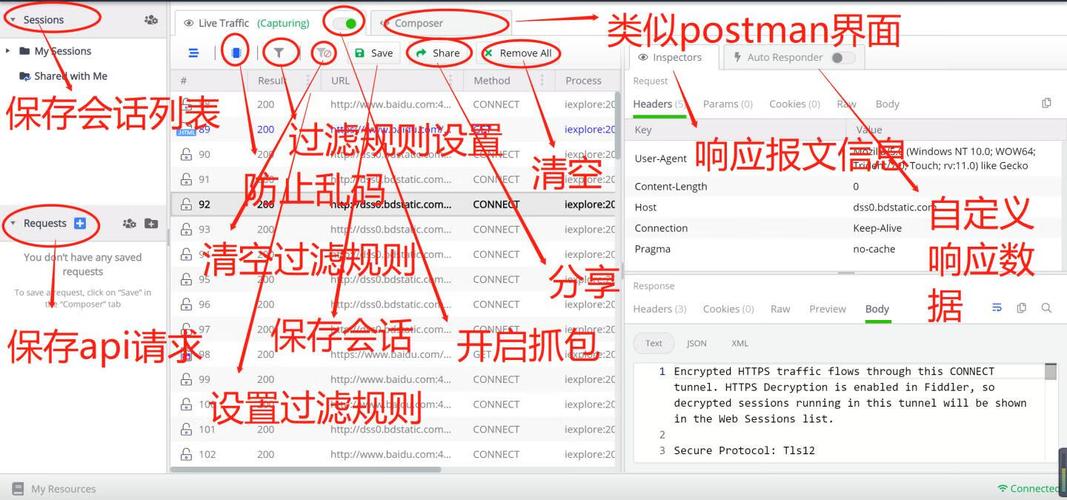
The easiest way is to download the Fiddler for Windows installer. During installation, it will place the FiddlerCore4.dll in a standard location, typically:
C:\Program Files (x86)\Fiddler4
Alternatively, you can find the DLL in the Fiddler repository on GitHub.
Step 2: Install Python.NET
This library is the bridge between Python and the .NET Common Language Runtime (CLR).
pip install pythonnet
Step 3: Configure Your Python Environment
Your Python script needs to know where to find the FiddlerCore4.dll. The best way is to add the DLL's directory to the system's PATH within your script.
import clr
import os
# Add the directory containing FiddlerCore4.dll to the .NET assembly search path
# Adjust this path to where you have the DLL installed
fiddler_core_path = r"C:\Program Files (x86)\Fiddler4"
if fiddler_core_path not in os.environ["PATH"]:
    os.environ["PATH"] += ";" + fiddler_core_path
# Now, load the FiddlerCore assembly
clr.AddReference("FiddlerCore4")
from Fiddler import *
print("FiddlerCore loaded successfully!")
Basic Usage: Capturing Traffic
Let's create a simple script that starts FiddlerCore, captures some traffic, and prints the URLs of the sessions.
import clr
import os
import time
# --- Setup (from Step 3) ---
fiddler_core_path = r"C:\Program Files (x86)\Fiddler4"
if fiddler_core_path not in os.environ["PATH"]:
    os.environ["PATH"] += ";" + fiddler_core_path
clr.AddReference("FiddlerCore4")
from Fiddler import *
# --- Main Logic ---
# Define a callback function for when a new session is captured
def OnBeforeSession(oSession: Session):
    """
    This function is called for every HTTP/HTTPS request before it's sent.
    """
    print(f"[REQUEST] {oSession.hostname}{oSession.PathAndQuery}")
def OnAfterSession(oSession: Session):
    """
    This function is called for every HTTP/HTTPS response after it's received.
    """
    print(f"[RESPONSE] {oSession.hostname}{oSession.PathAndQuery} -> {oSession.responseCode}")
# Configure FiddlerCore to not show its own UI
FiddlerApplication.Startup(8888, FiddlerCoreFlags.DecryptSSL)
# Register our callbacks
FiddlerApplication.AfterSession += OnAfterSession
FiddlerApplication.BeforeRequest += OnBeforeSession
print("FiddlerCore is running. Press Enter to stop and see captured sessions...")
print("Try opening a web browser or making a curl request.")
# Wait for user input
input()
# Shutdown FiddlerCore
FiddlerApplication.Shutdown()
print("FiddlerCore has been shut down.")
To run this:
- Save the code as
capture_traffic.py. - Run it from your terminal:
python capture_traffic.py. - The script will wait. While it's running, open your web browser, go to a few websites (like
google.com,wikipedia.org), or usecurl:curl https://httpbin.org/get - You will see the URLs printed in your Python console in real-time.
- Press Enter in the terminal to stop the script.
Advanced Features
A. Modifying Requests and Responses
You can inspect and change the content of requests and responses. This is extremely useful for testing API endpoints.
Let's modify a request to add a custom header and a response to change the HTML title.
# (Assuming the same setup as before)
def OnBeforeSession_Modify(oSession: Session):
    # Example 1: Add a custom header to all outgoing requests
    if "User-Agent" not in oSession.RequestHeaders:
        oSession.RequestHeaders.Add("User-Agent", "My-Python-Fiddler-Script/1.0")
    # Example 2: Block a specific request
    if "httpbin.org/deny" in oSession.fullUrl:
        oSession["ui-color"] = "red" # Mark it red in the UI
        oSession.oRequest["x-blocked-by"] = "FiddlerCore" # Add a custom header
        oSession.bypassGateway = True # Don't send the request at all
        print(f"BLOCKED request to: {oSession.fullUrl}")
def OnAfterSession_Modify(oSession: Session):
    # Example 3: Modify a response
    if "httpbin.org/html" in oSession.fullUrl:
        # The response body is a byte array. We need to decode it, modify, and re-encode.
        body_bytes = oSession.GetResponseBodyAsString()
        if "<title>" in body_bytes:
            # Replace the title
            modified_body = body_bytes.replace("<title>HTTPbin</title>", "<title>MODIFIED BY FIDDLERCORE!</title>")
            oSession.utilSetResponseBody(modified_body)
            print(f"MODIFIED response from: {oSession.fullUrl}")
# --- Main Logic ---
FiddlerApplication.Startup(8888, FiddlerCoreFlags.DecryptSSL)
FiddlerApplication.BeforeRequest += OnBeforeSession_Modify
FiddlerApplication.AfterSession += OnAfterSession_Modify
print("FiddlerCore is running. Modifying traffic...")
print("Try visiting http://httpbin.org/html and http://httpbin.org/deny")
input()
FiddlerApplication.Shutdown()
B. Handling HTTPS Traffic (Decryption)
To decrypt HTTPS traffic, FiddlerCore must act as a trusted root Certificate Authority. This involves generating and installing a FiddlerRoot certificate.
The script can automate this:
# (Assuming the same setup as before)
# --- Main Logic ---
# Check if the certificate is already installed
if not FiddlerApplication.GetIsCertificateInstalled():
    print("FiddlerRoot certificate is not installed. Installing...")
    # This will prompt the user for administrator privileges to install the root certificate.
    FiddlerApplication.InstallCertificate()
    print("Certificate installed.")
else:
    print("FiddlerRoot certificate is already installed.")
# Now, start FiddlerCore with the flag to decrypt traffic
FiddlerApplication.Startup(8888, FiddlerCoreFlags.DecryptSSL)
# Register callbacks as before...
def OnBeforeSession_Decrypt(oSession: Session):
    # Now you can see the decrypted HTTPS traffic
    print(f"[HTTPS] {oSession.hostname}{oSession.PathAndQuery}")
FiddlerApplication.BeforeRequest += OnBeforeSession_Decrypt
print("FiddlerCore is running with HTTPS decryption enabled.")
print("Try visiting any HTTPS website (e.g., https://www.google.com).")
input()
FiddlerApplication.Shutdown()
Important Considerations
- Administrator Privileges: On Windows, capturing traffic on port 80/443 requires running the Python script as an Administrator.
- Performance Impact: Intercepting and processing all traffic can have a performance impact on both your script and the system.
- Error Handling: The
pythonnetbridge can sometimes throw .NET exceptions, which may look different from Python exceptions. Wrap your code intry...except Exception as e:to catch them. - State Management: Be mindful of state. If you modify a session, it affects the traffic for that specific request/response pair. The
oSessionobject is your primary handle to manipulate traffic. - UI vs. Headless: FiddlerCore can run "headless" (without the Fiddler UI), which is perfect for automation. The
FiddlerApplication.Shutdown()method is crucial for releasing the ports and resources.
Alternatives
While FiddlerCore is powerful, consider these pure Python alternatives for simpler use cases:
mitmproxy: A fantastic, interactive man-in-the-proxy for HTTP/HTTPS. It has its own Python API and is often easier to set up for pure Python projects. It's the go-to choice for many developers.proxy.py: A lightweight, highly extensible HTTP proxy library written in pure Python. Great for building custom proxies.pcap/scapy: For lower-level network packet capture and analysis.
Summary
| Feature | How to do it with FiddlerCore |
|---|---|
| Start/Stop | FiddlerApplication.Startup(...), FiddlerApplication.Shutdown() |
| Capture Traffic | Register event handlers: FiddlerApplication.BeforeRequest, FiddlerApplication.AfterSession |
| Inspect Session | Access properties of the oSession object (e.g., oSession.url, oSession.RequestHeaders, oSession.GetResponseBodyAsString()) |
| Modify Traffic | Use methods like oSession.RequestHeaders.Add(), oSession.utilSetResponseBody() |
| Handle HTTPS | Use FiddlerCoreFlags.DecryptSSL and FiddlerApplication.InstallCertificate() |
| Run Headless | No UI is shown by default when you use the library. |