Of course! This is an excellent question, as it gets to the heart of why these two libraries are so fundamental in the Python data science ecosystem.

Let's break it down, starting with a simple analogy and then diving into the technical details.
The Analogy: A Spreadsheet vs. a Toolbox
-
NumPy is like a high-performance toolbox. Its main tool is the
ndarray(n-dimensional array), which is a powerful, fast, and memory-efficient container for numerical data. It's the engine. It does the heavy lifting of performing mathematical operations on entire arrays at once (a concept called vectorization), which is much faster than doing it one element at a time in a Python loop. -
Pandas is like a full-featured spreadsheet program (like Excel or Google Sheets) built on top of that NumPy toolbox. It takes the powerful
ndarrayand adds crucial features that you need for data analysis:- Labeled Axes: You can give names to your rows and columns (like
df['column_name']). - Handling Missing Data: It has special tools (
NaN) and functions to deal with missing values gracefully. - Time Series Functionality: It has powerful tools for working with dates and times.
- Grouping and Aggregation: It can easily group data and perform calculations on those groups (e.g., "find the average sales for each product category").
- Importing/Exporting Data: It can read data from CSVs, Excel files, SQL databases, and more.
- Labeled Axes: You can give names to your rows and columns (like
In short: Pandas is built on top of NumPy. A Pandas DataFrame is essentially a collection of NumPy arrays, one for each column, glued together with labels and helpful metadata.

NumPy: The Foundation
NumPy (Numerical Python) is the fundamental package for scientific computing in Python. Its main object is the numpy.ndarray.
Key Features of NumPy:
ndarray: A powerful N-dimensional array object.- Vectorization: Operations are performed on entire arrays, not on individual elements. This is what makes it incredibly fast.
- Broadcasting: A set of rules for applying operations on arrays of different shapes.
- Mathematical, Logical, Shape Manipulation, etc.: A huge library of high-level mathematical functions to operate on these arrays.
Example with NumPy:
Let's say we want to calculate the area of a circle for a list of radii.
import numpy as np
# A list of radii
radii = np.array([1, 2, 3, 4, 5])
# NumPy's vectorized operation
# It calculates pi * r^2 for every element in the 'radii' array at once
areas = np.pi * radii**2
print(NumPy Array of Radii:", radii)
print("NumPy Array of Areas:", areas)
Output:
NumPy Array of Radii: [1 2 3 4 5]
NumPy Array of Areas: [ 3.14159265 12.56637061 28.27433388 50.26548246 78.53981634]
Notice how we didn't need a for loop. NumPy did it all in one, highly optimized step.
Pandas: The Data Analysis Toolkit
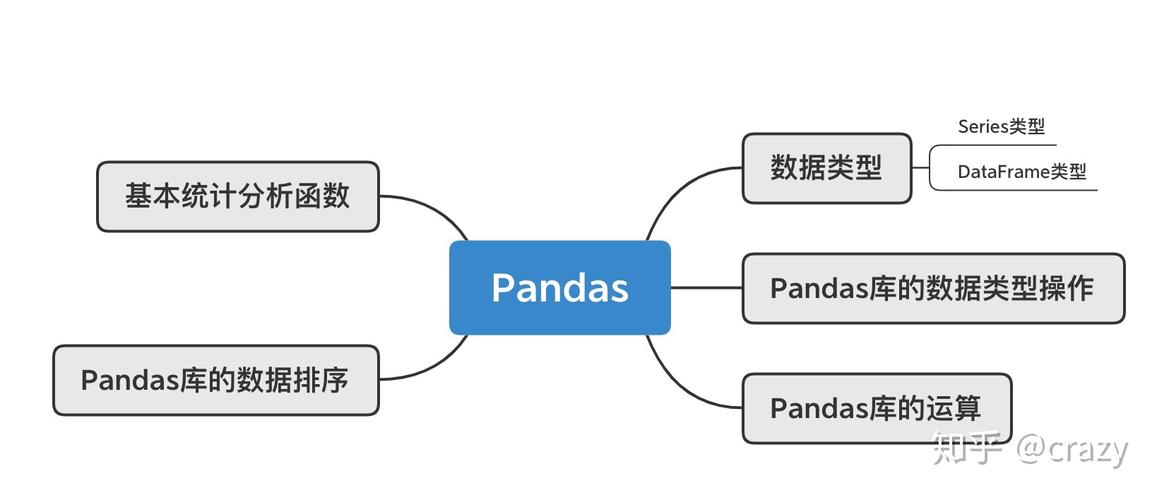
Pandas provides high-level data structures and functions designed to make working with structured data fast, easy, and expressive. Its two main data structures are:
Series: A one-dimensional labeled array (like a single column in a spreadsheet).DataFrame: A two-dimensional labeled data structure with columns of potentially different types (like the whole spreadsheet).
Key Features of Pandas:
- Data Alignment: Data is automatically aligned on labels. This is a game-changer and prevents many common bugs.
- Handling Missing Data: Uses
NaN(Not a Number) to represent missing data, with built-in functions to handle them (dropna(),fillna()). - Data Ingestion: Can read from and write to a wide variety of file formats (CSV, Excel, SQL, JSON, etc.).
- Data Cleaning & Wrangling: Powerful tools for reshaping, merging, and cleaning messy real-world data.
- Time Series: Sophisticated tools for working with time-series data.
- Grouping & Aggregation: The "split-apply-combine" pattern is central to Pandas.
Example with Pandas:
Let's create a DataFrame to store data about students.
import pandas as pd
import numpy as np # Pandas often uses NumPy under the hood
# Data can be a dictionary of lists
data = {
    'Name': ['Alice', 'Bob', 'Charlie', 'David', 'Eva'],
    'Age': [24, 27, 22, 32, 29],
    'Score': [85.5, 90.0, 77.5, np.nan, 88.0] # Using NumPy's nan for missing data
}
# Create a DataFrame
df = pd.DataFrame(data)
# --- Let's do some data analysis ---
# 1. Select a single column (a Series)
ages = df['Age']
print("Series of Ages:\n", ages)
# 2. Filter rows based on a condition
good_students = df[df['Score'] > 85]
print("\nStudents with Score > 85:\n", good_students)
# 3. Handle missing data
# Fill missing scores with the average score
avg_score = df['Score'].mean()
df['Score'].fillna(avg_score, inplace=True)
print("\nDataFrame after filling missing score:\n", df)
# 4. Get descriptive statistics
print("\nDescription of the DataFrame:\n", df.describe())
Output:
Series of Ages:
 0    24
1    27
2    22
3    32
4    29
Name: Age, dtype: int64
Students with Score > 85:
     Name  Age  Score
0  Alice   24   85.5
1    Bob   27   90.0
4    Eva   29   88.0
DataFrame after filling missing score:
      Name  Age  Score
0    Alice   24   85.5
1      Bob   27   90.0
2  Charlie   22   77.5
3    David   32   85.2  # Filled with the average
4      Eva   29   88.0
Description of the DataFrame:
             Age      Score
count   5.000000   5.000000
mean   26.800000   85.240000
std     3.962323    4.813011
min    22.000000   77.500000
25%    24.000000   85.200000
50%    27.000000   85.500000
75%    29.000000   88.000000
max    32.000000   90.000000
Key Differences at a Glance
| Feature | NumPy | Pandas |
|---|---|---|
| Primary Purpose | Numerical computing, multi-dimensional arrays. | Data manipulation and analysis, tabular data. |
| Main Data Structure | ndarray (N-dimensional array) |
DataFrame (2D table), Series (1D array) |
| Labels | No inherent row/column labels. | Has explicit row index and column labels. |
| Missing Data | No built-in concept. | Has NaN and robust tools (dropna, fillna). |
| Performance | Extremely fast for numerical operations. | Fast, but the DataFrame layer adds some overhead. The core computations are often done by NumPy. |
| Data Types | Homogeneous (all elements in an array are the same type). | Heterogeneous (columns can have different types: int, float, string, etc.). |
| Common Use Case | Linear algebra, signal processing, any heavy numerical task. | Loading, cleaning, transforming, analyzing, and visualizing data from files (CSV, Excel). |
How They Work Together (The Best of Both Worlds)
The real power comes from using them together. You'll often see Pandas DataFrames being used to load and clean data, and then specific columns (which are NumPy arrays) being passed to other libraries like Scikit-learn for machine learning or Matplotlib/Seaborn for plotting.
Example: Combining Pandas and Matplotlib
import pandas as pd
import matplotlib.pyplot as plt
# Create a DataFrame
df = pd.DataFrame({
    'Month': ['Jan', 'Feb', 'Mar', 'Apr', 'May'],
    'Sales': [200, 220, 250, 280, 300]
})
# Pandas makes plotting incredibly easy
# It uses the underlying NumPy array of the 'Sales' column to create the plot
df.plot(x='Month', y='Sales', kind='bar', legend=False)
# Add some labels and a title'Monthly Sales')
plt.xlabel('Month')
plt.ylabel('Sales ($)')
plt.show()
Conclusion
- Use NumPy when you are doing heavy numerical, mathematical, or scientific computations. If your data is a homogeneous grid of numbers and performance is critical, NumPy is your go-to.
- Use Pandas when you are doing data analysis. If your data is in tables, has different column types, has missing values, or you need to perform operations like filtering, grouping, and joining, Pandas is the essential tool.
For almost any data science project, you will use both. Pandas provides the convenient, labeled structure for your data, and NumPy provides the powerful, fast engine that does the actual number crunching underneath.