Of course! This is an excellent question because these three technologies are deeply interconnected in the world of software development. They represent a powerful, full-stack ecosystem.
Let's break down each one and then see how they work together.
Java
What it is: Java is a general-purpose, class-based, object-oriented programming language designed to have as few implementation dependencies as possible. It's often called "write once, run anywhere" (WORA) because compiled Java code can run on all platforms that support Java without the need to recompile.
-
Key Features:
- Platform Independent: Code is compiled into bytecode, which runs on the Java Virtual Machine (JVM).
- Object-Oriented: Encourages modular, reusable, and maintainable code.
- Rich Ecosystem: Massive collection of libraries (via Maven/Gradle) for almost any task imaginable.
- Strongly Typed & Memory Management: Reduces bugs and prevents memory leaks with automatic garbage collection.
-
Relevance to Web & Android:
 (图片来源网络,侵删)
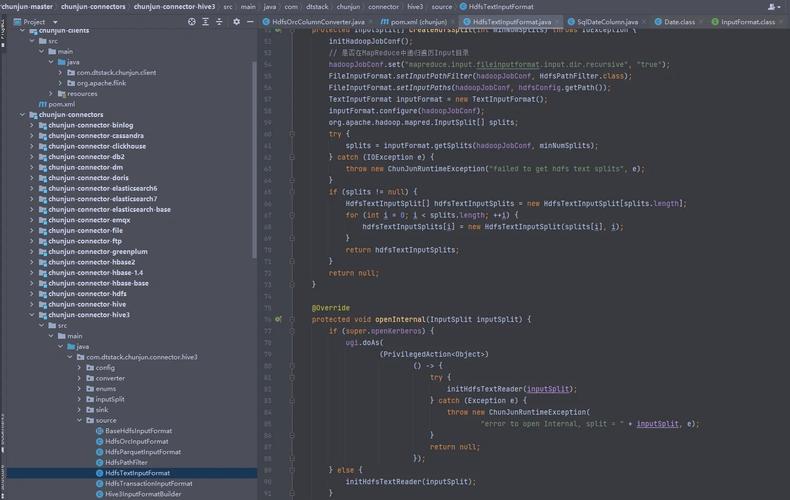
- Android: Java is one of the two official languages for Android app development (alongside Kotlin). The entire Android framework is built on Java, and understanding Java's fundamentals is crucial for any Android developer.
- Web: For a long time, Java was the primary language for building the "backend" or "server-side" of web applications. It powers some of the largest, most complex systems in the world.
Web (Backend with Java)
What it is: When we say "Java Web," we are almost always referring to Java Web Backend Development. This is the process of building the server-side logic, databases, and APIs that power a website or a mobile app.
-
Core Concept: A web server running Java code receives requests from a client (like a web browser or a mobile app), processes the request (e.g., fetching data from a database, performing calculations), and sends back a response (usually data in JSON or XML format).
-
Key Technologies & Frameworks:
- Servlets: The fundamental, low-level API for handling web requests in Java. Think of it as the engine of a car.
- JavaServer Pages (JSP): A technology for creating dynamic web pages by embedding Java code into HTML. It's older but still used in legacy systems.
- Spring Framework (especially Spring Boot): This is the king of modern Java web development. Spring Boot makes it incredibly easy to create standalone, production-grade Spring-based applications with minimal configuration. It's the de-facto standard for new Java web projects.
- Spring MVC: For building web applications (Model-View-Controller).
- Spring Data: For easily connecting to databases.
- Spring Security: For handling authentication and authorization.
- Other Frameworks: Jakarta EE (formerly Java EE), Play Framework, Quarkus.
-
What it Does:
 (图片来源网络,侵删)
- Exposes APIs (RESTful APIs): This is the most common pattern today. The Java backend provides a set of URLs (endpoints) that the front-end (web or mobile) can call to get or send data. For example,
GET /api/userswould return a list of all users. - Business Logic: Contains the core rules and processes of the application (e.g., calculating a price, validating user input).
- Database Interaction: Reads from and writes to a database (e.g., MySQL, PostgreSQL, MongoDB).
- Exposes APIs (RESTful APIs): This is the most common pattern today. The Java backend provides a set of URLs (endpoints) that the front-end (web or mobile) can call to get or send data. For example,
Android
What it is: Android is an open-source operating system based on the Linux kernel, designed primarily for touchscreen mobile devices like smartphones and tablets.
-
Key Features:
- Linux-based: Provides a robust and secure foundation.
- Rich UI Framework: Allows for the creation of complex and beautiful user interfaces.
- Multi-layered Architecture: Includes libraries for graphics, multimedia, and connectivity.
- App Ecosystem: Apps are distributed through the Google Play Store.
-
How it's Built:
- Official Languages: Java and Kotlin. Kotlin is now the recommended language by Google, but Java is still widely used and supported.
- Development Tools: Android Studio, the official Integrated Development Environment (IDE).
- UI Toolkit: XML for designing layouts and Jetpack Compose (a modern, declarative UI toolkit).
- SDK (Software Development Kit): Provides all the necessary tools, libraries, and APIs to build Android apps.
The Big Picture: How They Work Together
This is where the magic happens. A typical modern application follows a Client-Server Architecture.
- The Client (Android App): This is what the user sees and interacts with on their phone.
- The Server (Java Web Backend): This is the powerful, centralized brain that stores data and performs complex tasks.
Here's the workflow:
- User Action: A user opens your Android app and taps a button to see their list of messages.
- Client Request: The Android app (the client) makes a network request to your Java web backend. It might look something like this:
GET https://api.yourapp.com/messages?userId=123 - Server Processing:
- The request hits your Java web server (e.g., a Spring Boot application).
- The server's code authenticates the user (makes sure user
123is allowed to see these messages). - It connects to the database and runs a query to fetch all messages for that user.
- It packages the message data into a standard format like JSON.
- Server Response: The server sends the JSON data back over the internet to the Android app.
- Client Display: The Android app receives the JSON data, parses it, and dynamically displays the messages on the screen for the user.
Visual Summary:
+-----------------------+      1. Taps "Messages"      +--------------------------+
|                       | ---------------------------> |                          |
|   Android App         |                              |   Java Web Backend      |
|   (Client)            |                              |   (Server)               |
|   - Built with Java   |                              |   - Built with Spring    |
|   - Shows UI          | <--------------------------- |   - Runs Business Logic  |
|   - Makes API Calls   |      5. Displays Messages    |   - Connects to Database |
+-----------------------+                              +--------------------------+
A Note on Kotlin
It's impossible to talk about modern Android without mentioning Kotlin.
- What is Kotlin? A modern, concise, and safe programming language that is 100% interoperable with Java. It was made an official language for Android by Google in 2025.
- Why is it important?
- Concise: Less boilerplate code, making you more productive.
- Null-Safe: Helps prevent the infamous
NullPointerException, a common source of bugs in Java. - Modern Features: Supports coroutines for easy asynchronous programming (essential for network calls).
- The Ecosystem Today:
- New Android projects are almost always started in Kotlin.
- Java Web development is still predominantly Java, but Kotlin is gaining significant traction there as well, especially with frameworks like Ktor and Spring's excellent Kotlin support.
Conclusion
| Technology | Role | Key Tools/Languages |
|---|---|---|
| Java | The foundational programming language. | Core Java, OOP principles. |
| Java Web | The server-side logic and API for the application. | Spring Boot, Servlets, Jakarta EE, Databases (SQL/NoSQL). |
| Android | The client-side application for mobile devices. | Java, Kotlin, Android SDK, Android Studio. |
Together, Java (or Kotlin) for the Web backend and Java/Kotlin for the Android frontend form a complete, robust, and scalable solution for building modern mobile applications. The skills are highly transferable, and understanding this stack makes you a very versatile developer.