Of course. Handling CLOB (Character Large Object) data in Java with an Oracle database is a common but sometimes tricky task. A CLOB is designed to store large amounts of character data (up to 4 GB), making it ideal for storing things like XML documents, JSON, or large text files.
Here’s a comprehensive guide covering the key concepts, different methods to read and write, and best practices.
What is a CLOB?
- Purpose: To store large amounts of character data.
- Size: Can hold up to 4 GB of data.
- Character Set: The data is stored in the database's character set (e.g.,
AL32UTF8), which is crucial for correctly handling international characters (Unicode). - Storage: Unlike a
VARCHAR2, which is stored inline in the table block, aCLOBtypically stores a "locator" (a pointer) in the table, with the actual large data stored in a separate set of internal database pages. This is much more efficient for large data.
Key Java Classes and Interfaces
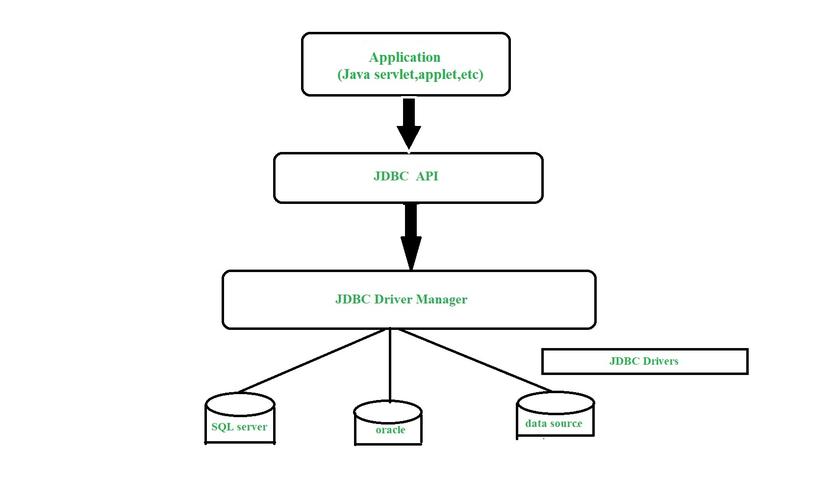
To interact with a CLOB in Java, you'll primarily use classes from the JDBC API and Oracle's specific extensions.
| Class/Interface | Purpose |
|---|---|
java.sql.Clob |
The standard JDBC interface representing a CLOB. Use this for portability. |
oracle.sql.CLOB |
Oracle's specific implementation of the CLOB interface. It provides additional, more powerful methods for direct interaction with the database. |
Connection.createClob() |
Standard JDBC method to create an empty Clob object on the client side. |
ResultSet.getClob() |
Retrieves a Clob object from a database column. |
PreparedStatement.setClob() |
Sets a Clob object as a parameter in a PreparedStatement. |
ResultSet.getString() / PreparedStatement.setString() |
(Important) You can often treat a CLOB column like a VARCHAR2 for smaller data. These methods will read/write the CLOB's content directly if it's small enough. |
Reading a CLOB from the Database
There are two main approaches to reading a CLOB: the standard JDBC way and the Oracle-specific way.
Method 1: The Standard JDBC Way (Portable)
This method is portable across different database systems but can be less efficient for very large CLOBs as it may require multiple round-trips to the database or loading the entire string into memory.
import java.sql.Connection;
import java.sql.DriverManager;
import java.sql.PreparedStatement;
import java.sql.ResultSet;
import java.sql.SQLException;
import java.sql.Clob;
import java.io.BufferedReader;
import java.io.IOException;
import java.io.StringReader;
public class ClobReaderStandardJdbc {
    public static void main(String[] args) {
        String url = "jdbc:oracle:thin:@//localhost:1521/XEPDB1";
        String user = "your_username";
        String password = "your_password";
        String sql = "SELECT id, document_content FROM documents WHERE id = ?";
        try (Connection conn = DriverManager.getConnection(url, user, password);
             PreparedStatement pstmt = conn.prepareStatement(sql)) {
            pstmt.setInt(1, 101); // The ID of the document to read
            ResultSet rs = pstmt.executeQuery();
            if (rs.next()) {
                int id = rs.getInt("id");
                Clob clob = rs.getClob("document_content");
                if (clob != null) {
                    // Option A: Get the entire content as a String (can cause OutOfMemoryError for huge CLOBs)
                    // String content = clob.getSubString(1, (int) clob.length());
                    // System.out.println("Content for ID " + id + ":\n" + content);
                    // Option B: Stream the content character by character (more memory-efficient)
                    System.out.println("Streaming content for ID " + id + ":");
                    try (BufferedReader reader = new BufferedReader(clob.getCharacterStream())) {
                        String line;
                        while ((line = reader.readLine()) != null) {
                            System.out.println(line);
                        }
                    }
                }
            }
        } catch (SQLException | IOException e) {
            e.printStackTrace();
        }
    }
}
Method 2: The Oracle-Specific Way (More Efficient and Flexible)
Using oracle.sql.CLOB gives you access to methods like getCharacterStream() which returns a Reader that is directly connected to the database. This is highly efficient as it streams the data without buffering the entire CLOB in memory.
import java.sql.Connection;
import java.sql.DriverManager;
import java.sql.PreparedStatement;
import java.sql.ResultSet;
import java.sql.SQLException;
import java.io.BufferedReader;
import java.io.IOException;
import java.io.Reader;
import oracle.sql.CLOB; // Import Oracle's CLOB class
public class ClobReaderOracleSpecific {
    public static void main(String[] args) {
        String url = "jdbc:oracle:thin:@//localhost:1521/XEPDB1";
        String user = "your_username";
        password = "your_password";
        String sql = "SELECT id, document_content FROM documents WHERE id = ?";
        try (Connection conn = DriverManager.getConnection(url, user, password);
             PreparedStatement pstmt = conn.prepareStatement(sql)) {
            pstmt.setInt(1, 101);
            ResultSet rs = pstmt.executeQuery();
            if (rs.next()) {
                int id = rs.getInt("id");
                // The result will be an oracle.sql.CLOB object
                CLOB oracleClob = (CLOB) rs.getClob("document_content");
                if (oracleClob != null) {
                    System.out.println("Streaming content for ID " + id + " (Oracle specific):");
                    // getCharacterStream() is very efficient for large CLOBs
                    try (Reader reader = oracleClob.getCharacterStream();
                         BufferedReader br = new BufferedReader(reader)) {
                        String line;
                        while ((line = br.readLine()) != null) {
                            System.out.println(line);
                        }
                    }
                }
            }
        } catch (SQLException | IOException e) {
            e.printStackTrace();
        }
    }
}
Writing to a CLOB in the Database
Writing a CLOB is more complex than reading because you often need to perform the operation in a transaction, and sometimes you need to write the data in chunks, especially for very large sources.
Method 1: The Simple Way (For Small to Medium Data)
If your data is not extremely large, you can often treat it like a VARCHAR2.
import java.sql.Connection;
import java.sql.DriverManager;
import java.sql.PreparedStatement;
import java.sql.SQLException;
public class ClobWriterSimple {
    public static void main(String[] args) {
        String url = "jdbc:oracle:thin:@//localhost:1521/XEPDB1";
        String user = "your_username";
        String password = "your_password";
        String sql = "INSERT INTO documents (id, document_content) VALUES (?, ?)";
        String largeText = "This is a very large piece of text that we want to store in a CLOB. " +
                           "It could be an XML document, a JSON payload, or a log file... " +
                           "and it goes on and on...";
        try (Connection conn = DriverManager.getConnection(url, user, password);
             PreparedStatement pstmt = conn.prepareStatement(sql)) {
            conn.setAutoCommit(false); // Recommended for DML operations
            pstmt.setInt(1, 102);
            // setString() can handle CLOBs for moderately sized data
            pstmt.setString(2, largeText);
            int rowsAffected = pstmt.executeUpdate();
            conn.commit();
            System.out.println(rowsAffected + " row inserted successfully.");
        } catch (SQLException e) {
            e.printStackTrace();
            // In a real app, you would rollback here
            // try { conn.rollback(); } catch (SQLException ex) { ex.printStackTrace(); }
        }
    }
}
Method 2: The Robust Way (For Very Large Data or Streaming)
For very large data (e.g., reading from a file), you must stream the data to the CLOB to avoid memory issues. The standard JDBC Clob object is not suitable for this. You must use Oracle's CLOB and its getCharacterOutputStream() method.
import java.io.BufferedReader;
import java.io.FileReader;
import java.io.IOException;
import java.io.OutputStream;
import java.io.OutputStreamWriter;
import java.io.Writer;
import java.sql.Connection;
import java.sql.DriverManager;
import java.sql.PreparedStatement;
import java.sql.SQLException;
import oracle.sql.CLOB;
public class ClobWriterLarge {
    public static void main(String[] args) {
        String url = "jdbc:oracle:thin:@//localhost:1521/XEPDB1";
        String user = "your_username";
        String password = "your_password";
        String filePath = "path/to/your/large_file.txt";
        int documentId = 103;
        String sql = "INSERT INTO documents (id, document_content) VALUES (?, EMPTY_CLOB())";
        try (Connection conn = DriverManager.getConnection(url, user, password);
             PreparedStatement pstmt = conn.prepareStatement(sql)) {
            conn.setAutoCommit(false);
            // Step 1: Insert a row with an empty CLOB
            pstmt.setInt(1, documentId);
            pstmt.executeUpdate();
            // Step 2: Select the empty CLOB for writing
            String selectSql = "SELECT document_content FROM documents WHERE id = ? FOR UPDATE";
            pstmt = conn.prepareStatement(selectSql);
            pstmt.setInt(1, documentId);
            ResultSet rs = pstmt.executeQuery();
            if (rs.next()) {
                CLOB oracleClob = (CLOB) rs.getClob("document_content");
                if (oracleClob != null) {
                    // Step 3: Get an output stream to write to the CLOB
                    try (OutputStream out = oracleClob.getAsciiOutputStream(); // For ASCII data
                         Writer writer = new OutputStreamWriter(out, "UTF-8"); // Or getCharacterOutputStream() for direct chars
                         BufferedReader br = new BufferedReader(new FileReader(filePath))) {
                        String line;
                        while ((line = br.readLine()) != null) {
                            writer.write(line + System.lineSeparator());
                        }
                        writer.flush();
                    }
                }
            }
            conn.commit();
            System.out.println("Large CLOB written successfully for ID " + documentId);
        } catch (SQLException | IOException e) {
            e.printStackTrace();
            // conn.rollback(); // Important in a real application
        }
    }
}
Note on getAsciiOutputStream() vs getCharacterOutputStream():
getAsciiOutputStream(): Writes ASCII characters. More performant but only for 7-bit ASCII data. If you have non-ASCII characters (like é, ü, 漢), you must usegetCharacterOutputStream().getCharacterOutputStream(): Writes Unicode characters. Use this for general-purpose text.
Best Practices and Common Pitfalls
- Transactions are Crucial: Always wrap
CLOBwrite operations in a transaction (conn.setAutoCommit(false)followed byconn.commit()orconn.rollback()). This ensures data integrity. - Memory Management: For large
CLOBs(100s of MBs or GBs), never useclob.getSubString()orrs.getString()on a CLOB column. This will attempt to load the entireCLOBinto the JVM's heap, causing anOutOfMemoryError. Always use streaming methods likegetCharacterStream(). - Oracle vs. Standard JDBC: For maximum performance and flexibility when working with Oracle, use
oracle.sql.CLOB. If you need your code to be database-agnostic, stick tojava.sql.Clob, but be aware of its limitations. - Connection Timeouts: If you are streaming a very large
CLOBover a slow network, the database connection might time out. Adjust your session or JDBC timeout settings if necessary. - Character Sets: Ensure your Java application's character encoding (usually UTF-8) matches the database's
NLS_CHARACTERSET(e.g.,AL32UTF8). This prevents data corruption, especially with special characters.