Of course! Let's break down IOException in Java, from the basics to practical examples.
What is IOException?
IOException (Input/Output Exception) is a checked exception in Java that signals that an I/O operation has failed or was interrupted. This can happen for a wide variety of reasons, such as:
- Trying to read a file that doesn't exist.
- The disk is full when trying to write to a file.
- A network connection is lost while reading from a socket.
- You don't have the necessary permissions to access a file or network resource.
Because it's a checked exception, the Java compiler forces you to handle it either by using a try-catch block or by declaring it in your method's signature with the throws keyword.
The Hierarchy of IOException
It's helpful to understand where IOException fits in the Java Exception hierarchy.
java.lang.Object
    java.lang.Throwable
        java.lang.Exception
            java.io.IOException  <-- This is the main class for all I/O related errors
                java.io.FileNotFoundException
                java.io.InterruptedIOException
                java.io.SocketException
                java.io.EOFException
... and many othersException: The superclass of all checked exceptions.IOException: The superclass for all exceptions thrown by failed or interrupted I/O operations. This is a general-purpose exception for I/O problems.- Subclasses of
IOException: These are more specific. For example,FileNotFoundExceptionis thrown when you try to open a file that doesn't exist. It's good practice to catch more specific exceptions when you can.
Why is it a "Checked" Exception?
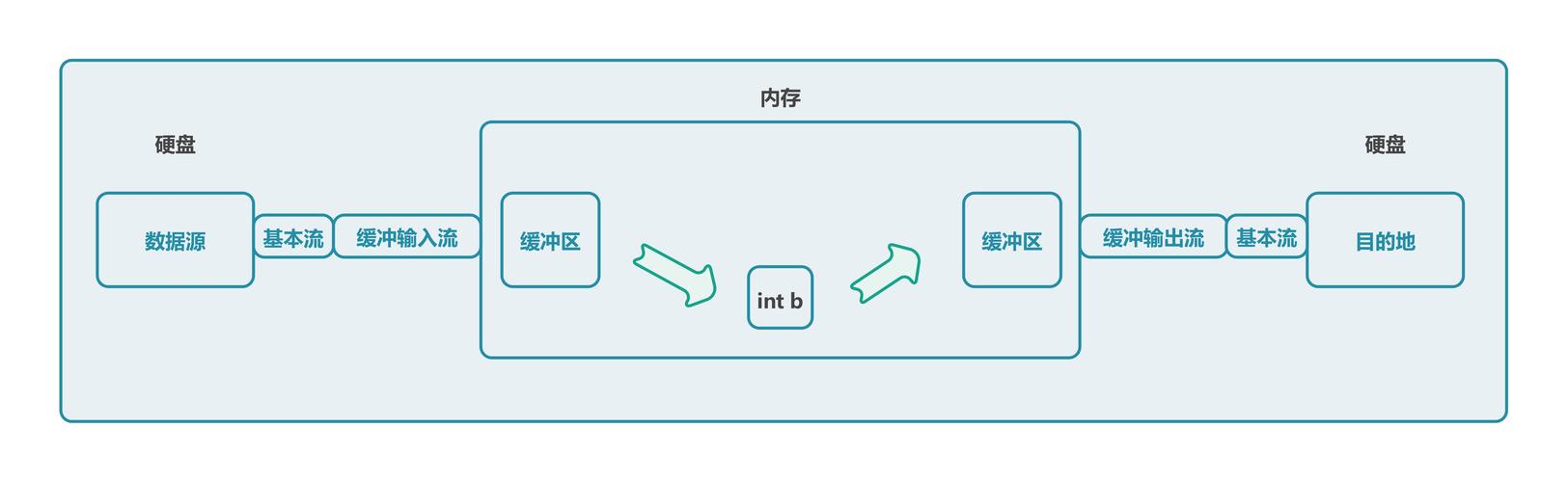
The Java designers decided that I/O operations are unreliable (files can be deleted, networks can fail). Therefore, they want to ensure that the programmer is always aware that a method call might fail.
This is enforced by the compiler:
- If you call a method that declares
throws IOException, you must handle it. - If you don't, your code will fail to compile.
This forces you to write more robust code by thinking about what to do if the I/O operation fails.
How to Handle IOException (Code Examples)
There are two primary ways to handle IOException.
Method 1: Using try-catch
This is the most common approach. You "try" to execute the code that might throw the exception and "catch" it if it occurs, allowing you to handle the error gracefully.
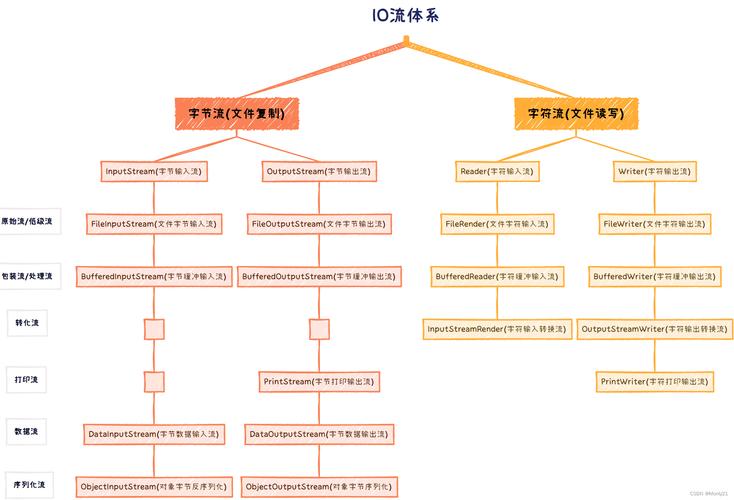
Example: Reading from a file that might not exist.
import java.io.BufferedReader;
import java.io.FileReader;
import java.io.IOException; // Don't forget to import!
public class ReadFileExample {
    public static void main(String[] args) {
        String filePath = "my_file.txt"; // Assume this file might not exist
        // The try block contains code that might throw an IOException
        try {
            FileReader fileReader = new FileReader(filePath);
            BufferedReader bufferedReader = new BufferedReader(fileReader);
            String line;
            System.out.println("Reading file content:");
            while ((line = bufferedReader.readLine()) != null) {
                System.out.println(line);
            }
            // It's crucial to close resources to avoid leaks
            bufferedReader.close();
            fileReader.close();
        }
        // The catch block handles the IOException
        catch (IOException e) {
            // 'e' is an object of the IOException class
            System.err.println("An error occurred while reading the file.");
            e.printStackTrace(); // Prints the full error trace to the console
        }
        System.out.println("\nProgram continues to run after the error is handled.");
    }
}
Explanation:
- The code inside the
tryblock is executed. - If
new FileReader(filePath)fails because the file doesn't exist, it throws aFileNotFoundException(which is a subclass ofIOException). - The
catch (IOException e)block "catches" this exception. - Instead of crashing the program, the code inside the
catchblock is executed. We print a user-friendly error message ande.printStackTrace()shows the developer the technical details of the error. - The program then continues normally.
Method 2: Using throws in the Method Signature
Sometimes, you don't want to handle the exception in your current method. Instead, you can "pass the buck" to the method that called yours. This is done with the throws keyword.
Example: A method that reads a file and lets the caller handle the error.
import java.io.BufferedReader;
import java.io.FileReader;
import java.io.IOException;
public class ThrowsExample {
    // This method declares that it might throw an IOException
    public static void readFileAndPrint(String filePath) throws IOException {
        System.out.println("Attempting to read: " + filePath);
        FileReader fileReader = new FileReader(filePath);
        BufferedReader bufferedReader = new BufferedReader(fileReader);
        String line;
        while ((line = bufferedReader.readLine()) != null) {
            System.out.println(line);
        }
        bufferedReader.close();
        fileReader.close();
    }
    public static void main(String[] args) {
        String filePath = "another_file.txt";
        // Since readFileAndPrint() throws IOException, WE must handle it here
        try {
            readFileAndPrint(filePath);
        } catch (IOException e) {
            System.err.println("Failed to read the file in the main method.");
            e.printStackTrace();
        }
        System.out.println("\nProgram continues to run.");
    }
}
Explanation:
- The
readFileAndPrintmethod does not use atry-catchblock. Instead, its signature hasthrows IOException. - This is a promise to the compiler: "This method might throw an
IOException, and I am not going to handle it here. The caller is responsible for handling it." - Therefore, the
mainmethod, which callsreadFileAndPrint(), must handle the exception usingtry-catch.
Best Practices
-
Be Specific: If you can, catch a more specific exception instead of the general
IOException. This allows for more precise error handling.// Good: Catches a specific case try { // ... } catch (FileNotFoundException e) { System.err.println("The file was not found. Please check the path."); } catch (IOException e) { System.err.println("A general I/O error occurred."); } // Less Good: Catches all I/O errors the same way try { // ... } catch (IOException e) { // This handles "file not found" the same way as "disk full" } -
Use
try-with-resources(Java 7+): This is the modern, recommended way to handle resources like files and network connections. It automatically closes the resource for you, even if an exception occurs, preventing resource leaks.import java.io.BufferedReader; import java.io.FileReader; import java.io.IOException; public class TryWithResourcesExample { public static void main(String[] args) { String filePath = "my_file.txt"; // The try-with-resources statement try (BufferedReader reader = new BufferedReader(new FileReader(filePath))) { String line; while ((line = reader.readLine()) != null) { System.out.println(line); } // No need to call reader.close() here! It's done automatically. } catch (IOException e) { System.err.println("An error occurred."); e.printStackTrace(); } } }This is cleaner, safer, and less error-prone than manually closing resources in a
finallyblock.
Summary
| Feature | Description |
|---|---|
| What is it? | A checked exception for any failure in Input/Output operations. |
| Why? | To force programmers to handle potential errors like missing files or network issues. |
| How to Handle? | Use a try-catch block or declare throws IOException in your method signature. |
| Best Practice | Use try-with-resources for automatic resource cleanup and catch specific exceptions when possible. |