
Of course! Let's dive deep into java.io.IOException. It's one of the most fundamental and commonly encountered exceptions in Java, especially when dealing with input/output operations.
What is IOException?
java.io.IOException is a checked exception in Java that signals that an I/O operation has failed or been interrupted. It's part of the java.io package, which contains classes for system input and output through data streams, serialization, and the file system.
Key Characteristics:
- Checked Exception: This is the most important thing to know. The Java compiler forces you to handle or declare
IOException. If a method can throw it (e.g.,FileInputStream.read()), you must either:- Handle it with a
try-catchblock. - Declare it in your method's signature using the
throwskeyword, passing the responsibility to the caller.
- Handle it with a
- Root of the I/O Exception Hierarchy: It's the parent class for many other, more specific I/O-related exceptions. This is why you often see it caught in a broad
catchblock.
The Hierarchy of IOException
Understanding the hierarchy is crucial for writing robust and specific error-handling code.
java.lang.Object
  java.lang.Throwable
    java.lang.Exception
      java.io.IOException  <-- The main class we're discussing
        |
        +-- FileNotFoundException
        +-- EOFException (End Of File)
        +-- InterruptedIOException
        +-- SocketException (from java.net)
        +-- MalformedURLException (from java.net)
        +-- ...and many others
This hierarchy allows you to:
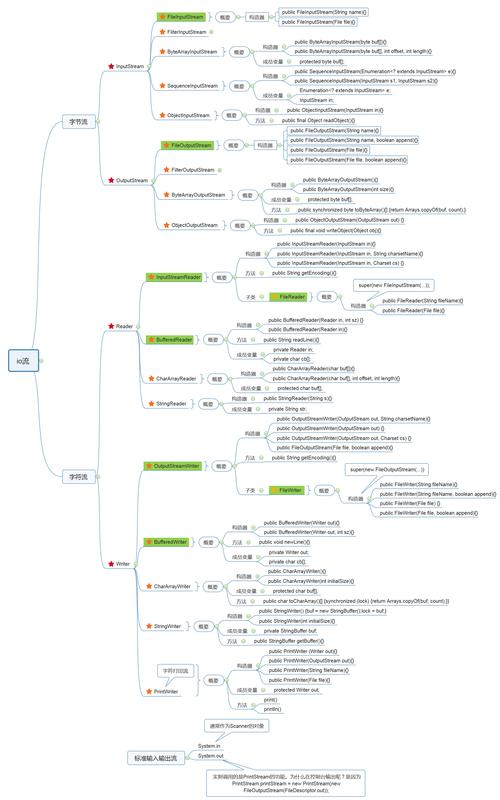
- Catch a general
IOExceptionto handle any kind of I/O problem broadly. - Catch a more specific exception (like
FileNotFoundException) to handle a particular case differently.
Common Causes and Examples
IOException can be thrown in many scenarios. Let's look at the most common ones with code examples.
Example 1: FileNotFoundException (A specific IOException)
This occurs when you try to read from a file that doesn't exist.
import java.io.FileInputStream;
import java.io.FileNotFoundException;
import java.io.IOException;
public class ReadFileExample {
    public static void main(String[] args) {
        String filePath = "non_existent_file.txt";
        // We must handle the checked exception.
        try {
            // This line will throw FileNotFoundException
            FileInputStream fis = new FileInputStream(filePath);
            System.out.println("File opened successfully!");
            fis.close();
        } catch (FileNotFoundException e) {
            // This catch block is specific to files not being found.
            System.err.println("Error: The file was not found at " + filePath);
            // e.printStackTrace(); // Uncomment to see the full stack trace
        } catch (IOException e) {
            // This is a more general catch for other I/O issues (e.g., permission denied).
            System.err.println("An I/O error occurred: " + e.getMessage());
        }
    }
}
Example 2: Reading from a Network Stream
When reading data from a network connection, the connection can be lost, or the server might stop sending data.
import java.io.BufferedReader;
import java.io.IOException;
import java.io.InputStreamReader;
import java.net.URL;
public class ReadUrlExample {
    public static void main(String[] args) {
        String urlString = "https://example.com";
        try {
            URL url = new URL(urlString);
            // BufferedReader can throw IOException
            BufferedReader reader = new BufferedReader(new InputStreamReader(url.openStream()));
            String line;
            while ((line = reader.readLine()) != null) {
                System.out.println(line);
            }
            reader.close(); // Closing the reader can also throw IOException
        } catch (IOException e) {
            System.err.println("Failed to read from URL: " + e.getMessage());
            // This could be due to no internet connection, DNS failure, server error, etc.
        }
    }
}
Example 3: Writing to a File (Permission Denied)
You might not have the necessary permissions to write to a certain location.
import java.io.FileWriter;
import java.io.IOException;
public class WriteFileExample {
    public static void main(String[] args) {
        // A path where you likely don't have write permissions (e.g., a system directory)
        String filePath = "/root/protected_file.txt";
        try (FileWriter writer = new FileWriter(filePath)) {
            // The try-with-resources statement ensures the writer is closed automatically.
            writer.write("Hello, World!");
            System.out.println("File written successfully.");
        } catch (IOException e) {
            // This IOException will be thrown if you don't have permission.
            System.err.println("Could not write to file. Check permissions.");
            System.err.println("Error details: " + e.getMessage());
        }
    }
}
Best Practices for Handling IOException
Use try-with-resources (Java 7+)
This is the modern and recommended way to handle resources like files, streams, and connections. It automatically closes the resource for you, even if an exception occurs, preventing resource leaks.
Before (manual close):
FileInputStream fis = null;
try {
    fis = new FileInputStream("file.txt");
    // ... read from fis
} catch (IOException e) {
    // handle exception
} finally {
    // IMPORTANT: Always close in a finally block
    if (fis != null) {
        try {
            fis.close();
        } catch (IOException e) {
            // Handle the exception during close
        }
    }
}
After (try-with-resources):
// The resource is declared in the try() parenthesis.
// It will be closed automatically at the end of the try block.
try (FileInputStream fis = new FileInputStream("file.txt")) {
    // ... read from fis
    // No need for a finally block to close fis!
} catch (IOException e) {
    // Handle the exception
    System.err.println("An I/O error occurred: " + e.getMessage());
}
This is cleaner, safer, and less error-prone.
Be Specific in Your catch Blocks
Catch the most specific exception you can. This allows you to handle different problems in different, more appropriate ways.
import java.io.*;
public class SpecificCatchExample {
    public void processData(String path) {
        try {
            // This can throw FileNotFoundException (more specific)
            BufferedReader reader = new BufferedReader(new FileReader(path));
            // ... process file
            reader.close();
        } catch (FileNotFoundException e) {
            // Handle the case where the file is missing.
            System.err.println("The file '" + path + "' does not exist. Please create it first.");
        } catch (IOException e) {
            // Handle other I/O issues, like read errors or permission problems.
            System.err.println("Could not read the file due to an I/O error: " + e.getMessage());
        }
    }
}
Provide Meaningful Error Messages
Never just print the exception to System.out or ignore it. Log the exception with a descriptive message so that you or another developer can understand what went wrong.
// Good
catch (IOException e) {
    log.error("Failed to process order file " + orderFile.getName(), e);
}
// Bad
catch (IOException e) {
    e.printStackTrace(); // Hard to find in logs
}
// Very Bad
catch (IOException e) {
    // Do nothing. This hides the problem and can lead to unpredictable behavior.
}
Propagate the Exception (Use throws)
If you are writing a library or a method in a middle layer, and you don't have the context to handle the I/O error meaningfully, it's perfectly acceptable to declare it in your method signature.
import java.io.*;
public class DataReader {
    // This method reads data and lets the caller handle any file-related problems.
    public String readAllData(String filePath) throws IOException {
        StringBuilder content = new StringBuilder();
        try (BufferedReader reader = new BufferedReader(new FileReader(filePath))) {
            String line;
            while ((line = reader.readLine()) != null) {
                content.append(line).append("\n");
            }
        }
        return content.toString();
    }
}
// The caller must now handle it.
public class Main {
    public static void main(String[] args) {
        DataReader reader = new DataReader();
        try {
            String data = reader.readAllData("data.txt");
            System.out.println(data);
        } catch (IOException e) {
            System.err.println("Failed to get data from DataReader: " + e.getMessage());
        }
    }
}
Summary
| Topic | Key Takeaway |
|---|---|
| What is it? | A checked exception for any failure in I/O operations (files, network, console). |
| Hierarchy | It's the parent of many specific exceptions like FileNotFoundException. |
| Handling | You must handle it with try-catch or declare it with throws. |
| Best Practice | Use try-with-resources to automatically close streams and prevent leaks. |
| Catching | Catch specific exceptions (like FileNotFoundException) when possible for better error handling. |
| Logging | Always log exceptions with meaningful messages for debugging. |


