Of course! In Java, converting a Set to a List is a common task. The most important thing to remember is that a Set does not allow duplicate elements, while a List does. Therefore, when you convert a Set to a List, the resulting List will contain only the unique elements from the original Set.
Here are the most common and effective ways to do this, ordered from the most recommended to older, more verbose methods.
Method 1: Using the Java 8 Stream API (Recommended)
This is the modern, concise, and most flexible way to convert a Set to a List in Java 8 and later.
Example:
import java.util.*;
import java.util.stream.Collectors;
public class SetToListExample {
    public static void main(String[] args) {
        // 1. Create a Set with some duplicate values to demonstrate
        Set<String> fruitSet = new HashSet<>();
        fruitSet.add("Apple");
        fruitSet.add("Banana");
        fruitSet.add("Orange");
        fruitSet.add("Apple"); // This duplicate will be ignored in the Set
        fruitSet.add("Grape");
        System.out.println("Original Set: " + fruitSet);
        // Output might be: [Apple, Grape, Orange, Banana] (order is not guaranteed)
        // 2. Convert Set to List using the Stream API
        List<String> fruitList = fruitSet.stream()
                                         .collect(Collectors.toList());
        System.out.println("Converted List: " + fruitList);
        // Output might be: [Apple, Grape, Orange, Banana] (order is preserved from the stream)
    }
}
Explanation:
fruitSet.stream(): Creates a sequential stream of elements from theSet..collect(Collectors.toList()): This is a terminal operation that gathers all the elements from the stream into a newList. TheCollectors.toList()method provides a convenient way to do this.
Why it's great:
- Readable and Concise: It's a single, expressive line of code.
- Flexible: You can easily add intermediate operations. For example, to filter out elements shorter than 5 letters before converting:
List<String> longFruitList = fruitSet.stream()
                                     .filter(fruit -> fruit.length() > 5)
                                     .collect(Collectors.toList());
System.out.println("Filtered List: " + longFruitList); // e.g., [Orange, Banana]
Method 2: Using the Constructor of ArrayList
This is another very common and clean method, especially if you don't need the flexibility of streams. You can pass the Set directly to the constructor of ArrayList (or any other List implementation).
Example:
import java.util.*;
public class SetToListConstructorExample {
    public static void main(String[] args) {
        Set<Integer> numberSet = new LinkedHashSet<>(); // Using LinkedHashSet to preserve insertion order
        numberSet.add(10);
        numberSet.add(20);
        numberSet.add(30);
        numberSet.add(10); // Duplicate
        System.out.println("Original Set: " + numberSet);
        // Output: [10, 20, 30] (order is preserved due to LinkedHashSet)
        // Convert Set to List using the ArrayList constructor
        List<Integer> numberList = new ArrayList<>(numberSet);
        System.out.println("Converted List: " + numberList);
        // Output: [10, 20, 30]
    }
}
Explanation:
new ArrayList<>(numberSet): TheArrayListclass has a constructor that takes aCollection(like aSet) as an argument. It iterates over the collection and adds each element to the newArrayList.
Why it's great:
-
Simple and Direct: Very easy to read and understand.
-
Efficient: It's highly optimized for this purpose.
-
Flexible: You can create any type of
Listyou want: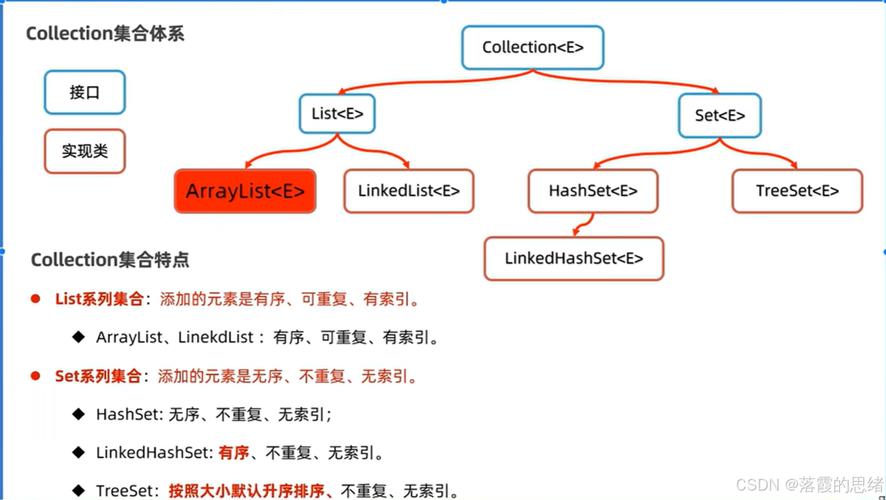 (图片来源网络,侵删)
// Create an immutable List List<Integer> immutableList = List.copyOf(numberSet); // Create a LinkedList List<Integer> linkedList = new LinkedList<>(numberSet);
Method 3: The Classic for-each Loop (Older Java versions)
This approach works in all versions of Java but is more verbose than the modern methods. It's useful to know for understanding the underlying mechanics.
Example:
import java.util.*;
public class SetToListLoopExample {
    public static void main(String[] args) {
        Set<Double> priceSet = new HashSet<>();
        priceSet.add(19.99);
        priceSet.add(5.49);
        priceSet.add(99.00);
        priceSet.add(19.99);
        System.out.println("Original Set: " + priceSet);
        // 1. Create an empty ArrayList
        List<Double> priceList = new ArrayList<>();
        // 2. Iterate over the Set and add each element to the List
        for (Double price : priceSet) {
            priceList.add(price);
        }
        System.out.println("Converted List: " + priceList);
    }
}
Explanation:
- You first create an empty
List. - You then loop through every element in the
Setusing an enhanced for-loop (for-each). - Inside the loop, you add each element from the
Setto yourList.
When to use it:
- Primarily when you are working with Java versions older than 8.
- If you need to perform some complex logic or filtering on each element during the conversion process.
Summary and Comparison
| Method | Pros | Cons | Best For |
|---|---|---|---|
Stream API (Collectors.toList()) |
Very flexible, modern, can be chained with other stream operations. | Slightly more verbose than the constructor for a simple conversion. | Java 8+ projects; when you need to filter/map/sort during conversion. |
List Constructor (new ArrayList<>(set)) |
Simple, readable, efficient, works for any List type. |
Less flexible for in-conversion processing than streams. | Most common use cases; simple, direct conversion in any Java version. |
**3. for-each Loop |
Works on all Java versions, explicit control over the process. | Verbose, more boilerplate code. | Legacy code; when complex logic is needed inside the conversion loop. |
Quick Reference Cheat Sheet
import java.util.*;
Set<String> mySet = new HashSet<>(Arrays.asList("A", "B", "C"));
// Method 1: Stream API (Recommended)
List<String> list1 = mySet.stream().toList(); // Java 16+ even shorter version!
// Or for older Java 8-15:
// List<String> list1 = mySet.stream().collect(Collectors.toList());
// Method 2: Constructor
List<String> list2 = new ArrayList<>(mySet);
// Method 3: For-each Loop
List<String> list3 = new ArrayList<>();
for (String item : mySet) {
    list3.add(item);
}