Of course! Let's break down Python's logging levels in detail, from the basics to best practices.
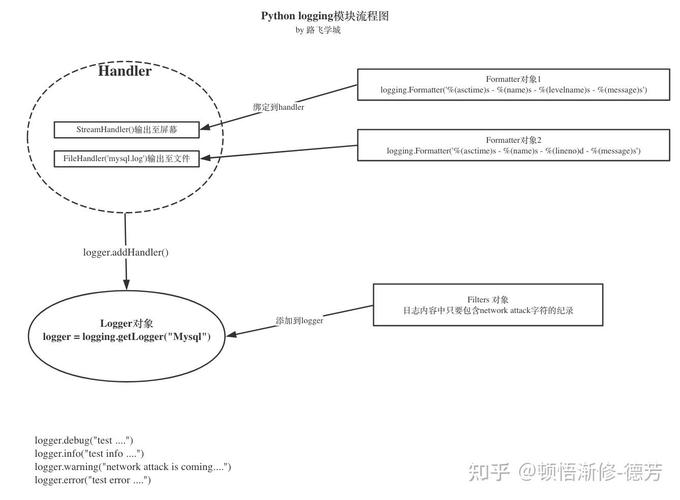
The Core Concept: Log Levels
Log levels are a standardized way to categorize the severity of events that occur in your running application. Instead of just printing messages, you assign a level to each log message, which helps you filter and manage the output.
Python's logging module has five standard levels, ordered from least to most severe:
| Level | Numeric Value | Description |
|---|---|---|
DEBUG |
10 | Detailed information, typically of interest only when diagnosing problems. |
INFO |
20 | Confirmation that things are working as expected. |
WARNING |
30 | An indication that something unexpected happened, or a potential problem in the near future (e.g., 'disk space low'). The software is still working as expected. |
ERROR |
40 | Due to a more serious problem, the software has not been able to perform some function. |
CRITICAL |
50 | A very serious error, indicating that the program itself may be unable to continue running. |
There are also two levels that are less commonly used directly:
NOTSET(0): The default level for a logger, meaning it will pass all messages to its parent.level(custom levels): You can define your own levels, but it's generally not recommended as it can break interoperability.
How It Works: The Logging Hierarchy
The key to understanding logging levels is the Logger Hierarchy.
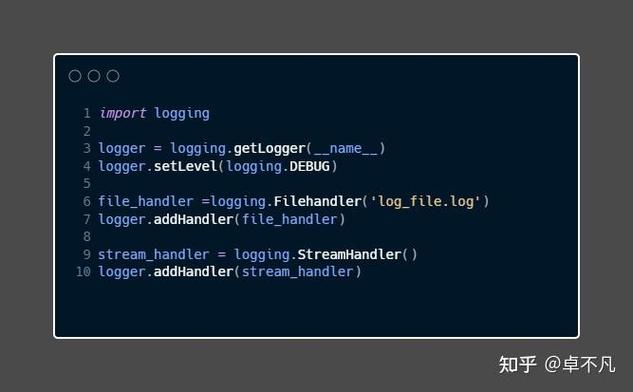
- Loggers: You get a logger instance, usually named after the module (e.g.,
__name__). This is the object you call methods on likelogger.info(). - Handlers: Handlers determine what happens to a log message. Does it go to the console? A file? An email? A handler has its own level setting.
- Loggers have levels: A logger will only process a message if its severity is at or above its own set level.
- Handlers have levels: A handler will only process a message if its severity is at or above its own set level.
The Golden Rule: A message is only processed if it passes both the logger's level filter and the handler's level filter.
Practical Examples
Let's see this in action.
Example 1: Basic Configuration
By default, the root logger is set to WARNING. This means only WARNING, ERROR, and CRITICAL messages will be displayed.
import logging
# By default, the logging level is WARNING
logging.debug("This is a debug message.")      # Will NOT be shown
logging.info("This is an info message.")        # Will NOT be shown
logging.warning("This is a warning message.")  # WILL be shown
logging.error("This is an error message.")      # WILL be shown
logging.critical("This is a critical message.")# WILL be shown
Output:

WARNING:root:This is a warning message.
ERROR:root:This is an error message.
CRITICAL:root:This is a critical message.
Example 2: Setting the Global Level
You can change the global logging level for the root logger using basicConfig().
import logging
# Set the root logger's level to INFO
logging.basicConfig(level=logging.INFO)
print("--- After setting level to INFO ---")
logging.debug("This is a debug message.")      # Will NOT be shown
logging.info("This is an info message.")        # WILL be shown
logging.warning("This is a warning message.")  # WILL be shown
Output:
--- After setting level to INFO ---
INFO:root:This is an info message.
WARNING:root:This is a warning message.
Example 3: Using Named Loggers and Handlers
This is where the real power lies. Let's create a logger for a specific module and add a handler with a different level.
import logging
# 1. Create a logger for this module
logger = logging.getLogger(__name__)
logger.setLevel(logging.DEBUG)  # This logger will handle DEBUG and above
# 2. Create a console handler (prints to the screen)
console_handler = logging.StreamHandler()
console_handler.setLevel(logging.WARNING)  # This handler will only show WARNING and above
# 3. Create a formatter to define the log message format
formatter = logging.Formatter('%(asctime)s - %(name)s - %(levelname)s - %(message)s')
console_handler.setFormatter(formatter)
# 4. Add the handler to the logger
logger.addHandler(console_handler)
# 5. Now, let's log some messages
logger.debug("This is a debug message from the app module.")
logger.info("This is an info message from the app module.")
logger.warning("This is a warning message from the app module.")
logger.error("This is an error message from the app module.")
Output:
Notice that DEBUG and INFO messages are ignored because they don't pass the handler's level filter (WARNING), even though they pass the logger's level filter (DEBUG).
2025-10-27 10:30:00,123 - __main__ - WARNING - This is a warning message from the app module.
2025-10-27 10:30:00,124 - __main__ - ERROR - This is an error message from the app module.
Example 4: Multiple Handlers
You can have multiple handlers attached to a single logger, each with a different purpose and level.
import logging
# 1. Create a logger
logger = logging.getLogger("my_app")
logger.setLevel(logging.DEBUG)
# 2. Handler 1: Console, for warnings and errors
console_handler = logging.StreamHandler()
console_handler.setLevel(logging.WARNING)
# 3. Handler 2: File, for all info and above
file_handler = logging.FileHandler("app.log")
file_handler.setLevel(logging.INFO)
# 4. Create a formatter and add it to both handlers
formatter = logging.Formatter('%(asctime)s - %(levelname)s - %(message)s')
console_handler.setFormatter(formatter)
file_handler.setFormatter(formatter)
# 5. Add handlers to the logger
logger.addHandler(console_handler)
logger.addHandler(file_handler)
# 6. Log messages
logger.info("Application started.")
logger.warning("A potential issue was detected.")
logger.error("A critical operation failed.")
logger.debug("This is a fine-grained detail for developers.")
Console Output (only WARNING and ERROR):
2025-10-27 10:31:00,125 - WARNING - A potential issue was detected.
2025-10-27 10:31:00,126 - ERROR - A critical operation failed.
File app.log content (INFO, WARNING, ERROR):
2025-10-27 10:31:00,125 - INFO - Application started.
2025-10-27 10:31:00,126 - WARNING - A potential issue was detected.
2025-10-27 10:31:00,127 - ERROR - A critical operation failed.
Best Practices
-
Use
__name__for Logger Names: Always get your logger usinglogger = logging.getLogger(__name__). This creates a hierarchy that mirrors your package/module structure (e.g.,my_app.database,my_app.api). This is incredibly useful for filtering logs later.# In my_app/database.py logger = logging.getLogger(__name__) # Becomes 'my_app.database'
-
Configure Logging Once: Configure logging (using
basicConfigor a more complex setup) at the start of your application's entry point (e.g., in yourmain.pyor__init__.py). Don't configure it inside libraries or modules that might be imported multiple times. -
Choose the Right Level:
DEBUG: For detailed diagnostics. Turn it on only when you need to trace a problem. It's very verbose.INFO: For general operational information. "User logged in," "Data processed," "Service started." This is the level you'd typically have on in a production environment to monitor the application's health.WARNING: For things that are not errors but are unusual or might lead to problems. "Cache miss," "Configuration file not found, using defaults."ERROR: For when something has gone wrong and a function failed. "Failed to connect to the database," "Could not process user input."CRITICAL: For when the application itself is in danger of crashing or becoming unstable. "Running out of memory," "Critical system service unavailable."
-
Don't Use
print()for Logging: Logging is more powerful. It's thread-safe, can be configured globally, can be sent to different outputs (files, network, etc.), and includes structured data like timestamps and logger names.print()is a simple, unbuffered console output and is not suitable for application-level logging.