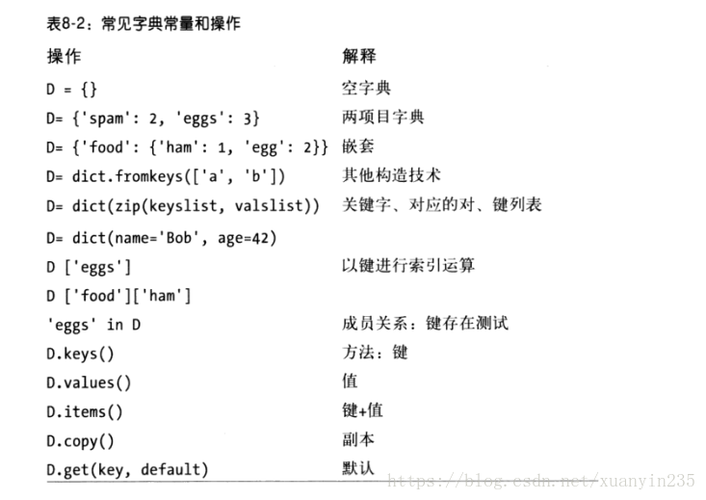
Of course! Filtering a dictionary in Python is a common task. The goal is to create a new dictionary containing only the key-value pairs that meet a specific condition.
There are several ways to do this, but the most modern and recommended approach is using a dictionary comprehension.
Let's start with a sample dictionary we'll use in all examples:
products = {
    'apple': 1.20,
    'banana': 0.50,
    'cherry': 2.50,
    'dragonfruit': 5.75,
    'elderberry': 3.00
}
Method 1: Dictionary Comprehension (Recommended)
This is the most concise, readable, and "Pythonic" way to filter a dictionary. It's similar to a list comprehension but creates a dictionary instead.
Syntax
new_dict = {key: value for key, value in old_dict.items() if condition}
Example 1: Filter by Value (e.g., price > $2.00)
Let's say we only want products that cost more than $2.00.
# Filter for products with a price greater than 2.00
expensive_products = {product: price for product, price in products.items() if price > 2.00}
print(expensive_products)
Output:
{'cherry': 2.5, 'dragonfruit': 5.75, 'elderberry': 3.0}Example 2: Filter by Key (e.g., keys starting with 'a')
Let's get all products whose name starts with the letter 'a'.
# Filter for products whose name starts with 'a'
a_products = {product: price for product, price in products.items() if product.startswith('a')}
print(a_products)
Output:
{'apple': 1.2}Example 3: Filter using a Custom Function
For more complex logic, you can define a function and use it in the comprehension.
def is_fruit_odd_price(name, price):
    """Returns True if the price is an odd number and the name contains 'berry'."""
    return price % 2 != 0 and 'berry' in name
# Filter using the custom function
filtered_products = {name: price for name, price in products.items() if is_fruit_odd_price(name, price)}
print(filtered_products)
Output:
{'elderberry': 3.0}Method 2: Using the filter() Function
This is a more functional programming approach. The filter() function takes a function and an iterable, and returns an iterator containing only the items for which the function returns True.
Since dictionaries are iterated over by key by default, it's best to use .items() to work with key-value pairs.
Syntax
# filter(function, iterable) -> returns an iterator of (key, value) tuples
filtered_items = filter(lambda item: condition, old_dict.items())
# Convert the iterator back to a dictionary
new_dict = dict(filtered_items)
Example: Filter by Value (e.g., price < $2.00)
Let's get all products that cost less than $2.00.
# Use filter with a lambda function
cheap_products = dict(filter(lambda item: item[1] < 2.00, products.items()))
print(cheap_products)
Output:
{'apple': 1.2, 'banana': 0.5}Note: item[0] is the key, and item[1] is the value from the (key, value) tuple.
Method 3: Using a for Loop (The Manual Way)
This method is more verbose but is great for beginners to understand the underlying logic. You create an empty dictionary and loop through the original one, adding items that match your condition.
Example: Filter by Key (e.g., keys with length > 6)
Let's get all products with names longer than 6 characters.
# Create an empty dictionary
long_name_products = {}
# Loop through the original dictionary
for product, price in products.items():
    # Check the condition
    if len(product) > 6:
        # Add the item to the new dictionary
        long_name_products[product] = price
print(long_name_products)
Output:
{'dragonfruit': 5.75, 'elderberry': 3.0}Comparison and Summary
| Method | Pros | Cons | Best for... |
|---|---|---|---|
| Dictionary Comprehension | Concise, readable, Pythonic, efficient. | Can become hard to read if the condition is very complex. | Most use cases. This is the standard, preferred method. |
filter() Function |
Functional style, can be elegant for simple conditions. | Requires an extra dict() call. Slightly less readable for simple filters. |
When you already have a function defined that you want to use as the filter. |
for Loop |
Very explicit, easy for beginners to understand and debug. | Verbose (more lines of code), less efficient than comprehensions. | Learning purposes or when the filtering logic is extremely complex and needs multiple steps inside the loop. |
Advanced Filtering: Filtering a Dictionary of Dictionaries
What if your dictionary contains other dictionaries? This is very common (e.g., from JSON data). The principles are the same, but you access the inner dictionary's values.
users = {
    'user1': {'name': 'Alice', 'age': 30, 'active': True},
    'user2': {'name': 'Bob', 'age': 25, 'active': False},
    'user3': {'name': 'Charlie', 'age': 35, 'active': True}
}
# Filter for active users
active_users = {user_id: data for user_id, data in users.items() if data['active']}
print(active_users)
Output:
{'user1': {'name': 'Alice', 'age': 30, 'active': True}, 'user3': {'name': 'Charlie', 'age': 35, 'active': True}}Conclusion
For filtering dictionaries in Python, always prefer dictionary comprehensions. They are the most idiomatic, efficient, and readable solution for the vast majority of situations. Use filter() if it fits a more functional style, and use a for loop if the logic becomes too convoluted for a one-liner.