Of course! This is a fundamental concept in Python, especially when dealing with text and I/O (Input/Output).
Let's break it down clearly.
The Core Concept: In Python 3, str is Already Unicode
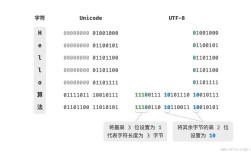
The most important thing to understand is that in Python 3, the str type is, by default, a sequence of Unicode characters. It is not "encoded" in any specific encoding like UTF-8.
Think of it like this:
str(Unicode): The abstract idea of the text "hello". It's just the characters themselves, independent of how they are stored.bytes(UTF-8): The concrete, computer-friendly representation of that text. It's a sequence of bytes that can be written to a file or sent over a network.
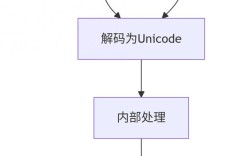
The process of converting from str to bytes is called encoding. The process of converting from bytes back to str is called decoding.
How to Convert a str to UTF-8 bytes
You use the .encode() method on a string. The default encoding for this method in Python 3 is UTF-8, so you can often omit the argument.
Method 1: The Standard Way (Using .encode())
This is the most common and Pythonic way.
# Our original string, which is Unicode by default.
my_string = "Hello, World! 🌎"
# Convert the string to UTF-8 bytes.
# The default encoding is 'utf-8', so you can just use .encode()
utf8_bytes = my_string.encode()
# Let's see what we have now
print(f"Original string: {my_string}")
print(f"Type of original: {type(my_string)}")
print(f"\nEncoded bytes: {utf8_bytes}")
print(f"Type of encoded: {type(utf8_bytes)}")
Output:
Original string: Hello, World! 🌎
Type of original: <class 'str'>
Encoded bytes: b'Hello, World! \xf0\x9f\x8c\x8e'
Type of encoded: <class 'bytes'>
Explanation:
- Notice the
b''prefix. This is how Python shows you it's abytesliteral. - The characters
H,e,l, etc., are represented by their single ASCII byte values. - The emoji is a complex Unicode character, so it's represented by a sequence of four bytes (
\xf0\x9f\x8c\x8e).
Method 2: Explicitly Specifying the Encoding (Best Practice)
It's always good practice to be explicit about the encoding you're using. This makes your code more readable and less prone to errors if the default ever changes.
my_string = "Hello, World! 🌎"
# Explicitly tell Python to encode using UTF-8
utf8_bytes_explicit = my_string.encode('utf-8')
print(utf8_bytes_explicit)
Output:
b'Hello, World! \xf0\x9f\x8c\x8e'This produces the exact same result as the first method but is clearer about your intent.
The Reverse: Converting UTF-8 bytes back to str
To complete the picture, you use the .decode() method on a bytes object.
# Let's use the bytes object from our previous example
utf8_bytes = b'Hello, World! \xf0\x9f\x8c\x8e'
# Convert the bytes back to a string
original_string = utf8_bytes.decode('utf-8')
print(f"Original bytes: {utf8_bytes}")
print(f"Type of bytes: {type(utf8_bytes)}")
print(f"\nDecoded string: {original_string}")
print(f"Type of decoded: {type(original_string)}")
Output:
Original bytes: b'Hello, World! \xf0\x9f\x8c\x8e'
Type of bytes: <class 'bytes'>
Decoded string: Hello, World! 🌎
Type of decoded: <class 'str'>
Common Scenario: Reading from a File
A very common place you'll see this is when reading a file. If you don't specify an encoding, Python might use the system's default, which can lead to errors if the file is encoded differently (e.g., latin-1).
Incorrect way (can cause errors):
# If my_file.txt contains non-ASCII characters and is saved as UTF-8,
# this might raise a UnicodeDecodeError on some systems.
with open('my_file.txt', 'r') as f:
    content = f.read()
Correct way (explicitly specify UTF-8):
# This is the robust, recommended way.
with open('my_file.txt', 'r', encoding='utf-8') as f:
    content = f.read() # 'content' is now a normal Python 'str'
# If you need to write it back to a file as bytes:
with open('my_file_output.txt', 'wb') as f:
    f.write(content.encode('utf-8')) # Explicitly encode to bytes before writing
Summary
| Action | Method | Example | Result |
|---|---|---|---|
str → bytes |
.encode() |
"hello".encode() |
b'hello' |
bytes → str |
.decode() |
b'hello'.decode() |
'hello' |
| File Read (Text) | open(..., encoding='utf-8') |
open('f.txt', 'r', encoding='utf-8') |
Returns a str |
| File Write (Text) | open(..., encoding='utf-8') |
open('f.txt', 'w', encoding='utf-8') |
Expects a str |
| File Write (Bytes) | open(..., 'wb') |
open('f.bin', 'wb') |
Expects bytes |