Of course. Here's a comprehensive guide to using urllib2 in Python 3.4.

Important: urllib2 in Python 3.4
First, a critical point of clarification: urllib2 does not exist in Python 3. The urllib library was refactored and split into several modules in Python 3.
In Python 3.4, the functionality of the old Python 2 urllib2 is spread across two main modules:
urllib.request: For opening and reading URLs (this is the direct replacement forurllib2).urllib.error: Contains exception classes raised byurllib.request(this replacesurllib2'sURLErrorandHTTPError).
So, when you see a Python 2 tutorial using import urllib2, you need to translate it to import urllib.request in Python 3.4.
Quick Translation Guide: Python 2 urllib2 vs. Python 3.4
Python 2 (urllib2) |
Python 3.4 (urllib) |
Description |
|---|---|---|
import urllib2 |
import urllib.request |
Main module for opening URLs |
import urllib |
import urllib.parse |
For parsing URLs (was in urllib in Py2) |
urllib2.urlopen() |
urllib.request.urlopen() |
Function to open a URL |
urllib2.Request() |
urllib.request.Request() |
Class to create a request object |
urllib2.HTTPError |
urllib.error.HTTPError |
Exception for HTTP errors |
urllib2.URLError |
urllib.error.URLError |
Exception for URL errors (e.g., network down) |
urllib.urlencode() |
urllib.parse.urlencode() |
To encode form data |
Core Functionality in Python 3.4
Let's dive into the most common tasks.
Making a Simple GET Request
This is the most basic operation: fetching the content of a webpage.
# In Python 2:
# import urllib2
# response = urllib2.urlopen('http://python.org')
# In Python 3.4:
import urllib.request
try:
    # Open the URL and get a response object
    with urllib.request.urlopen('http://python.org') as response:
        # Read the response data (it's in bytes)
        html = response.read()
    # The data is in bytes, so we need to decode it to a string (e.g., using UTF-8)
    html_string = html.decode('utf-8')
    print(html_string[:200]) # Print the first 200 characters
except urllib.error.URLError as e:
    print(f"Failed to reach the server. Reason: {e.reason}")
Explanation:
urllib.request.urlopen()opens the URL.- The
withstatement ensures the network connection is properly closed. response.read()returns the entire content of the response as abytesobject..decode('utf-8')converts the bytes into a human-readable string.
Making a POST Request (Sending Form Data)
To send data to a server (like a login form), you need to make a POST request. The data must be encoded.
import urllib.request
import urllib.parse
# The data to be sent (as a dictionary)
data = {
    'username': 'john_doe',
    'password': 'secret_password'
}
# Encode the data into bytes
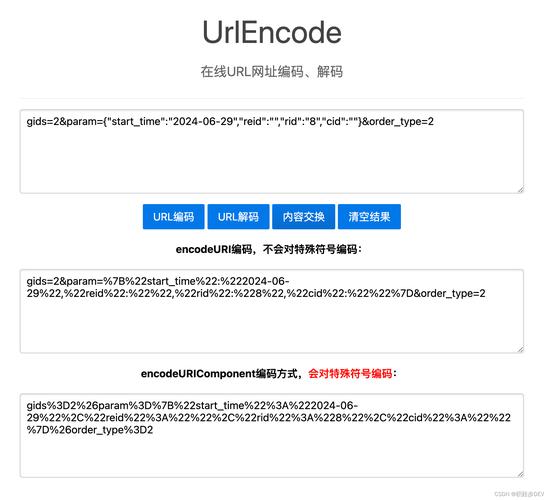
# urlencode converts the dict into 'username=john_doe&password=secret_password'
encoded_data = urllib.parse.urlencode(data).encode('utf-8')
# The URL to send the POST request to
url = 'http://httpbin.org/post' # A testing service that echoes back what you send
try:
    # Create a request object
    request = urllib.request.Request(url, data=encoded_data, method='POST')
    # Add a custom User-Agent header (good practice)
    request.add_header('User-Agent', 'MyCoolApp/1.0')
    # Send the request and get the response
    with urllib.request.urlopen(request) as response:
        response_data = response.read()
    # Decode and print the server's response
    print(response_data.decode('utf-8'))
except urllib.error.HTTPError as e:
    print(f"HTTP Error: {e.code} - {e.reason}")
except urllib.error.URLError as e:
    print(f"URL Error: {e.reason}")
Explanation:
urllib.parse.urlencode(): This function takes a dictionary of data and converts it into a URL-encoded query string (e.g.,key1=value1&key2=value2)..encode('utf-8'): Theurlopenfunction requires the data to be inbytes, so we encode the string.urllib.request.Request(): We create a request object. This allows us to specify the URL, the data to send, and the HTTP method.method='POST': Explicitly sets the request method to POST.request.add_header(): You can add custom headers to your request. This is very common for things likeUser-Agent,Authorization,Content-Type, etc.- Error Handling: We catch
HTTPError(for bad status codes like 404, 500) andURLError(for network-level problems like DNS failure).
Handling Cookies
urllib.request has built-in support for cookies using http.cookiejar. This is essential for websites that require a login session.
import urllib.request
import urllib.parse
import http.cookiejar
import json
# 1. Create a CookieJar object to store cookies
cookie_jar = http.cookiejar.CookieJar()
# 2. Create an opener that will use the CookieJar
opener = urllib.request.build_opener(urllib.request.HTTPCookieProcessor(cookie_jar))
# 3. Install the opener. Now all urllib.request calls will use it.
urllib.request.install_opener(opener)
# --- First Request: Login to the site ---
login_url = 'http://httpbin.org/post' # Using httpbin to simulate a login form
login_data = urllib.parse.urlencode({'username': 'test', 'password': 'test'}).encode('utf-8')
try:
    # This request will send the data and the server will send back cookies
    # which are automatically stored in our cookie_jar
    with urllib.request.urlopen(login_url, data=login_data) as response:
        print("Login successful. Cookies received.")
        # print(response.read().decode('utf-8'))
    # --- Second Request: Access a protected page ---
    # The opener will automatically send the stored cookies with this request
    protected_url = 'http://httpbin.org/cookies' # This page shows the cookies it received
    with urllib.request.urlopen(protected_url) as response:
        # The server now knows we are logged in
        protected_data = response.read().decode('utf-8')
        print("\nAccessing protected page:")
        print(protected_data)
except urllib.error.URLError as e:
    print(f"An error occurred: {e.reason}")
# You can inspect the cookies that were stored
print("\nCookies stored in the jar:")
for cookie in cookie_jar:
    print(cookie)
The Modern Alternative: requests
While urllib.request is powerful and built-in, it can be verbose and unintuitive. The requests library is the de-facto standard for HTTP in Python because it's much simpler and more user-friendly.
If you can, it's highly recommended to use requests instead.
Here's how you would do the same tasks with requests:
Installation
pip install requests
GET Request with requests
import requests
try:
    response = requests.get('http://python.org')
    # Automatically decodes to a string (if possible)
    html = response.text
    print(html[:200])
    # JSON responses are automatically parsed into a Python dict
    # response.json()
except requests.exceptions.RequestException as e:
    print(f"An error occurred: {e}")
POST Request with requests
import requests
url = 'http://httpbin.org/post'
data = {
    'username': 'john_doe',
    'password': 'secret_password'
}
# Headers are easy to add
headers = {
    'User-Agent': 'MyCoolApp/1.0'
}
try:
    response = requests.post(url, data=data, headers=headers)
    # Raise an exception for bad status codes (4xx or 5xx)
    response.raise_for_status()
    # The response is already decoded as a string
    print(response.json()) # httpbin.org/post returns JSON
except requests.exceptions.HTTPError as e:
    print(f"HTTP Error: {e}")
except requests.exceptions.RequestException as e:
    print(f"An error occurred: {e}")
As you can see, requests handles encoding, headers, JSON, and error handling in a much cleaner way. It also has excellent support for sessions (which handle cookies automatically), authentication, and timeouts.