Of course! Here is a comprehensive guide to creating a UDP server in Java, including a complete, runnable example, explanations of the code, and best practices.
What is a UDP Server?
A UDP (User Datagram Protocol) server is a network application that listens for incoming datagrams (packets) from clients. Unlike TCP, which is connection-oriented and reliable, UDP is connectionless and "fire-and-forget." This makes it faster and have less overhead, but it doesn't guarantee that packets will arrive, be delivered in order, or be free of errors.
Key Characteristics of UDP:
- Connectionless: No handshake is required to establish a connection.
- Unreliable: Packets may be lost, duplicated, or arrive out of order.
- Datagram-based: Data is sent in discrete packets (datagrams).
- Fast and Lightweight: No overhead for maintaining connections or guaranteeing delivery.
When to Use UDP:
- Online Gaming: Where low latency is more important than perfect accuracy (e.g., a missed position update is better than a lag).
- Video/Audio Streaming: A few lost packets won't ruin the entire experience.
- DNS (Domain Name System): A classic example of UDP in action.
- Broadcasting/Multicasting: Sending the same data to multiple hosts on a network.
- IoT Sensor Data: Receiving frequent, small data packets where losing one is acceptable.
The Java Code: A Simple UDP Echo Server
This example will create a server that listens on a specific port. When it receives a datagram from a client, it will read the message, print it to the console, and send the exact same message back to the client.
The Server Code (UdpServer.java)
import java.io.IOException;
import java.net.DatagramPacket;
import java.net.DatagramSocket;
import java.net.SocketException;
public class UdpServer {
    // The port number the server will listen on
    private static final int PORT = 9876;
    public static void main(String[] args) {
        // The DatagramSocket is used to send and receive UDP packets
        try (DatagramSocket serverSocket = new DatagramSocket(PORT)) {
            System.out.println("Server is listening on port " + PORT);
            // Buffer to receive data. A standard size is 1024 bytes.
            byte[] receiveBuffer = new byte[1024];
            while (true) {
                // 1. Create a DatagramPacket to receive data
                DatagramPacket receivePacket = new DatagramPacket(receiveBuffer, receiveBuffer.length);
                // 2. Receive data from the client (this is a blocking call)
                serverSocket.receive(receivePacket);
                // 3. Extract the message from the packet
                String receivedMessage = new String(receivePacket.getData(), 0, receivePacket.getLength());
                System.out.println("Received from client: " + receivedMessage);
                // 4. Get the client's address and port to send the reply back
                String clientAddress = receivePacket.getAddress().getHostAddress();
                int clientPort = receivePacket.getPort();
                System.out.println("Client address: " + clientAddress + ":" + clientPort);
                // 5. Create the reply message
                String replyMessage = "Server received: " + receivedMessage;
                // 6. Create a DatagramPacket for the reply
                byte[] sendBuffer = replyMessage.getBytes();
                DatagramPacket sendPacket = new DatagramPacket(sendBuffer, sendBuffer.length, receivePacket.getAddress(), receivePacket.getPort());
                // 7. Send the reply to the client
                serverSocket.send(sendPacket);
                System.out.println("Reply sent to client.\n");
            }
        } catch (SocketException e) {
            System.err.println("Socket error: " + e.getMessage());
            e.printStackTrace();
        } catch (IOException e) {
            System.err.println("I/O error: " + e.getMessage());
            e.printStackTrace();
        }
    }
}
The Client Code (UdpClient.java)
To test the server, you need a client. Here is a simple client that sends a message to the server and prints the reply.
import java.io.IOException;
import java.net.*;
import java.util.Scanner;
public class UdpClient {
    // The server's address and port
    private static final String SERVER_ADDRESS = "localhost"; // Use "127.0.0.1" or the server's IP
    private static final int SERVER_PORT = 9876;
    public static void main(String[] args) {
        // The DatagramSocket is used to send and receive UDP packets
        try (DatagramSocket clientSocket = new DatagramSocket()) {
            Scanner scanner = new Scanner(System.in);
            System.out.println("UDP Client started. Type messages to send (or 'exit' to quit):");
            while (true) {
                System.out.print("Enter message: ");
                String message = scanner.nextLine();
                if ("exit".equalsIgnoreCase(message)) {
                    break;
                }
                // 1. Convert the message to bytes
                byte[] sendBuffer = message.getBytes();
                // 2. Create a DatagramPacket to send to the server
                InetAddress serverAddress = InetAddress.getByName(SERVER_ADDRESS);
                DatagramPacket sendPacket = new DatagramPacket(sendBuffer, sendBuffer.length, serverAddress, SERVER_PORT);
                // 3. Send the packet to the server
                clientSocket.send(sendPacket);
                System.out.println("Sent to server: " + message);
                // 4. Create a DatagramPacket to receive the reply
                byte[] receiveBuffer = new byte[1024];
                DatagramPacket receivePacket = new DatagramPacket(receiveBuffer, receiveBuffer.length);
                // 5. Receive the reply from the server (this is a blocking call)
                clientSocket.receive(receivePacket);
                // 6. Extract the reply message
                String replyMessage = new String(receivePacket.getData(), 0, receivePacket.getLength());
                System.out.println("Received from server: " + replyMessage);
                System.out.println("----------------------------------");
            }
        } catch (UnknownHostException e) {
            System.err.println("Unknown host: " + SERVER_ADDRESS);
            e.printStackTrace();
        } catch (IOException e) {
            System.err.println("I/O error: " + e.getMessage());
            e.printStackTrace();
        }
    }
}
How to Run the Example
- Save the Code: Save the two code blocks above as
UdpServer.javaandUdpClient.javain the same directory. - Compile the Code: Open a terminal or command prompt in that directory and compile both files.
javac UdpServer.java UdpClient.java
- Run the Server: In one terminal, run the server. It will start and wait for connections.
java UdpServer
You should see the output:
Server is listening on port 9876 - Run the Client: In a second terminal, run the client.
java UdpClient
- Interact: The client will prompt you to enter a message. Type something and press Enter. The client will send it to the server, and the server will print it and send it back. The client will then display the server's reply.
Code Breakdown
UdpServer.java
-
DatagramSocket serverSocket = new DatagramSocket(PORT);- This creates a socket bound to the specified port (
9876). The server will listen for incoming packets on this port. If you usenew DatagramSocket(), the OS will pick an available port for you.
- This creates a socket bound to the specified port (
-
byte[] receiveBuffer = new byte[1024];UDP packets have a maximum size. This buffer acts as a temporary storage for the incoming data. If a packet is larger than the buffer, it will be truncated.
-
while (true)Servers typically run indefinitely, continuously waiting for new clients. This infinite loop keeps the server alive.
-
DatagramPacket receivePacket = new DatagramPacket(receiveBuffer, receiveBuffer.length);- This creates an empty "envelope" (
receivePacket) that thereceive()method will fill with the incoming data, the sender's IP address, and the sender's port.
- This creates an empty "envelope" (
-
serverSocket.receive(receivePacket);- This is the most critical line. It blocks execution until a datagram is received by the socket. Once a packet arrives, it's copied into
receivePacket.
- This is the most critical line. It blocks execution until a datagram is received by the socket. Once a packet arrives, it's copied into
-
String receivedMessage = new String(receivePacket.getData(), 0, receivePacket.getLength());- The
getData()method returns the raw byte array of the packet. However, the buffer might not be full.getLength()tells you the exact number of bytes that contain the message. We use this to create a cleanString.
- The
-
receivePacket.getAddress()andreceivePacket.getPort()- These methods are essential. They tell you who sent the packet so you can send a reply back to the correct client.
-
DatagramPacket sendPacket = new DatagramPacket(...)- To send a reply, you create a new
DatagramPacket. You must provide the message as a byte array, the length, the recipient's address, and the recipient's port.
- To send a reply, you create a new
-
serverSocket.send(sendPacket);This method sends the prepared packet out onto the network.
UdpClient.java
The client's logic is similar but simpler.
- It creates a
DatagramSocket(usually without specifying a port, letting the OS assign one). - It creates a
DatagramPacketwith the message to send, the server's address, and the server's port. - It sends the packet using
socket.send(). - It then creates a new, empty
DatagramPacketto receive the server's reply. - It calls
socket.receive()to wait for the reply. - It processes the received packet just like the server does.
Key Considerations and Best Practices
-
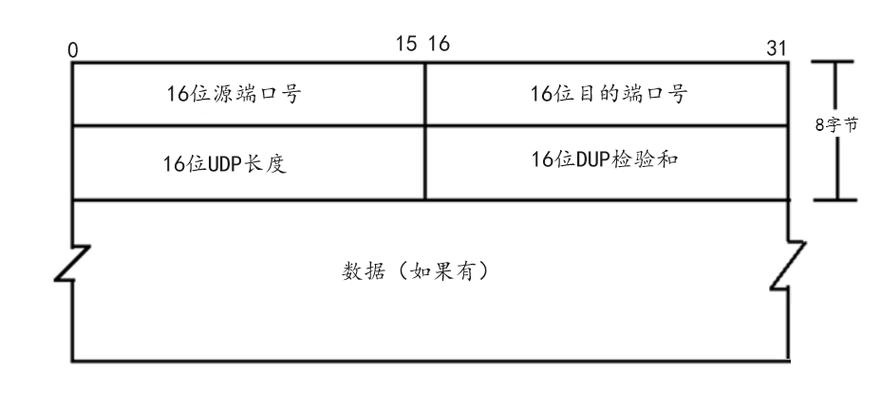
Packet Size: UDP has a theoretical maximum packet size of 65,507 bytes (65,535 - 8 bytes for the UDP header). In practice, networks have a Maximum Transmission Unit (MTU), often around 1500 bytes. If your data is larger than the MTU, it will be fragmented, which can lead to failure if any fragment is lost. For large data, TCP is often a better choice.
-
Error Handling: As mentioned, UDP is unreliable. If a packet is lost, the server won't know, and the client won't get a reply. If reliability is needed, you have to implement it yourself in your application logic (e.g., using acknowledgements, sequence numbers, and retransmission). This is complex and is the main reason TCP exists.
-
Blocking Calls: Both
socket.receive()andsocket.send()can block.receive()blocks until a packet arrives.send()usually returns immediately, but if the system's send buffer is full, it can block. Using the try-with-resources statement (try (DatagramSocket ...)) ensures the socket is always closed, even if an error occurs. -
Concurrency: A single-threaded server like the one above can only handle one client at a time. If a client is slow, it will block the server from serving other clients. For real-world applications, you would typically use a thread pool to handle multiple clients concurrently. Each client connection (or each packet) would be processed by a separate thread.