Of course! In Java, checking if one date is "after" another is a common task. The method you're looking for is Date.after(). However, it's crucial to understand which Java Date/Time API you are using, as modern Java has a much better, safer, and more expressive set of tools.
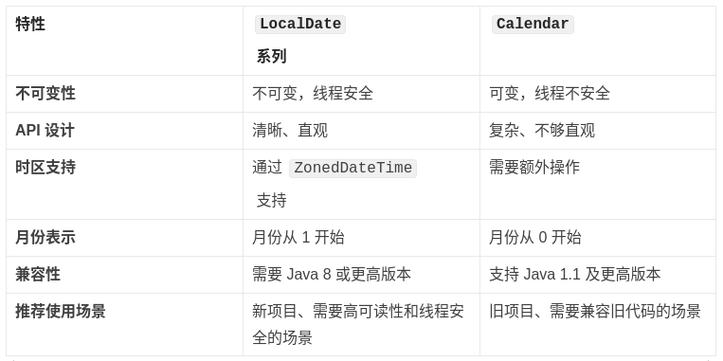
Here’s a complete guide covering the old java.util.Date way and the recommended modern java.time approach.
The Modern & Recommended Way: java.time (Java 8+)
The java.time package, introduced in Java 8, is the official and modern way to handle dates and times. It's immutable, thread-safe, and has a much clearer API.
Key Classes:
LocalDate: Represents a date (year, month, day) without a time or time zone. Perfect for comparing dates like birthdays, anniversaries, or due dates.LocalDateTime: Represents a date and time, but without a time zone.ZonedDateTime: Represents a date and time with a time zone. Essential for comparing moments in time across different regions.
Example: Using LocalDate
This is the most common scenario for checking if one date is after another.
import java.time.LocalDate;
public class DateAfterModernExample {
    public static void main(String[] args) {
        // 1. Create two LocalDate objects
        LocalDate date1 = LocalDate.of(2025, 10, 26); // October 26, 2025
        LocalDate date2 = LocalDate.of(2025, 10, 25); // October 25, 2025
        LocalDate date3 = LocalDate.of(2025, 10, 26); // Same as date1
        // 2. Use the isAfter() method
        // It returns a boolean: true if the calling date is after the other date, false otherwise.
        System.out.println("Is date1 after date2? " + date1.isAfter(date2)); // true
        System.out.println("Is date2 after date1? " + date2.isAfter(date1)); // false
        System.out.println("Is date1 after date3? " + date1.isAfter(date3)); // false (they are equal)
        // 3. A practical example: Check if a due date has passed
        LocalDate today = LocalDate.now();
        LocalDate dueDate = LocalDate.of(2025, 12, 31);
        if (today.isAfter(dueDate)) {
            System.out.println("The due date has passed.");
        } else {
            System.out.println("The due date has not yet passed.");
        }
    }
}
Example: Using LocalDateTime
If you need to compare specific dates and times, LocalDateTime is the right choice.
import java.time.LocalDateTime;
public class DateTimeAfterExample {
    public static void main(String[] args) {
        LocalDateTime dateTime1 = LocalDateTime.of(2025, 10, 26, 15, 30); // 3:30 PM
        LocalDateTime dateTime2 = LocalDateTime.of(2025, 10, 26, 10, 0);  // 10:00 AM
        System.out.println("Is dateTime1 after dateTime2? " + dateTime1.isAfter(dateTime2)); // true
    }
}
The Legacy Way: java.util.Date (Pre-Java 8)
This is the old, problematic API. You should avoid using it in new code, but you might encounter it in legacy systems.
Key Class:
java.util.Date: Represents an instant on the timeline, with millisecond precision. It's confusing because it's often used to represent just a date, but it also contains time information.
Example: Using Date.after()
The Date.after() method works similarly to isAfter(). It returns true if the calling Date object is chronologically after the Date argument.
import java.util.Date;
public class DateAfterLegacyExample {
    public static void main(String[] args) {
        // 1. Create two Date objects
        // Note: The constructor is deprecated. The modern way is to use java.time,
        // but for legacy code, you might see this.
        Date date1 = new Date(); // Represents the current date and time
        Date date2 = new Date(System.currentTimeMillis() - 86400000); // Yesterday's date and time
        // 2. Use the after() method
        System.out.println("Is date1 after date2? " + date1.after(date2)); // true
        // 3. Important Caveat: Comparing dates only (ignoring time)
        // If you want to compare just the date part, you must normalize the time.
        // A common trick is to set the time to midnight for both dates.
        Date today = new Date();
        Date yesterday = new Date(today.getTime() - 86400000);
        // Normalize both dates to midnight
        today = normalizeToMidnight(today);
        yesterday = normalizeToMidnight(yesterday);
        System.out.println("Is today (midnight) after yesterday (midnight)? " + today.after(yesterday)); // true
    }
    /**
     * Helper method to set the time of a Date object to midnight.
     * This is a common pattern when you only care about the date.
     */
    private static Date normalizeToMidnight(Date date) {
        // Create a new Calendar instance
        java.util.Calendar calendar = java.util.Calendar.getInstance();
        // Set the calendar's time to the given date
        calendar.setTime(date);
        // Set hours, minutes, seconds, and milliseconds to zero
        calendar.set(java.util.Calendar.HOUR_OF_DAY, 0);
        calendar.set(java.util.Calendar.MINUTE, 0);
        calendar.set(java.util.Calendar.SECOND, 0);
        calendar.set(java.util.Calendar.MILLISECOND, 0);
        // Return the normalized date
        return calendar.getTime();
    }
}
Summary: isAfter() vs. after()
| Feature | java.time.LocalDate.isAfter() (Modern) |
java.util.Date.after() (Legacy) |
|---|---|---|
| Class | java.time.LocalDate / LocalDateTime |
java.util.Date |
| Return Type | boolean |
boolean |
| Usage | date1.isAfter(date2) |
date1.after(date2) |
| Readability | Excellent. isAfter clearly states the intent. |
Good, but less explicit. |
| Time Handling | LocalDate ignores time. LocalDateTime includes time. |
Always includes time. Requires manual normalization for date-only comparisons. |
| Thread Safety | Immutable and thread-safe. | Mutable and not thread-safe. |
| Recommendation | Highly Recommended for all new code. | Avoid. Use only when maintaining legacy code. |
Which One Should You Use?
| Scenario | Recommended Class | Why? |
|---|---|---|
| Comparing birthdays, due dates, holidays | LocalDate |
It represents a date perfectly, without confusing time components. |
| Comparing timestamps, log entries, event schedules | LocalDateTime or ZonedDateTime |
You need to compare the full date and time. ZonedDateTime is best for true moments in time. |
| Working with old code or databases | java.util.Date |
You have no choice. Be aware of its pitfalls, especially with time zones and mutability. |
| Any new Java 8+ project | java.time |
It's the modern, safer, and more powerful standard. |