Of course! Here is a comprehensive guide to performing SQL UPDATE operations in Java, covering the best practices, common pitfalls, and code examples.
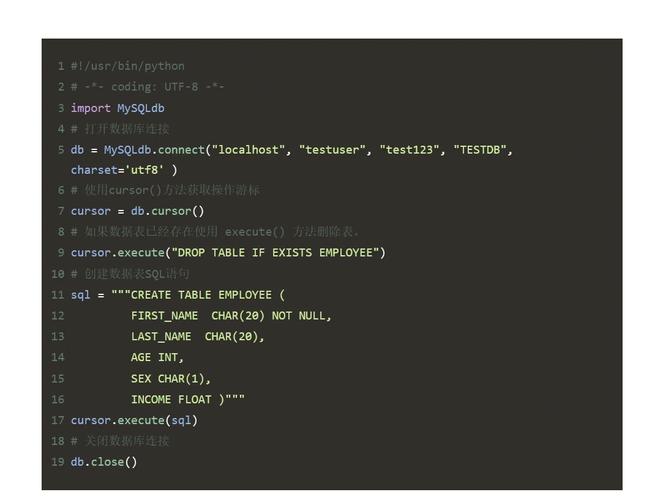
The Basic Concept: JDBC PreparedStatement
The standard and safest way to perform an UPDATE in Java is using the JDBC PreparedStatement.
Why use PreparedStatement?
- Security: It prevents SQL Injection attacks. The input data is sent separately from the SQL command, so the database never treats it as executable code.
- Performance: The database can pre-compile the SQL statement, which can lead to faster execution if the same statement is run multiple times with different parameters.
- Readability: It separates the SQL logic from the data, making the code cleaner and easier to maintain.
Step-by-Step Example (The Classic JDBC Approach)
This example shows the fundamental steps of connecting to a database, executing an UPDATE statement, and cleaning up resources.
Prerequisites
- A JDBC driver for your database (e.g., PostgreSQL, MySQL, Oracle).
- The driver JAR file in your project's classpath.
Scenario
Let's update the email for a user with user_id = 101 in a users table.
Table Schema:
CREATE TABLE users (
    user_id INT PRIMARY KEY,
    username VARCHAR(50) NOT NULL,
    email VARCHAR(100)
);
Java Code:
import java.sql.Connection;
import java.sql.DriverManager;
import java.sql.PreparedStatement;
import java.sql.SQLException;
public class JdbcUpdateExample {
    // IMPORTANT: Replace with your actual database connection details
    private static final String DB_URL = "jdbc:postgresql://localhost:5432/your_database";
    private static final String DB_USER = "your_username";
    private static final String DB_PASSWORD = "your_password";
    public static void main(String[] args) {
        // The SQL update statement with a placeholder (?)
        String sqlUpdate = "UPDATE users SET email = ? WHERE user_id = ?";
        // Using try-with-resources to ensure the connection is closed automatically
        try (Connection conn = DriverManager.getConnection(DB_URL, DB_USER, DB_PASSWORD);
             PreparedStatement pstmt = conn.prepareStatement(sqlUpdate)) {
            // 1. Set the parameters for the PreparedStatement
            // The first parameter is the new email
            pstmt.setString(1, "new.email@example.com");
            // The second parameter is the user_id to find
            pstmt.setInt(2, 101);
            // 2. Execute the update
            int rowsAffected = pstmt.executeUpdate();
            // 3. Check the result
            if (rowsAffected > 0) {
                System.out.println(rowsAffected + " row(s) updated successfully.");
            } else {
                System.out.println("No rows were updated. User with ID 101 might not exist.");
            }
        } catch (SQLException e) {
            System.err.println("Database update error: " + e.getMessage());
            e.printStackTrace();
        }
    }
}
Code Breakdown:
- SQL String:
UPDATE users SET email = ? WHERE user_id = ?- The are placeholders. You must not put variables directly into the string (e.g.,
"... SET email = '" + newEmail + "'..."). This is how SQL injection happens.
- The are placeholders. You must not put variables directly into the string (e.g.,
DriverManager.getConnection(...): Establishes a connection to the database.conn.prepareStatement(sqlUpdate): Creates aPreparedStatementobject from the connection and the SQL string. The database pre-compiles this statement.pstmt.setString(1, ...)andpstmt.setInt(2, ...): This is the most critical step. You set the values for the placeholders.- The first argument (
1or2) is the index of the placeholder (1-based). - The second argument is the actual value. Use the correct method (
setString,setInt,setDate, etc.) based on your database column type.
- The first argument (
pstmt.executeUpdate(): This method executes the SQLUPDATEstatement. It returns anintrepresenting the number of rows that were changed.try-with-resources: This syntax ensures thatconnandpstmtare automatically closed when the block is exited, even if an exception occurs. This is crucial for preventing resource leaks.
Advanced Example: Updating with Dynamic Conditions
What if you want to update a user based on their username, but the username could be null? You need to dynamically build the WHERE clause.
The Problem: You can't do WHERE username = ? if the username might be null, because username = NULL is not valid SQL. You must use WHERE username IS NULL.
Solution: Use dynamic SQL with StringBuilder.
import java.sql.Connection;
import java.sql.DriverManager;
import java.sql.PreparedStatement;
import java.sql.SQLException;
public class DynamicUpdateExample {
    private static final String DB_URL = "jdbc:postgresql://localhost:5432/your_database";
    private static final String DB_USER = "your_username";
    private static final String DB_PASSWORD = "your_password";
    public static void updateUserStatus(int userId, String username, String newStatus) {
        Connection conn = null;
        PreparedStatement pstmt = null;
        try {
            conn = DriverManager.getConnection(DB_URL, DB_USER, DB_PASSWORD);
            // Dynamically build the SQL query
            StringBuilder sql = new StringBuilder("UPDATE users SET status = ? WHERE user_id = ?");
            if (username != null) {
                sql.append(" AND username = ?");
            }
            pstmt = conn.prepareStatement(sql.toString());
            // Set parameters
            int paramIndex = 1;
            pstmt.setString(paramIndex++, newStatus);
            pstmt.setInt(paramIndex++, userId);
            if (username != null) {
                pstmt.setString(paramIndex, username);
            }
            int rowsAffected = pstmt.executeUpdate();
            System.out.println(rowsAffected + " row(s) updated.");
        } catch (SQLException e) {
            e.printStackTrace();
        } finally {
            // Important to close resources in a finally block
            if (pstmt != null) try { pstmt.close(); } catch (SQLException e) { /* ignored */ }
            if (conn != null) try { conn.close(); } catch (SQLException e) { /* ignored */ }
        }
    }
    public static void main(String[] args) {
        // Case 1: Update user 101 with username 'john_doe'
        updateUserStatus(101, "john_doe", "ACTIVE");
        // Case 2: Update user 102, where username is unknown (could be null)
        updateUserStatus(102, null, "INACTIVE");
    }
}
Modern Approach: Using JPA (Java Persistence API) / Hibernate
For most modern applications, you would not use raw JDBC. Instead, you'd use an ORM (Object-Relational Mapping) framework like Hibernate, which is the most popular implementation of JPA.
This approach works with Java objects (Entities) instead of writing SQL.
Define the Entity Class
This class maps to your users table.
import javax.persistence.Entity;
import javax.persistence.Id;
import javax.persistence.Table;
@Entity // Marks this class as a JPA entity
@Table(name = "users") // Specifies the table name in the database
public class User {
    @Id // Marks this field as the primary key
    private int userId;
    private String username;
    private String email;
    private String status;
    // Constructors, Getters, and Setters are required
    public User() {}
    public User(int userId, String username, String email) {
        this.userId = userId;
        this.username = username;
        this.email = email;
    }
    // Getters and Setters...
    public int getUserId() { return userId; }
    public void setUserId(int userId) { this.userId = userId; }
    public String getUsername() { return username; }
    public void setUsername(String username) { this.username = username; }
    public String getEmail() { return email; }
    public void setEmail(String email) { this.email = email; }
    public String getStatus() { return status; }
    public void setStatus(String status) { this.status = status; }
}
Perform the Update using JPA/Hibernate
You interact with a EntityManager to manage your entities.
import javax.persistence.EntityManager;
import javax.persistence.EntityManagerFactory;
import javax.persistence.Persistence;
public class JpaUpdateExample {
    public static void main(String[] args) {
        // "yourPersistenceUnitName" must match the name in your persistence.xml file
        EntityManagerFactory emf = Persistence.createEntityManagerFactory("yourPersistenceUnitName");
        EntityManager em = emf.createEntityManager();
        try {
            // Begin a transaction
            em.getTransaction().begin();
            // 1. Find the entity you want to update
            User user = em.find(User.class, 101); // Find user with primary key 101
            if (user != null) {
                // 2. Modify the entity's fields
                user.setEmail("updated.email@jpa.com");
                user.setStatus("ACTIVE");
                // 3. The EntityManager will automatically detect the changes
                //    and generate the correct UPDATE SQL when the transaction is committed.
                // No explicit "update" call is needed for simple changes!
            } else {
                System.out.println("User not found.");
            }
            // Commit the transaction. This is when the UPDATE SQL is executed.
            em.getTransaction().commit();
            System.out.println("User updated successfully using JPA.");
        } catch (Exception e) {
            if (em.getTransaction().isActive()) {
                em.getTransaction().rollback(); // Rollback in case of error
            }
            e.printStackTrace();
        } finally {
            em.close();
            emf.close();
        }
    }
}
JPA Update Workflow:
- Find: Retrieve the
Userobject from the database usingem.find(). - Modify: Change the fields on the retrieved Java object (e.g.,
user.setEmail(...)). - Commit: End the transaction with
em.getTransaction().commit(). - Generate SQL: Hibernate detects that the
userobject is "dirty" (has been changed) and automatically generates and executes the appropriateUPDATESQL statement behind the scenes.
Best Practices Summary
| Method | Pros | Cons | When to Use |
|---|---|---|---|
JDBC PreparedStatement |
- Full control over SQL - No framework overhead - Best performance for simple, repeated operations |
- Verbose and boilerplate code - Manual resource management - Prone to errors if not careful |
- Simple applications or scripts - Performance-critical sections - When you need to execute complex, vendor-specific SQL that an ORM might not support. |
| JPA/Hibernate | - High-level, object-oriented - Automatic SQL generation (CRUD) - Built-in caching, transactions, relationships |
- Steeper learning curve - Performance overhead (can be tuned) - "Magic" can sometimes make debugging difficult |
- Most standard business applications - Projects where development speed and maintainability are key priorities. |
| JPA/Hibernate (JPQL) | - More powerful than Criteria API - Still database-agnostic |
- Still a query language, not pure Java | - When you need to write more complex queries than a simple findBy method but want to stay within the JPA ecosystem. |
Final Recommendation:
- For new projects, start with JPA/Hibernate. It abstracts away the SQL and lets you focus on your business logic.
- Use raw JDBC
PreparedStatementwhen you have a very specific, performance-critical need that the ORM cannot handle efficiently or when you are working on a simple utility where adding a full JPA setup is overkill.