Of course! Let's dive into Akka with Java. Akka is a powerful toolkit and runtime for building concurrent and distributed applications on the JVM. It's based on the Actor Model, which is a fantastic way to manage complexity in concurrent systems.

This guide will cover:
- The Core Concept: The Actor Model
- Setting up an Akka Project
- Building a Simple Akka Application in Java
- Key Akka Concepts
- Advanced Topics & Best Practices
The Core Concept: The Actor Model
Before we write code, we need to understand the "why". Traditional concurrency in Java (using synchronized, volatile, java.util.concurrent) is powerful but can lead to complex, error-prone code like deadlocks and race conditions.
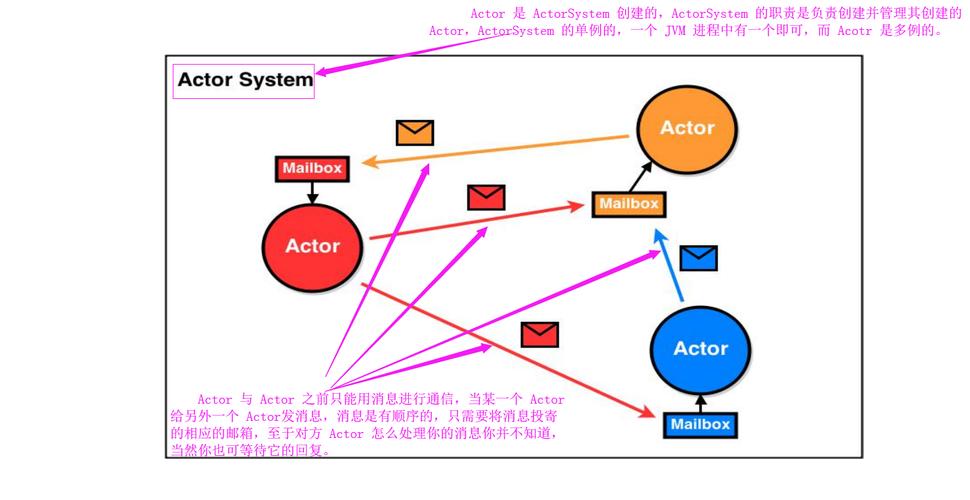
The Actor Model provides a higher-level abstraction to solve these problems. In Akka, everything is an Actor.
An Actor is like a tiny, independent, concurrent "person" with the following rules:

- Encapsulated State: An Actor's internal state is private. It cannot be accessed directly from the outside. This is the key to avoiding race conditions.
- Communication via Asynchronous Messages: Actors communicate by sending immutable messages to each other. They never share memory; they communicate by passing messages.
- Sequential Processing: Each Actor processes one message at a time in its own thread (or a thread from a thread pool). This means you don't have to worry about locks or
synchronizedblocks inside an Actor's logic. It's inherently thread-safe for its own state. - Behavior: An Actor can change its behavior over time in response to the messages it receives.
Think of it like a company:
- You (a client) don't walk into the CEO's office and change their files directly.
- You send a memo (a message) to their assistant.
- The CEO processes one memo at a time.
- The CEO can change how they handle memos (their behavior) without telling you.
Setting up an Akka Project
The easiest way to start is with a build tool like Maven or Gradle.
Maven (pom.xml)
Add the Akka dependency. For Akka 2.8+ (the current major version), you need to use the new jakarta namespace.
<dependencies>
    <!-- Akka Actor dependency -->
    <dependency>
        <groupId>com.typesafe.akka</groupId>
        <artifactId>akka-actor-typed_2.13</artifactId>
        <version>2.8.5</version> <!-- Use the latest version -->
    </dependency>
</dependencies>
Note: We use akka-actor-typed, which is the modern, type-safe API for Akka. It's strongly recommended over the older untyped API.
Gradle (build.gradle)
dependencies {
    // Akka Actor dependency
    implementation 'com.typesafe.akka:akka-actor-typed_2.13:2.8.5' // Use the latest version
}
Building a Simple Akka Application in Java
Let's create a classic "Ping-Pong" example. We'll have two actors: a Pinger and a Ponger. The Pinger will start the game by sending a "Ping" message to the Ponger. The Ponger will respond with a "Pong" message, and this will repeat a few times.
Step 1: Define the Messages
Messages must be immutable. The best way to ensure this in Java is to make them public static classes or records.
// PingPongMessages.java
package com.example.akka;
// Using records is a great way to create immutable message classes.
public record Ping(String message) {}
public record Pong(String message) {}
Step 2: Create the Actors
We define an Actor by creating a class that implements the Behavior<T> interface, where T is the type of message it can handle.
The Ponger Actor
This actor is simple. It only knows how to handle Ping messages.
// Ponger.java
package com.example.akka;
import akka.actor.typed.ActorRef;
import akka.actor.typed.Behavior;
import akka.actor.typed.javadsl.Behaviors;
public class Ponger {
    // This is the "factory" method to create the initial behavior of our Ponger actor.
    public static Behavior<Ping> create() {
        return Behaviors.receive(Ping.class)
                .onMessage(Ping.class, Ponger::onPing) // When a Ping is received, call onPing
                .build();
    }
    // This is the handler for the Ping message.
    private Behavior<Ping> onPing(Ping message) {
        System.out.println("Ponger: Received " + message.message());
        // To send a reply, we need the sender's reference, which is available in the message context.
        // We'll get this in the Pinger.
        // After replying, we stay in the same state.
        return Behaviors.same();
    }
}
The Pinger Actor
This actor is a bit more complex. It needs to:
- Start the conversation by sending the first
Ping. - Handle
Pongreplies. - Keep track of how many pings have been sent.
- Stop itself after a certain number of messages.
// Pinger.java
package com.example.akka;
import akka.actor.typed.ActorRef;
import akka.actor.typed.Behavior;
import akka.actor.typed.javadsl.Behaviors;
public class Pinger {
    // We use an enum for the internal commands of the Pinger.
    // This is a common pattern to differentiate between messages from other actors
    // and internal signals.
    public enum Stop implements Pong {
        INSTANCE;
        @Override
        public String message() {
            return "STOP";
        }
    }
    public static Behavior<Pong> create(int numberOfPings, ActorRef<Ping> ponger) {
        return Behaviors.setup(context -> Behaviors.receive(Pong.class)
                .onMessage(Pong.class, pong -> onPong(pong, numberOfPings, context, ponger))
                .build()
        );
    }
    private Behavior<Pong> onPong(Pong pong, int remainingPings, akka.actor.typed.javadsl.ActorContext<Pong> context, ActorRef<Ping> ponger) {
        System.out.println("Pinger: Received " + pong.message());
        if (remainingPings == 0) {
            System.out.println("Pinger: Done. Stopping.");
            return Behaviors.stopped(); // Signal to the Actor System to stop this actor.
        }
        // Send the next Ping
        ponger.tell(new Ping("Ping " + (10 - remainingPings + 1)));
        // Decrement the counter and continue
        return create(remainingPings - 1, ponger);
    }
}
Behaviors.setup: This is used for initial actor creation, often to get a reference to the actor itself (context.self).context.spawn: This is how we create a new actor within the system.actor.tell(message): This is the asynchronous way to send a message to an actor.
Step 3: Putting It All Together (The Main class)
This class sets up the Akka ActorSystem and wires our actors together.
// Main.java
package com.example.akka;
import akka.actor.typed.ActorSystem;
import akka.actor.typed.javadsl.Behaviors;
public class Main {
    public static void main(String[] args) {
        // 1. Create the ActorSystem
        // This is the entry point for all actors in our application.
        // It manages the threads and the lifecycle of the actors.
        ActorSystem<Pong> system = ActorSystem.create(
                Behaviors.setup(context -> {
                    // 2. Create the child actors
                    ActorRef<Ping> ponger = context.spawn(Ponger.create(), "ponger");
                    ActorRef<Pong> pinger = context.spawn(Pinger.create(10, ponger), "pinger");
                    // 3. Start the conversation by sending the first Ping to the Ponger
                    // The sender of this first message is the "guardian" actor of the system.
                    // We can pass context.self to represent the guardian.
                    ponger.tell(new Ping("Ping 1", context.self()));
                    // The guardian actor doesn't need to do anything else, so we return a "do nothing" behavior.
                    return Behaviors.empty();
                }),
                "PingPongSystem"
        );
        // The system will run until all actors are stopped.
        // In this case, the Pinger will stop itself after 10 pings,
        // which will cause the guardian to stop, and the whole system will shut down.
    }
}
How to Run It
- Save the files in a
com.example.akkapackage. - Run the
Mainclass. - You will see the following output in your console:
Ponger: Received Ping 1
Pinger: Received Pong
Ponger: Received Ping 2
Pinger: Received Pong
...
Ponger: Received Ping 10
Pinger: Received Pong
Pinger: Done. Stopping.
Key Akka Concepts
- ActorSystem: The high-level entry point. It manages a hierarchy of actors, provides configuration, and is the factory for top-level actors. You typically only have one
ActorSystemper application. - ActorRef (Reference): You never interact with an
Actorinstance directly. You only get anActorRef, which is a "handle" or a "proxy" to the actor. This is crucial for location transparency (the ref could point to an actor on a different JVM). - Messages: Must be immutable. Use
finalclasses or Javarecords. - Behaviors: Define how an actor reacts to messages.
Behaviors.receiveis for handling messages.Behaviors.setupis for initial actor creation.Behaviors.stopped()terminates the actor. - Actor Lifecycle: An actor can be
Started,Running, orStopped. When an actor stops, its children are automatically stopped first (hierarchical supervision).
Advanced Topics & Best Practices
-
Supervision: This is a cornerstone of Akka's resilience. A parent actor (the supervisor) can decide what to do when a child actor fails (throws an exception). The strategies are:
- Restart: Create a new child instance, keeping its place in the hierarchy. (Most common).
- Resume: Keep the failing instance but reset its state.
- Stop: Permanently stop the child.
- Escalate: The supervisor itself fails, and its supervisor handles the failure.
-
Ask Pattern (): For request-response, where you expect a reply. Akka provides a
askutility that handles the response for you. It's better thantell+onMessagefor simple RPC-style calls. -
Akka Typed vs. Untyped: We used Akka Typed. It's the modern API, uses Java Generics for compile-time type safety, and prevents common errors found in the older untyped API. Always prefer Akka Typed for new projects.
-
Clustering: Akka's killer feature. You can run your actors across multiple machines, and Akka handles all the complex networking, message routing, and failure detection for you, making it look like they are all in one system.
-
Persistence (Event Sourcing): Akka Persistence allows you to store an actor's state by storing the sequence of commands/events it has processed. This makes actors resilient to crashes, as they can replay their event log to restore their state.