Of course! Let's break down the concept of a "random seed" in Python in a clear and comprehensive way.
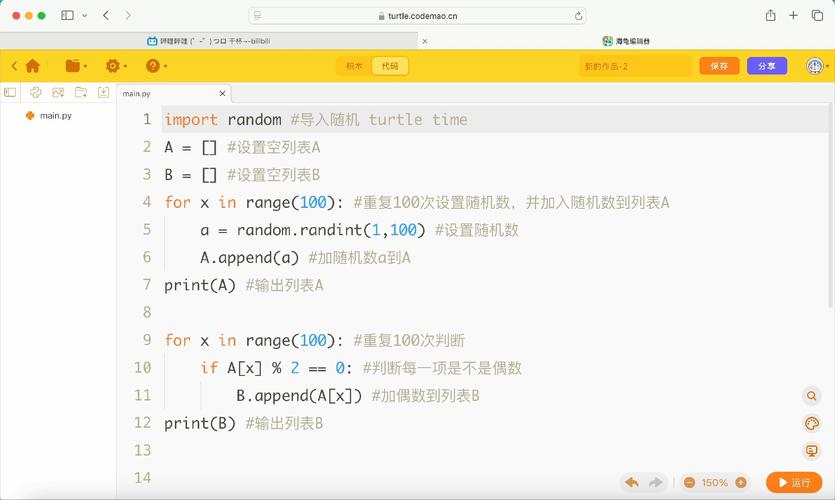
The Core Idea: A Random Number Generator's "Starting Point"
Imagine a random number generator (RNG) is not a magical source of pure randomness but rather a very clever list of numbers that appears random.
A random seed is the initial value you give to this generator to start its sequence.
Here's the key insight: If you start the generator with the same seed, you will always get the exact same sequence of "random" numbers.
This might sound counterintuitive, but it's incredibly useful.
Why is This Useful? (The "Why")
-
Reproducibility: This is the most important reason. In science, data analysis, and machine learning, you need to be able to reproduce your results. If you use a fixed seed, your "random" data splits, model initializations, or simulations will be identical every time you run the code. This allows others (or you, in the future) to verify your work.
-
Debugging: If your code has a bug that only appears with a certain random sequence, you can fix the seed to that value. This makes the bug happen every single time, making it much easier to find and fix.
-
Sharing and Collaboration: You can share your code and the specific seed you used, allowing others to generate the same random data you did.
How to Use a Random Seed in Python
Python's primary library for random number generation is random. For more advanced needs, especially in machine learning, you'll use numpy.
Using the random Module
The random.seed() function sets the seed for the random module.
import random
# --- Scenario 1: No Seed ---
# The sequence will be different every time you run this code.
print("--- Without a Seed (will be different each run) ---")
random_list_1 = [random.randint(1, 10) for _ in range(5)]
print(random_list_1)
random_list_2 = [random.randint(1, 10) for _ in range(5)]
print(random_list_2)
print("\n")
# --- Scenario 2: With a Seed ---
# The sequence will be the same every time you run this code.
# Try running this block multiple times!
print("--- With a Seed (will be the same each run) ---")
random.seed(42)  # Set the seed to 42
random_list_3 = [random.randint(1, 10) for _ in range(5)]
print(random_list_3) # Will always be [2, 1, 5, 5, 7]
random.seed(42) # Reset the seed to 42 to get the same sequence again
random_list_4 = [random.randint(1, 10) for _ in range(5)]
print(random_list_4) # Will also be [2, 1, 5, 5, 7]
Using the numpy Module (Very Common in Data Science)
numpy is the standard for numerical computing in Python and has its own, more powerful random module. The principle is identical.
import numpy as np
# --- Scenario 1: No Seed ---
# The sequence will be different every time.
print("--- Without a Seed (will be different each run) ---")
arr_1 = np.random.randint(1, 10, size=5)
print(arr_1)
arr_2 = np.random.randint(1, 10, size=5)
print(arr_2)
print("\n")
# --- Scenario 2: With a Seed ---
# The sequence will be the same every time.
print("--- With a Seed (will be the same each run) ---")
np.random.seed(42) # Set the seed for numpy
arr_3 = np.random.randint(1, 10, size=5)
print(arr_3) # Will always be [6 3 7 4 6]
np.random.seed(42) # Reset the seed
arr_4 = np.random.randint(1, 10, size=5)
print(arr_4) # Will also be [6 3 7 4 6]
A Crucial Detail: random.seed() vs. np.random.seed()
When using libraries like scikit-learn, TensorFlow, or PyTorch, they often have their own random number generators that can be influenced by numpy's state.
Best Practice: If you are using numpy and any other library that relies on random number generation, it's best practice to set the seed for numpy. This often controls the randomness for the other libraries as well, ensuring full reproducibility across your entire project.
import numpy as np
from sklearn.model_selection import train_test_split
# Set a global seed for numpy. This is often enough.
np.random.seed(123)
# This data split will now be reproducible
X = np.arange(10).reshape((5, 2))
y = np.array([0, 1, 0, 1, 0])
X_train, X_test, y_train, y_test = train_test_split(X, y, test_size=0.4, random_state=123) # Note: some functions have their own random_state argument
print("X_train:", X_train)
# X_train will always be the same array
When NOT to Use a Seed
You should not use a random seed in production code that requires true unpredictability.
- Security Tokens: Generating API keys, session tokens, or passwords.
- Cryptography: Creating keys for encryption.
- Gambling: Any application where fairness and unpredictability are paramount.
In these cases, you should use a source of "true" randomness from the operating system, which Python provides through the secrets module.
import secrets
# Use this for security-sensitive applications
secure_token = secrets.token_hex(16) # Generate a 16-byte (32 char) hex token
print(f"Secure Token: {secure_token}")
# For generating a secure random integer in a range
secure_random_int = secrets.randbelow(100) # A random int from 0 to 99
print(f"Secure Random Int: {secure_random_int}")
Summary Table
| Concept | What it is | When to Use It | Python Example |
|---|---|---|---|
| Random Seed | A starting number for a pseudo-random number generator. | Reproducibility: For debugging, sharing code, and scientific experiments. | random.seed(42)np.random.seed(42) |
| No Seed | Uses the system's current time (or another changing value) as the seed. | General Purpose: When you want different results on each run. | random.randint(1, 10)np.random.rand() |
secrets Module |
Uses a source of true randomness from the OS. | Security: For tokens, passwords, keys, and any security-critical application. | secrets.token_hex(16) |