Nginx 教程:从入门到精通
Nginx (发音 "engine-x") 是一款由俄罗斯程序员 Igor Sysoev 开发的高性能 HTTP 和反向代理服务器,它以其高并发、低内存消耗、稳定性和丰富的功能而闻名,是全球最流行的 Web 服务器之一。
第一部分:入门篇 - 初识 Nginx
1 什么是 Nginx?
想象一下,你有一个网站(比如一个用 PHP 写的博客),当用户访问 yourdomain.com 时,需要一个程序来接收请求、处理它,然后把网页内容返回给用户,这个程序就是 Web 服务器。
Nginx 就是这样一个角色,但它远不止于此,它主要有三个角色:
- Web 服务器:直接处理静态文件请求(如 HTML, CSS, JavaScript, 图片)。
- 反向代理服务器:作为客户端和后端服务器(如 Tomcat, Node.js, Python 应用)之间的中间人,接收请求并转发给合适的应用服务器。
- 负载均衡器:当有多个后端服务器时,Nginx 可以根据不同的策略(如轮询、最少连接)将请求分发到不同的服务器,防止单台服务器过载。
2 Nginx 的核心优势
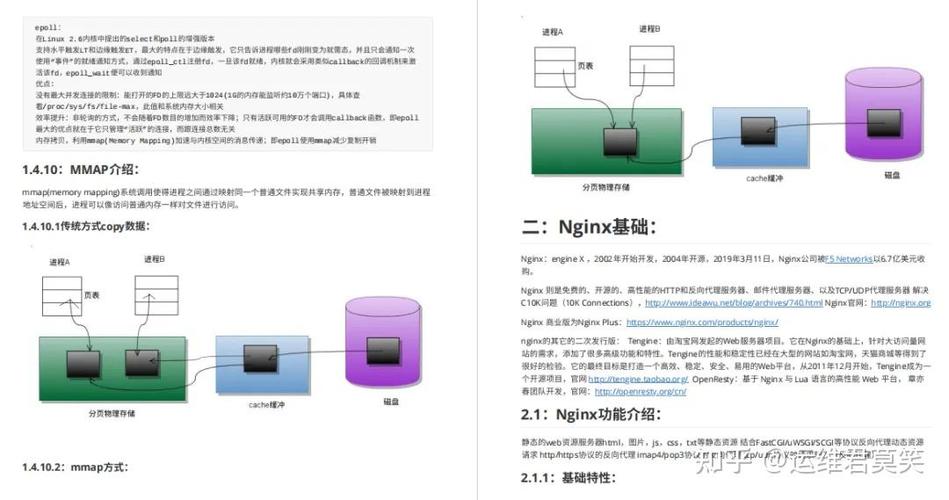
- 高并发:Nginx 采用事件驱动、异步非阻塞的模型(epoll 模型),使其能轻松处理数万甚至数十万的并发连接,远超传统的 Apache 等服务器。
- 低资源消耗:处理高并发的同时,Nginx 本身占用的内存非常小。
- 高稳定性:Nginx 的设计非常注重稳定性和健壮性,能够长时间不间断运行。
- 模块化设计:功能丰富且高度可扩展,通过加载不同的模块可以实现各种复杂功能。
- 配置简单:配置文件结构清晰,易于理解和维护。
3 Nginx 与 Apache 的简单对比
| 特性 | Nginx | Apache |
|---|---|---|
| 模型 | 异步非阻塞 | 同步阻塞(传统模式) |
| 并发性能 | 极高 | 相对较低 |
| 静态文件处理 | 极快 | 较快 |
| 反向代理 | 原生支持,性能卓越 | 需要模块支持 |
| 配置文件 | 声明式,简洁 | 功能强大但有时复杂 |
| 需要配合 FastCGI 等处理 | 原生支持 PHP 等模块 |
Nginx 在处理高并发和静态资源方面优势明显,非常适合作为现代 Web 应用的前端网关。
第二部分:安装与基础配置
1 安装 Nginx
根据你的操作系统选择安装方式。
在 Linux (Ubuntu/Debian) 上:
# 更新软件包列表
sudo apt update
# 安装 nginx
sudo apt install nginx
# 启动 nginx 服务
sudo systemctl start nginx
# 设置开机自启
sudo systemctl enable nginx
# 检查服务状态
sudo systemctl status nginx
在 Linux (CentOS/RHEL) 上:
# 安装 EPEL 仓库
sudo yum install epel-release
# 安装 nginx
sudo yum install nginx
# 启动 nginx 服务
sudo systemctl start nginx
# 设置开机自启
sudo systemctl enable nginx
# 检查服务状态
sudo systemctl status nginx
在 macOS 上 (使用 Homebrew):
# 安装 Homebrew (如果尚未安装)
/bin/bash -c "$(curl -fsSL https://raw.githubusercontent.com/Homebrew/install/HEAD/install.sh)"
# 安装 nginx
brew install nginx
# 启动 nginx
brew services start nginx
2 Nginx 目录结构
安装完成后,了解几个关键目录:
- 配置文件目录:
/etc/nginx/: 主配置目录。/etc/nginx/nginx.conf: Nginx 的主配置文件。/etc/nginx/sites-available/: 存放可用站点配置文件。/etc/nginx/sites-enabled/: 存放已启用的站点配置文件(通常是sites-available中文件的软链接)。
- Web 根目录:
/var/www/html/: 默认存放网站静态文件的地方。
- 日志目录:
/var/log/nginx/: 存放访问日志和错误日志。/var/log/nginx/access.log: 访问日志。/var/log/nginx/error.log: 错误日志。
3 Nginx 核心配置文件解析
打开 /etc/nginx/nginx.conf,我们来理解其结构:
user www-data; # 运行 Nginx 的用户和组
worker_processes auto; # 工作进程数,通常设置为 CPU 核心数或 auto
events {
    worker_connections 768; # 每个工作进程的最大连接数
}
http {
    # --- 基础设置 ---
    sendfile on; # 高效传输文件
    tcp_nopush on;
    tcp_nodelay on;
    keepalive_timeout 65; # 保持连接的超时时间
    types_hash_max_size 2048;
    # --- 文件类型映射 ---
    include /etc/nginx/mime.types;
    default_type application/octet-stream;
    # --- 日志格式 ---
    log_format main '$remote_addr - $remote_user [$time_local] "$request" '
                    '$status $body_bytes_sent "$http_referer" '
                    '"$http_user_agent" "$http_x_forwarded_for"';
    access_log /var/log/nginx/access.log main;
    error_log /var/log/nginx/error.log;
    # --- Gzip 压缩 ---
    gzip on;
    gzip_vary on;
    gzip_proxied any;
    gzip_comp_level 6;
    gzip_types text/plain text/css application/json application/javascript text/xml application/xml application/xml+rss text/javascript;
    # --- 包含站点配置 ---
    include /etc/nginx/conf.d/*.conf;
    include /etc/nginx/sites-enabled/*;
}
核心概念:
main(主) 块: 最顶层的配置,影响全局。events块: 主要影响 Nginx 与网络连接相关的设置。http块: 几乎所有关于 HTTP 协议的配置都在这里,例如虚拟主机、MIME 类型、日志、Gzip 等。
第三部分:核心功能实践
这是 Nginx 最常用的部分,我们将通过配置一个虚拟主机来实践。
1 什么是虚拟主机?
虚拟主机允许你在一台物理服务器上托管多个网站,Nginx 通过域名或 IP 地址来区分不同的网站。
2 配置第一个虚拟主机
假设我们要创建一个名为 example.com 的网站。
步骤 1:创建网站目录
sudo mkdir -p /var/www/example.com
步骤 2:创建一个简单的首页文件
echo "<h1>Hello from example.com!</h1>" | sudo tee /var/www/example.com/index.html
步骤 3:在 sites-available 中创建配置文件
创建 /etc/nginx/sites-available/example.com:
server {
    # 监听 80 端口,并监听 example.com 和 www.example.com
    listen 80;
    server_name example.com www.example.com;
    # 访问日志
    access_log /var/log/nginx/example.com.access.log;
    error_log /var/log/nginx/example.com.error.log;
    # 网站根目录
    root /var/www/example.com;
    index index.html index.htm;
    # 当访问根路径时
    location / {
        try_files $uri $uri/ =404;
    }
    # 可以添加其他 location 块来处理特定请求
    # 处理所有 .php 文件
    # location ~ \.php$ {
    #    include snippets/fastcgi-php.conf;
    #    fastcgi_pass unix:/run/php/php8.1-fpm.sock;
    # }
}
配置解析:
server: 定义一个虚拟主机。listen: 监听的端口号。server_name: 用于匹配请求的域名。root: 网站文件的根目录。index: 默认的首页文件名。location: 匹配 URL 的特定部分,并应用相应的配置。 匹配所有以 开头的请求。
步骤 4:启用站点
创建 sites-available 中的配置文件后,它并不会生效,我们需要创建一个指向它的软链接到 sites-enabled 目录。
sudo ln -s /etc/nginx/sites-available/example.com /etc/nginx/sites-enabled/
步骤 5:测试并重载 Nginx
在重载配置之前,务必测试配置文件是否有语法错误。
# 测试配置
sudo nginx -t
# 如果输出如下,则表示成功:
# nginx: the configuration file /etc/nginx/nginx.conf syntax is ok
# nginx: configuration file /etc/nginx/nginx.conf test is successful
# 重载 Nginx 使配置生效
sudo systemctl reload nginx
步骤 6:修改本地 hosts 文件(可选,用于本地测试)
如果你想在自己的电脑上测试,而不是购买真实域名,可以编辑 /etc/hosts 文件(在 Windows 上是 C:\Windows\System32\drivers\etc\hosts):
0.0.1 example.com
127.0.0.1 www.example.com
在浏览器中访问 http://example.com,你应该能看到 "Hello from example.com!"。
第四部分:进阶应用
掌握了基础配置后,我们来学习 Nginx 最强大的两个功能:反向代理和负载均衡。
1 反向代理
场景:你有一个用 Node.js 或 Python 写的后端应用,运行在 localhost:3000 上,但你不想让用户直接访问 3000 端口,而是通过 http://api.example.com 来访问。
配置:修改 example.com 的配置文件:
server {
    listen 80;
    server_name api.example.com;
    location / {
        # 将所有请求转发到 http://localhost:3000
        proxy_pass http://localhost:3000;
        # 设置一些代理头,让后端应用知道真实信息
        proxy_set_header Host $host;
        proxy_set_header X-Real-IP $remote_addr;
        proxy_set_header X-Forwarded-For $proxy_add_x_forwarded_for;
        proxy_set_header X-Forwarded-Proto $scheme;
    }
}
工作原理:
- 用户访问
http://api.example.com/users。 - Nginx 接收到请求。
location /匹配到该请求。- Nginx 将请求原封不动地转发给
http://localhost:3000/users。 - Node.js 应用处理请求,并将响应返回给 Nginx。
- Nginx 再将响应返回给用户。
用户完全不知道后端应用的存在和运行端口。
2 负载均衡
场景:你的后端应用部署在三台服务器上,为了防止单点故障和提高性能,你需要将请求分发到这三台服务器上。
步骤 1:定义一个 upstream
在 http 块中(不要放在 server 块内),定义一个服务器组:
http {
    # ... 其他配置 ...
    # 定义一个名为 myapp1 的上游服务器组
    upstream myapp1 {
        # 轮询策略 (默认)
        server backend1.example.com;
        server backend2.example.com;
        server backend3.example.com;
        # 其他策略示例:
        # 权重策略: server backend1.example.com weight=5;
        # IP 哈希: ip_hash;
        # 最少连接: least_conn;
    }
    # ... 其他配置 ...
}
步骤 2:在 server 块中使用 upstream
修改你的 api.example.com 配置,将 proxy_pass 指向这个 upstream:
server {
    listen 80;
    server_name api.example.com;
    location / {
        # 将请求转发到 myapp1 组中的服务器
        proxy_pass http://myapp1;
        # ... proxy_set_header 配置 ...
    }
}
所有访问 api.example.com 的请求都会被 Nginx 按照 upstream 中定义的策略分发到后端三台服务器之一。
第五部分:安全与优化
1 安全加固
-
创建非 root 用户运行:修改
nginx.conf中的user指令。 -
隐藏 Nginx 版本号:在
http块中添加server_tokens off;。 -
配置防火墙:只开放必要的端口(如 80, 443)。
sudo ufw allow 'Nginx Full'
-
使用 HTTPS (SSL/TLS):这是最重要的安全措施,可以使用 Let's Encrypt 免费证书。
server { listen 443 ssl http2; server_name example.com; ssl_certificate /path/to/your/fullchain.pem; ssl_certificate_key /path/to/your/privkey.pem; # ... 其他配置 ... } -
防止恶意请求:
- 限制请求体大小:
client_max_body_size 20M; - 防止盗链:配置
valid_referers指令。
- 限制请求体大小:
2 性能优化
- Gzip 压缩:确保在
http块中开启了gzip on。 - 缓存静态资源:使用
expires指令设置浏览器缓存。location ~* \.(jpg|jpeg|png|gif|ico|css|js)$ { expires 1y; add_header Cache-Control "public, immutable"; } - 优化工作进程和连接数:根据你的服务器 CPU 和内存调整
worker_processes和worker_connections。 - 开启文件缓存:在
http块中调整open_file_cache相关指令。 - 使用
sendfile:确保sendfile on;已开启,这能极大提高文件传输效率。
第六部分:精通之路与资源
1 监控与日志分析
- 监控:使用
status模块了解 Nginx 的运行状态。location /nginx_status { stub_status on; access_log off; allow 127.0.0.1; deny all; }访问
http://your_server_ip/nginx_status可以看到当前的连接数、请求总数等。 - 日志分析:使用工具如
GoAccess或ELK Stack (Elasticsearch, Logstash, Kibana)对 Nginx 日志进行实时分析和可视化。
2 高级模块
ngx_lua:在 Nginx 中直接嵌入 Lua 脚本,实现复杂的逻辑处理,如 WAF(Web 应用防火墙)、API 网关等。nginx-module-vts:提供更详细的虚拟主机状态信息,非常适合监控。modsecurity:一个强大的 Web 应用防火墙模块,可以检测和阻止各种攻击。
3 最佳实践
- 配置管理:使用版本控制(如 Git)管理你的 Nginx 配置文件。
- 环境分离:为开发、测试、生产环境准备不同的配置。
- 优雅关闭:使用
nginx -s quit而不是nginx -s stop,让 Nginx 完成正在处理的请求后再关闭。 - 保持配置简洁:不要在一个
server块中塞入过多逻辑,合理使用include拆分配置。
4 学习资源
- 官方文档:nginx.org/en/docs/ (最权威、最全面)
- Nginx 博客:nginx.com/resources/
- 在线书籍:《The Nginx Cookbook》
- 社区:Stack Overflow, Reddit (r/nginx)
这份教程为你铺开了一条从 Nginx 新手到专家的完整路径,关键在于动手实践,从搭建一个简单的网站开始,逐步尝试反向代理、负载均衡,再到安全和性能优化,Nginx 是一个强大而灵活的工具,掌握它将为你的运维和开发工作带来巨大价值,祝你学习顺利!