Of course! Building a Peer-to-Peer (P2P) system with Java Sockets is a classic and excellent way to understand the fundamentals of network programming. A P2P network is decentralized, meaning peers communicate directly with each other without a central server.
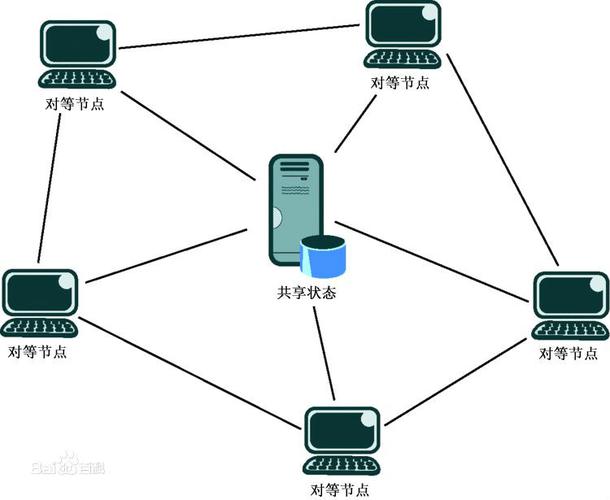
Let's break down how to build a simple but functional P2P chat application in Java. We'll cover the core concepts, a basic architecture, and provide a complete, runnable code example.
Core Concepts of a P2P System
- Peer (Node): Each participant in the network is a peer. In our chat app, each peer will be both a client (to send messages) and a server (to receive messages).
- Server Socket: Each peer must listen for incoming connections from other peers. This is done using a
ServerSocket. - Client Socket: To connect to another peer, a peer uses a regular
Socket. - Discovery Mechanism: This is the most challenging part of P2P. How does a new peer find other peers to connect to? Since there's no central server, we need a decentralized method. The simplest approach for a demo is a bootstrap list (a pre-configured list of known peers). More advanced systems use gossip protocols or Distributed Hash Tables (DHTs) like BitTorrent's.
Architecture for Our Simple P2P Chat
We'll create a single Java class, Peer, that handles all the logic.
-
Initialization:
- When a
Peerstarts, it creates aServerSocketon a specific port to listen for incoming connections. - It maintains a list of all known peers (the "neighbor list" or "peer list").
- When a
-
Connecting to the Network:
 (图片来源网络,侵删)
- If the peer has a bootstrap list of other peers, it will attempt to connect to them one by one.
- When a connection is successfully established, the new peer adds the remote peer to its list and sends its own information so the remote peer can add it back.
-
Message Handling:
- Sending: When a user types a message, the peer sends it to all other peers in its list.
- Receiving: The peer has a dedicated thread that continuously listens on its
ServerSocket. When a new connection arrives, it spawns a newHandlerThreadto manage communication with that specific peer. ThisHandlerThreadwill read messages and display them to the user.
-
Maintaining the Network:
If a peer disconnects, it should be removed from the list to prevent future attempts to send messages to it.
Complete Java Code Example
This code implements the architecture described above. It's a self-contained class that you can run multiple instances of to simulate a P2P network.
Peer.java
import java.io.*;
import java.net.*;
import java.util.*;
import java.util.concurrent.CopyOnWriteArrayList;
public class Peer {
    // The port this peer will listen on
    private final int port;
    // The list of all connected peers
    private final List<PeerConnection> peers = new CopyOnWriteArrayList<>();
    // The ServerSocket to listen for incoming connections
    private ServerSocket serverSocket;
    // A flag to control the running of the server
    private volatile boolean running;
    public Peer(int port) {
        this.port = port;
    }
    public void start(String bootstrapHost, int bootstrapPort) {
        running = true;
        System.out.println("Peer starting on port " + port + "...");
        // 1. Start the server socket in a new thread to listen for incoming connections
        new Thread(this::startServer).start();
        // 2. If a bootstrap peer is provided, try to connect to it
        if (bootstrapHost != null && bootstrapPort > 0) {
            connectToPeer(bootstrapHost, bootstrapPort);
        }
        // 3. Start a thread to handle user input for sending messages
        new Thread(this::handleUserInput).start();
    }
    private void startServer() {
        try {
            serverSocket = new ServerSocket(port);
            System.out.println("Server socket listening on port " + port);
            while (running) {
                try {
                    Socket clientSocket = serverSocket.accept();
                    System.out.println("Connection accepted from: " + clientSocket.getInetAddress().getHostAddress());
                    // Create a new handler for this connection
                    PeerConnection connection = new PeerConnection(clientSocket, this);
                    peers.add(connection);
                    new Thread(connection).start();
                } catch (SocketException e) {
                    // This is expected when the server socket is closed
                    if (running) {
                        System.err.println("Server socket error: " + e.getMessage());
                    }
                }
            }
        } catch (IOException e) {
            System.err.println("Could not start server on port " + port + ": " + e.getMessage());
        } finally {
            System.out.println("Server has shut down.");
        }
    }
    public void connectToPeer(String host, int port) {
        try {
            Socket socket = new Socket(host, port);
            System.out.println("Connected to peer at " + host + ":" + port);
            PeerConnection connection = new PeerConnection(socket, this);
            peers.add(connection);
            new Thread(connection).start();
        } catch (ConnectException e) {
            System.err.println("Connection refused. Is the peer at " + host + ":" + port + " running?");
        } catch (IOException e) {
            System.err.println("Failed to connect to peer: " + e.getMessage());
        }
    }
    public void broadcastMessage(String message) {
        System.out.println("Broadcasting message to " + peers.size() + " peers...");
        for (PeerConnection peer : peers) {
            peer.sendMessage(message);
        }
    }
    public void removePeer(PeerConnection peer) {
        peers.remove(peer);
        System.out.println("Peer removed. Total connected peers: " + peers.size());
    }
    private void handleUserInput() {
        Scanner scanner = new Scanner(System.in);
        System.out.println("Enter messages to broadcast (type 'exit' to quit):");
        while (running) {
            String message = scanner.nextLine();
            if ("exit".equalsIgnoreCase(message)) {
                shutdown();
                break;
            }
            broadcastMessage(message);
        }
        scanner.close();
    }
    public void shutdown() {
        running = false;
        System.out.println("Shutting down peer...");
        // Close all peer connections
        for (PeerConnection peer : peers) {
            peer.close();
        }
        peers.clear();
        // Close the server socket
        if (serverSocket != null && !serverSocket.isClosed()) {
            try {
                serverSocket.close();
            } catch (IOException e) {
                System.err.println("Error closing server socket: " + e.getMessage());
            }
        }
    }
    // Nested class to handle a connection with a single peer
    private static class PeerConnection implements Runnable {
        private final Socket socket;
        private final Peer parentPeer;
        private PrintWriter out;
        private BufferedReader in;
        public PeerConnection(Socket socket, Peer parentPeer) {
            this.socket = socket;
            this.parentPeer = parentPeer;
        }
        @Override
        public void run() {
            try {
                out = new PrintWriter(socket.getOutputStream(), true);
                in = new BufferedReader(new InputStreamReader(socket.getInputStream()));
                // Send a welcome message to the new peer
                out.println("Welcome to the P2P chat from peer " + socket.getLocalPort());
                String inputLine;
                while ((inputLine = in.readLine()) != null) {
                    System.out.println("Message received: " + inputLine);
                }
            } catch (SocketException e) {
                // Peer disconnected
                System.out.println("Peer disconnected: " + e.getMessage());
            } catch (IOException e) {
                System.err.println("Error in peer connection: " + e.getMessage());
            } finally {
                close();
                parentPeer.removePeer(this);
            }
        }
        public void sendMessage(String message) {
            if (out != null) {
                out.println(message);
            }
        }
        public void close() {
            try {
                if (in != null) in.close();
                if (out != null) out.close();
                if (socket != null && !socket.isClosed()) socket.close();
            } catch (IOException e) {
                System.err.println("Error closing peer connection: " + e.getMessage());
            }
        }
    }
    public static void main(String[] args) {
        if (args.length < 1) {
            System.out.println("Usage: java Peer <my_port> [bootstrap_host] [bootstrap_port]");
            System.out.println("Example 1 (First peer): java Peer 9000");
            System.out.println("Example 2 (Connecting peer): java Peer 9001 localhost 9000");
            return;
        }
        int myPort = Integer.parseInt(args[0]);
        String bootstrapHost = args.length > 1 ? args[1] : null;
        int bootstrapPort = args.length > 2 ? Integer.parseInt(args[2]) : -1;
        Peer peer = new Peer(myPort);
        peer.start(bootstrapHost, bootstrapPort);
    }
}
How to Compile and Run
-
Save: Save the code above as
Peer.java. -
Compile: Open a terminal or command prompt and compile the code.
javac Peer.java
-
Run (First Peer): Open a terminal and start the first peer. This peer will not connect to anyone initially; it will just wait for connections.
java Peer 9000
You will see output like:
Peer starting on port 9000... Server socket listening on port 9000 Enter messages to broadcast (type 'exit' to quit): -
Run (Second Peer): Open a second terminal. Start a second peer, telling it to connect to the first peer (on
localhost:9000).java Peer 9001 localhost 9000
You will see output like:
Peer starting on port 9001...
Server socket listening on port 9001
Connected to peer at localhost:9000
Enter messages to broadcast (type 'exit' to quit):
And in the first peer's terminal, you will see:
Connection accepted from: 127.0.0.1 -
Chat!
- Type a message in the first peer's terminal and press Enter. It will appear in the second peer's terminal.
- Type a message in the second peer's terminal and press Enter. It will appear in the first peer's terminal.
Limitations and Next Steps
This simple example has several limitations, which are great areas for further learning:
- Peer Discovery: The bootstrap list is static. A real P2P system needs a dynamic discovery mechanism.
- Gossip Protocol: When a peer connects, it shares its list of known peers. The peers it connects to then add those new peers to their own lists. This information "spreads" through the network like gossip.
- No Unique Identity: Peers are identified by their IP and port, which can change. A real system uses a unique, persistent peer ID.
- Message Routing (for larger networks): In a large network, a peer won't connect to everyone. It will only connect to a few "neighbors." To send a message to a specific peer, you need a routing table (like in a DHT) to find the path to the target. This is how BitTorrent works.
- No NAT Traversal: This example will not work if peers are behind a NAT (Network Address Translation) or a firewall, which is common. Real P2P applications use techniques like UDP Hole Punching, STUN (Session Traversal Utilities for NAT), and TURN (Traversal Using Relays around NAT) to establish direct connections in such environments.
This Peer.java class provides a solid foundation for understanding the core mechanics of P2P communication with Java sockets. From here, you can expand on these concepts to build more complex and robust decentralized applications.