Of course! Let's break down the continue keyword in Java, specifically in the context of a while loop.
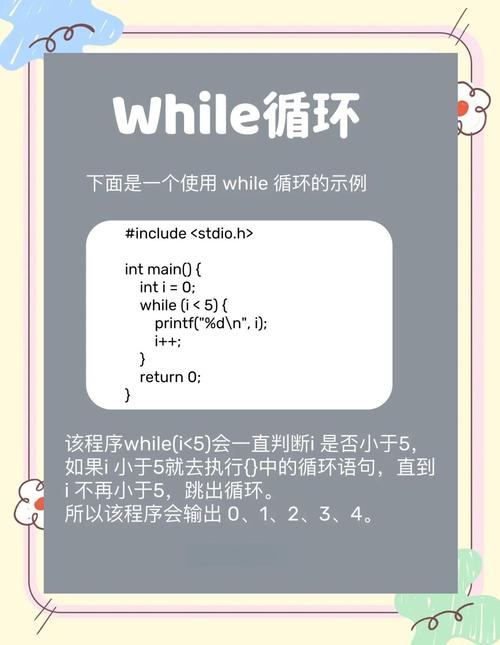
What is continue?
The continue keyword is a jump statement. When used inside a loop (like while, for, or do-while), it immediately terminates the current iteration and jumps to the beginning of the next iteration.
Think of it as saying: "Stop what I'm doing right now in this loop cycle, and let's start the next cycle immediately."
How continue Works in a while Loop
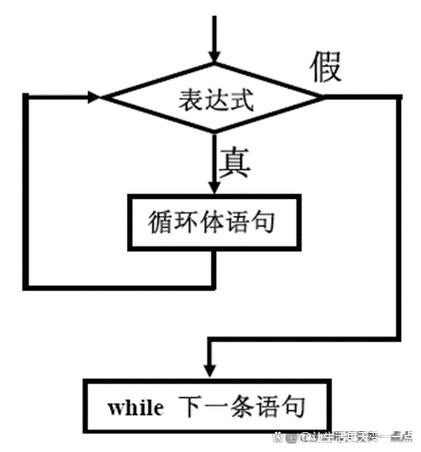
In a while loop, the flow is as follows:
- Check the condition. If it's
false, the loop terminates. - Execute the loop body.
- If the body encounters a
continuestatement, the rest of the code in the current iteration is skipped.
- If the body encounters a
- Go back to Step 1. The condition is checked again for the next iteration.
A key point to remember is that continue does not re-evaluate the while loop's condition itself. It just skips to the top, where the condition is checked again.
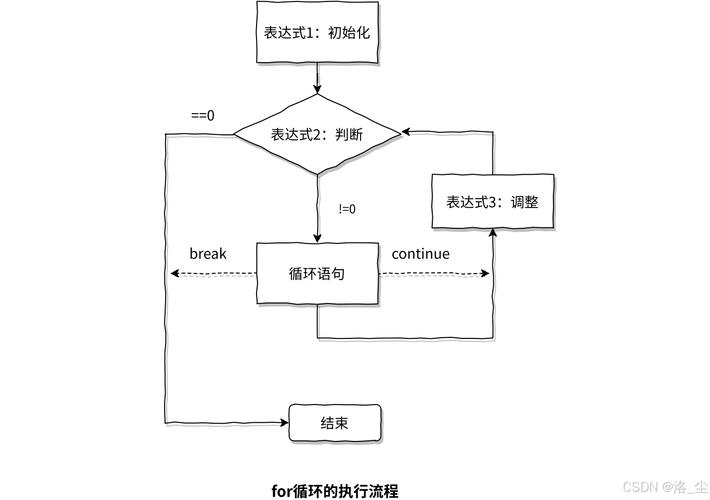
Visual Flowchart
      +-------------------+
      |  1. Check Condition |
      | (while (i < 10))   |
      +--------+----------+
               |
            /   \
          /       \
        /           \
      +-------------+  | No
      | 2. Execute  |  |
      |   Loop Body |  |
      +-------------+  |
           |    |      |
           |  Yes      |
           |    |      |
           V    |      |
      +-------------+  |
      |   continue? |  |
      +-------------+  |
           |    |      |
           | Yes|      |
           V    |      |
      +-------------+  |
      |   Skip to   |  |
      |   Step 1    |  |
      +-------------+  |
               |
               V
      +-------------------+
      | Loop Ends         |
      +-------------------+
Code Examples
Let's look at a few practical examples to see continue in action.
Example 1: Skipping an Odd Number
This is the classic example. We want to print all even numbers from 1 to 10.
public class ContinueWhileExample {
    public static void main(String[] args) {
        int i = 1;
        System.out.println("Printing even numbers from 1 to 10:");
        while (i <= 10) {
            // Check if the number is odd
            if (i % 2 != 0) {
                // If it's odd, skip this iteration and go to the next one
                i++; // IMPORTANT: We must increment i here!
                continue;
            }
            // This line will only be reached for even numbers
            System.out.println("Current number: " + i);
            // Increment the counter for the next iteration
            i++;
        }
    }
}
Output:
Printing even numbers from 1 to 10:
Current number: 2
Current number: 4
Current number: 6
Current number: 8
Current number: 10
Crucial Detail: Notice the i++ inside the if block. If you forget this, i would never change, the condition i <= 10 would always be true, and you'd be stuck in an infinite loop. This is a common pitfall with continue in while loops.
Example 2: Processing a List and Skipping Nulls
Imagine you have an array of names, and you want to print the length of each name, but you want to skip any null entries.
public class ContinueWhileListExample {
    public static void main(String[] args) {
        String[] names = {"Alice", null, "Bob", "Charlie", null, "David"};
        int index = 0;
        System.out.println("Processing names and skipping nulls:");
        while (index < names.length) {
            String currentName = names[index];
            // Check if the current name is null
            if (currentName == null) {
                System.out.println("Skipping null entry at index " + index);
                index++; // Move to the next item
                continue; // Skip the rest of this iteration
            }
            // This code only runs if the name is not null
            System.out.println("Name: " + currentName + ", Length: " + currentName.length());
            index++; // Move to the next item
        }
    }
}
Output:
Processing names and skipping nulls:
Name: Alice, Length: 5
Skipping null entry at index 1
Name: Bob, Length: 3
Name: Charlie, Length: 7
Skipping null entry at index 4
Name: David, Length: 5
continue vs. break
It's very important not to confuse continue with break.
| Feature | continue |
break |
|---|---|---|
| Action | Skips the rest of the current iteration and starts the next one. | Exits the entire loop immediately. |
| Analogy | "I'm done with this step, let's move to the next." | "I'm done with this entire task, I'm leaving the loop." |
| Example | In a while loop, continue jumps back to the condition check. |
In a while loop, break jumps to the code immediately after the while loop. |
Let's see them side-by-side.
public class ContinueVsBreak {
    public static void main(String[] args) {
        int i = 0;
        System.out.println("--- Using 'continue' ---");
        while (i < 5) {
            i++;
            if (i == 3) {
                continue; // Skip printing 3, but the loop continues
            }
            System.out.println("continue: " + i);
        }
        System.out.println("\n--- Using 'break' ---");
        i = 0; // Reset counter
        while (i < 5) {
            i++;
            if (i == 3) {
                break; // Exit the loop entirely
            }
            System.out.println("break: " + i);
        }
    }
}
Output:
--- Using 'continue' ---
continue: 1
continue: 2
continue: 4
continue: 5
--- Using 'break' ---
break: 1
break: 2
When to Use continue
Use continue to:
- Skip specific cases: When you want to process a collection but ignore certain items that don't meet a criteria (like
nullvalues, empty strings, or negative numbers). - Improve readability: It can make your code cleaner than using a deeply nested
if-elsestatement. Instead of wrapping a large block of code in anif (!condition) { ... }, you can check for the "skip" condition at the top and usecontinue.
When to Avoid continue
Be cautious with continue in while loops because of the risk of infinite loops if you forget to update your loop counter. It can sometimes make code harder to follow ("spaghetti code"). If the logic is simple, a standard if-else block might be more readable.
Summary
continueskips to the next iteration of a loop.- In a
whileloop, aftercontinueis executed, the program jumps back to the condition check. - Be careful to update your loop variables inside a
continueblock to avoid infinite loops. - Use
continueto skip specific items or improve code readability, but use it judiciously.