
Of course! This is a classic and powerful combination. Let's break down how these three technologies work together, from a high-level overview to practical examples.
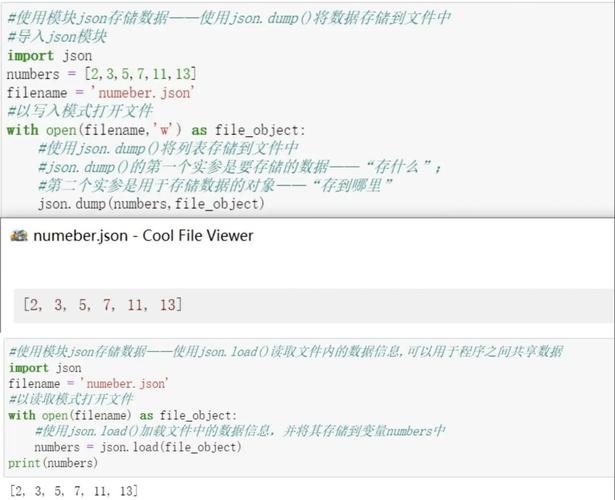
The Big Picture: A Classic Three-Tier Architecture
Think of this setup as a team working together:
- Linux: The Foundation or the Operating System. It's the stable, secure, and powerful platform where everything else runs. It's like the land and the building.
- MySQL: The Database. It's the organized filing cabinet or the warehouse. Its only job is to store, retrieve, and manage data efficiently and reliably.
- Python: The Brain or the Application. It's the intelligent worker that uses the operating system (Linux) to perform tasks. Its main job in this context is to talk to the MySQL database, fetch data, process it, and present it to the user (e.g., via a web browser).
Here's a simple flow:
User -> Python App (on Linux) -> MySQL Database (on Linux) -> Data is stored/retrieved -> Python App processes data -> Result is shown to User
Linux: The Operating System
Linux is the bedrock. It's not strictly necessary to understand Linux deeply to start, but you'll need to use it.
-
Why Linux?
- Free & Open Source: No licensing costs.
- Stable & Secure: Powers the majority of web servers in the world.
- Powerful & Flexible: You have complete control over your environment.
- Excellent for Development: Most cloud servers (AWS, Google Cloud, DigitalOcean) run on Linux. It's the standard for deploying web applications.
-
Essential Linux Commands for this Stack:
ssh user@your_server: Connect to your remote Linux server.sudo apt update && sudo apt upgrade: Update system packages (Debian/Ubuntu).sudo systemctl status mysql: Check if the MySQL service is running.sudo systemctl start mysql: Start the MySQL service.ufw allow 3306: Allow incoming connections to the MySQL port (be careful with this security-wise!).cd /var/www: Navigate to a common directory for web applications.python3 your_app.py: Run your Python script.
MySQL: The Database
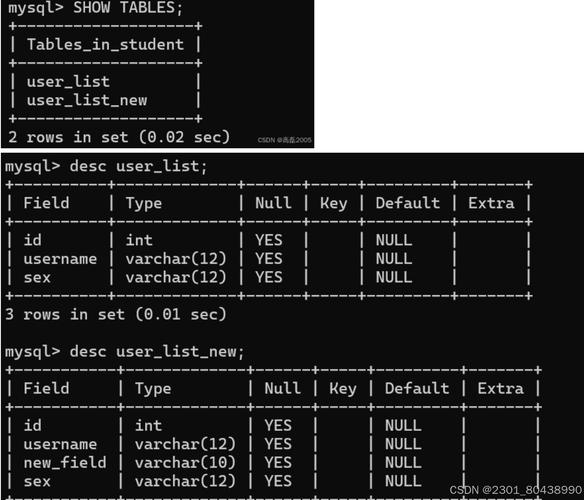
MySQL is a Relational Database Management System (RDBMS). It stores data in tables with rows and columns, like a sophisticated spreadsheet.
-
Core Concepts:
 (图片来源网络,侵删)
- Database: A container for all your tables (e.g.,
my_web_app). - Table: A collection of related data (e.g.,
users,products). - Schema: The structure of your tables (column names, data types like
INT,VARCHAR,DATETIME). - SQL (Structured Query Language): The language you use to "talk" to the database to
CREATE,READ,UPDATE, andDELETEdata (CRUD operations).
- Database: A container for all your tables (e.g.,
-
Basic MySQL Commands (using the command-line client):
mysql -u root -p: Log in to the MySQL server as the root user.CREATE DATABASE my_web_app;: Create a new database.USE my_web_app;: Select the database to work with.CREATE TABLE users (id INT AUTO_INCREMENT PRIMARY KEY, name VARCHAR(100), email VARCHAR(100) UNIQUE);: Create a table.INSERT INTO users (name, email) VALUES ('Alice', 'alice@example.com');: Add a new row.SELECT * FROM users;: Retrieve all data from theuserstable.UPDATE users SET name = 'Bob' WHERE id = 1;: Update existing data.DELETE FROM users WHERE id = 1;: Delete a row.
Python: The Connector
Python is the glue that brings your application logic and your database together. To do this, you need a "driver" or "connector" library.
The Practical Guide: Connecting Python to MySQL on Linux
Here is a step-by-step guide to setting this up on a typical Linux server (like Ubuntu).
Step 1: Install MySQL on Linux
# Update your package list
sudo apt update
# Install the MySQL server
sudo apt install mysql-server
# Secure the installation (sets a root password, removes anonymous users, etc.)
sudo mysql_secure_installation
Step 2: Create a Database and User for Your App
It's bad practice to use the root user for your application. Let's create a dedicated user.
# Log in to MySQL as root
sudo mysql -p
# Once inside the MySQL shell:
CREATE DATABASE my_app_db;
CREATE USER 'my_app_user'@'localhost' IDENTIFIED BY 'a_very_strong_password';
GRANT ALL PRIVILEGES ON my_app_db.* TO 'my_app_user'@'localhost';
FLUSH PRIVILEGES;
EXIT;
Step 3: Install the Python MySQL Connector
The most common library is mysql-connector-python.
# It's best practice to use a virtual environment
python3 -m venv my_app_env
source my_app_env/bin/activate
# Install the connector library
pip install mysql-connector-python
Step 4: Write Python Code to Interact with MySQL
Now for the fun part! Let's create a simple Python script (db_example.py).
import mysql.connector
from mysql.connector import Error
def create_connection(host_name, user_name, user_password, db_name):
    """Establishes a connection to the MySQL database."""
    connection = None
    try:
        connection = mysql.connector.connect(
            host=host_name,
            user=user_name,
            passwd=user_password,
            database=db_name
        )
        print("Connection to MySQL DB successful")
    except Error as e:
        print(f"The error '{e}' occurred")
    return connection
def create_table(connection):
    """Creates a 'books' table if it doesn't exist."""
    cursor = connection.cursor()
    create_table_query = """
    CREATE TABLE IF NOT EXISTS books (
        id INT AUTO_INCREMENT PRIMARY KEY,
        title VARCHAR(255) NOT NULL,
        author VARCHAR(255) NOT NULL,
        year_published INT
    )
    """
    try:
        cursor.execute(create_table_query)
        print("Table 'books' created successfully")
    except Error as e:
        print(f"The error '{e}' occurred")
def insert_book(connection, title, author, year):
    """Inserts a new book into the 'books' table."""
    cursor = connection.cursor()
    insert_query = "INSERT INTO books (title, author, year_published) VALUES (%s, %s, %s)"
    book_data = (title, author, year)
    try:
        cursor.execute(insert_query, book_data)
        connection.commit() # Commit the transaction
        print(f"Book '{title}' inserted successfully")
    except Error as e:
        print(f"The error '{e}' occurred")
def fetch_all_books(connection):
    """Fetches and prints all books from the 'books' table."""
    cursor = connection.cursor()
    select_query = "SELECT * FROM books"
    try:
        cursor.execute(select_query)
        rows = cursor.fetchall()
        print("\n--- All Books ---")
        for row in rows:
            print(f"ID: {row[0]}, Title: {row[1]}, Author: {row[2]}, Year: {row[3]}")
        print("-----------------\n")
    except Error as e:
        print(f"The error '{e}' occurred")
# --- Main execution ---
if __name__ == "__main__":
    # Connection details (replace with your own)
    db_host = "localhost"
    db_user = "my_app_user"
    db_password = "a_very_strong_password"
    db_name = "my_app_db"
    # Connect to the database
    conn = create_connection(db_host, db_user, db_password, db_name)
    if conn is not None:
        # Create the table
        create_table(conn)
        # Insert some data
        insert_book(conn, "The Hobbit", "J.R.R. Tolkien", 1937)
        insert_book(conn, "1984", "George Orwell", 1949)
        insert_book(conn, "Dune", "Frank Herbert", 1965)
        # Fetch and display all data
        fetch_all_books(conn)
        # Close the connection
        conn.close()
        print("MySQL connection is closed")
Step 5: Run the Script
Make sure your virtual environment is active, then run the script from your Linux terminal:
python3 db_example.py
Expected Output:
Connection to MySQL DB successful
Table 'books' created successfully
Book 'The Hobbit' inserted successfully
Book '1984' inserted successfully
Book 'Dune' inserted successfully
--- All Books ---
ID: 1, Title: The Hobbit, Author: J.R.R. Tolkien, Year: 1937
ID: 2, Title: 1984, Author: George Orwell, Year: 1949
ID: 3, Title: Dune, Author: Frank Herbert, Year: 1965
-----------------
MySQL connection is closed
Popular Alternatives & Next Steps
- Alternative Python Libraries:
mysqlclient: A faster, C-based wrapper around the MySQL C API. It's what older versions of Django used by default. Can be a bit trickier to install.PyMySQL: A pure Python implementation. Very lightweight and easy to use.
- Alternative Databases:
- PostgreSQL: Often considered more advanced and robust than MySQL. A very popular choice.
- SQLite: A serverless, file-based database. Great for simple applications, small projects, or development where you don't need a separate database server.
- Next Steps:
- Web Frameworks: Use this stack within a framework like Django (which has its own ORM that simplifies database interaction) or Flask (which gives you more control and you use a library like SQLAlchemy).
- Security: Learn about SQL Injection and always use parameterized queries (like we did with
%sin the example) to prevent it. - Deployment: Learn how to deploy your Python application (e.g., using Gunicorn/uWSGI) and your MySQL database on a cloud server like AWS or DigitalOcean.











