Of course! The if, elif, and else statements are fundamental building blocks in Python for controlling the flow of your program. They allow you to execute certain blocks of code only if specific conditions are met.
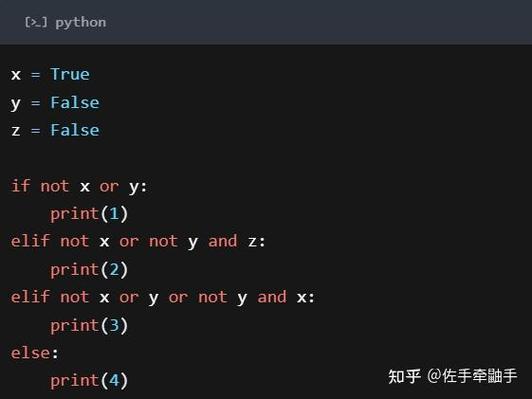
Let's break it down from the simplest case to more complex ones.
The Basic if Statement
This is the most fundamental form. It checks a single condition. If the condition is True, the code inside the if block is executed. If the condition is False, the code is simply skipped.
Syntax:
if condition:
    # This code runs only if the condition is True
    # (Notice the indentation! It's crucial in Python)
Example:
age = 18
if age >= 18:
    print("You are eligible to vote.")
print("This line will always be printed.")
Output:
You are eligible to vote.
This line will always be printed.
If we change age to 16, the output would be:
This line will always be printed.The if-else Statement
This is used when you have two possible paths: one for when the condition is True and another for when it's False.
Syntax:

if condition:
    # This code runs if the condition is True
else:
    # This code runs if the condition is False
Example:
temperature = 15
if temperature > 20:
    print("It's a warm day.")
else:
    print("It's a bit chilly today.")
Output:
It's a bit chilly today.The if-elif-else Chain
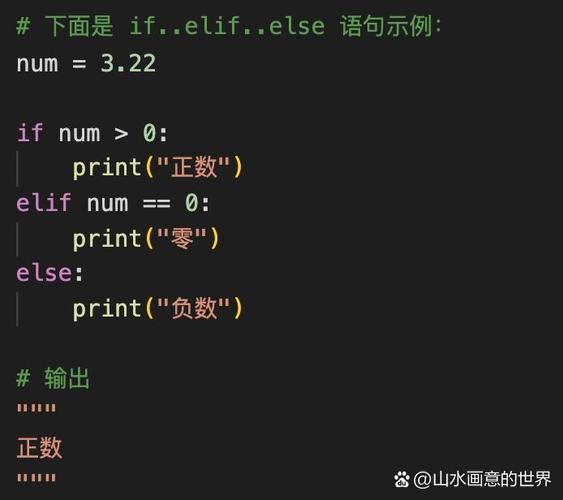
This is the most common and powerful structure. It allows you to check a series of conditions. Python will execute the block for the first condition that is True. Once a condition is met, it skips all the remaining elif and else blocks.
Syntax:
if condition1:
    # Code if condition1 is True
elif condition2:
    # Code if condition1 is False, but condition2 is True
elif condition3:
    # Code if condition1 and condition2 are False, but condition3 is True
else:
    # Code if all the above conditions are False
Example:
score = 85
if score >= 90:
    print("Grade: A")
elif score >= 80:
    print("Grade: B")
elif score >= 70:
    print("Grade: C")
elif score >= 60:
    print("Grade: D")
else:
    print("Grade: F")
# Let's trace this:
# 1. Is 85 >= 90? No.
# 2. Is 85 >= 80? Yes! This block is executed. The rest are skipped.
Output:
Grade: BNested if Statements
You can place an if statement inside another if statement. This is called nesting. Be careful, as too much nesting can make your code hard to read.
Example:
age = 25
has_license = True
if age >= 18:
    print("You are old enough to drive.")
    if has_license:
        print("And you have a license. You can drive a car.")
    else:
        print("But you don't have a license yet.")
else:
    print("You are not old enough to drive.")
Output:
You are old enough to drive.
And you have a license. You can drive a car.
Combining Conditions with and, or, not
You can create more complex conditions by combining them with logical operators.
and: The condition isTrueonly if all conditions areTrue.or: The condition isTrueif at least one of the conditions isTrue.not: Reverses the boolean value of a condition (TruebecomesFalse, and vice-versa).
Example with and:
age = 20
is_student = True
if age < 25 and is_student:
    print("You are eligible for the student discount.")
else:
    print("You are not eligible for the student discount.")
Output:
You are eligible for the student discount.Example with or:
day = "Saturday"
is_holiday = False
if day == "Saturday" or day == "Sunday" or is_holiday:
    print("It's the weekend or a holiday! Time to relax.")
else:
    print("It's a weekday. Time to work.")
Output:
It's the weekend or a holiday! Time to relax.The Ternary Conditional Operator (One-Liner if-else)
For simple if-else assignments, Python offers a concise, one-line version. This is great for making your code more readable and compact.
Syntax:
value_if_true if condition else value_if_false
Example:
age = 17
status = "Adult" if age >= 18 else "Minor"
print(f"This person is a {status}.")
Output:
This person is a Minor.Key Takeaways
-
Indentation is King: Unlike other languages that use curly braces , Python uses indentation (usually 4 spaces) to define blocks of code. Incorrect indentation will result in an
IndentationError. -
Conditions are Expressions: The
conditionin anifstatement must evaluate to a boolean value (TrueorFalse). This can be a direct boolean (if True:) or an expression that results in a boolean (if 5 > 3:). -
elifvs. Multipleifs: Be careful of the difference. Anif-elif-elsechain is an exclusive structure—only one block runs. Multiple separateifstatements are inclusive—each one is checked independently, and multiple blocks can run.# Exclusive: Only one of these will print if x > 10: print("x is greater than 10") elif x > 5: print("x is greater than 5") else: print("x is 5 or less") # Inclusive: Both could print if x is 15 if x > 10: print("x is greater than 10") if x > 5: print("x is greater than 5")