Of course! The combination of Python and Oracle DBA is a powerful and increasingly essential skill set in the modern IT landscape. Python acts as a "force multiplier" for a DBA, automating tedious tasks, providing deep insights, and enabling complex operations that would be difficult or impossible with traditional shell scripting.
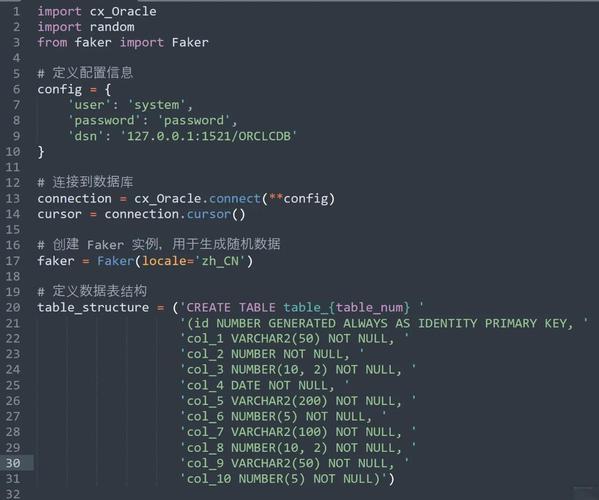
Here’s a comprehensive guide covering why, how, and what you can do with Python as an Oracle DBA.
Why Python for an Oracle DBA?
If you're an Oracle DBA, you might wonder, "Why learn another language?" The answer lies in efficiency and capability.
- Automation: The primary reason. Automate daily checks, health reports, batch job monitoring, and space management. What used to take hours of manual work can be scripted to run in minutes.
- Powerful Data Analysis: Python's libraries like Pandas and NumPy are industry standards for data manipulation and analysis. You can pull performance data from AWR reports or ASH and perform sophisticated analysis to find the root cause of a performance issue.
- Integration and Orchestration: Python can easily integrate with other systems. Trigger an Ansible playbook from a database alert, send a detailed Slack message when a critical error occurs, or push metrics to a monitoring system like Prometheus or Grafana.
- Cloud and DevOps: The modern DBA role is evolving towards "DevOps DBA" or "Data Engineer." Python is the lingua franca of the cloud (AWS, Azure, GCP) and DevOps tools (Terraform, Docker, Kubernetes). Knowing Python is crucial for managing databases in these environments.
- Beyond SQL: While SQL is powerful for data within the database, Python allows you to process data after it's been extracted. You can merge data from multiple sources (database, logs, APIs), perform complex calculations, and generate rich visualizations.
- Ease of Use: Python has a simple, readable syntax. It's much easier to learn and maintain than Perl or Java, and it has a vast ecosystem of pre-built libraries for almost any task imaginable.
The Essential Python Libraries for an Oracle DBA
You don't need to be a Python expert to be effective, but you should be comfortable with its core concepts and key libraries.
| Library | Purpose | Key Use Cases for DBA |
|---|---|---|
cx_Oracle |
The most important one. This is the official Oracle Database driver for Python. It allows your Python script to connect to the database, execute SQL and PL/SQL, and fetch results. | Everything! Running queries, executing DDL/DML, calling stored procedures, fetching AWR data. |
pandas |
A powerful data analysis and manipulation library. It provides data structures like DataFrames, which are like in-memory spreadsheets. | Processing AWR/ASH reports, analyzing performance data, comparing database statistics over time, creating reports. |
matplotlib & seaborn |
Plotting and visualization libraries. | Creating charts and graphs for performance reports (e.g., wait event charts, execution time trends). |
os, subprocess |
Built-in libraries for interacting with the operating system. | Running OS commands from Python (e.g., ls, ps, tail -f), managing files, executing RMAN scripts via rman cmdfile=.... |
logging |
Built-in library for event logging. | Essential for creating robust scripts. Log script execution, errors, and important information to a file instead of just print(). |
argparse |
Built-in library for creating command-line interfaces. | Make your scripts flexible by accepting arguments like a date range, a specific database name, or a threshold value. |
schedule |
A simple library for running jobs at specific intervals. | A lightweight alternative to cron for scheduling tasks directly within your script. |
slack_sdk |
The official SDK for interacting with Slack. | Sending notifications to Slack channels when an alert is triggered. |
smtplib |
Built-in library for sending emails. | Sending detailed email reports with attachments. |
Practical Examples: Python in Action for a DBA
Let's see some concrete examples of what you can build.
Example 1: Basic Health Check Script
This script connects to the database and checks for critical issues like long-running transactions, tablespace usage, and invalid objects.
import cx_Oracle
import pandas as pd
from datetime import datetime
# --- Configuration ---
DB_USER = "sys"
DB_PASSWORD = "your_password"
DB_DSN = "your_host:your_port/your_service_name" # Use AS SYSDBA
THRESHOLD_MINUTES = 60 # Alert for transactions running longer than 60 mins
# --- Main Logic ---
def run_health_check():
    """Connects to Oracle and runs a series of health checks."""
    try:
        # Create connection
        connection = cx_Oracle.connect(user=DB_USER, password=DB_PASSWORD, dsn=DB_DSN, mode=cx_Oracle.SYSDBA)
        print(f"Successfully connected to {connection.version}")
        cursor = connection.cursor()
        # 1. Check for long-running transactions
        print("\n--- Checking for long-running transactions ---")
        query_long_tx = f"""
        SELECT s.sid, serial#, s.username, s.status, s.last_call_et/60 minutes_running
        FROM v$session s
        WHERE s.username IS NOT NULL
        AND s.last_call_et > {THRESHOLD_MINUTES} * 60
        """
        cursor.execute(query_long_tx)
        long_tx = cursor.fetchall()
        if long_tx:
            print("WARNING: Long-running transactions found:")
            for tx in long_tx:
                print(f"  SID: {tx[0]}, SERIAL#: {tx[1]}, USER: {tx[2]}, MINUTES: {tx[4]:.2f}")
        else:
            print("No long-running transactions found.")
        # 2. Check tablespace usage
        print("\n--- Checking tablespace usage (alert if > 85%) ---")
        query_tbs = """
        SELECT df.tablespace_name, ROUND(df.space_used/df.space_total * 100, 2) "Pct Used",
               ROUND(df.space_total/1024/1024/1024, 2) "Total GB",
               ROUND(df.space_free/1024/1024/1024, 2) "Free GB"
        FROM (
            SELECT tablespace_name,
                   SUM(bytes) space_used,
                   (SELECT SUM(bytes) FROM dba_data_files WHERE tablespace_name = df.tablespace_name) space_total
            FROM dba_free_space df
            GROUP BY tablespace_name
        ) df
        WHERE df.tablespace_name NOT IN ('SYSTEM', 'SYSAUX') -- Exclude system tablespaces
        ORDER BY "Pct Used" DESC
        """
        cursor.execute(query_tbs)
        tbs_usage = cursor.fetchall()
        for tbs in tbs_usage:
            pct_used = tbs[1]
            if pct_used > 85:
                print(f"CRITICAL: Tablespace {tbs[0]} is {pct_used:.2f}% full. (Total: {tbs[2]} GB, Free: {tbs[3]} GB)")
            elif pct_used > 75:
                print(f"WARNING: Tablespace {tbs[0]} is {pct_used:.2f}% full.")
            else:
                print(f"OK: Tablespace {tbs[0]} is {pct_used:.2f}% full.")
        # 3. Check for invalid objects
        print("\n--- Checking for invalid objects ---")
        cursor.execute("SELECT owner, object_name, object_type FROM dba_objects WHERE status = 'INVALID' AND owner NOT IN ('SYS', 'SYSTEM')")
        invalid_objects = cursor.fetchall()
        if invalid_objects:
            print("WARNING: Invalid objects found:")
            for obj in invalid_objects:
                print(f"  OWNER: {obj[0]}, NAME: {obj[1]}, TYPE: {obj[2]}")
        else:
            print("No invalid objects found.")
    except cx_Oracle.DatabaseError as e:
        error, = e.args
        print(f"Database Error: {error.code} - {error.message}")
    finally:
        if 'connection' in locals() and connection:
            cursor.close()
            connection.close()
            print("\nDatabase connection closed.")
if __name__ == "__main__":
    run_health_check()
Example 2: Parsing AWR Data with Pandas
This script fetches SQL execution statistics from the AWR and uses Pandas to analyze them.
import cx_Oracle
import pandas as pd
# --- Configuration ---
DB_USER = "your_user" # Needs AWR privileges
DB_PASSWORD = "your_password"
DB_DSN = "your_host:your_port/your_service_name"
# --- Main Logic ---
def analyze_top_sql():
    """Fetches top SQL by elapsed time from AWR and analyzes it with Pandas."""
    try:
        connection = cx_Oracle.connect(user=DB_USER, password=DB_PASSWORD, dsn=DB_DSN)
        cursor = connection.cursor()
        # AWR query to get top SQL by average elapsed time
        # This is a simplified example; a real query would be more complex
        awr_query = """
        SELECT sql_id, plan_hash_value, executions, elapsed_time/1000000 avg_elapsed_sec,
               disk_reads, buffer_gets
        FROM dba_hist_sqlstat
        WHERE dbid = (SELECT dbid FROM v$database)
        AND snap_id BETWEEN (SELECT MAX(snap_id) FROM dba_hist_snapshot) - 6 AND (SELECT MAX(snap_id) FROM dba_hist_snapshot)
        ORDER BY avg_elapsed_sec DESC
        """
        # Fetch data into a Pandas DataFrame directly
        df = pd.read_sql(awr_query, connection)
        if df.empty:
            print("No AWR data found for the specified period.")
            return
        print("\n--- Top SQL by Average Elapsed Time (last 6 snaps) ---")
        print(df.head(10)) .head(10) # Show top 10
        # Add useful columns using Pandas
        df['avg_sec_per_exec'] = df['avg_elapsed_sec'] / df['executions']
        df['buffer_gets_per_exec'] = df['buffer_gets'] / df['executions']
        df['disk_reads_per_exec'] = df['disk_reads'] / df['executions']
        # Find SQL with high logical reads per execution
        print("\n--- SQL with High Logical Reads per Execution (> 1000) ---")
        high_logical_reads = df[df['buffer_gets_per_exec'] > 1000]
        if not high_logical_reads.empty:
            print(high_logical_reads[['sql_id', 'avg_sec_per_exec', 'buffer_gets_per_exec']])
        else:
            print("No SQL found with high logical reads per execution.")
    except cx_Oracle.DatabaseError as e:
        error, = e.args
        print(f"Database Error: {error.code} - {error.message}")
    finally:
        if 'connection' in locals() and connection:
            connection.close()
            print("\nDatabase connection closed.")
if __name__ == "__main__":
    analyze_top_sql()
How to Get Started: A Learning Path
- Learn Python Fundamentals: Don't skip this. Focus on variables, data types (lists, dictionaries), loops (
for,while), conditionals (if/else), and functions. - Install Python and
pip: Make sure you have Python 3 installed on your machine.pipis the package installer that comes with it. - Install
cx_Oracle: Open your terminal or command prompt and run:pip install cx_Oracle
- Set Up Oracle Instant Client:
cx_Oracleneeds Oracle client libraries. The easiest way is to download the Oracle Instant Client from Oracle's website and add its path to your system'sPATHenvironment variable. - Write Your First Script: Start simple. Write a script that just connects to the database and executes
SELECT 'Hello from Python!' FROM DUAL;. Print the result. - Build on Examples: Take the examples above, run them, and then modify them. Change the queries, add new checks, or format the output differently.
- Integrate with Other Tools: Once you're comfortable, try to integrate your script with another tool. For example, use the
pandasDataFrame you created and save it as an Excel file usingdf.to_excel('report.xlsx').
Important Considerations
- Security: NEVER hardcode passwords in your scripts. Use environment variables, a configuration file with restricted permissions, or a secrets management tool (like HashiCorp Vault or AWS Secrets Manager).
- Error Handling: Always wrap your database calls in
try...exceptblocks. A script that crashes silently is worse than no script at all. - Performance: Be mindful of the queries you run. Don't pull massive amounts of data into memory if you don't need to. Use
WHEREclauses to filter data at the database level. - Permissions: The Python script will run with the permissions of the OS user and the database user it connects as. Ensure the database user has the necessary privileges (e.g.,
SELECT_CATALOG_ROLE,DBAfor some checks).
By embracing Python, you can transform your role from a reactive "fire-fighter" to a proactive, strategic database professional who leverages automation and data to drive stability and performance.