一次遍历,构建新字符串
replace 算法的核心思想非常直观:
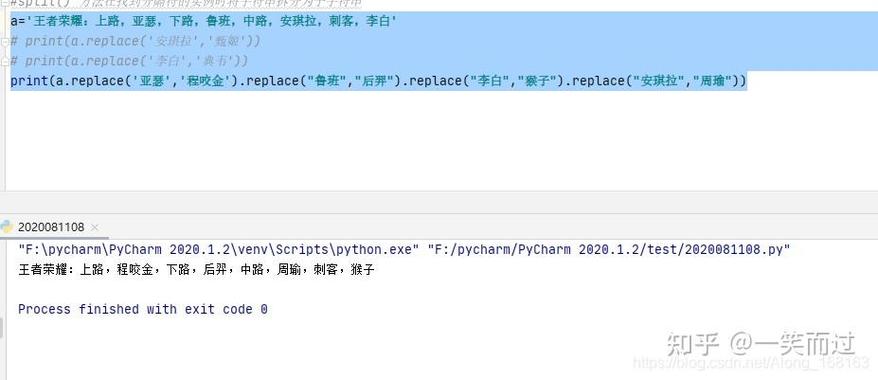
- 遍历原始字符串:从头到尾检查原始字符串的每一个字符。
- 查找匹配项:在遍历过程中,检查从当前位置开始的子串是否与我们要查找的“旧子串”(
old)相匹配。 - 构建新字符串:
- 如果匹配成功,就将“新子串”(
new)添加到结果中,然后跳过“旧子串”的长度,继续从下一个位置检查。 - 如果没有匹配,就将当前字符直接添加到结果中,并移动到下一个位置。
- 如果匹配成功,就将“新子串”(
- 返回结果:当原始字符串遍历完毕后,构建出的新字符串就是最终的结果。
这个算法可以看作是一种模式匹配和字符串构建的结合体。
算法步骤分解
让我们用一个具体的例子来分解这个过程。
假设我们要执行:
my_string = "hello world, hello python".replace("hello", "hi")
目标: 将 "hello" 替换为 "hi"
原始字符串: "hello world, hello python"
新字符串: (初始为空)
步骤分解:
-
索引
i = 0:- 检查从索引
0开始的子串my_string[0:5](即"hello")。 - 它与
"hello"匹配! - 将
"hi"添加到新字符串:new_string = "hi" - 跳过
len("hello")(即 5) 个字符,将索引移动到i = 5。
- 检查从索引
-
索引
i = 5:- 当前字符是 (空格)。
- 它不是
"hello"的开头,所以不匹配。 - 将 添加到新字符串:
new_string = "hi " - 索引移动到
i = 6。
-
索引
i = 6: (图片来源网络,侵删)
- 当前字符是
'w'。 - 它不是
"hello"的开头,所以不匹配。 - 将
'w'添加到新字符串:new_string = "hi w" - 索引移动到
i = 7。 - ... (这个过程会一直持续,直到遇到下一个可能的匹配点)
- 当前字符是
-
索引
i = 13:- 检查从索引
13开始的子串my_string[13:18](即"hello")。 - 它与
"hello"再次匹配! - 将
"hi"添加到新字符串:new_string = "hi world, hi" - 跳过
len("hello")(即 5) 个字符,将索引移动到i = 18。
- 检查从索引
-
索引
i = 18:- 当前字符是
'p'。 - 它不是
"hello"的开头,所以不匹配。 - 将
'p'添加到新字符串:new_string = "hi world, hip" - ... (继续这个过程直到字符串末尾)
- 当前字符是
-
结束:
- 遍历完整个字符串后,最终得到的新字符串是:
"hi world, hi python"。
- 遍历完整个字符串后,最终得到的新字符串是:
Python 代码实现(伪代码)
为了更好地理解,我们可以用 Python 写一个简化版的 replace 函数,它体现了上述算法的逻辑。
def my_replace(text, old, new):
    """
    一个简化版的 replace 算法实现。
    """
    if not old:
        # old 是空字符串,Python 的标准行为是返回原始字符串的副本。
        # 或者也可以抛出 ValueError,取决于具体实现。
        return text
    result = []  # 使用列表来高效地构建字符串
    i = 0
    old_len = len(old)
    text_len = len(text)
    while i < text_len:
        # 检查从当前位置 i 开始的子串是否等于 old
        if text[i:i+old_len] == old:
            # 如果匹配,添加 new 并跳过 old 的长度
            result.append(new)
            i += old_len
        else:
            # 如果不匹配,添加当前字符并移动到下一个位置
            result.append(text[i])
            i += 1
    # 将列表中的所有元素连接成一个字符串
    return "".join(result)
# --- 测试 ---
original_str = "hello world, hello python"
replaced_str = my_replace(original_str, "hello", "hi")
print(f"原始字符串: {original_str}")
print(f"替换后字符串: {replaced_str}")
# 输出:
# 原始字符串: hello world, hello python
# 替换后字符串: hi world, hi python
# 测试不匹配的情况
replaced_str_2 = my_replace(original_str, "foo", "bar")
print(f"不匹配时的结果: {replaced_str_2}")
# 输出:
# 不匹配时的结果: hello world, hello python
为什么使用 list.append() 和 "".join()?
在 Python 中,字符串是不可变的,如果你在循环中不断使用 来拼接字符串,result = result + new,每次操作都会创建一个新的字符串对象,这非常低效,时间复杂度会变成 O(n²)。
而使用列表 result 来收集所有字符串片段,最后只调用一次 "".join(result),时间复杂度是 O(n),这是 Python 中构建字符串的标准高效方式。
核心算法分析
-
时间复杂度: *O(n m)**
n是原始字符串的长度。m是“旧子串”(old)的长度。- 在最坏的情况下,比如字符串是
"aaaaa",要替换的是"aa",我们几乎要在每个位置都进行一次长度为m的比较,时间复杂度是n和m的乘积。
-
空间复杂度: O(n)
- 算法需要创建一个新的字符串来存储结果,在最坏情况下(没有匹配,或者
new比old长很多),新字符串的长度可能与原始字符串相当,甚至更长,空间复杂度与输入字符串的长度n成正比。
- 算法需要创建一个新的字符串来存储结果,在最坏情况下(没有匹配,或者
str.replace() 的其他重要参数
我们上面的讨论默认是全局替换,Python 的 str.replace() 还有一个可选的 count 参数,用于限制替换的次数。
算法如何处理 count?
这只需要在上述算法的核心循环中增加一个计数器即可。
- 初始化一个替换计数器
replaced_count = 0。 - 在每次成功匹配并添加
new到结果后,执行replaced_count += 1。 - 在循环开始前,检查
if count is not None and replaced_count >= count:,如果条件成立,就跳出循环,并将剩余的原始字符串直接拼接到结果后面。
示例代码(带 count 参数):
def my_replace_with_count(text, old, new, count=-1):
    if not old:
        return text
    result = []
    i = 0
    old_len = len(old)
    text_len = len(text)
    replaced_count = 0
    while i < text_len:
        # 如果已经达到替换次数,直接跳出循环
        if count != -1 and replaced_count >= count:
            break
        if text[i:i+old_len] == old:
            result.append(new)
            i += old_len
            replaced_count += 1
        else:
            result.append(text[i])
            i += 1
    # 如果因为达到 count 而跳出循环,需要把剩下的部分加上
    if i < text_len:
        result.append(text[i:])
    return "".join(result)
# --- 测试 ---
s = "one two three two one"
print(f"原始字符串: {s}")
# 只替换前两次
replaced_2 = my_replace_with_count(s, "two", "2", count=2)
print(f"替换前两次: {replaced_2}")
# 输出: 替换前两次: one 2 three 2 one
# 只替换第一次
replaced_1 = my_replace_with_count(s, "two", "2", count=1)
print(f"替换第一次: {replaced_1}")
# 输出: 替换第一次: one 2 three two one
Python 的 str.replace() 算法是一个简单、健壮且高效的字符串处理工具,其核心是:
- 一次遍历:通过一个循环扫描整个原始字符串。
- 模式匹配:在循环中检查子串是否匹配。
- 高效构建:使用列表和
join方法来避免不必要的字符串拷贝,从而保证性能。 - 灵活控制:通过
count参数可以轻松实现局部替换功能。
理解这个算法不仅能让你更好地使用 replace 方法,也能为你自己编写类似的字符串处理逻辑(如删除、插入等)提供坚实的基础。