Of course! Here is a comprehensive Python cheatsheet covering the most essential concepts, from basic syntax to more advanced features. It's structured to be a quick reference.
(图片来源网络,侵删)
Python Cheatsheet
Basics & Syntax
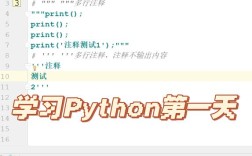
- Comments:
# This is a single-line comment- Multiline:
"""This is a multiline comment (docstring)"""
- Multiline:
- Variables: No declaration needed. Dynamic typing.
name = "Alice"
age = 30
height = 5.6
is_student = True
- Print:
print("Hello, World!") print(name, age) # Output: Alice 30 print(f"Hello, {name}") # f-string (recommended) print("Hello, " + name) # Concatenation - Input:
user_input = input("Enter your name: ") # Returns a string
print(f"Hello, {user_input}")
Data Types
- Numbers:
int,float,complexx = 10 # int y = 3.14 # float z = 2 + 3j # complex
- Strings:
strs = "Hello" s = 'Hello' s = """This is a multiline string."""
- Indexing/Slicing:
s[0]is 'H',s[1:4]is 'ell',s[-1]is 'o'.
- Indexing/Slicing:
- Booleans:
True,False - Lists: Ordered, mutable collections.
[ ]my_list = [1, "apple", 3.14, True] my_list.append("banana") # Add to end my_list[0] = 10 # Change element my_list.remove("apple") # Remove by value - Tuples: Ordered, immutable collections.
my_tuple = (1, "apple", 3.14)
# my_tuple[0] = 10 # This will cause an error
- Dictionaries: Key-value pairs. Unordered (in Python < 3.7), mutable.
my_dict = {"name": "Alice", "age": 30} my_dict["city"] = "New York" # Add or update print(my_dict["name"]) # Access value - Sets: Unordered collections of unique items.
my_set = {1, 2, 2, 3} # Becomes {1, 2, 3}
my_set.add(4)
my_set.remove(2)
Operators
- Arithmetic: , , , (float division), (floor division), (modulo), (exponent)
- Comparison:
, ,
>,<,>=,<= - Logical:
and,or,not - Membership:
in,not inprint("apple" in ["apple", "banana"]) # True print("apple" not in {"orange", "kiwi"}) # True - Assignment:
, , , , , etc.
x = 5
x += 3 # x is now 8
Control Flow
-
If/Elif/Else:
if age < 18: print("Minor") elif age >= 18 and age < 65: print("Adult") else: print("Senior") -
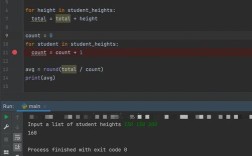
For Loops:
# Iterate over a list for item in my_list: print(item) # Iterate with index for i in range(len(my_list)): print(f"Index {i}: {my_list[i]}") # Using enumerate (more Pythonic) for index, item in enumerate(my_list): print(f"Index {index}: {item}") -
While Loops:
count = 0 while count < 5: print(count) count += 1 -
Break & Continue:
break: Exits the loop immediately.continue: Skips the rest of the current iteration and moves to the next.
Functions
-
Definition:
def greet(name, greeting="Hello"): # name is required, greeting is optional """This function greets a person.""" return f"{greeting}, {name}!" message = greet("Bob") print(message) # Output: Hello, Bob! -
Arguments:
- Positional:
greet("Charlie") - Keyword:
greet(name="Charlie", greeting="Hi") - *Arbitrary `args` (variable positional):**
def sum_all(*args): return sum(args) print(sum_all(1, 2, 3, 4)) # 10 - Arbitrary `kwargs` (variable keyword):**
def print_details(**kwargs):
    for key, value in kwargs.items():
        print(f"{key}: {value}")
print_details(name="David", age=40, city="London")
- Positional:
-
Lambda Functions (Anonymous):
# Single expression, anonymous
square = lambda x: x**2
print(square(5)) # 25
Data Structures (Advanced Operations)
- List Comprehensions: (Create lists concisely)
# Create a list of squares
squares = [x**2 for x in range(10)]
# Create a list of squares for even numbers only
even_squares = [x**2 for x in range(10) if x % 2 == 0]
- Dictionary Comprehensions:
# Create a dictionary mapping numbers to their squares square_dict = {x: x**2 for x in range(5)} - Set Comprehensions:
# Create a set of unique lengths of words
word_lengths = {len(word) for word in ["hello", "world", "python"]}
File I/O
- Reading a file:
# 'r' for read mode (default) with open("my_file.txt", "r") as f: content = f.read() # Reads entire file # for line in f: # Reads line by line # print(line) - Writing to a file:
# 'w' for write mode (overwrites file)
# 'a' for append mode (adds to end of file)
with open("my_file.txt", "w") as f:
    f.write("Hello, this is a new line.\n")
    f.write("This is another line.")
Error Handling
- Try/Except/Finally:
try:
    result = 10 / 0
except ZeroDivisionError:
    print("Cannot divide by zero!")
except Exception as e:
    print(f"An error occurred: {e}")
finally:
    print("This block always runs.")
Object-Oriented Programming (OOP)
-
Class Definition:
class Dog: # Class attribute (shared by all instances) species = "Canis familiaris" # Constructor/Initializer def __init__(self, name, age): self.name = name self.age = age # Instance method def bark(self): return f"{self.name} says Woof!" # String representation def __str__(self): return f"{self.name} is {self.age} years old." -
Creating an Object (Instance):
my_dog = Dog("Rex", 5)
print(my_dog) # Uses __str__
print(my_dog.bark())
print(my_dog.species)
Modules & Packages
-
Importing a Module:
import math
print(math.sqrt(16)) # 4.0
from math import pi, sqrt
print(sqrt(25)) # 5.0
import math as m
print(m.pi) # 3.14159...
-
Installing a Package (using pip):
pip install requests
Useful Built-in Functions
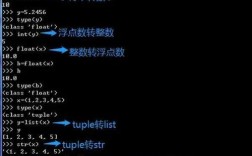
len(obj): Length of a sequence.type(obj): Type of an object.isinstance(obj, type): Checks if an object is of a certain type.str(obj),int(obj),float(obj): Type conversion.max(iterable),min(iterable): Maximum/minimum value.sum(iterable): Sum of numbers in an iterable.sorted(iterable): Returns a new sorted list.range(start, stop, step): Generates a sequence of numbers.enumerate(iterable): Returns index and value pairs.zip(iterable1, iterable2): Combines iterables into tuples.names = ["Alice", "Bob"] ages = [30, 25] for name, age in zip(names, ages): print(f"{name} is {age} years old.")
Popular Libraries
requests: For making HTTP requests.import requests response = requests.get("https://api.github.com") print(response.status_code)pandas: For data analysis and manipulation.import pandas as pd df = pd.read_csv("data.csv") print(df.head())numpy: For numerical computing.import numpy as np arr = np.array([1, 2, 3, 4]) print(arr * 2) # [2, 4, 6, 8]
matplotlib&seaborn: For data visualization.import matplotlib.pyplot as plt plt.plot([1, 2, 3, 4], [1, 4, 9, 16]) plt.show()