Of course! This is a fundamental and often confusing topic for Java developers. Let's break down how to create a new String object in Java, from the simple ways to the important details behind the scenes.
The Short Answer: Three Main Ways
Here are the most common ways to create a String object.
-
Using String Literals (The Most Common Way)
String str1 = "Hello, World!";
-
Using the
newKeyword (The Explicit Way)String str2 = new String("Hello, World!"); -
Using the Operator (For Concatenation)
 (图片来源网络,侵删)
String str3 = "Hello, " + "World!";
Detailed Explanation: The "Why" Behind the Ways
The confusion arises because Java handles strings in a special way to improve performance. This is all tied to the String Pool (or String Constant Pool).
String Literals: String str = "text";
When you create a string using a literal, Java first checks the String Pool to see if an identical string already exists.
- If it exists: Java simply returns a reference to the existing object from the pool. No new object is created.
- If it does not exist: Java creates a new
Stringobject in the pool, stores it, and then returns a reference to it.
Example:
String s1 = "Java";
String s2 = "Java";
// Are s1 and s2 pointing to the same object?
// Yes, because "Java" was found in the pool.
System.out.println(s1 == s2); // Output: true (they have the same memory address)
System.out.println(s1.equals(s2)); // Output: true (their content is the same)
When to use: This is the preferred method. It's more memory-efficient and faster because it reuses existing objects.
Using the new Keyword: String str = new String("text");
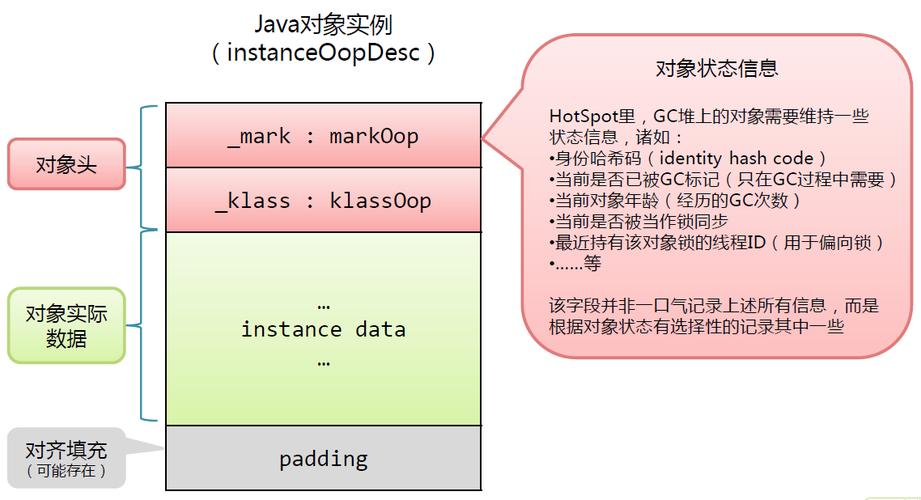
When you use the new keyword, you are explicitly telling the Java Virtual Machine (JVM) to always create a new String object in the regular heap memory, regardless of whether an identical string already exists in the String Pool.
- If a pool version exists: The
newkeyword will create a second copy on the heap. Now you have two objects with the same content: one in the pool and one on the heap. - If a pool version doesn't exist: A new object is created on the heap, and a corresponding entry is also added to the String Pool.
Example:
String s1 = new String("Java");
String s2 = "Java";
// Is s1 the same object as s2?
// No. s1 was created on the heap with 'new'.
// s2 was found in the string pool.
System.out.println(s1 == s2); // Output: false (different memory addresses)
// Is their content the same?
// Yes.
System.out.println(s1.equals(s2)); // Output: true
When to use: Rarely. You should almost always prefer string literals. The only time you might explicitly use new is if you need to guarantee a new, unique object for some specific reason (e.g., for interning purposes or to bypass the pool).
Using the Operator: String str = "a" + "b";
This is a special case. The Java compiler is smart. It optimizes string concatenation at compile time.
For expressions involving only literals, the compiler joins them into a single literal.
Example:
// The compiler sees this and compiles it as if you wrote:
// String s = "HelloWorld";
String s = "Hello" + "World";
// So, this behaves exactly like a literal:
String s2 = "HelloWorld";
System.out.println(s == s2); // Output: true
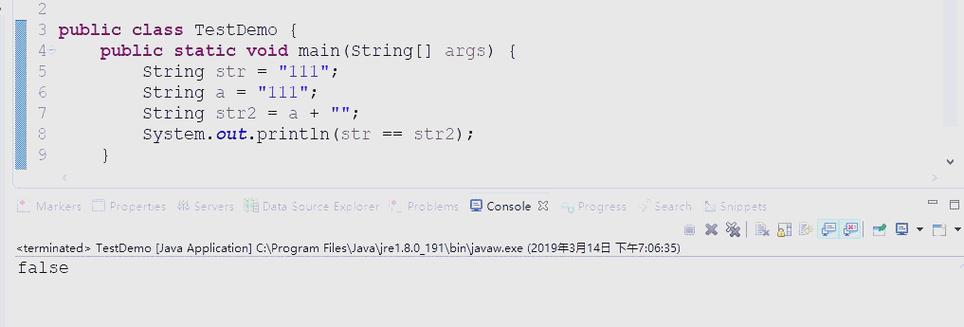
However, if any part of the expression is a variable, the optimization doesn't happen at compile time. Instead, the Java compiler translates the into a call to the StringBuilder class at runtime. This is done for performance, because repeatedly creating new String objects with in a loop is very inefficient.
Key Concepts to Remember
| Concept | Description | Example |
|---|---|---|
| String Pool | A special area in the Java heap memory that stores unique string literals. It helps save memory by reusing strings. | String s = "test"; |
vs .equals() |
This is the most critical distinction. | |
| Compares object references (i.e., memory addresses). It checks if two variables point to the exact same object. | s1 == s2 |
|
.equals() |
Compares the actual content (sequence of characters) of the strings. | s1.equals(s2) |
| Immutability | String objects are immutable. Once a String object is created, its value cannot be changed. |
Operations like s.toUpperCase() don't change s; they return a new String object with the uppercase value. |
Best Practices
-
Prefer String Literals: Always use
"text"to create strings unless you have a specific reason not to.// Good String name = "Alice";
-
Use
StringBuilderfor Concatenation in Loops: When you need to build a string dynamically (e.g., in a loop), using repeatedly creates many intermediateStringobjects, which is inefficient.StringBuilderis designed for this.// Inefficient String text = ""; for (int i = 0; i < 1000; i++) { text = text + "a"; // Creates a new String object in each iteration } // Efficient StringBuilder sb = new StringBuilder(); for (int i = 0; i < 1000; i++) { sb.append("a"); // Modifies the StringBuilder object in place } String efficientText = sb.toString(); -
Use
.equals()for Content Comparison: To check if two strings have the same characters, always use.equals(). Use only when you specifically want to check if two references point to the same object (which is rare in application logic).