Of course! The Comparator in Java is a crucial interface for sorting and ordering objects. Let's break it down from the basics to advanced usage.
What is a Comparator?
A Comparator is a functional interface that defines a comparison strategy. It's essentially a "rulebook" that tells Java how to compare two objects of the same type to determine their order.
Why is it needed?
- Default Order: Many classes (like
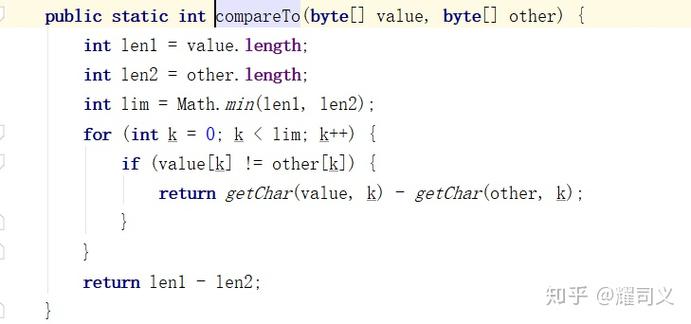
StringorInteger) have a natural ordering defined by theircompareTomethod. This is used by default by sorting methods. - Custom Order: What if you want to sort a
ListofEmployeeobjects by salary instead of name? Or sort aListofProductobjects by price, but in descending order? This is whereComparatorshines. It allows you to define multiple, different sorting rules without modifying the original class.
The Core Method: compare(T o1, T o2)
The Comparator interface has one abstract method you need to implement:
int compare(T o1, T o2);
How it works:

- It takes two objects,
o1ando2, as arguments. - It returns:
- A negative integer if
o1should come beforeo2. - Zero if
o1ando2are considered equal in order. - A positive integer if
o1should come aftero2.
- A negative integer if
Simple Analogy:
Imagine you're two people in a line. The compare method is the rule the line leader uses to decide who goes first.
compare(personA, personB)returns-5->personAgoes beforepersonB.compare(personA, personB)returns0-> They are equal in order.compare(personA, personB)returns10->personAgoes afterpersonB.
How to Use a Comparator
There are three main ways to create and use a Comparator.
The Classic Way: Implementing the Interface (Pre-Java 8)
This is the traditional, verbose way. You create a separate class that implements Comparator.
Example:
Let's say we have a Product class.
// Product.java
public class Product {
    private String name;
    private double price;
    public Product(String name, double price) {
        this.name = name;
        this.price = price;
    }
    public String getName() { return name; }
    public double getPrice() { return price; }
    @Override
    public String toString() {
        return "Product{name='" + name + "', price=" + price + "}";
    }
}
Now, let's create a Comparator to sort products by price.
// PriceComparator.java
import java.util.Comparator;
public class PriceComparator implements Comparator<Product> {
    @Override
    public int compare(Product p1, Product p2) {
        // Compare prices. If p1's price is less than p2's, it should come first.
        return Double.compare(p1.getPrice(), p2.getPrice());
    }
}
Using it:
import java.util.ArrayList;
import java.util.Collections;
import java.util.List;
public class Main {
    public static void main(String[] args) {
        List<Product> products = new ArrayList<>();
        products.add(new Product("Laptop", 1200.50));
        products.add(new Product("Mouse", 25.00));
        products.add(new Product("Keyboard", 75.99));
        System.out.println("Before sorting: " + products);
        // Sort using our custom comparator
        Collections.sort(products, new PriceComparator());
        System.out.println("After sorting by price (ascending): " + products);
    }
}
Output:
Before sorting: [Product{name='Laptop', price=1200.5}, Product{name='Mouse', price=25.0}, Product{name='Keyboard', price=75.99}]
After sorting by price (ascending): [Product{name='Mouse', price=25.0}, Product{name='Keyboard', price=75.99}, Product{name='Laptop', price=1200.5}]
The Anonymous Class Way (A Common Pre-Java 8 Pattern)
This avoids creating a separate .java file but is still quite verbose.
List<Product> products = ...; // same list as before
Collections.sort(products, new Comparator<Product>() {
    @Override
    public int compare(Product p1, Product p2) {
        return Double.compare(p1.getPrice(), p2.getPrice());
    }
});
The Modern Way: Lambda Expressions (Java 8+)
This is the most common and concise way to write comparators today. Since Comparator is a functional interface, you can use a lambda expression.
The syntax (o1, o2) -> { ... } replaces the entire implements Comparator block.
List<Product> products = ...; // same list as before
// Sort by price in ascending order
Collections.sort(products, (p1, p2) -> Double.compare(p1.getPrice(), p2.getPrice()));
// Or even simpler for primitives, but be careful with nulls and overflow!
// Collections.sort(products, (p1, p2) -> (int)(p1.getPrice() - p2.getPrice()));
The Comparator Factory Methods (Java 8+)
Java 8 introduced a set of static helper methods in the Comparator class that make writing complex comparators incredibly easy.
Comparator.thenComparing()
This method allows you to chain multiple comparison criteria. It's used for secondary sorting.
Example: Sort products by price (primary) and then by name (secondary) if prices are equal.
import java.util.Comparator;
// Sort by price, then by name
Comparator<Product> priceThenNameComparator =
    Comparator.comparing(Product::getPrice)
              .thenComparing(Product::getName);
Collections.sort(products, priceThenNameComparator);
Comparator.comparing(Product::getPrice)creates a comparator based on thegetPricemethod..thenComparing(Product::getName)says: "If the prices are the same, use thegetNamemethod to break the tie."
Comparator.reversed()
This method simply reverses the order of an existing comparator.
Example: Sort products by price in descending order.
// Sort by price in descending order
Comparator<Product> descendingPriceComparator =
    Comparator.comparing(Product::getPrice).reversed();
Collections.sort(products, descendingPriceComparator);
Comparator.nullsFirst() and Comparator.nullsLast()
These methods are essential for handling null values in your list. They wrap an existing comparator and specify where null values should appear.
Example: Sort a list of names that might contain nulls.
import java.util.Arrays;
import java.util.Collections;
import java.util.List;
List<String> names = Arrays.asList("Charlie", null, "Alice", "Bob", null);
// Sort alphabetically, with nulls first
Comparator<String> nullsFirstComparator = Comparator.nullsFirst(Comparator.naturalOrder());
Collections.sort(names, nullsFirstComparator);
System.out.println(names); // [null, null, Alice, Bob, Charlie]
// Sort alphabetically, with nulls last
Comparator<String> nullsLastComparator = Comparator.nullsLast(Comparator.naturalOrder());
Collections.sort(names, nullsLastComparator);
System.out.println(names); // [Alice, Bob, Charlie, null, null]
Comparator.comparing() (with key extractors)
This is the most powerful method. It takes a "key extractor" function (like a method reference) and creates a comparator based on that key.
Example: Sort a list of Employee objects by their department.
class Employee {
    private String name;
    private String department;
    // ... constructor, getters
}
List<Employee> employees = ...; // list of employees
// Sort by department
Comparator<Employee> byDepartment = Comparator.comparing(Employee::getDepartment);
Collections.sort(employees, byDepartment);
You can also specify the order for the extracted key:
Comparator.comparing(Employee::getDepartment, Comparator.reverseOrder())Comparator.comparing(Employee::getName, String.CASE_INSENSITIVE_ORDER)
Complete Example: Putting It All Together
Let's create an Employee class and sort it in multiple ways.
import java.util.ArrayList;
import java.util.Comparator;
import java.util.List;
// Employee class
class Employee {
    private String name;
    private int age;
    private double salary;
    public Employee(String name, int age, double salary) {
        this.name = name;
        this.age = age;
        this.salary = salary;
    }
    public String getName() { return name; }
    public int getAge() { return age; }
    public double getSalary() { return salary; }
    @Override
    public String toString() {
        return "Employee{name='" + name + "', age=" + age + ", salary=" + salary + "}";
    }
}
public class Main {
    public static void main(String[] args) {
        List<Employee> employees = new ArrayList<>();
        employees.add(new Employee("Alice", 30, 75000));
        employees.add(new Employee("Charlie", 25, 85000));
        employees.add(new Employee("Bob", 30, 65000));
        employees.add(new Employee("David", 45, 95000));
        System.out.println("Original List: " + employees);
        // 1. Sort by salary (ascending) using a lambda
        employees.sort((e1, e2) -> Double.compare(e1.getSalary(), e2.getSalary()));
        System.out.println("\nSorted by Salary (Ascending): " + employees);
        // 2. Sort by age (descending) using method references and reversed()
        employees.sort(Comparator.comparing(Employee::getAge).reversed());
        System.out.println("\nSorted by Age (Descending): " + employees);
        // 3. Sort by name (alphabetically) using comparing()
        employees.sort(Comparator.comparing(Employee::getName));
        System.out.println("\nSorted by Name (Alphabetically): " + employees);
        // 4. Sort by age (primary), then by salary (secondary) for same age
        Comparator<Employee> ageThenSalaryComparator =
            Comparator.comparing(Employee::getAge)
                      .thenComparing(Employee::getSalary);
        employees.sort(ageThenSalaryComparator);
        System.out.println("\nSorted by Age, then by Salary: " + employees);
    }
}
Comparator vs. Comparable
This is a very common point of confusion.
| Feature | Comparator |
Comparable |
|---|---|---|
| Purpose | To define an external ordering. To sort objects in ways not defined by their natural order. | To define an internal or natural ordering for a class. |
| Location | A separate class or a lambda. Defined outside the class being sorted. | An interface implemented inside the class being sorted. |
| Method | compare(T o1, T o2) |
compareTo(T o) |
| When to use | When you need multiple sorting criteria or when you cannot/can't modify the source class. | When there is one, clear "natural" way to order objects of that class (e.g., numbers, strings, dates). |
Analogy:
Comparableis like a person having a height. It's an intrinsic property.Comparatoris like a teacher who decides to line the class up by height, then by last name. The teacher is applying an external rule.
Summary
- Use
Comparatorwhen you need to define custom sorting logic. - Prefer lambda expressions and the static factory methods (
comparing,thenComparing,reversed,nullsFirst,nullsLast) for clean, readable, and powerful code. - Use
Comparatorfor flexible, multi-criteria sorting and when you can't modify the class you're sorting. - Use
Comparablefor the single, natural ordering of a class.