Of course! Here is a comprehensive guide to using TCP sockets in Java, covering both the server and client sides, with detailed explanations and complete, runnable code examples.
What is a TCP Socket?
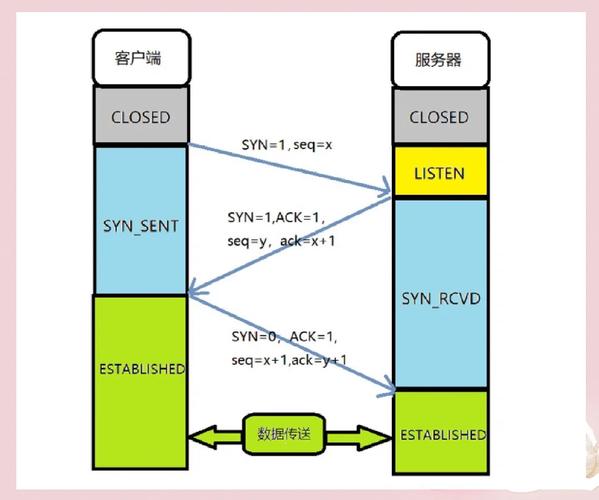
A socket is one endpoint of a two-way communication link between two programs running on the network. The TCP (Transmission Control Protocol) is a connection-oriented protocol, meaning it establishes a reliable, ordered, and error-checked stream of data between the client and server.
Think of it like a phone call:
- Dialing (Client Connects): The client "dials" the server's IP address and port number.
- Connection Established (Server Accepts): The server "answers" the call. A dedicated, stable communication channel is now open.
- Conversation (Data Exchange): Both parties can send and receive messages.
- Hang Up (Connection Closed): Either party can "hang up" to close the connection.
Key Java Classes for TCP Sockets
Java's networking API is primarily in the java.net package.
| Class | Description |
|---|---|
java.net.ServerSocket |
Used by the server to listen for incoming client connections. It "opens a door" on a specific port. |
java.net.Socket |
Represents a client's connection to a server. It's also used by the ServerSocket to represent a specific, established client connection. |
java.net.InetAddress |
Represents an IP address (either IPv4 or IPv6). Used to identify the network location of a host. |
java.io.InputStream / java.io.OutputStream |
Used to read data from and write data to the socket's connection. These are low-level byte streams. |
java.io.BufferedReader / java.io.PrintWriter |
More convenient, higher-level wrappers around the streams for reading/writing text (strings) line by line. |
The TCP Server
The server's job is to:
- Create a
ServerSocketand bind it to a specific port. - Wait for a client to connect (this is a blocking call).
- When a client connects, accept the connection and get a
Socketobject for that specific client. - Use the
Socket's streams to communicate with the client. - Close the connection when done.
Example: Simple Echo Server
This server will listen for a client, receive a message from it, and send the exact same message back.
// EchoServer.java
import java.io.BufferedReader;
import java.io.IOException;
import java.io.InputStreamReader;
import java.io.PrintWriter;
import java.net.ServerSocket;
import java.net.Socket;
public class EchoServer {
    public static void main(String[] args) {
        int port = 6789; // The port number the server will listen on
        // Use try-with-resources to automatically close the ServerSocket
        try (ServerSocket serverSocket = new ServerSocket(port)) {
            System.out.println("Server is listening on port " + port);
            // The accept() method blocks until a client connects
            Socket clientSocket = serverSocket.accept();
            System.out.println("Client connected: " + clientSocket.getInetAddress().getHostAddress());
            // Use try-with-resources to automatically close the streams
            try (
                // Input stream to read from the client
                BufferedReader in = new BufferedReader(new InputStreamReader(clientSocket.getInputStream()));
                // Output stream to send to the client
                PrintWriter out = new PrintWriter(clientSocket.getOutputStream(), true); // true for auto-flush
            ) {
                String inputLine;
                // Read lines from the client until "exit" is received
                while ((inputLine = in.readLine()) != null) {
                    System.out.println("Received from client: " + inputLine);
                    if ("exit".equalsIgnoreCase(inputLine)) {
                        System.out.println("Client requested to exit. Closing connection.");
                        break;
                    }
                    // Echo the received message back to the client
                    out.println("Server: " + inputLine);
                }
            } finally {
                // Ensure the client socket is closed
                clientSocket.close();
                System.out.println("Client disconnected. Server is still running...");
            }
        } catch (IOException e) {
            System.err.println("Server exception: " + e.getMessage());
            e.printStackTrace();
        }
    }
}
The TCP Client
The client's job is to:
- Know the server's IP address and port number.
- Create a
Socketand attempt to connect to the server (this is also a blocking call). - Once connected, use the
Socket's streams to communicate with the server. - Close the connection when done.
Example: Simple Echo Client
This client will connect to the server, send messages, and print the server's responses.
// EchoClient.java
import java.io.BufferedReader;
import java.io.IOException;
import java.io.InputStreamReader;
import java.io.PrintWriter;
import java.net.Socket;
import java.net.UnknownHostException;
public class EchoClient {
    public static void main(String[] args) {
        String hostname = "localhost"; // Use the server's IP address if it's on another machine
        int port = 6789;
        // Use try-with-resources to automatically close the socket and streams
        try (
            Socket socket = new Socket(hostname, port);
            // Input stream to read from the server
            BufferedReader in = new BufferedReader(new InputStreamReader(socket.getInputStream()));
            // Output stream to send to the server
            PrintWriter out = new PrintWriter(socket.getOutputStream(), true); // true for auto-flush
        ) {
            System.out.println("Connected to the server.");
            // Set up a reader for the user's console input
            BufferedReader stdIn = new BufferedReader(new InputStreamReader(System.in));
            String userInput;
            // Read user input from the console
            while (true) {
                System.out.print("Enter a message (or 'exit' to quit): ");
                userInput = stdIn.readLine();
                if ("exit".equalsIgnoreCase(userInput)) {
                    break;
                }
                // Send the user's message to the server
                out.println(userInput);
                // Read the server's response
                String response = in.readLine();
                System.out.println("Server response: " + response);
            }
        } catch (UnknownHostException e) {
            System.err.println("Don't know about host " + hostname);
            e.printStackTrace();
        } catch (IOException e) {
            System.err.println("Couldn't get I/O for the connection to " + hostname);
            e.printStackTrace();
        }
        System.out.println("Client disconnected.");
    }
}
How to Run the Example
-
Save the Code: Save the two code blocks above as
EchoServer.javaandEchoClient.javain the same directory.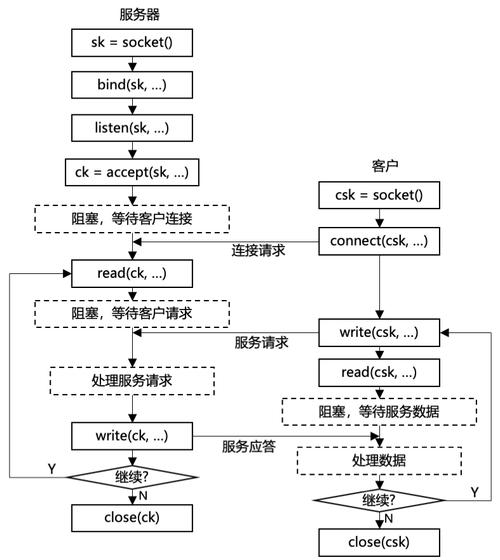 (图片来源网络,侵删)
 -
Compile the Code: Open a terminal or command prompt in that directory and run the Java compiler.
javac EchoServer.java EchoClient.java
-
Run the Server: First, start the server. It will wait for a connection.
java EchoServer
You will see the output:
Server is listening on port 6789. -
Run the Client: Open a new terminal window and run the client.
java EchoClient
You will see:
Connected to the server.and a prompt. -
Interact:
- In the client terminal, type a message and press Enter.
Enter a message (or 'exit' to quit): Hello, Server! - The server will receive it and print:
Received from client: Hello, Server! - The client will then print the server's echo:
Server response: Server: Hello, Server!
- In the client terminal, type a message and press Enter.
-
Quit: Type
exitin the client terminal and press Enter. Both the client and server will close their respective connections gracefully.
Advanced Topic: Handling Multiple Clients
The simple server above can only handle one client at a time. After it accepts a connection, it processes that client until the connection is closed, and only then can it accept the next one.
To handle multiple clients simultaneously, you need to use multithreading. The main server thread's only job is to accept incoming connections. For each new connection, it spawns a new ClientHandler thread to manage that specific client.
Example: Multi-threaded Server
// MultiThreadEchoServer.java
import java.io.BufferedReader;
import java.io.IOException;
import java.io.InputStreamReader;
import java.io.PrintWriter;
import java.net.ServerSocket;
import java.net.Socket;
public class MultiThreadEchoServer {
    public static void main(String[] args) {
        int port = 6789;
        try (ServerSocket serverSocket = new ServerSocket(port)) {
            System.out.println("Server is listening on port " + port);
            while (true) { // Keep accepting new clients
                Socket clientSocket = serverSocket.accept();
                System.out.println("New client connected: " + clientSocket.getInetAddress().getHostAddress());
                // Create a new thread for each client
                ClientHandler clientHandler = new ClientHandler(clientSocket);
                new Thread(clientHandler).start();
            }
        } catch (IOException e) {
            System.err.println("Server exception: " + e.getMessage());
            e.printStackTrace();
        }
    }
    // A separate class to handle the client's communication
    private static class ClientHandler implements Runnable {
        private final Socket clientSocket;
        public ClientHandler(Socket socket) {
            this.clientSocket = socket;
        }
        @Override
        public void run() {
            try (
                BufferedReader in = new BufferedReader(new InputStreamReader(clientSocket.getInputStream()));
                PrintWriter out = new PrintWriter(clientSocket.getOutputStream(), true);
            ) {
                String inputLine;
                while ((inputLine = in.readLine()) != null) {
                    System.out.println("Received from " + clientSocket.getInetAddress() + ": " + inputLine);
                    if ("exit".equalsIgnoreCase(inputLine)) {
                        System.out.println("Client " + clientSocket.getInetAddress() + " requested to exit.");
                        break;
                    }
                    out.println("Server: " + inputLine);
                }
            } catch (IOException e) {
                System.err.println("Error handling client " + clientSocket.getInetAddress() + ": " + e.getMessage());
            } finally {
                try {
                    clientSocket.close();
                    System.out.println("Client " + clientSocket.getInetAddress() + " disconnected.");
                } catch (IOException e) {
                    e.printStackTrace();
                }
            }
        }
    }
}
This multi-threaded version can now handle many clients at once, as each client's communication is isolated in its own thread.