Of course! Let's dive deep into Java Properties. This is a fundamental topic for any Java developer, especially for configuration management.
What are Java Properties?
In Java, the Properties class is a subclass of Hashtable. It is used to maintain a list of values where both the key and the value are of type String. Its primary purpose is to handle configuration data for applications, such as database connection details, feature flags, and other settings.
Key characteristics:
- Key-Value Pairs: Stores data in a simple
key=valueformat. - String-Based: Both keys and values must be strings.
- Persistent: Can easily be loaded from and saved to a
.propertiesfile. - Hierarchical (with
Properties.load()): When loading from a stream, it can read a sequence of lines that are treated as lines from a character stream, allowing for multi-line values and comments.
The Properties Class
The java.util.Properties class is the workhorse. Here are its most important methods.
Core Methods
| Method | Description |
|---|---|
setProperty(String key, String value) |
Associates the specified value with the specified key. Similar to put(). |
getProperty(String key) |
Returns the value associated with the key, or null if the key is not found. |
getProperty(String key, String defaultValue) |
Returns the value for the key, or defaultValue if the key is not found. |
load(InputStream inStream) |
Reads a properties list from an input byte stream. |
load(Reader reader) |
Reads a properties list from a character input stream. (Recommended for text files) |
store(OutputStream out, String comments) |
Writes this property list to an output byte stream. |
store(Writer writer, String comments) |
Writes this property list to a character output stream. (Recommended for text files) |
list(PrintStream out) / list(PrintWriter out) |
Prints this property list to the specified output stream. Useful for debugging. |
Working with .properties Files
This is the most common use case. Let's create a sample configuration file.

Example: config.properties
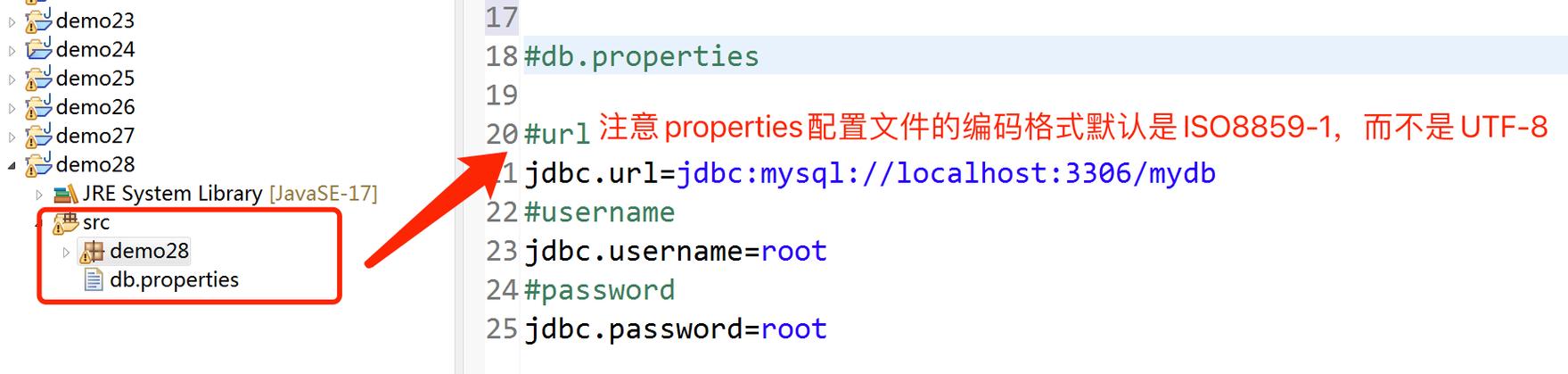
Create a file named config.properties in your project's src/main/resources directory (or any accessible location).
# Database Configuration
db.url=jdbc:mysql://localhost:3306/my_app
db.username=admin
db.password=secret123
# Application Settings
app.name=My Awesome Application
app.version=1.2.0
feature.flag.newUI=true
# A multi-line comment or value is not directly supported,
# but you can use a backslash to continue a line.
app.description=This is a sample \
application to demonstrate \
Java Properties.
Loading Properties from a File
You typically load properties from a file at the start of your application.
import java.io.FileInputStream;
import java.io.IOException;
import java.io.InputStream;
import java.util.Properties;
public class PropertiesLoader {
    public static void main(String[] args) {
        // The path to the properties file
        String propFileName = "config.properties";
        // Use try-with-resources to ensure the stream is closed automatically
        try (InputStream input = new FileInputStream(propFileName)) {
            Properties prop = new Properties();
            // load the properties file
            prop.load(input);
            // get the property value and print it out
            System.out.println("Application Name: " + prop.getProperty("app.name"));
            System.out.println("Database URL: " + prop.getProperty("db.url"));
            System.out.println("Database User: " + prop.getProperty("db.username"));
            System.out.println("Database Password: " + prop.getProperty("db.password"));
            System.out.println("New UI Feature: " + prop.getProperty("feature.flag.newUI"));
            // Using a default value
            System.out.println("Admin Email: " + prop.getProperty("admin.email", "default@example.com"));
        } catch (IOException ex) {
            ex.printStackTrace();
        }
    }
}
Important: The above example assumes the file is in the project root. For a Maven/Gradle project, it's better to load from the classpath:
// For Maven/Gradle projects, load from classpath
try (InputStream input = PropertiesLoader.class.getClassLoader().getResourceAsStream("config.properties")) {
    if (input == null) {
        System.out.println("Sorry, unable to find config.properties");
        return;
    }
    // ... rest of the code is the same
}
Writing Properties to a File
You can also save your properties to a file. This is useful for saving user preferences or configuration changes.
import java.io.FileOutputStream;
import java.io.IOException;
import java.io.OutputStream;
import java.util.Properties;
public class PropertiesWriter {
    public static void main(String[] args) {
        Properties prop = new Properties();
        OutputStream output = null;
        try {
            output = new FileOutputStream("config_new.properties");
            // set the properties value
            prop.setProperty("db.url", "jdbc:mysql://newhost:3306/my_app");
            prop.setProperty("db.username", "new_user");
            prop.setProperty("db.password", "new_secret");
            prop.setProperty("last.updated.by", "admin");
            // save the properties to the file
            // The "comments" parameter is a description for the file
            prop.store(output, "This is an updated configuration file");
            System.out.println("Properties file saved successfully!");
        } catch (IOException io) {
            io.printStackTrace();
        } finally {
            if (output != null) {
                try {
                    output.close();
                } catch (IOException e) {
                    e.printStackTrace();
                }
            }
        }
    }
}
This will create a config_new.properties file with content like:
#This is an updated configuration file
#Mon Oct 23 10:30:00 CEST 2025
db.url=jdbc:mysql://newhost:3306/my_app
db.username=new_user
last.updated.by=admin
db.password=new_secret
System Properties
Java also maintains a set of system properties that provide information about the runtime environment, such as the Java version, OS name, etc. You can access them with System.getProperty().
You can also define your own system properties when starting the JVM:
java -Dmy.custom.property="Hello World" -jar myapp.jar
public class SystemPropertiesExample {
    public static void main(String[] args) {
        // Accessing standard system properties
        System.out.println("Java Version: " + System.getProperty("java.version"));
        System.out.println("OS Name: " + System.getProperty("os.name"));
        System.out.println("User Home: " + System.getProperty("user.home"));
        // Accessing a custom system property
        String customProp = System.getProperty("my.custom.property", "default_value");
        System.out.println("Custom Property: " + customProp);
    }
}
Best Practices and Modern Alternatives
While java.util.Properties is still widely used, especially for simple configurations, modern Java projects often prefer more robust and type-safe alternatives.
Best Practices for Properties
- Use
try-with-resources: Always wrap file streams (InputStream,OutputStream) in atry-with-resourcesblock to prevent resource leaks. - Place Files in
src/main/resources: For Maven/Gradle projects, this directory is automatically included in the classpath, making your configuration portable. - Use
.propertiesfor Configuration, Not Code: Don't store business logic or complex data structures in properties files. - Encoding: When possible, use
load(Reader)andstore(Writer)instead ofload(InputStream)andstore(OutputStream)to avoid character encoding issues (e.g., with non-ASCII characters). If you must use streams, specify the encoding explicitly.
Modern Alternatives
-
JSON (e.g., with Jackson or Gson):
- Pros: Human-readable, supports nested objects and arrays, standard format, great for complex configurations.
- Cons: Requires a library (Jackson/Gson), slightly more overhead for simple key-value pairs.
Example (
config.json):{ "database": { "url": "jdbc:mysql://localhost:3306/my_app", "username": "admin", "password": "secret123" }, "app": { "name": "My Awesome Application", "version": "1.2.0" } } -
YAML (e.g., with SnakeYAML):
- Pros: Very human-readable, supports nested structures and comments, often preferred for complex configurations (e.g., in Spring Boot).
- Cons: Requires a library.
-
HOCON (Human-Optimized Config Object Notation):
- Pros: Superset of JSON, more flexible syntax (allows comments, no trailing commas), merges objects easily.
- Cons: Requires a library (e.g., from Typesafe Config).
-
Environment Variables:
- Pros: Platform-agnostic, secure (secrets don't live in code or config files), great for containerized environments (Docker, Kubernetes).
- Cons: Not hierarchical, can become unwieldy for many settings.
Summary: When to Use What
| Technology | Best For | Pros | Cons |
|---|---|---|---|
| Java Properties | Simple, flat key-value configurations. No dependencies. | Simple, built-in, standard for Java. | No hierarchy, no data types (all strings), limited syntax. |
| JSON | Complex, structured configurations. Nested objects, arrays. | Standard, flexible, widely supported. | Requires a library, slightly more verbose for simple cases. |
| YAML | Complex, human-readable configurations. Preferred in many frameworks. | Excellent readability, supports comments and nesting. | Requires a library, indentation-sensitive. |
| Environment Variables | Sensitive data (passwords, API keys), containerized apps. | Secure, portable across environments. | Not hierarchical, can be hard to manage for many settings. |
For most new projects, if your configuration is simple, Properties is fine. If it's complex or you're using a framework like Spring Boot, you'll likely use a more modern format like YAML or JSON. For secrets, always prefer environment variables.