Of course! Let's break down the int data type in Java in detail.
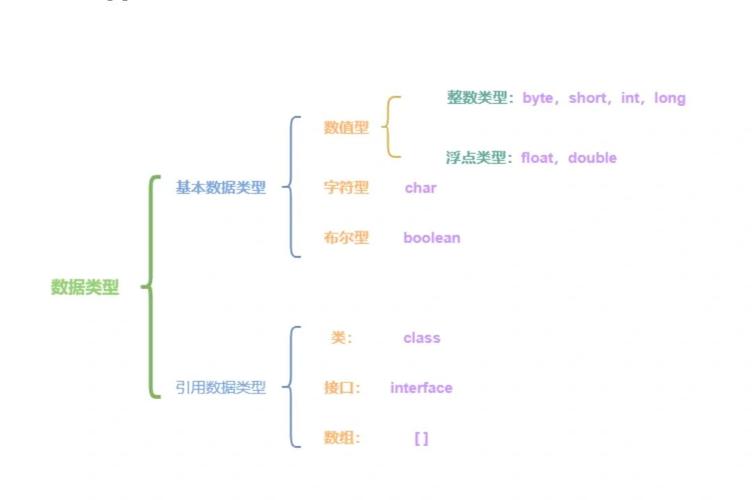
What is int?
int is a primitive data type in Java used to store integer values. This means it can store whole numbers without any decimal or fractional part.
- Stands for: Integer.
- Size: It occupies 32 bits (4 bytes) of memory.
- Range: Because it's 32 bits, it can store a specific range of values. The range is from -2,147,483,648 to 2,147,483,647.
- You can remember the maximum value as
2,147,483,647. This number is special because it's the largest value a 32-bit signed integer can hold. If you add 1 to it, it "wraps around" to the minimum value,-2,147,483,648.
- You can remember the maximum value as
- Default Value: If you declare an
intas an instance variable (a variable inside a class but not inside a method), its default value is 0.
Declaration and Initialization
You declare an int variable using the int keyword.
Syntax:
int variableName;
Example:
public class Main {
    public static void main(String[] args) {
        // Declaration
        int myAge;
        // Initialization (assigning a value for the first time)
        myAge = 30;
        // You can also declare and initialize in one line
        int studentCount = 150;
        // You can declare multiple variables of the same type in one line
        int x = 10, y = 20, z = 30;
        System.out.println("My Age: " + myAge);
        System.out.println("Student Count: " + studentCount);
        System.out.println("x: " + x + ", y: " + y + ", z: " + z);
    }
}
Key Characteristics and Rules
a. Primitive Type
int is a primitive type, not an object. This means it's more memory-efficient and faster to use than its wrapper class counterpart, Integer. For most simple calculations, you should use int.
b. No Decimal Points
You cannot store a decimal number in an int. If you try, you will get a compilation error.
// This will cause a COMPILE ERROR
int price = 19.99; // Error: incompatible types: possible lossy conversion from double to int
If you need to store a number with a decimal, you must use a floating-point type like double or float.
double price = 19.99; // This is correct
c. Overflow and Underflow
Since int has a fixed range, what happens if you go beyond it?
- Overflow: When a number is too large to be stored (exceeds
2,147,483,647). - Underflow: When a number is too small to be stored (is less than
-2,147,483,648).
Java does not throw an exception for overflow/underflow in standard arithmetic. Instead, the value "wraps around" to the other end of the range.
public class OverflowExample {
    public static void main(String[] args) {
        int maxInt = Integer.MAX_VALUE; // This is 2,147,483,647
        System.out.println("Maximum int value: " + maxInt);
        // Adding 1 to the maximum value causes an overflow
        int overflowedValue = maxInt + 1;
        System.out.println("Value after overflow: " + overflowedValue); // Outputs -2147483648
        // Subtracting 1 from the minimum value causes an underflow
        int minInt = Integer.MIN_VALUE; // This is -2,147,483,648
        System.out.println("Minimum int value: " + minInt);
        int underflowedValue = minInt - 1;
        System.out.println("Value after underflow: " + underflowedValue); // Outputs 2147483647
    }
}
int vs. Integer (The Wrapper Class)
This is a very important concept in Java.
| Feature | int (Primitive) |
Integer (Wrapper Class) |
|---|---|---|
| Type | Primitive | Object (Reference Type) |
| Purpose | For storing simple integer values. | For storing int values in contexts that require an object (e.g., collections, generics). |
| Default Value | 0 |
null |
Can be null? |
No. It cannot hold a null value. |
Yes. It can be null. |
| Memory | Uses less memory (fixed size). | Uses more memory (stores the primitive value plus object overhead). |
| Example Use | int score = 100; |
List<Integer> scores = new ArrayList<>(); |
Example of Integer being null:
Integer nullableInt = null; // This is valid
// int anotherInt = nullableInt; // This would cause a NullPointerException at runtime!
Autoboxing and Unboxing
Java automatically converts between int and Integer to make your code cleaner.
- Autoboxing: Automatically converting an
intto anInteger. - Unboxing: Automatically converting an
Integerto anint.
// Autoboxing: int is automatically converted to Integer
Integer autoBoxedInt = 100; // The int 100 is wrapped into an Integer object
// Unboxing: Integer is automatically converted to int
int unboxedInt = autoBoxedInt; // The Integer object is unwrapped to an int
// This is why you can do this:
List<Integer> numbers = new ArrayList<>();
numbers.add(10); // Autoboxing happens here (10 becomes an Integer)
int firstNumber = numbers.get(0); // Unboxing happens here (Integer becomes int)
Common Operations with int
You can perform all standard arithmetic operations on int variables.
int a = 10;
int b = 3;
int sum = a + b;        // 13
int difference = a - b;  // 7
int product = a * b;     // 30
int quotient = a / b;    // 3 (Note: Integer division truncates the decimal part)
int remainder = a % b;   // 1 (The modulus operator gives the remainder)
System.out.println("Sum: " + sum);
System.out.println("Difference: " + difference);
System.out.println("Product: " + product);
System.out.println("Quotient: " + quotient);
System.out.println("Remainder: " + remainder);
Summary
| Aspect | Description |
|---|---|
| What it is | A primitive data type for whole numbers. |
| Size | 32 bits (4 bytes). |
| Range | -2,147,483,648 to 2,147,483,647. |
| Use Case | The default choice for any integer value in calculations, counters, and loop indices. |
| Key Limitation | Cannot store decimal points and can overflow/underflow silently. |
| Object Version | Integer, used when an object is required (e.g., in collections). |