Of course! Here is a comprehensive guide to Python's range() function, covering its syntax, use cases, and important details.
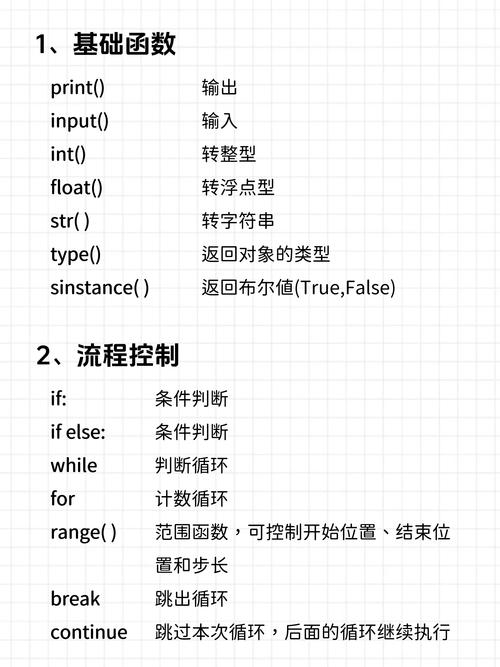
What is range()?
In Python, range() is a built-in function that generates a sequence of numbers. It's a highly efficient way to create a list of numbers for looping, especially when dealing with large sequences.
The key thing to remember is that range() returns a range object, not a list. This object is a sequence of numbers that is generated on-the-fly, which saves memory because it doesn't store all the numbers at once.
Syntax and Overloads
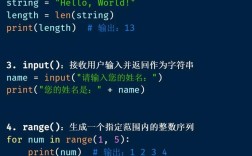
range() can be called in three different ways, depending on the number of arguments you provide.
a) range(stop)
This is the simplest form. It generates numbers from 0 up to (but not including) stop.
- Syntax:
range(stop) - Generates:
0, 1, 2, ..., stop - 1
Example:
# Generate numbers from 0 up to (but not including) 5
numbers = range(5)
print(numbers)  # Output: range(0, 5) - This is the range object itself
# To see the actual numbers, you can convert it to a list
print(list(numbers)) # Output: [0, 1, 2, 3, 4]
b) range(start, stop)
This form lets you specify a custom starting point. It generates numbers from start up to (but not including) stop.
- Syntax:
range(start, stop) - Generates:
start, start + 1, start + 2, ..., stop - 1
Example:
# Generate numbers from 2 up to (but not including) 8
numbers = range(2, 8)
print(list(numbers)) # Output: [2, 3, 4, 5, 6, 7]
c) range(start, stop, step)
This is the most flexible form. The step argument specifies the increment (or decrement) between each number.
- Syntax:
range(start, stop, step) - Generates:
start, start + step, start + 2*step, ...(stopping beforestopis reached)
Example 1: Positive Step (Incrementing)
# Generate numbers from 0 to 20, counting by 5
numbers = range(0, 21, 5)
print(list(numbers)) # Output: [0, 5, 10, 15, 20]
Example 2: Negative Step (Decrementing)
When using a negative step, you must ensure that start is greater than stop for the sequence to be valid.
# Generate numbers from 10 down to (but not including) 0, counting by -2
numbers = range(10, 0, -2)
print(list(numbers)) # Output: [10, 8, 6, 4, 2]
# If start < stop and step is negative, the result is an empty sequence
empty_range = range(0, 10, -1)
print(list(empty_range)) # Output: []
Key Characteristics of range()
-
Exclusive of the
stopValue: Thestopvalue is never included in the sequence. This is a very common point of confusion for beginners. Remember the phrase "up to, but not including". -
Memory Efficiency:
range()does not create a list of all the numbers in memory. Instead, it stores thestart,stop, andstepvalues and calculates each number as you need it. This makes it incredibly fast and memory-efficient, especially for very large ranges.# This does NOT create a list with one billion items in memory. # It creates a very small range object. huge_range = range(1_000_000_000) print(huge_range) # Output: range(0, 1000000000) print(type(huge_range)) # Output: <class 'range'>
-
Indexable and Iterable: You can access elements by index (like a list) and loop over it (like any other sequence).
r = range(10, 20, 2) # Generates [10, 12, 14, 16, 18] # Indexing print(r[0]) # Output: 10 print(r[2]) # Output: 14 print(r[-1]) # Output: 18 # Iterating with a for loop for number in r: print(number, end=" ") # Output: 10 12 14 16 18 -
Immutable: You cannot change the elements of a
rangeobject after it has been created.r = range(5) r[0] = 10 # This will raise a TypeError
Common Use Cases
range() is most frequently used in for loops.
a) Standard Looping
Iterating a specific number of times.
# Print "Hello" 5 times
for _ in range(5):
    print("Hello")
b) Iterating Over a Sequence by Index
This is a classic pattern, though in modern Python, iterating directly over the items is often preferred.
my_list = ['apple', 'banana', 'cherry']
# Using range to get the indices
for i in range(len(my_list)):
    print(f"Index {i}: {my_list[i]}")
# Output:
# Index 0: apple
# Index 1: banana
# Index 2: cherry
c) Creating Lists, Tuples, or Sets
You can easily convert a range object into other sequence types.
# Create a list of squares
squares = [x**2 for x in range(10)] # List comprehension
print(squares)
# Output: [0, 1, 4, 9, 16, 25, 36, 49, 64, 81]
# Create a tuple of even numbers
evens = tuple(range(0, 11, 2))
print(evens)
# Output: (0, 2, 4, 6, 8, 10)
# Create a set of unique numbers from a range
number_set = set(range(-5, 6))
print(number_set)
# Output: {-5, -4, -3, -2, -1, 0, 1, 2, 3, 4, 5} (order not guaranteed)
range() vs. xrange() (Python 2)
In Python 2, there were two functions:
range(): Returned a full list in memory, which could be slow and memory-intensive for large ranges.xrange(): Returned a memory-efficientxrangeobject, just like Python 3'srange().
In Python 3, xrange() was removed, and the efficient xrange()-like behavior was built into the range() function. So, in Python 3, you always get the memory-efficient version.
Summary Table
| Syntax | Generates | Example Output (list(...)) |
|---|---|---|
range(5) |
0, 1, 2, 3, 4 |
[0, 1, 2, 3, 4] |
range(2, 8) |
2, 3, 4, 5, 6, 7 |
[2, 3, 4, 5, 6, 7] |
range(0, 10, 2) |
0, 2, 4, 6, 8 |
[0, 2, 4, 6, 8] |
range(10, 0, -2) |
10, 8, 6, 4, 2 |
[10, 8, 6, 4, 2] |
range(5, 5) |
(Empty sequence) | [] |