Of course! The choice between Java and MongoDB isn't a direct "or" because they are not competing technologies. They are partners.
- Java is a powerful, general-purpose programming language. It's used to build applications, backend services, and systems.
- MongoDB is a popular NoSQL database. It's used to store, manage, and retrieve data for those applications.
Think of it like this: Java is the engine and chassis of your car, and MongoDB is the fuel tank. You need both to make a complete, functional vehicle.
The real question is: "How do I use Java to interact with a MongoDB database?"
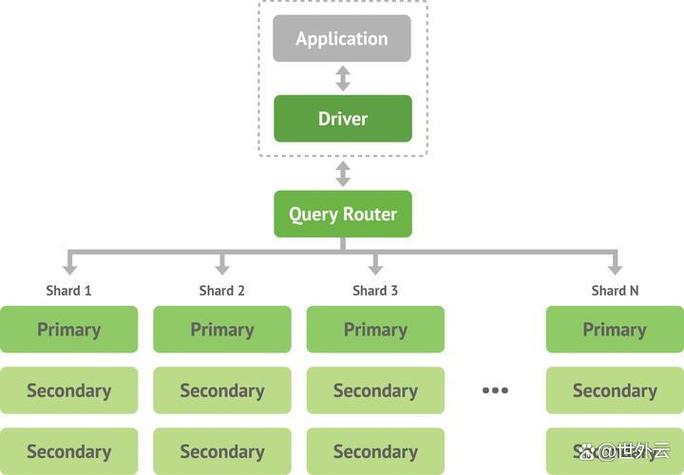
The answer is by using a MongoDB Java Driver. This driver is a library that translates your Java code into commands that the MongoDB database can understand.
Here’s a comprehensive breakdown of how Java and MongoDB work together.
The Official MongoDB Java Driver
This is the standard, recommended way to connect Java applications to MongoDB. It's a lightweight, type-safe, and feature-rich library.
Key Features:
- Asynchronous Support: Built on Reactive Streams, allowing for non-blocking, high-performance applications.
- Fluent API: Provides a readable and chainable API for building queries.
- Aggregation Framework: Full support for MongoDB's powerful aggregation pipeline.
- Transactions: Supports multi-document ACID transactions.
How to Use It (Maven Example):
First, add the driver dependency to your pom.xml:
<dependency>
    <groupId>org.mongodb</groupId>
    <artifactId>mongodb-driver-sync</artifactId>
    <version>4.11.1</version> <!-- Check for the latest version -->
</dependency>
Simple Code Example:
This example connects to a MongoDB instance, inserts a document, and then finds it.
import com.mongodb.client.MongoClient;
import com.mongodb.client.MongoClients;
import com.mongodb.client.MongoCollection;
import com.mongodb.client.MongoDatabase;
import org.bson.Document;
public class MongoJavaExample {
    public static void main(String[] args) {
        // 1. Create a connection string to your MongoDB instance
        String uri = "mongodb://localhost:27017";
        // 2. Create a client and connect to the server
        try (MongoClient mongoClient = MongoClients.create(uri)) {
            // 3. Get a database (creates it if it doesn't exist)
            MongoDatabase database = mongoClient.getDatabase("myDatabase");
            // 4. Get a collection (creates it if it doesn't exist)
            MongoCollection<Document> collection = database.getCollection("users");
            // 5. Create a document to insert
            Document newUser = new Document("name", "Alice")
                    .append("age", 30)
                    .append("city", "New York");
            // 6. Insert the document into the collection
            collection.insertOne(newUser);
            System.out.println("Inserted a new user: " + newUser.toJson());
            // 7. Find a document
            Document foundUser = collection.find(new Document("name", "Alice")).first();
            if (foundUser != null) {
                System.out.println("Found user: " + foundUser.toJson());
            } else {
                System.out.println("No user found with the name 'Alice'.");
            }
        } // The try-with-resources statement ensures the client is closed
    }
}
The Spring Data MongoDB Framework
For applications built using the Spring Framework, the best choice is Spring Data MongoDB. It's not a driver itself but a layer on top of the official driver that dramatically simplifies database access.
Key Features:
- Repository Abstraction: Define a simple interface (e.g.,
UserRepository extends MongoRepository<User, String>), and Spring automatically provides methods likesave(),findById(),findAll(),deleteById(), etc. No need to writeMongoCollectionboilerplate code. - Object-Mapping (ODM): Seamlessly maps your Java objects (POJOs/Entities) to MongoDB documents. It handles serialization/deserialization automatically.
- Easy Configuration: Simple annotation-based configuration (
@Document,@Id,@Field). - Tight Spring Integration: Works perfectly with Spring Boot, making it incredibly easy to set up.
How to Use It (Spring Boot Example):
Step 1: Add the Spring Boot Starter Dependency
<dependency>
    <groupId>org.springframework.boot</groupId>
    <artifactId>spring-boot-starter-data-mongodb</artifactId>
</dependency>
Step 2: Configure Connection in application.properties
# Connect to the default 'test' database on localhost
spring.data.mongodb.uri=mongodb://localhost:27017/mySpringDb
Step 3: Create a Document Entity
import org.springframework.data.annotation.Id;
import org.springframework.data.mongodb.core.mapping.Document;
import org.bson.types.ObjectId;
// @Document maps this class to a MongoDB collection named "users"
@Document(collection = "users")
public class User {
    @Id
    private ObjectId id; // MongoDB uses ObjectId as the default primary key
    private String name;
    private int age;
    private String city;
    // Constructors, Getters, and Setters
    public User() {}
    public User(String name, int age, String city) {
        this.name = name;
        this.age = age;
        this.city = city;
    }
    @Override
    public String toString() {
        return "User{" +
                "id=" + id +
                ", name='" + name + '\'' +
                ", age=" + age +
                ", city='" + city + '\'' +
                '}';
    }
    // Getters and Setters...
    public ObjectId getId() { return id; }
    public void setId(ObjectId id) { this.id = id; }
    public String getName() { return name; }
    public void setName(String name) { this.name = name; }
    public int getAge() { return age; }
    public void setAge(int age) { this.age = age; }
    public String getCity() { return city; }
    public void setCity(String city) { this.city = city; }
}
Step 4: Create the Repository Interface
import org.springframework.data.mongodb.repository.MongoRepository;
import org.springframework.stereotype.Repository;
@Repository
public interface UserRepository extends MongoRepository<User, ObjectId> {
    // You can add custom query methods here
    User findByName(String name);
}
Step 5: Use the Repository in a Service
import org.springframework.beans.factory.annotation.Autowired;
import org.springframework.stereotype.Service;
@Service
public class UserService {
    @Autowired
    private UserRepository userRepository;
    public User createUser(String name, int age, String city) {
        User user = new User(name, age, city);
        return userRepository.save(user);
    }
    public User findUserByName(String name) {
        return userRepository.findByName(name);
    }
}
Comparison: Driver vs. Spring Data
| Feature | MongoDB Java Driver | Spring Data MongoDB |
|---|---|---|
| Purpose | Low-level, direct communication with the database. | High-level abstraction for Spring applications. |
| Boilerplate Code | High. You manage connections, collections, and queries manually. | Very Low. Repository pattern and annotations reduce it significantly. |
| Learning Curve | Steeper. You need to understand MongoDB's query structure. | Gentle for Spring developers. Focus on business logic, not DB plumbing. |
| Flexibility | Maximum flexibility. You have full control over every database operation. | Less flexible. You work within the Spring Data framework conventions. |
| Use Case | Small projects, standalone Java apps, or when you need fine-grained control. | The de-facto standard for any Spring Boot or Spring-based application. |
| Performance | Excellent performance. | Excellent performance, as it uses the official driver underneath. |
When to Choose Which?
Choose the MongoDB Java Driver when:
- You are not using the Spring Framework.
- You need maximum performance and have very specific, low-level database interaction needs.
- You are building a lightweight, standalone application or a library.
- You want to avoid the "magic" and conventions of Spring and have full control over your database code.
Choose Spring Data MongoDB when:
- You are building a Spring Boot application. This is the most common and recommended scenario.
- You want to rapidly develop an application and focus on business logic rather than database boilerplate.
- You value convention over configuration and want a clean, consistent data access layer.
- You need features like declarative transactions, easy integration with other Spring components (e.g., security, caching), and simplified testing.
Conclusion
Java and MongoDB are not "or" options; they are "and" options.
- For most modern applications, especially those using the Spring ecosystem, Spring Data MongoDB is the clear winner due to its simplicity, power, and seamless integration.
- For non-Spring projects or for developers who need fine-grained control, the official MongoDB Java Driver is the perfect, robust choice.