Of course! Using the $or operator in Java with the MongoDB Java Driver is a common and essential task. It allows you to query a collection for documents that match at least one of multiple conditions.
Let's break it down with a complete, runnable example.
The Core Concept: $or in MongoDB
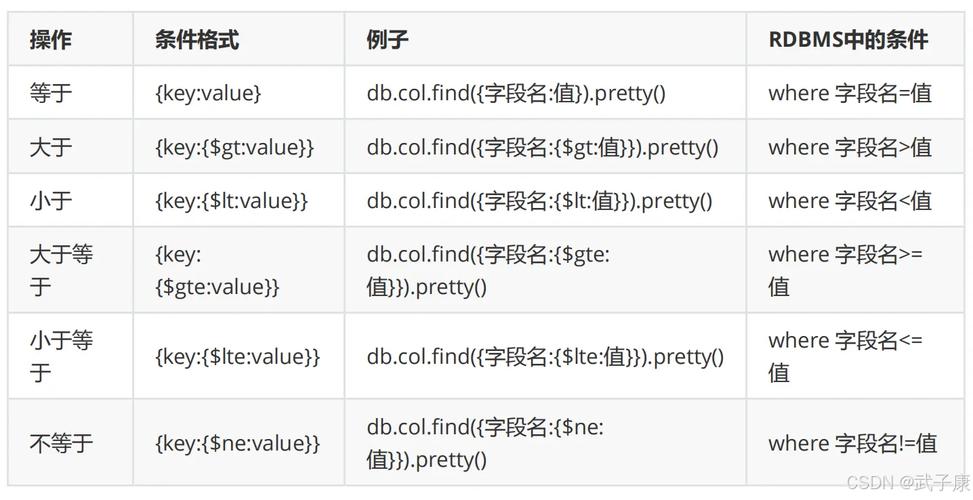
In MongoDB, the $or operator is a query operator that takes an array of one or more query expressions. A document matches if it satisfies at least one of the expressions in the array.
MongoDB Shell Example:
// Find documents where the status is "active" OR the age is greater than 30
db.users.find({
  $or: [
    { status: "active" },
    { age: { $gt: 30 } }
  ]
})
Translating to Java with the MongoDB Driver
The Java driver provides a type-safe and fluent way to build queries. The $or operator is represented by the Filters.or() static method.
Complete Java Example
Here is a full, step-by-step example. You can copy, paste, and run this code.
Step 1: Add Dependency
First, ensure you have the MongoDB Java driver in your project. If you're using Maven, add this to your pom.xml:
<dependency>
    <groupId>org.mongodb</groupId>
    <artifactId>mongodb-driver-sync</artifactId>
    <version>4.11.1</version> <!-- Check for the latest version -->
</dependency>
Step 2: The Java Code
This code will:
- Connect to a local MongoDB instance.
- Insert some sample data into a
userscollection. - Build and execute an
$orquery. - Print the results.
import com.mongodb.client.*;
import com.mongodb.client.model.Filters;
import org.bson.Document;
import org.bson.conversions.Bson;
import java.util.Arrays;
public class MongoOrExample {
    public static void main(String[] args) {
        // 1. Connect to MongoDB
        String uri = "mongodb://localhost:27017";
        try (MongoClient mongoClient = MongoClients.create(uri)) {
            MongoDatabase database = mongoClient.getDatabase("testDB");
            MongoCollection<Document> collection = database.getCollection("users");
            // Clean up previous data for a fresh run (optional)
            collection.deleteMany(new Document());
            // 2. Insert Sample Data
            collection.insertMany(Arrays.asList(
                new Document("name", "Alice").append("status", "active").append("age", 25),
                new Document("name", "Bob").append("status", "inactive").append("age", 35),
                new Document("name", "Charlie").append("status", "active").append("age", 45),
                new Document("name", "David").append("status", "pending").append("age", 20),
                new Document("name", "Eve").append("status", "inactive").append("age", 50)
            ));
            System.out.println("Sample data inserted.");
            // 3. Build the $or Query
            // We want to find users who are EITHER "active" OR older than 40
            Bson orQuery = Filters.or(
                Filters.eq("status", "active"), // Condition 1: status is "active"
                Filters.gt("age", 40)           // Condition 2: age is greater than 40
            );
            System.out.println("\nExecuting query: " + orQuery.toBsonDocument().toJson());
            // 4. Execute the Query and Print Results
            System.out.println("\n--- Users matching the $or condition ---");
            FindIterable<Document> results = collection.find(orQuery);
            results.forEach(doc -> System.out.println(doc.toJson()));
            // Expected Output:
            // 1. Alice (status: active)
            // 2. Charlie (status: active AND age > 40)
            // 3. Eve (age > 40)
            // Note: Bob is inactive and age <= 40, so he is NOT included.
            // Note: David is not active and age <= 40, so he is NOT included.
        } catch (Exception e) {
            e.printStackTrace();
        }
    }
}
Explanation of Key Java Components
Filters.or(...): This is the main method for creating an$orquery. It accepts a variable number ofBsonobjects as arguments. Each argument represents one of theorconditions.Filters.eq(field, value): Creates a query for an exact match ({ field: value }).Filters.gt(field, value): Creates a query for "greater than" ({ field: { $gt: value } }).collection.find(Bson query): This is the method used to execute a query. It takes aBsonobject (whichFilters.or()returns) as the filter criteria.FindIterable<Document>: The result of thefindoperation, which you can iterate over to access the matching documents.
More Complex $or Examples
Combining $or with Other Operators
You can easily combine $or with other parts of your query. For example, find users who are either active OR over 40, but their name must start with 'A'.
// Find users where (status is "active" OR age > 40) AND name starts with 'A'
Bson complexQuery = new Document()
    .append("$or", Arrays.asList(
        new Document("status", "active"),
        new Document("age", new Document("$gt", 40))
    ))
    .append("name", new Document("$regex", "^A")); // AND condition
// Or using the Filters helper (more readable)
Bson complexQueryWithFilters = Filters.and(
    Filters.or(
        Filters.eq("status", "active"),
        Filters.gt("age", 40)
    ),
    Filters.regex("name", "^A")
);
collection.find(complexQueryWithFilters).forEach(doc -> System.out.println(doc.toJson()));
$or with Nested Documents
If your documents have nested structures, you can reference them using dot notation.
// Sample data with a nested 'address' document
collection.insertOne(new Document("name", "Frank")
    .append("contact", new Document("email", "frank@example.com").append("phone", "123-456-7890")));
// Find users where either the email is 'frank@example.com' OR the name is 'Frank'
Bson nestedOrQuery = Filters.or(
    Filters.eq("contact.email", "frank@example.com"),
    Filters.eq("name", "Frank")
);
collection.find(nestedOrQuery).forEach(doc -> System.out.println(doc.toJson()));
Best Practices
- Indexing: For queries with
$or, performance is highly dependent on indexes. If you frequently run a query likeFilters.or(Filters.eq("fieldA", ...), Filters.eq("fieldB", ...)), consider creating a compound index onfieldAandfieldB.// In the mongo shell db.users.createIndex({ "status": 1, "age": 1 }); - Readability: For complex queries, using the
Filtershelper methods (Filters.and,Filters.or,Filters.gt, etc.) is generally more readable and less error-prone than manually constructingDocumentobjects. - Type Safety: The
Filtersmethods provide compile-time type checking, which is a big advantage over building rawDocumentobjects.