
Of course! "MongoDB Java and..." is a common search phrase. I'll provide a comprehensive guide covering the most likely combinations, starting with the core Java driver and then moving to other popular integrations.
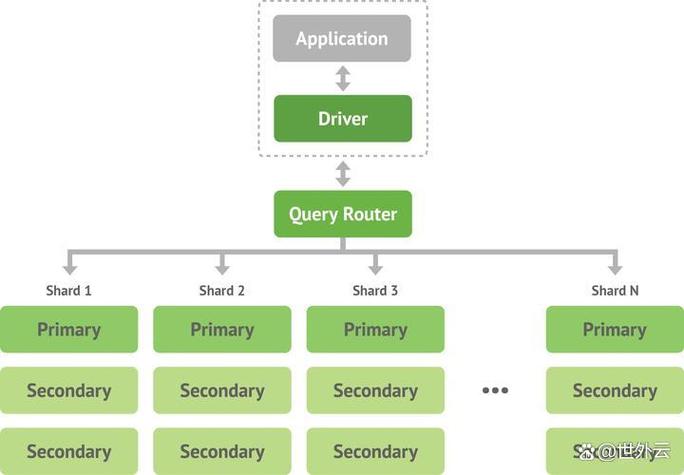
Part 1: The Official MongoDB Java Driver (The Foundation)
This is the essential, low-level way to interact with MongoDB from any Java application. It gives you full control over database operations.
Setup (Maven)
First, you need to add the MongoDB Java Driver to your project. If you're using Maven, add this to your pom.xml:
<dependency>
    <groupId>org.mongodb</groupId>
    <artifactId>mongodb-driver-sync</artifactId>
    <version>4.11.1</version> <!-- Check for the latest version -->
</dependency>
Basic Code Example
Here’s a complete, runnable example showing how to connect, insert, find, and update a document.
import com.mongodb.client.*;
import com.mongodb.client.model.Filters;
import com.mongodb.client.model.Updates;
import org.bson.Document;
import org.bson.conversions.Bson;
public class MongoQuickStart {
    public static void main(String[] args) {
        // 1. Connection String
        // Replace with your MongoDB connection string
        String uri = "mongodb://localhost:27017";
        // 2. Create a client and connect to the server
        try (MongoClient mongoClient = MongoClients.create(uri)) {
            // 3. Get a database
            // If the database doesn't exist, MongoDB will create it on first use.
            MongoDatabase database = mongoClient.getDatabase("myDatabase");
            // 4. Get a collection
            // If the collection doesn't exist, MongoDB will create it on first use.
            MongoCollection<Document> collection = database.getCollection("users");
            // --- Insert a Document ---
            System.out.println("--- Inserting a user ---");
            Document user = new Document("name", "Alice")
                    .append("age", 30)
                    .append("city", "New York");
            collection.insertOne(user);
            System.out.println("Inserted user: " + user.toJson());
            // --- Find a Document ---
            System.out.println("\n--- Finding a user named Alice ---");
            // Create a query filter
            Bson filter = Filters.eq("name", "Alice");
            // Find one document that matches the filter
            Document foundUser = collection.find(filter).first();
            if (foundUser != null) {
                System.out.println("Found user: " + foundUser.toJson());
            } else {
                System.out.println("No user found with that name.");
            }
            // --- Update a Document ---
            System.out.println("\n--- Updating Alice's age ---");
            // Create an update operation
            Bson update = Updates.set("age", 31);
            // Update the first document that matches the filter
            collection.updateOne(filter, update);
            System.out.println("Updated user. Let's find her again.");
            // --- Find All Documents ---
            System.out.println("\n--- Finding all users ---");
            // Find all documents in the collection
            FindIterable<Document> allUsers = collection.find();
            // Iterate over the results and print them
            allUsers.forEach(doc -> System.out.println(doc.toJson()));
            // --- Delete a Document ---
            System.out.println("\n--- Deleting the user named Alice ---");
            collection.deleteOne(filter);
            System.out.println("Deleted user.");
            // Verify deletion
            System.out.println("\n--- Finding all users after deletion ---");
            collection.find().forEach(doc -> System.out.println(doc.toJson()));
        } catch (Exception e) {
            e.printStackTrace();
        }
    }
}
Part 2: "MongoDB Java and..." Common Integrations
This is where the "and" comes in. The official driver is powerful, but frameworks like Spring Boot make it incredibly easy to use in a typical web application.
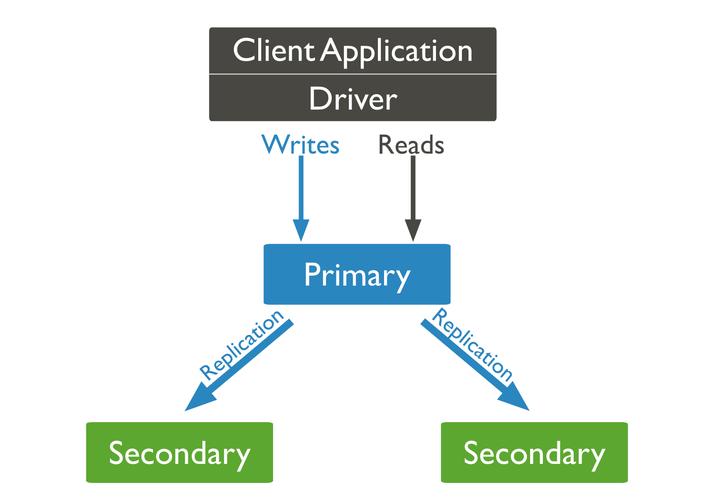
A. MongoDB Java and Spring Boot
This is the most popular and recommended way to use MongoDB in a modern Java application. Spring Data MongoDB provides a high-level abstraction that reduces boilerplate code significantly.
Setup (Maven)
Add the Spring Boot starter for MongoDB to your pom.xml:
<dependency>
    <groupId>org.springframework.boot</groupId>
    <artifactId>spring-boot-starter-data-mongodb</artifactId>
</dependency>
Configuration
In your src/main/resources/application.properties file, specify the MongoDB connection string:
spring.data.mongodb.uri=mongodb://localhost:27017/myDatabase
Create a Model (POJO)
Create a plain Java object (POJO) that represents your document. Spring will automatically map this to a MongoDB collection.
import org.springframework.data.annotation.Id;
import org.springframework.data.mongodb.core.mapping.Document;
@Document(collection = "users") // Maps this class to the "users" collection
public class User {
    @Id // Marks this field as the primary key (_id in MongoDB)
    private String id;
    private String name;
    private int age;
    private String city;
    // Getters and Setters (and/or a constructor)
    public User() {}
    public User(String name, int age, String city) {
        this.name = name;
        this.age = age;
        this.city = city;
    }
    // ... Getters and Setters ...
    @Override
    public String toString() {
        return "User{" +
                "id='" + id + '\'' +
                ", name='" + name + '\'' +
                ", age=" + age +
                ", city='" + city + '\'' +
                '}';
    }
}
Create a Repository Interface
This is where the magic happens. You just define an interface that extends MongoRepository, and Spring provides all the CRUD methods for free!
import org.springframework.data.mongodb.repository.MongoRepository;
import org.springframework.stereotype.Repository;
@Repository
public interface UserRepository extends MongoRepository<User, String> {
    // You can define custom query methods here
    User findByName(String name);
}
Use the Repository in a Service
Inject the repository into a service and use it.
import org.springframework.beans.factory.annotation.Autowired;
import org.springframework.stereotype.Service;
import java.util.List;
@Service
public class UserService {
    @Autowired
    private UserRepository userRepository;
    public User createUser(User user) {
        return userRepository.save(user);
    }
    public User findUserByName(String name) {
        return userRepository.findByName(name);
    }
    public List<User> findAllUsers() {
        return userRepository.findAll();
    }
}
B. MongoDB Java and Spring Data Reactive
For building high-throughput, non-blocking applications (e.g., with WebFlux), you use the reactive stack.
Setup (Maven)
Use the reactive starter instead of the synchronous one.
<dependency>
    <groupId>org.springframework.boot</groupId>
    <artifactId>spring-boot-starter-data-mongodb-reactive</artifactId>
</dependency>
The Repository Interface
The repository interface now extends ReactiveMongoRepository.
import org.springframework.data.mongodb.repository.ReactiveMongoRepository;
import org.springframework.stereotype.Repository;
@Repository
public interface ReactiveUserRepository extends ReactiveMongoRepository<User, String> {
}
Usage in a Service
The service methods now return reactive types (Mono for 0-1 items, Flux for 0-N items).
import org.springframework.beans.factory.annotation.Autowired;
import org.springframework.stereotype.Service;
import reactor.core.publisher.Flux;
import reactor.core.publisher.Mono;
@Service
public class ReactiveUserService {
    @Autowired
    private ReactiveUserRepository userRepository;
    public Mono<User> createUser(User user) {
        return userRepository.save(user);
    }
    public Flux<User> findAllUsers() {
        return userRepository.findAll();
    }
}
C. MongoDB Java and Morphia (An Alternative ORM)
Morphia is another popular Object-Document Mapper (ODM) for MongoDB. It's similar to Spring Data but can be used in any Java project, not just Spring Boot.
Setup (Maven)
<dependency>
    <groupId>dev.morphia.morphia</groupId>
    <artifactId>morphia-core</artifactId>
    <version>2.3.3</version> <!-- Check for the latest version -->
</dependency>
Code Example
import dev.morphia.Datastore;
import dev.morphia.Morphia;
import dev.morphia.annotations.Entity;
import dev.morphia.annotations.Id;
@Entity("users") // Maps to the "users" collection
public class MorphiaUser {
    @Id
    private String id;
    private String name;
    private int age;
    // Getters and Setters...
}
public class MorphiaExample {
    public static void main(String[] args) {
        // 1. Create a Morphia instance
        Morphia morphia = new Morphia();
        // 2. Tell Morphia where to find your classes
        morphia.mapPackage("com.yourpackage.models"); // Package containing your entity classes
        // 3. Create the Datastore
        Datastore datastore = morphia.createDatastore(MongoClients.create("mongodb://localhost:27017"), "myDatabase");
        // 4. Ensure the mapped classes are registered
        datastore.ensureCaps();
        // 5. Use the Datastore
        MorphiaUser user = new MorphiaUser();
        user.setName("Bob");
        user.setAge(42);
        // Insert
        datastore.save(user);
        System.out.println("Saved user: " + user.getId());
        // Find
        MorphiaUser foundUser = datastore.find(MorphiaUser.class).field("name").equal("Bob").first();
        System.out.println("Found user: " + foundUser);
    }
}
Summary: Which One Should I Use?
| Technology | Best For | Pros | Cons |
|---|---|---|---|
| Official Java Driver | Learning the fundamentals, low-level control, scripts, non-Spring projects. | Full control, no framework overhead, the most direct way to talk to MongoDB. | Requires more boilerplate code. |
| Spring Data MongoDB | Most Java applications, especially Spring Boot web apps. | Huge productivity boost, minimal boilerplate, excellent integration with the Spring ecosystem. | Tightly coupled with the Spring framework. |
| Spring Data Reactive | High-performance, non-blocking applications (e.g., microservices, streaming). | Scalable, non-blocking I/O, great for high concurrency. | Requires understanding of reactive programming (Mono/Flux). |
| Morphia | Projects that want an ODM but aren't using Spring. | Simple and powerful annotation-based mapping, framework-agnostic. | Smaller community than Spring Data, less integrated with other Java tools. |
For most new Java projects, Spring Data MongoDB is the recommended choice due to its simplicity and power. If you're not using Spring, the official driver is the way to go for pure Java, and Morphia is a great ODM alternative.


