Of course! The phrase "Java HashMap for" is typically the start of a question about its purpose, use cases, or implementation. Let's break it down comprehensively.
The Short Answer: What is a HashMap for?
A HashMap in Java is used to store key-value pairs for extremely fast lookup, insertion, and deletion based on the key.
Think of it like a real-world dictionary:
- Key: The word you look up (e.g., "Apple").
- Value: The definition of that word (e.g., "A fruit that grows on trees.").
- HashMap: The entire dictionary.
If you want the definition of "Apple", you don't read the dictionary from cover to cover. You jump directly to the 'A' section and find "Apple". A HashMap does the same thing, but with super-computer speed, using a concept called a hash function.
Core Concepts: How it Works
Understanding how it works will help you understand when to use it.
Key-Value Pair
Every element in a HashMap is stored as a pair:
- Key: Must be unique. It's like an ID. You use it to find the associated value.
- Value: Can be duplicate. It's the data you want to retrieve.
Hashing
This is the magic behind HashMap's speed.
- When you add a key-value pair (
put("key", "value")), theHashMaptakes thekeyand passes it to a hash function. - The hash function converts the key into an integer, which is called the hash code. This hash code determines the "bucket" or storage location for the value inside an internal array.
- To retrieve a value (
get("key")), theHashMapperforms the exact same hash function on the key you provide. It gets the same hash code, goes directly to that specific bucket, and retrieves the value.
This process allows for an average time complexity of O(1) for put, get, and remove operations, which means the time it takes is constant and doesn't depend on the number of items in the map.
Handling Collisions
What happens if two different keys produce the same hash code (a "collision")? This is where the equals() method comes in.
The HashMap stores all key-value pairs that hash to the same bucket in a linked list (or a balanced tree in Java 8+ if the list gets too long). When you retrieve a value, it first finds the right bucket and then uses the key.equals() method to find the exact entry you're looking for within that bucket.
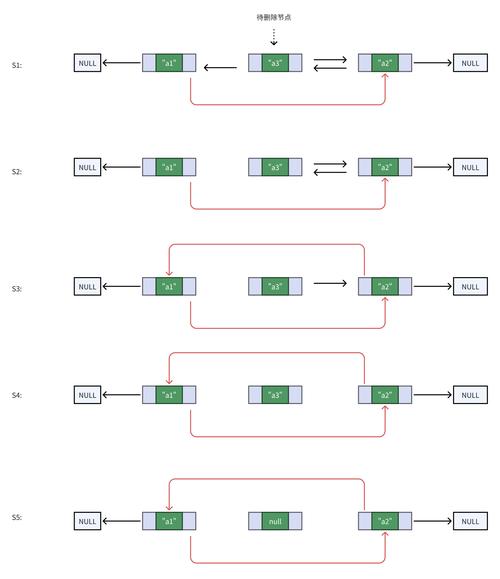
Code Examples: How to Use It
Here are the most common operations you'll perform.
Creating and Populating a HashMap
import java.util.HashMap;
import java.util.Map;
public class HashMapExample {
    public static void main(String[] args) {
        // 1. Create a HashMap that maps String keys to Integer values
        Map<String, Integer> studentScores = new HashMap<>();
        // 2. Add key-value pairs using the put() method
        studentScores.put("Alice", 95);
        studentScores.put("Bob", 88);
        studentScores.put("Charlie", 76);
        // You can update a value by putting a key that already exists
        studentScores.put("Bob", 90); // Bob's score is updated to 90
        System.out.println("Initial Map: " + studentScores);
        // Output: Initial Map: {Charlie=76, Alice=95, Bob=90} (Order is not guaranteed!)
    }
}
Retrieving Values
// Continuing from the example above...
// 3. Get a value by its key using get()
Integer alicesScore = studentScores.get("Alice");
System.out.println("Alice's score: " + alicesScore); // Output: Alice's score: 95
// What if the key doesn't exist?
Integer davesScore = studentScores.get("Dave");
System.out.println("Dave's score: " + davesScore); // Output: Dave's score: null
// Use getOrDefault() to provide a default value if the key is not found
Integer davesDefaultScore = studentScores.getOrDefault("Dave", 0);
System.out.println("Dave's default score: " + davesDefaultScore); // Output: Dave's default score: 0
Checking for Keys and Values
// Continuing from the example above...
// 4. Check if a key or value exists
boolean hasAlice = studentScores.containsKey("Alice");
System.out.println("Is Alice in the map? " + hasAlice); // Output: Is Alice in the map? true
boolean hasScore95 = studentScores.containsValue(95);
System.out.println("Is there a score of 95? " + hasScore95); // Output: Is there a score of 95? true
Removing and Iterating
// Continuing from the example above...
// 5. Remove an entry by key
studentScores.remove("Charlie");
System.out.println("Map after removing Charlie: " + studentScores);
// Output: Map after removing Charlie: {Bob=90, Alice=95}
// 6. Iterate over the map
// --- Method A: Using a for-each loop on the entry set ---
System.out.println("\n--- Iterating with for-each loop ---");
for (Map.Entry<String, Integer> entry : studentScores.entrySet()) {
    String name = entry.getKey();
    int score = entry.getValue();
    System.out.println("Student: " + name + ", Score: " + score);
}
// --- Method B: Using Java 8 forEach with a lambda ---
System.out.println("\n--- Iterating with forEach ---");
studentScores.forEach((name, score) -> System.out.println("Student: " + name + ", Score: " + score));
Common Use Cases: When to Use a HashMap
Use a HashMap when you need to:
- Cache Data: Store frequently accessed data (like database query results) with a unique ID as the key.
- Count Frequencies: Count occurrences of items. For example, counting word frequencies in a text file.
Map<String, Integer> wordCounts = new HashMap<>(); String text = "the quick brown fox jumps over the lazy dog"; for (String word : text.split(" ")) { wordCounts.put(word, wordCounts.getOrDefault(word, 0) + 1); } // wordCounts will be {the=2, quick=1, brown=1, fox=1, jumps=1, over=1, lazy=1, dog=1} - Implement Indexes: Create a fast lookup for objects based on a unique property (like a user ID, email, or username).
- Group Data: Group a list of objects by a common property.
- Store Configuration: Load settings from a file or database where each setting has a name (key) and a value.
Important Characteristics to Remember
| Characteristic | Description |
|---|---|
| Not Ordered | The HashMap does not maintain any order of insertion. The order you see when printing is based on hash codes and can change. If you need insertion order, use LinkedHashMap. If you need natural order (e.g., alphabetical), use TreeMap. |
Allows One null Key |
You can have only one null key. Multiple null keys will just overwrite the previous value. |
Allows null Values |
You can have multiple null values in the map. |
| Not Thread-Safe | HashMap is not synchronized. If multiple threads access and modify it concurrently, you must synchronize it externally (e.g., using Collections.synchronizedMap(new HashMap<>())) or use ConcurrentHashMap. |
| Performance | O(1) average time complexity for get, put, and remove. In the worst case (many collisions), it can degrade to O(n), but this is rare with a good hash function and proper sizing. |