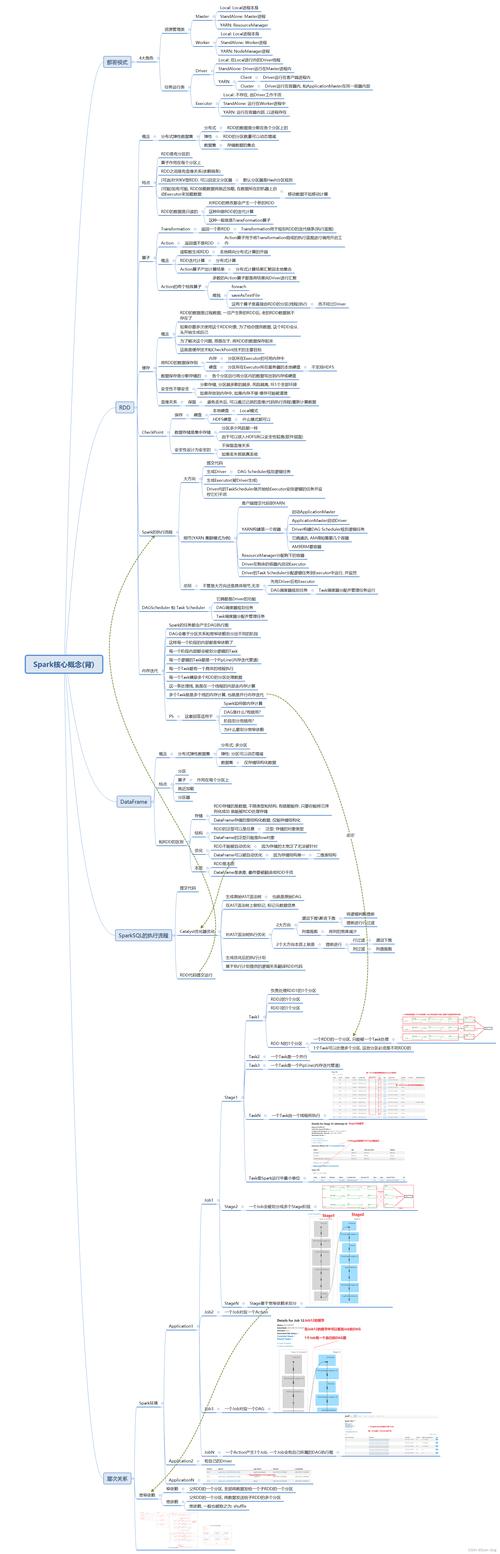
Of course! This is a fantastic question that gets to the heart of how Apache Spark is used in the real world. Let's break down the relationship between Spark, Python, and Java.
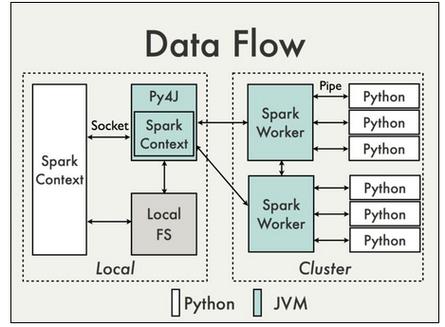
Here's a high-level overview, followed by a detailed comparison.
The Core Idea: Spark is the Engine, Python and Java are the Steering Wheels
Think of Apache Spark as a powerful, distributed engine for processing large amounts of data. This engine is written in Scala (which runs on the Java Virtual Machine - JVM), and it has a robust Java API.
- Python is not the core engine itself. Instead, it acts as a "client" or a "driver." When you write a Spark job in Python (using PySpark), your Python code sends commands to the Spark engine, which then executes those tasks in parallel across a cluster of machines using its Java/Scala core.
- Java is much closer to the core. The Spark engine itself is JVM-based, and the Java API is a first-class citizen. A Java Spark job runs directly on the JVM, making it highly efficient and tightly integrated with the Spark runtime.
Detailed Comparison: PySpark (Python) vs. Spark Java API
| Feature | PySpark (Python API) | Spark Java API |
|---|---|---|
| Ease of Use & Learning Curve | Winner. Extremely low barrier to entry. Python's simple, readable syntax makes it ideal for data analysis, prototyping, and interactive exploration with tools like Jupyter Notebooks and PySpark Shell. | Steeper learning curve. Requires knowledge of Java, object-oriented programming (OOP), and the JVM. Verbose syntax can be less intuitive for quick analysis. |
| Performance | Generally very good. For most data processing tasks, the performance is excellent and often indistinguishable from Java. The "bottleneck" is usually data transfer, not the Python interpreter itself. However, Python can be slower for complex, CPU-intensive UDFs (User-Defined Functions). | Winner for raw speed. As a compiled language running on the JVM, Java offers superior performance, especially for CPU-bound operations and complex UDFs. It avoids the overhead of the Python interpreter for the core task logic. |
| Ecosystem & Libraries | Winner. Unmatched access to the Python data science ecosystem. Seamless integration with Pandas, NumPy, Scikit-learn, TensorFlow, and PyTorch. This makes it the go-to choice for machine learning pipelines. | Excellent integration with the Java/Scala ecosystem. Great for big data libraries like Hadoop, Flink, and Kafka. Strong for building large, robust, enterprise-grade applications. |
| Interactivity | Winner. The PySpark shell and Jupyter notebooks provide a highly interactive environment for data exploration, visualization, and iterative development. You can run commands and see results immediately. | Less interactive. Typically involves a longer compile-deploy-run cycle, though modern IDEs have improved this. Not as well-suited for quick, exploratory analysis. |
| Deployment & Overhead | Simpler to get started locally. However, in a cluster, the Python driver and executors have an overhead because they need to start a Python interpreter for each executor, which can consume more memory. | More lightweight in a cluster. Since the executors are already running on the JVM, there is no interpreter startup overhead, leading to better resource utilization in large-scale deployments. |
| Best Use Cases | - Data analysis and ETL (Extract, Transform, Load). - Rapid prototyping and interactive data exploration. - Machine learning and data science projects. - Ad-hoc querying and visualization. |
- Building large-scale, production-grade data applications. - High-performance, low-latency stream processing. - Complex ETL pipelines where performance is critical. - Integration with existing Java-based enterprise systems. |
Code Example: Word Count
Let's see how the classic "Word Count" example looks in both languages. This highlights the verbosity difference.
PySpark (Python)
# pyspark_wordcount.py
from pyspark.sql import SparkSession
# 1. Create a SparkSession
spark = SparkSession.builder.appName("WordCount").getOrCreate()
# 2. Read the input file
#    - textFile reads the file as an RDD (Resilient Distributed Dataset)
lines = spark.sparkContext.textFile("input.txt")
# 3. Perform the transformations
#    - flatMap: Split each line into words
#    - map: Create a tuple (word, 1)
#    - reduceByKey: Sum the counts for each word
word_counts = lines.flatMap(lambda line: line.split(" ")) \
                   .map(lambda word: (word, 1)) \
                   .reduceByKey(lambda count1, count2: count1 + count2)
# 4. Collect and print the results
#    - collect() brings the data back to the driver node
output = word_counts.collect()
for word, count in output:
    print(f"{word}: {count}")
# 5. Stop the SparkSession
spark.stop()
Spark Java API
// JavaWordCount.java
import org.apache.spark.api.java.JavaPairRDD;
import org.apache.spark.api.java.JavaRDD;
import org.apache.spark.sql.SparkSession;
import scala.Tuple2;
import java.util.Arrays;
import java.util.List;
public class JavaWordCount {
    public static void main(String[] args) {
        // 1. Create a SparkSession
        SparkSession spark = SparkSession
                .builder()
                .appName("JavaWordCount")
                .getOrCreate();
        // 2. Read the input file
        JavaRDD<String> lines = spark.sparkContext().textFile("input.txt", 1);
        // 3. Perform the transformations
        //    - flatMap: Split each line into words
        //    - mapToPair: Create a tuple (word, 1)
        //    - reduceByKey: Sum the counts for each word
        JavaPairRDD<String, Integer> word_counts = lines
                .flatMap(line -> Arrays.asList(line.split(" ")).iterator())
                .mapToPair(word -> new Tuple2<>(word, 1))
                .reduceByKey((count1, count2) -> count1 + count2);
        // 4. Collect and print the results
        //    - collect() brings the data back to the driver node
        List<Tuple2<String, Integer>> output = word_counts.collect();
        for (Tuple2<?, ?> tuple : output) {
            System.out.println(tuple._1() + ": " + tuple._2());
        }
        // 5. Stop the SparkSession
        spark.stop();
    }
}
As you can see, the Python code is more concise and readable, while the Java code is more verbose due to static typing and the need to define specific RDD types (like JavaPairRDD).
How to Choose?
| Choose PySpark (Python) if: | Choose Spark Java API if: |
|---|---|
| ✅ You are a data scientist, analyst, or ML engineer. | ✅ You are a Java/Scala backend developer building a data pipeline. |
| ✅ Your primary goal is rapid prototyping and exploration. | ✅ Performance and raw speed are the absolute top priority. |
| ✅ You need to integrate with the Python ML ecosystem (Scikit-learn, etc.). | ✅ You are building a large, long-running, production-grade application. |
| ✅ You value code readability and a shorter development cycle. | ✅ You need to deeply integrate with other Java-based systems (e.g., Spring, Hadoop). |
| ✅ Your team's expertise is in Python. | ✅ Your team's expertise is in Java/Scala. |
The Role of Scala (The Missing Piece)
It's important to remember that Spark's core is written in Scala. Scala is a modern JVM language that combines object-oriented and functional programming. It is often considered the "native" language of Spark.
- Performance: Scala code is compiled to the JVM bytecode, giving it performance similar to Java.
- Conciseness: Scala's syntax is much more concise than Java's, often resembling Python's functional style.
- API First: New Spark features and APIs are typically released in Scala first, with Java and Python APIs following.
For developers who want the best of both worlds—high performance and concise code—learning Scala for Spark is a powerful option.