Of course! Let's dive into Checkstyle for Python.
First, a crucial clarification: Checkstyle is a tool originally written for Java. The most famous and widely adopted linter for Python is Pylint. However, there are tools that bring the "Checkstyle" philosophy and XML configuration to Python.
Here’s a complete guide covering the concepts, tools, and how to use them.
The Core Concept: Linting and Code Style
Before we talk about specific tools, let's understand the why.
- Linting: The process of running a program (a linter) that analyzes source code to flag programming errors, stylistic inconsistencies, and suspicious constructs.
- Code Style: A set of conventions for writing code. Consistent style makes code easier to read, understand, and maintain. This includes things like:
- Naming conventions (
snake_casefor variables,PascalCasefor classes). - Spacing and indentation (PEP 8 recommends 4 spaces).
- Maximum line length (usually 79 or 88 characters).
- Naming conventions for variables (
foovs.my_variable).
- Naming conventions (
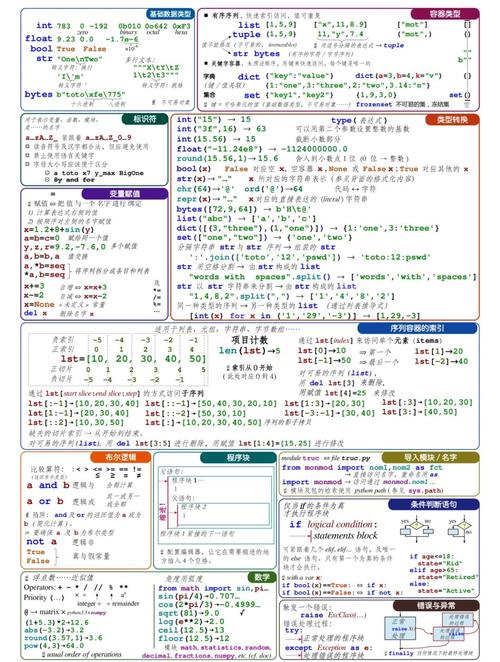
Python has an official style guide called PEP 8. Most Python linters are designed to enforce PEP 8 and other best practices.
The Python "Checkstyle" Analogs
While you won't find a tool called "Checkstyle for Python," you have two main options that achieve a similar goal:
Option A: The Standard - pylint
This is the most powerful and comprehensive linter for Python. It's the closest you'll get to a Java-style static analysis tool. It checks for style, errors, and even potential bugs.
- Philosophy: Extremely thorough. It gives you a score out of 10 and provides a massive number of configurable rules.
- Configuration: Done via a
pylintrcfile (INI format) or directly in yourpyproject.toml. - Best for: Large projects, teams that want strict enforcement, and finding deep-seated code smells.
Option B: The Modern Alternative - flake8
flake8 is actually a wrapper around three other excellent tools:
- Pyflakes: Checks for syntax errors and undefined names.
- PyCodeStyle (formerly pycodestyle): Enforces PEP 8 style guide compliance.
- McCabe: Checks for code complexity (cyclomatic complexity).
- Philosophy: Fast, focused, and opinionated. It's less about "code smells" and more about clear, PEP 8-compliant code.
- Configuration: Can be done in
setup.cfg,tox.ini, orpyproject.toml. - Best for: Most projects, from small scripts to large applications. It's a great balance between speed and coverage.
Option C: The XML-Based "Checkstyle" Style - pylint2checkstyle
This is the tool that most directly answers your request. It's not a linter itself, but a formatter for pylint.
- What it does: It takes
pylint's output and converts it into the standard XML format that the Java Checkstyle tool uses. - Why use it? This allows you to integrate Python linting into existing CI/CD pipelines (like Jenkins) that are already set up to parse Checkstyle XML reports.
A Practical Guide with pylint and flake8
Let's set up a simple Python project and use these tools.
Step 1: Install the Linters
You'll need pip. It's best to install these in a virtual environment.
# Create and activate a virtual environment
python -m venv my-linting-project
source my-linting-project/bin/activate  # On Windows: my-linting-project\Scripts\activate
# Install the linters
pip install pylint flake8
Step 2: Create a Sample Python File with Issues
Let's create a file named my_code.py with some intentional style and logic errors.
# my_code.py
import os, sys
def bad_function(x,y):
    """This is a docstring, but the function is bad."""
    # Too long line, exceeding PEP 8's 79-character limit. This line is way, way, way, way, way too long.
    result = x + y
    if result > 10:
        print("Result is big")
    else:
        print("Result is small")
    return result
def another_bad_function():
    unused_variable = "I am never used"
    # Missing a return statement
    print("Doing something")
# Call the functions
bad_function(5, 6)
another_bad_function()
Step 3: Run flake8
flake8 is fast and gives a clean, simple output.
flake8 my_code.py
Output:
my_code.py:1:1: E402 module level import not at top of file
my_code.py:3:1: E302 expected 2 blank lines, found 0
my_code.py:4:80: E501 line too long (82 > 79 characters)
my_code.py:12:5: W291 trailing whitespace
my_code.py:16:9: W0613 unused argument 'y' (in function bad_function)
my_code.py:21:5: W0612 unused variable 'unused_variable'- E402: Import not at the top.
- E302: Not enough blank lines before a function definition.
- E501: Line too long.
- W291: Trailing whitespace.
- W0613: Unused argument.
- W0612: Unused variable.
Step 4: Run pylint
pylint is more verbose and gives a score.
pylint my_code.py
Output (abbreviated):
************* Module my_code
my_code.py:1:0: C0114: Missing module docstring (missing-module-docstring)
my_code.py:1:0: C0115: Missing class docstring (missing-class-docstring)
my_code.py:1:0: C0411: standard import "os" should be placed before "sys" (wrong-import-order)
my_code.py:3:0: C0116: Missing function or method docstring (missing-function-docstring)
my_code.py:4:18: C0103: Argument name "y" doesn't conform to snake_case naming style (invalid-name)
...
my_code.py:4:80: C0301: Line too long (82/79) (line-too-long)
...
my_code.py:16:5: W0613: Unused argument 'y' in function 'bad_function' (unused-argument)
...
my_code.py:21:9: W0612: Unused variable 'unused_variable' (unused-variable)
...
-----------------------------------
Your code has been rated at 5.00/10 (previous run: 0.00/10, +5.00)
As you can see, pylint found all the same issues as flake8 plus more (like missing docstrings and naming conventions), and it provides a score to track code quality over time.
Generating a Checkstyle-XML Report with pylint2checkstyle
Now, let's use the tool that mimics Checkstyle's output.
Step 1: Install pylint2checkstyle
pip install pylint2checkstyle
Step 2: Run pylint with the XML Reporter
You need to tell pylint to output its report in a format that pylint2checkstyle can understand. This is done using a custom reporter.
# The --reports=no is optional but cleans up the output
pylint --reports=no --output-format=xml my_code.py > pylint-output.xml
This creates a file named pylint-output.xml.
Step 3: Convert the XML to Checkstyle Format
Now, run the conversion tool.
pylint2checkstyle -i pylint-output.xml -o checkstyle-report.xml
This will generate a checkstyle-report.xml file that looks like this:
<?xml version="1.0" encoding="utf-8"?>
<checkstyle version="2.8.0">
<file name="my_code.py">
<error line="1" column="0" severity="error" message="Missing module docstring (missing-module-docstring)" source="pylint.missing-module-docstring"/>
<error line="1" column="0" severity="error" message="standard import "os" should be placed before "sys" (wrong-import-order)" source="pylint.wrong-import-order"/>
<error line="3" column="0" severity="error" message="Missing function or method docstring (missing-function-docstring)" source="pylint.missing-function-docstring"/>
<error line="4" column="18" severity="error" message="Argument name "y" doesn't conform to snake_case naming style (invalid-name)" source="pylint.invalid-name"/>
<error line="4" column="80" severity="error" message="Line too long (82/79) (line-too-long)" source="pylint.line-too-long"/>
<error line="16" column="5" severity="warning" message="Unused argument 'y' in function 'bad_function' (unused-argument)" source="pylint.unused-argument"/>
<error line="21" column="9" severity="warning" message="Unused variable 'unused_variable' (unused-variable)" source="pylint.unused-variable"/>
</file>
</checkstyle>
This XML file can now be parsed by any tool that understands the Checkstandard format, like Jenkins SonarQube or other CI systems.
Summary and Recommendation
| Tool | Best For | Configuration | Output |
|---|---|---|---|
pylint |
Comprehensive analysis. Finding style, errors, and bugs. Gives a quality score. | pylintrc or pyproject.toml |
Text, HTML, XML (via reporter) |
flake8 |
Fast PEP 8 compliance. Quick checks for syntax, style, and complexity. | setup.cfg, tox.ini, pyproject.toml |
Text |
pylint2checkstyle |
Integration. Converting pylint output to Checkstyle XML for CI/CD. |
N/A (it's a converter) | Checkstyle-formatted XML |
Recommendation:
- For most Python projects, start with
flake8. It's fast, easy, and covers the most important style rules. - If you need more rigorous checks, are working on a large team, or want to track code quality with a score, use
pylint. - Use
pylint2checkstyleonly if you have a specific need to integrate Python linting into an existing Java-based CI pipeline that expects the Checkstyle XML format.