
Of course! The for item in items loop is one of the most fundamental and powerful concepts in Python. Let's break it down in detail.
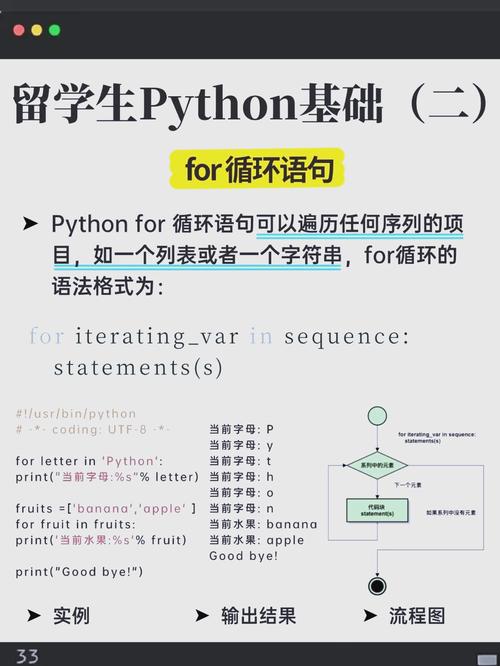
The Core Idea: Iteration
At its heart, a for loop in Python is used for iteration. This means it allows you to "loop through" or "traverse" each item in a sequence (like a list, a string, or a tuple) or any other iterable object.
The general syntax is:
for item in iterable:
    # Do something with the item
    # This code block runs for each item in the iterable
forandinare keywords in Python.itemis a variable name you choose. It will temporarily hold the value of the current element from theiterablein each loop cycle.iterableis the collection you are looping over (e.g., a list, a string, a dictionary).
Looping Through a List (The Most Common Case)
This is what people usually mean when they say "loop through items".
Example:
# A list of fruits
fruits = ["apple", "banana", "cherry"]
# Loop through the list
for fruit in fruits:
    print(f"I like to eat {fruit}s.")
Output:
I like to eat apples.
I like to eat bananas.
I like to eat cherrys.
How it works:
- The loop starts. It takes the first item from the
fruitslist, which is"apple", and assigns it to thefruitvariable. - The code inside the loop (
print(...)) is executed. - The loop continues. It takes the next item,
"banana", and assigns it tofruit. The code inside runs again. - This process repeats until every item in the
fruitslist has been processed.
Looping Through Other Iterables
The power of this syntax is that it works with many different types of data.
A) Strings
A string is an iterable sequence of characters.
greeting = "Hello"
for char in greeting:
    print(char)
Output:
H
e
l
l
o
B) Tuples
Tuples are also sequences, just like lists, but they are immutable (cannot be changed).
coordinates = (10.5, 20.1)
for coord in coordinates:
    print(f"Processing coordinate: {coord}")
Output:
Processing coordinate: 10.5
Processing coordinate: 20.1
C) Dictionaries
When you loop through a dictionary, you are looping through its keys by default.
student_grades = {
    "Alice": 92,
    "Bob": 88,
    "Charlie": 95
}
print("Looping through keys:")
for name in student_grades:
    print(name)
Output:
Looping through keys:
Alice
Bob
Charlie
To get the values, you can use the .values() method. To get both keys and values together, use the .items() method (which is very useful!).
print("\nLooping through values:")
for grade in student_grades.values():
    print(grade)
print("\nLooping through key-value pairs with .items():")
for name, grade in student_grades.items():
    print(f"{name} scored a {grade}.")
Output:
Looping through values:
92
88
95
Looping through key-value pairs with .items():
Alice scored a 92.
Bob scored a 88.
Charlie scored a 95.
The enumerate() Function: Getting the Index
Sometimes you need both the item and its index (its position in the list). The enumerate() function is perfect for this. It returns a sequence of (index, item) tuples.
Example:
tasks = ["Read book", "Write code", "Go for a run"]
for index, task in enumerate(tasks):
    # Note the order: index comes first, then task
    print(f"Task #{index + 1}: {task}")
Output:
Task #1: Read book
Task #2: Write code
Task #3: Go for a run
Without enumerate, you would have to manually manage a counter variable, which is less "Pythonic".
The range() Function: Looping a Specific Number of Times
What if you don't have a list, but you just want to repeat an action a certain number of times? You use the range() function.
range(n) generates a sequence of numbers from 0 up to (but not including) n.
Example:
# Print "Hello World" 5 times
for i in range(5):
    print(f"Hello World (count {i})")
Output:
Hello World (count 0)
Hello World (count 1)
Hello World (count 2)
Hello World (count 3)
Hello World (count 4)
You can also specify a start and stop value: range(start, stop).
# Print numbers from 2 to 5 (6 is not included)
for i in range(2, 6):
    print(i)
Output:
2
3
4
5
Modifying Items in a List
A common beginner mistake is trying to modify the items in a list while looping through it. This can lead to bugs or unexpected behavior.
The Problematic Way:
numbers = [1, 2, 3, 4, 5]
for num in numbers:
    if num % 2 == 0:
        numbers.remove(num) # This skips items!
print(numbers) # What will this print?
Output: [1, 3, 5] might seem correct, but let's trace it carefully:
- Loop 1:
numis1. No change. - Loop 2:
numis2. It's even, soremove(2)is called. The list becomes[1, 3, 4, 5]. - Loop 3:
numis now3(the next item). It skips4!
The Correct Way: Loop over a copy of the list if you need to modify the original.
numbers = [1, 2, 3, 4, 5]
for num in numbers[:]: # The [:] creates a shallow copy of the list
    if num % 2 == 0:
        numbers.remove(num)
print(numbers)
Output: [1, 3, 5] (This time, the logic is correct because we are looping over a copy while modifying the original).
Summary Table
| Iterable Type | What you loop over | Example |
|---|---|---|
| List | Each element in the list | for item in [1, 2, 3]: |
| String | Each character in the string | for char in "hello": |
| Tuple | Each element in the tuple | for item in (1, 2, 3): |
| Dictionary | Each key in the dictionary | for key in {"a": 1, "b": 2}: |
range(n) |
Numbers from 0 to n-1 |
for i in range(5): |
enumerate() |
A sequence of (index, item) pairs |
for i, item in enumerate(["a", "b"]): |


